
- TutorialsFrom WPBakery to tagDiv Composer
 AndreVC
Hi! I recently purchase this template and for the first couple of days it works very well.
However, for the last few days, I can’t save any changes that I made on the template, on my homepage, for example.
Sometimes a error message appears on top: “Erros at columns elements” and I lose the capacity of edit any block. In this cases, I’ve to recovery the last revision using Elementor.
This is the URL: https://exploraromundo.com/
 Gekkies
Hi, mobile search wont work on my website http://www.gadgetgekkies.nl. It will show the results in but if i hit ‘search’ the URL changes in https://gadgetgekkies.nl/?s=test but im just getting on my homepage.
The same happens on my website http://www.internetgekkies.nl.
What can i do?
 Anamaria
 Hi,
Please disable the tagdiv mobile theme plugin.
Using our theme you can choose from 3 mobile versions
-> mobile responsive => https://www.screencast.com/t/oJ2ShOp47
-> mobile theme plugin => https://forum.tagdiv.com/the-mobile-theme/
-> mobile page => https://tagdiv.com/newspaper-10-3-7-update-brings-customizable-and-fast-mobile-pages/
If you created the mobile pages with tagDiv Composer, then when you install the Mobile Theme plugin, your pages will be overwritten by the plugin (the mobile theme comes with its templates for page, post, category, etc so your current templates from the desktop theme will get converted to the mobile theme layout, the page content is made without builders in mobile editor => https://www.screencast.com/t/xbgZG8kH also, the options that are provided to edit the mobile theme version are limited (this keeps the things simple)).
This is a video about Responsive Newspaper Theme, AMP & Mobile Theme, Mobile Pages & Templates -> https://www.youtube.com/watch?v=SpGkOnJeNZY
So, the mobile responsive is what you see when that you select the viewport on phone => https://www.screencast.com/t/matV17hH, so some settings may apply for each viewport(where is the border blue), and others are not(where the border is black).
The mobile page has the mobile templates from Cloud Library => https://www.screencast.com/t/YCcZ8rL8
The Mobile responsive version of the theme and the mobile page editor can be edit with tagDiv Composer, the mobile theme plugin cannot.
For example, you can have the mobile theme plugin activated and use the mobile page/mobile responsive version for the homepage/pages, but for the categories pages/404 page, you can’t use the mobile page/mobile responsive version if you have the mobile theme plugin activated.
So, if you want to design the pages with tagDiv Composer, you can use the mobile page or mobile responsive version.
Thank you!
 sheikhali191
I have added elements and created mobile homepage and save it but nothing is changed, same old default mobile layout is showing. How can i set it for homepage?
website: http://www.hairs.london
Anamaria Hi,
You can set the rel attribute on user url https://i.imgur.com/Irk61wj.png or redirect author url to homepage
Unfortunately, there is no other option.
Thank you!
 Calin
Calin Hello,
1. For this you should use the column text or text with title, those are using the wp editor from wordpress and you can set links on text.
2. Do you want to translate it or to remove it? You need to edit the homepage using the tagDiv Composer and select the block that contains the read post – https://i.imgur.com/b1txj8e.png and go to the layout – https://i.imgur.com/8TePUO0.png
3. I think that you use the theme panel options but for posts not blocks, for blocks you can use the genera option – https://i.imgur.com/u0J6KTK.png
4. There is a theme option and can be done using tagDiv Composer, edit the page and select the social network – https://i.imgur.com/0K03ub5.png
Thank you!
Anamaria Hello,
Unfortunately, there is no option because the amp works with mobile theme and has a different structure.
Using our theme, you can choose from 3 mobile versions
-> mobile responsive => https://www.screencast.com/t/oJ2ShOp47
-> mobile theme plugin => https://forum.tagdiv.com/the-mobile-theme/
-> mobile page => https://tagdiv.com/newspaper-10-3-7-update-brings-customizable-and-fast-mobile-pages/
If you created the mobile pages with tagDiv Composer, then when you install the Mobile Theme plugin, your pages will be overwritten by the plugin (the mobile theme comes with its templates for page, post, category, etc so your current templates from the desktop theme will get converted to the mobile theme layout, the page content is made without builders in mobile editor => https://www.screencast.com/t/xbgZG8kH also, the options that are provided to edit the mobile theme version are limited (this keeps the things simple)).
This is a video about Responsive Newspaper Theme, AMP & Mobile Theme, Mobile Pages & Templates -> https://www.youtube.com/watch?v=SpGkOnJeNZY
So, the mobile responsive is what you see when that you select the viewport on phone => https://www.screencast.com/t/matV17hH, so some settings may apply for each viewport(where is the border blue), and others are not(where the border is black).
The mobile page has the mobile templates from Cloud Library => https://www.screencast.com/t/YCcZ8rL8
The Mobile responsive version of the theme and the mobile page editor can be edit with tagDiv Composer, the mobile theme plugin cannot.
For example, you can have the mobile theme plugin activated and use the mobile page/mobile responsive version for the homepage/pages, but for the categories pages/404 page, you can’t use the mobile page/mobile responsive version if you have the mobile theme plugin activated.
So, if you want to design the pages with tagDiv Composer, you can use the mobile page or mobile responsive version.
Thank you!
 wphindinews
I am using google web stories plugin and making stories. But i could not able to put it on my home page in any manner.
Please check my website: https://thehindidaily.com/ i have at last put web stories in menu as a seperate page.
Why web stories dont show in filter when we want to put web-stories on homepage.
Is newspaper theme dosn’t support web-stories if yes it’s disgusting.
You have to do something about it because now its an integral part of blogging or news website
 gomakeout
Hello,
Firstly, I read some very positive feedback about the Newspaper theme and decided to acquire it.
We installed a new WordPress instance, migrated 4,000 posts to it on a VPN server with 32GB RAM and 8 cores, but we haven’t opened it to the public yet.
We also installed the wp-rocket plugin and set up Cloudflare.
My team, consisting of 6 people, is testing simultaneous navigation on the demo reels, which includes the mega menu in homepage. However, we noticed in our SSH terminal that HTOP is indicating 100% CPU usage.
We made some adjustments, such as caching some blocks, but the CPU usage remains too high. I’ve noticed that some major portals using the Newspaper theme are also experiencing this issue.
Is there any solution to work around this while keeping the mega menu?
Do you have any tips for us, given that we have a large portal? When we open it to the public, the expected monthly traffic is one million accesses per month.
 vallartamirror
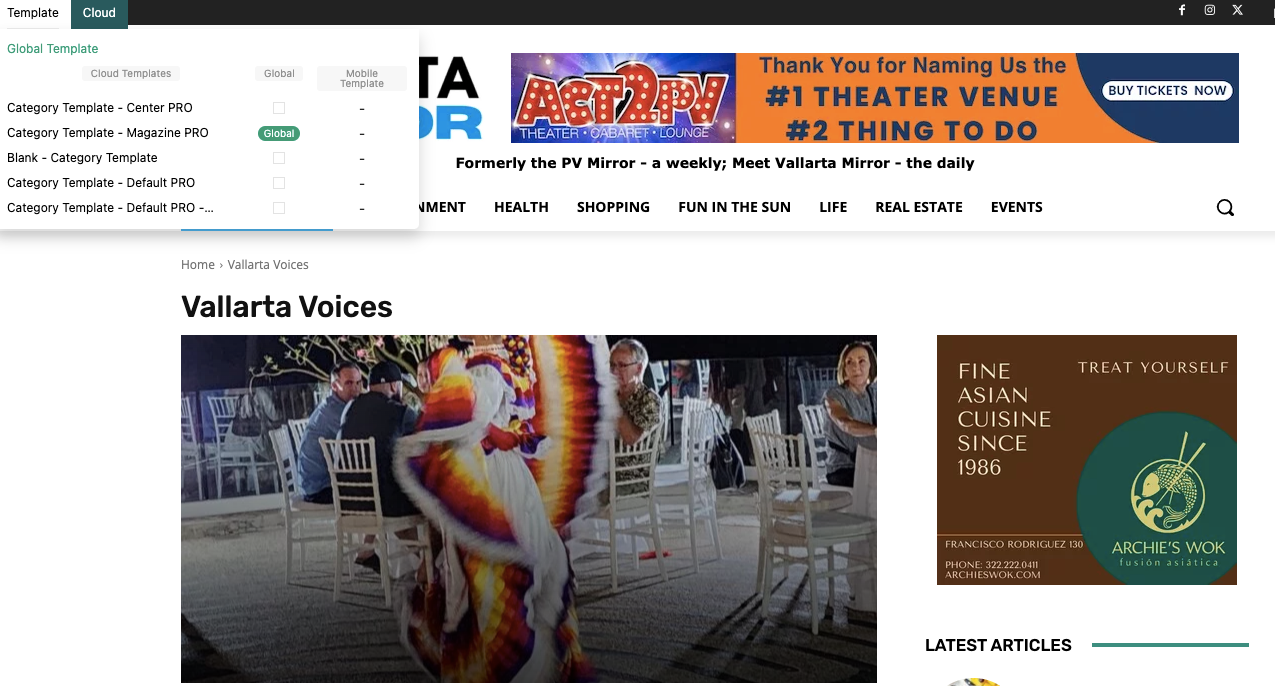
My homepage template is set to “Homepage – Magazine PRO” (globally). My category template is set to “Category Template – Magazine PRO” (globally). Everything is displayed correctly for my home. However, my category pages do not always display correctly outside of edit mode.
Sometimes the page displays correct and other times I receive an old layout. Could this be a cache issue? I have cleared my browser cache, and it does not fix the problem. Is there a cache setting that I need to look at in WordPress?
I have double checked each individual category, and they are all correctly marked as “Category Template – Magazine PRO”
 inakio
Hi.
The last weeks, I do not know if is an update problem, but this weeks the homepage is looking like this.
Could you help me? Thanks!
Calin Hello mashmedia, this can be done by editing the homepage, go down to footer, select the block title and try this option – https://i.imgur.com/2JojqjP.png global header, this should set the header title to the right.
If you want to use a different header style, you can use the title element, that one has align options – https://i.imgur.com/uq601uu.png
I hope this will help you!
Anamaria Hi,
Yes, you need to install another template and overwrite it if you really want to have the template in the cloud templates-> homepage or page template; if you don’t want to have them there, then you can create a new page and after edit it with tagdiv Composer. -> https://forum.tagdiv.com/homepage-how-to-build-and-set-it/
Thank you!
Anamaria Hello,
Please let me know what version you use the mobile theme or mobile page.
Using our theme, you can choose from 3 mobile versions
-> mobile responsive => https://www.screencast.com/t/oJ2ShOp47
-> mobile theme plugin => https://forum.tagdiv.com/the-mobile-theme/
-> mobile page => https://tagdiv.com/newspaper-10-3-7-update-brings-customizable-and-fast-mobile-pages/
If you created the mobile pages with tagDiv Composer, then when you install the Mobile Theme plugin, your pages will be overwritten by the plugin (the mobile theme comes with its templates for page, post, category, etc so your current templates from the desktop theme will get converted to the mobile theme layout, the page content is made without builders in mobile editor => https://www.screencast.com/t/xbgZG8kH also, the options that are provided to edit the mobile theme version are limited (this keeps the things simple)).
This is a video about Responsive Newspaper Theme, AMP & Mobile Theme, Mobile Pages & Templates -> https://www.youtube.com/watch?v=SpGkOnJeNZY
So, the mobile responsive is what you see when that you select the viewport on phone => https://www.screencast.com/t/matV17hH, so some settings may apply for each viewport(where is the border blue), and others are not(where the border is black).
The mobile page has the mobile templates from Cloud Library => https://www.screencast.com/t/YCcZ8rL8
The Mobile responsive version of the theme and the mobile page editor can be edit with tagDiv Composer, the mobile theme plugin cannot.
For example, you can have the mobile theme plugin activated and use the mobile page/mobile responsive version for the homepage/pages, but for the categories pages/404 page, you can’t use the mobile page/mobile responsive version if you have the mobile theme plugin activated.
So, if you want to design the pages with tagDiv Composer, you can use the mobile page or mobile responsive version.
Thank you!
 10v3eternal
Hi, I’m encountering a significant issue on my WordPress site (d5technews.com) with the ‘Newspaper’ theme. I’m facing 404 errors across all pages for ‘text.js’ and ‘mode-less.js’ files within the td-composer plugin, which may be related to the css live feature. Despite the files being on the server, these errors persist.
Examples of the errors include:
mode-less.js - 404 on 2023-11-25 17:09:53 (Homepage)

snippets/text.js - 404 on 2023-11-25 17:09:53 (Homepage)

mode-less.js - 404 on 2023-11-25 17:26:30 (Homepage)

snippets/text.js - 404 on 2023-11-25 17:26:30 (Homepage)
…[additional examples if needed]…
I’m seeking advice on:
Possible reasons for these site-wide 404 errors, especially given the files are present
Any specific issues within the ‘Newspaper’ theme or td-composer plugin, particularly concerning css live, that might be causing this
Recommended steps to diagnose and fix this issue
Your expertise and any guidance you can offer would be immensely helpful in resolving this urgent problem.
 kylevorbach
 I’m now seeing from the import prebuilt website dialogue that this is supposed to import homepages. So far when I do this, no matter what I do, zero home pages are imported.
I do get a “server configured incorrectly” error while doing this, although it says it will continue installing everything. The only thing that the system status says is not configured is the cache plugin (which I am waiting to install until after I get the demo imported).
EDIT: I installed the recommended caching plugin and it still says that it’s configured incorrectly. It says to check my upload folder permissions (which are normal) and to contact you.
I got this theme because I thought the installation of the demo would be the easy part. No idea why this is rocket science.
-
This reply was modified 2 years by
kylevorbach.
kylevorbachI have a completely blank, fresh installation of WordPress. When I install any of the prebuilt demos, no pages or anything come with it. All the posts are generated, but my home page looks like completely blank, unstyled text.
What do I need to do for the prebuilt website to effect my home page? Does my home page need to be called something in particular? Right now under Settings -> Reading I have my homepage set as a static page called “Home. Is this incorrect?
 Twisted Pear
 Thank you for your response.
When you say ‘add a page’ do you mean add a Cloud Template?
As I mentioned there is no ‘Blank’ Cloud Template option for Homepage or Page to install and replace. Do I need to install another template (with assets and styles) and then overwrite it?
 Kari7
Kari7 Hello,
That’s exactly what I did and the code is still up on my website.
Only photos in article don’t show the image hover title.
My homepage and sidebar images all show the image hover titles.
it only works for images on article posts not the homepage and sidebar and other images on my site.
Do you know how to fix it?
 renovaweb
Hello !
I really like this theme, thanks !
But the mobile version doesn’t work (critical error)
Homepage seems fine
I tried with AMP, AMP + Mobile, Mobile
I tried with AMP plugin not activated too
Website: https://dev.magazine3rve.cc/
PHP 8 with php ini ressources boosted to max
WordPress 6.4.1 with Newspaper Child theme Version : 9.0c
NewspaperVersion : 12.6.1
PHP errors on inner pages or articles
Warning: require_once(/home/mag3rve/dev.magazine3rve.cc/wp-content/themes/Newspaper/legacy/common/wp_booster/td_css_res_compiler.php): Failed to open stream: No such file or directory in /home/mag3rve/dev.magazine3rve.cc/wp-includes/template.php on line 790
Fatal error: Uncaught Error: Failed opening required ‘/home/mag3rve/dev.magazine3rve.cc/wp-content/themes/Newspaper/legacy/common/wp_booster/td_css_res_compiler.php’ (include_path=’.:/opt/cpanel/ea-php80/root/usr/share/pear’) in /home/mag3rve/dev.magazine3rve.cc/wp-includes/template.php:790 Stack trace: #0 /home/mag3rve/dev.magazine3rve.cc/wp-content/plugins/td-composer/legacy/common/wp_booster/td_autoload_classes.php(42): load_template(‘/home/mag3rve/d…’, true) #1 [internal function]: td_autoload_classes->loading_classes(‘td_css_res_comp…’) #2 /home/mag3rve/dev.magazine3rve.cc/wp-content/plugins/td-composer/legacy/common/wp_booster/td_global.php(780): class_exists(‘td_css_res_comp…’, true) #3 /home/mag3rve/dev.magazine3rve.cc/wp-content/plugins/td-composer/legacy/common/wp_booster/td_wp_booster_functions.php(1184): td_global::reset_theme_settings() #4 /home/mag3rve/dev.magazine3rve.cc/wp-includes/class-wp-hook.php(324): hook_wp_head(”) #5 /home/mag3rve/dev.magazine3rve.cc/wp-includes/class-wp-hook.php(348): WP_Hook->apply_filters(NULL, Array) #6 /home/mag3rve/dev.magazine3rve.cc/wp-includes/plugin.php(517): WP_Hook->do_action(Array) #7 /home/mag3rve/dev.magazine3rve.cc/wp-includes/general-template.php(3052): do_action(‘wp_head’) #8 /home/mag3rve/dev.magazine3rve.cc/wp-content/plugins/td-standard-pack/Newspaper/header.php(11): wp_head() #9 /home/mag3rve/dev.magazine3rve.cc/wp-content/plugins/td-composer/td-composer.php(259): require_once(‘/home/mag3rve/d…’) #10 /home/mag3rve/dev.magazine3rve.cc/wp-includes/class-wp-hook.php(324): {closure}(”) #11 /home/mag3rve/dev.magazine3rve.cc/wp-includes/class-wp-hook.php(348): WP_Hook->apply_filters(”, Array) #12 /home/mag3rve/dev.magazine3rve.cc/wp-includes/plugin.php(517): WP_Hook->do_action(Array) #13 /home/mag3rve/dev.magazine3rve.cc/wp-content/themes/Newspaper/header.php(2): do_action(‘tdc_header’) #14 /home/mag3rve/dev.magazine3rve.cc/wp-includes/template.php(790): require_once(‘/home/mag3rve/d…’) #15 /home/mag3rve/dev.magazine3rve.cc/wp-includes/template.php(725): load_template(‘/home/mag3rve/d…’, true, Array) #16 /home/mag3rve/dev.magazine3rve.cc/wp-includes/general-template.php(48): locate_template(Array, true, true, Array) #17 /home/mag3rve/dev.magazine3rve.cc/wp-content/plugins/td-standard-pack/Newspaper/page.php(7): get_header() #18 /home/mag3rve/dev.magazine3rve.cc/wp-includes/template-loader.php(106): include(‘/home/mag3rve/d…’) #19 /home/mag3rve/dev.magazine3rve.cc/wp-blog-header.php(19): require_once(‘/home/mag3rve/d…’) #20 /home/mag3rve/dev.magazine3rve.cc/index.php(17): require(‘/home/mag3rve/d…’) #21 {main} thrown in /home/mag3rve/dev.magazine3rve.cc/wp-includes/template.php on line 790
Thank you very much !
Twisted PearHi,
I need to migrate Cloud Templates from dev to live without disturbing existing posts on live.
I have been able to migrate the Cloud Templates by using WordPress’s export/import, however, the Page Templates (Homepage & Page) have not come across?
I can recreate the pages by using Gutenberg, but how do I make them Cloud Templates? There is no ‘Blank’ Cloud Template option for Homepage or Page to install and replace. Do I need to install another template (with assets and styles) and then overwrite it?
 syned
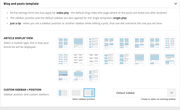
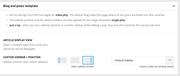
synedToday I updated the Newspaper theme and all the different modules/templates disappeared from Template Settings.
Is there any way to bring them back and make my site look as it did before the update?
For example it now shows full post content on the homepage instead of showing only excerpt.
Template settings before and after update:
 Arsenio Spadoni
I need to have two different sidebars, one for the standard homepage and one for the mobile homepage. I created the “Default Newspaper” that I use for the home page, I would like to create a “Default Newspaper bis” (different from the standard) to use only on the mobile page. It’s possible? How can I do?
Thanks you in advance,
Arsenio Spadoni
Anamaria Hello,
Please check this topic https://wordpress.org/support/topic/favicon-not-showing-on-bing/
Also, on the homepage there’s an option Customize icon => https://www.screencast.com/t/I2uVvP4b -> Site identity -> Site icon -> Change image -> publish => https://www.screencast.com/t/lY9WEOZEj
Thank you!
 WEALTHSIDE
 Hello Bettina,
ok ok. I don’t have any code. I bought the plugin Thrive Leads. Thrive Leads is installed and activated under DESIGN/WIDGETS (NEWSPAPER DEFAULT/THRIVE LEADS WIDGETS). There is only one checkbox and it is activated. The Thrive Leads Newsletter Box is only displayed on customised pages such as Imprint, Privacy Policy. But not on the homepage or published articles.
Thank you.



