
- ApiUsing the Theme API in plugins
- ApiPractical example – How to add a new Block and Module
- ApiAPI – Smart Lists – Introduction
- ApiAPI – Category top section style – Introduction
- ApiAPI – Category top section template – Introduction
- Apitd_api_module::update
- Apitd_api_module::add
- ApiAPI – Modules – Introduction
 Anamaria
 Hello,
Please let me know what code is showing on the top, if you have the same error as @zebu59, please check this topic https://forum.tagdiv.com/topic/update-diary-and-worries-mobile-theme/#post-412163
Thank you!
 arvind9725
I want to preload cdn.ampproject.org/v0.js into my website for better performance.
1) /applications/rmanupmumc/public_html/wp-content/plugins/td-composer/mobile/amp/functions.php
2) /applications/rmanupmumc/public_html/wp-content/plugins/td-composer/mobile/functions.php
======== my code – start ==========
function dns_prefetch_mobile() {
echo “<link as=script href=https://cdn.ampproject.org/v0.js rel=preload>”;
}
add_action( ‘wp_head’, ‘dns_prefetch_mobile’, 0 );
======== my code – end ==========
I have placed the above code in both above locations but the code is not working. I have put the above code in both the files one by one but js file is not preloaded.
I am using the latest version of the newspaper theme (11.2). can you please help me?
waiting for your response.
 tapan29588
Newspaper theme is installed on my website. My problem is that the AdSense anchor ad does not appear on the mobile device. It looks fine if I open it on the desktop. So please tell us what to do to make AdSense anchor ads appear properly on mobile devices. And AMP auto aids are also not working.
 fahrezy
 I have been update to newspaper Latest Version.
but Website error, if tagDiv Mobile Theme Active.
wp_booster error:
td_api_base::mark_used_on_page : a component with the ID: td_style is not set.
/var/www/html/wp-content/plugins/td-composer/legacy/common/wp_booster/td_api.php
 zebu59
Hello
after performing my newspaper and wordpress update, a weird error appears in this condition:
On the login page, an error code appears if you make a login or password error. This only on mobile phone.
If I deactivate the newspaper mobile theme plugin, I no longer have this error. I emptied the cache and reinstalled the plugin, nothing changes.
Thanks for your help
Here is this error:
Warning: is_readable (): open_basedir restriction in effect. File (/Newspaper-child/theme.json) is not within the allowed path (s): (/ web / zebinfo: / web2 / zebinfo: / home / temporary / upload / zebinfo: / home / temporary / sessions / zebinfo: / tmp: / usr / local / lib / ZFramework: / dev / urandom) in /web2/zebinfo/www/Potager/wp-includes/class-wp-theme-json-resolver.php on line 354
zebu59 I have the same thing. Me concerning the error code appears with the activation mobile theme, during a connection error and on my phone. I don’t know if the problem stays the same even after clearing the cache, it doesn’t change.
 Naveen7829
Hi,
When I update the 5.8 WordPress theme it shows some coding on the top. For resolving this I downgrade the WordPress.
 vikramsaiteja
Hey there ,
can you say me how to disable all the previews of featured images in my site when I’m using the tag div mobile plugin , As it is using default pages for home and posts and my content didn’t had any featured images its not looking good .
 shpetimH
Hi all,
I have a WP 5.8 and Newspaper 11.2 version (https://observeri.com/).
Everything is working perfectly fine but I have a complex scenario and I ran into some issues which I will try to explain.
– I have few categories, each of them have different headers and footer (body almost the same to all)
– For all categories I also have different mobile versions (those are working as they should)
– Every Single Posts under certain category have also different layout (those are working fine as well)
– When I try to create mobile templates for Single Posts for different Categories, those are getting overwritten 🙁
For example:
– Category X desktop / mobile is fine
– Single Post under Category X uses header and footer as Category X and both desktop / mobile templates are fine
– When I try to design Single Post Mobile Templates for Category Y, all other Single Posts templates are getting overwritten.
Everything is set to use specific templates to “Theme Panel > Categories” and Desktop version is working perfectly, this is happening only on Mobile Templates.
PS: Every mobile template I create from Template itself using “Create Mobile Template”, and on “Cloud Templates” they seem to be correctly linked for example 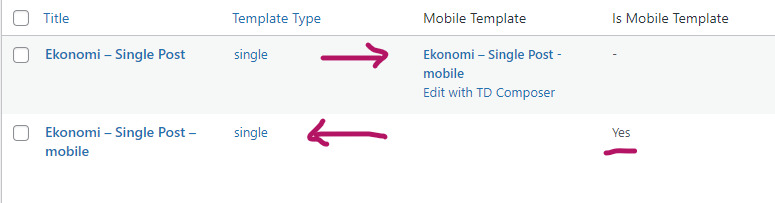
Everytime I create a new single post mobile templates all single posts will start using the latest one!
I would really appreciate any help.
Thanks and regards.
 BarbaraZ
Dear Support,
How to avoid the situation that the cloud templates come up in google search instead of the actual pages of the blog created with the Newspaper Theme: http://www.detektywsmaku.pl.
The first search result is this:
Home Mob – Detektyw Smakuhttps://detektywsmaku.pl › home-mob
And it takes you to the template of the mobile version on normal computer…
All the best,
Barbara
 Newsminions
 Hello,
Thanks for the reply, Also according to your suggestions above I have already set it to Amp for mobile theme. Also, I have placed adsense amp code on the header of the site using the insert header and footer plugin. But now also ads are not getting displayed. Help me to resolve the issue at the earliest. I have attached the screenshots of various setting of my site as per your request.
Mobile Theme setting – https://prnt.sc/1jocolv
Insert Header And Footer – https://prnt.sc/1jofbk4
AMP version of my site – https://prnt.sc/1jodqnj
Thanks,
-
This reply was modified 5 years by
Newsminions.
 gamingsociety
 Mobile theme not read the translate… On desktop all works great, but on mobile footer, comments etc. doesnt works… i try in incogntio mode, delete cache, try on another phone, not works on 2 of my websites…
gamingsocietyHello, on 2 of my sites translation doesnt works on mobile/amp pages.
Please look https://gs.x-connect.pl on mobile.
I translate all in Theme Options and looks in Loco Translate is everything translated, but on mobile i see only english words like ABOUT US in footer.
I need see this in polish language.
Anamaria Hello,
if you are using the mobile theme and amp, then it will be using the mobile theme version of mobile, or for mobile + amp or only for the amp.
Now about ads, if those are amp ads -> https://i.imgur.com/iFxAfYW.png, then yes, those will be displayed only when you set the mobile theme + amp or amp option, if it is on mobile then is not display the amp version, therefore, the amp ads will not be displayed. If you use standard ads set in mobile ads -> https://i.imgur.com/NtQS9Mz.png, then those should be displayed for both mobile and amp versions.
If there are still some problems, please provide some screenshots with your settings for mobile ads.
Thank you!
 Vlad S
 Hello!
Yes, all you have to do is simply remove the Mobile Theme plugin.
Thank you!
Vlad S Hello!
That can be done from the Theme panel – Mobile theme – Theme fonts as you can see here: https://www.screencast.com/t/6FkR3wkM
Thank you!
 muxurou
 Thank for your reply.
I have update 11.2, but In Newspaper Mobile Theme(android and ios), There are 5 sub-category iteams, There has 10 sub-category iteams.
 iamkingsleyf
 @thelastpoet i have also added for the mobile theme to have the last modified date which will also work on AMP but they have refused… pixwell WordPress theme does this.
 thelastpoet
 If you use a mobile theme and set a modified date on the Desktop, the modified date won’t show on mobile, and Google won’t pick it up.
Google uses the mobile version to index pages. If you want the modified date picked up by Google, disable the mobile plugin and use the mobile page, which has the setting from tag div composer.
If you only use the mobile theme for AMP and set the modified date on the Desktop, it will show on Google since Google will use the responsive version on mobile to update the SERPs.
I requested the modified date feature be added to the mobile theme some months back; maybe they will add it in the coming updates.
 Sergey
Hello. tagDiv Mobile Theme. How can I change the font size of the text on the page.
 Bettina
 Hello!
Let me explain you which options you have:
1. Responsive version: A responsive version of your website is looking similar like on desktop, edit the page with TagDiv Composer, click on the mobile viewport: https://www.screencast.com/t/XDQJedlggSB ; there you can see your mobile version and you can edit the elements there.
2. Mobile pages: https://tagdiv.com/newspaper-10-3-7-update-brings-customizable-and-fast-mobile-pages/
3. Mobile theme plugin: https://forum.tagdiv.com/the-mobile-theme/
If you want a responsive version for your mobile version, then you should uninstall the Mobile Theme plugin which has its own templates and your responsive version will appear automatically.
A full explanation you can find here: https://www.youtube.com/watch?v=SpGkOnJeNZY
Thank you!
Anamaria Hello,
In our theme are two menus because one is used for the desktop version and one for the mobile version.
Unfortunately, if you remove a menu, it will not appear on one of the used versions, for example, if you delete the one on the mobile, then you will not have a menu for the mobile version.
For the second issue I’m not sure what you mean please provide more details.
Thank you!
Anamaria Hello,
Using our theme you can choose from 3 mobile versions
-> mobile responsive => https://www.screencast.com/t/oJ2ShOp47
-> mobile theme plugin => https://forum.tagdiv.com/the-mobile-theme/
-> mobile page => https://tagdiv.com/newspaper-10-3-7-update-brings-customizable-and-fast-mobile-pages/
This is a video about Responsive Newspaper Theme, AMP & Mobile Theme, Mobile Pages & Templates -> https://www.youtube.com/watch?v=SpGkOnJeNZY
So, the mobile responsive is what you see then that you select the viewport on phone => https://www.screencast.com/t/matV17hH, so some settings may apply for each viewport(where is the border blue), and others are not(where the border is black).
The mobile page has the mobile templates from Cloud Library => https://www.screencast.com/t/YCcZ8rL8
The mobile theme comes with its own templates for page, post, category, 404 etc so your current templates from the desktop theme will get converted to the mobile theme layout, the page content is made without builders in mobile editor => https://www.screencast.com/t/xbgZG8kH also, the options that are provided to edit the mobile theme version are limited (this keeps the things simple).
Mobile responsive version of the theme and the mobile page editor can be edit with tagDiv Composer, the mobile theme plugin not.
For example, you can have the mobile theme plugin activate and use the mobile page/mobile responsive version for the homepage/pages, but for the categories page/404 page you can’t use the mobile page/mobile responsive version if you have the mobile theme plugin activate.
Thank you!
 rinkdemi
Hello,
I edited the mobile theme through the TagDiv Composer, but it won’t be shown on my mobile. I tried many things myself but it won’t show-up. Could someone help me?
Anamaria Hello,
Usually, this problem when the mobile version is displaying on the desktop, the plugin for the cache that you are using don’t recognize mobile theme plugins and mobile pages, and display it, on the desktop. We recommend using the WP Super Cache plugin https://forum.tagdiv.com/cache-plugin-install-and-configure/
Also, please asks your host if a cache plugin is enabled.
To better understand the problems you have, please provide us with as much information/details as possible, with screenshots and a link to your website.
Thank you!


