
- TutorialsFrom WPBakery to tagDiv Composer
- TutorialsWhat is Ajax preloading?
 Anamaria
 Hello,
If you have a header template, then you can add the top bar in the mobile like this -> https://www.screencast.com/t/sMECJT6Pw
Thank you!
 ddj
ddj Like I said, in TagDiv Composer, the font is set to Oswald in all the locations. I specified that font via the editing panel on the left side of the screen.
For the two sentences, it is set at General > Post Content > Oswald.
For the main navigation, it is set at Style > Fonts > Element Text > Oswald.
For the Image Box (buttons), it is set at General > Style > Custom Titles Text > Oswald.
In the TagDiv editor, the font displays as Oswald. After saving and viewing the live page, the font shows up as Alegreya.
I do have some custom CSS, but none of it mentions Alegreya. Here’s what the custom CSS looks like.
.entry-crumbs {
display: none;
}
.woocommerce-ordering select {
display: none;
}
.woocommerce .td-container .page-title {
margin-top: 50px;
}
.woocommerce .product .images .flex-control-thumbs li img {
cursor: pointer;
opacity: .5;
margin: 10px;
padding-right: 10px;
padding-top: 10px;
}
.woocommerce .added_to_cart {
font-size: 12px;
color: #222;
padding-left: 10px;
}
.woocommerce div.product .woocommerce-tabs ul.tabs li {
display: none;
}
.woocommerce.widget {
margin-bottom: 38px;
background-color: lightgray;
padding: 5px;
}
.tdb_mobile_menu {
z-index: 10;
}
.tdb_mobile_search {
z-index: 10;
}
.td-search-wrap-mob .td-search-input span {
font-size: 20px;
font-family: ‘Oswald’;
}
.td-search-wrap-mob #td-header-search-mob {
font-family: ‘Oswald’;
}
.td-search-wrap-mob .result-msg {
margin: 0 5%;
font-size: 20px;
font-family: ‘Oswald’;
}
.tagdiv-type ul, .tagdiv-type ol {
margin-bottom: 6px;
}
-
This reply was modified 3 years by
ddj.
 perspektive
Hey, when trying to change a mobile-page it gives me the following error.
Of course all plugins are updated and installed.
Thanks!
 Atithya
Hi, I have just shifted from standard pack to tag div ui, but after shifting the sign-in users are unable to see top black bar menu on mobile, can you please tell me how to retain the top black bar menu in mobile?
 WordDom
 I use Mobile theme plugin of course.
And i use “amp for wp”, not “amp” plugin because of ads problem.
So i ask the question again : how to use mobile theme plugin with “amp for wp” since it’s only available in the paid version of “amp for wp” ?
 Bettina
 Hello!
You don’t need to buy an amp. You can use Mobile theme + AMP. You can not mix the mobile version.
We have 3 options for mobile versions that you can use:
1. Responsive version: A responsive version of your website looks similar to the desktop version. TagDiv Composer is used to edit the page.Click on the mobile viewport: https://www.screencast.com/t/XDQJedlggSB. There, you can see your mobile version and edit or adjust the elements to look better.
2. Mobile pages: https://tagdiv.com/newspaper-10-3-7-update-brings-customizable-and-fast-mobile-pages
3. Mobile theme plugin: The Mobile Theme is a performance-optimized theme included in the main Newspaper theme that only loads on mobile devices. It comes with its own templates and designs for pages, posts, categories, etc., so your current templates from the desktop theme will get converted to the mobile theme layout. Please see https://forum.tagdiv.com/the-mobile-theme/ and https://forum.tagdiv.com/mobile-theme-introduction/ for more information.
A full explanation is here: https://www.youtube.com/watch?v=SpGkOnJeNZY
If you need to use the mobile version 1 or 2, then you need to disable the Mobile Theme plugin.
Thank you!
WordDom I don’t have screenshot or video to post because i’m searching for a solution i can’t use for the moment.
Question is simple : how to use newspaper mobile theme with “amp for wp” plugin ?
Only the paid version of this plugin brings YOUR theme available Please see by yourself : https://ampforwp.com/themes/).
But with the free version, it’s possible to create custom templates.
So… what do we need to update in mobile theme code in order to be recognized by “amp for wp” as a template ?
I tried to put the mobile theme folder in /wp-content/plugins/accelerated-mobile-pages/templates/design-manager but it’s note recognized
WordDomHi, i know we need to use mobile theme with classic amp plugin but settings don’t permit to use ads placement as we like.
I mean, specific ads placement are possible for mobile theme OR amp theme but not AND. And auto ads for amp doesn’t interest me.
So, the thing is with “amp for wp” paid version, there is the newspaper theme available. And it looks like yours, this is your theme.
As i don’t need the paid version, i suppose we can convert actual mobile theme, upload it in the correct folder of amp for wp theme and use it. But apparently it needs some changes because it’s not recognized.
They have a page about how to make a custom theme for amp for wp so i know it’s possible :
https://ampforwp.com/create-a-custom-amp-theme-for-wordpress/
Can you help please ?
Bettina Hello @imadfuse !
Set it to https://prnt.sc/Mr9J_j_KzAbX for desktop and https://prnt.sc/YjhM9_3G2n4c for mobile.
You set up the title of your website. Examine the theme panel as well. Delete everything from there too, and set your logo again.
Thank you!
Anamaria Hello,
The mega menu will not be displayed on the mobile theme; this can work only on the responsive version or mobile page. What you can do is create a mobile menu and set it on mobile.
Thank you!
 luojeda
Hello, I have a problem on my website, when the mobile theme is enabled, the dropdown menu on main navigation doesn’t work
Is that how the menu is supposed to work?
 makoto1995
 I had already tried the option to create a menu but it puts me in a list under footer, here I am sending you an image of the mobile version and where I would like the list to appear
mi web es: https://elrinconcolombiano.com/

Anamaria Hello,
Please let me know your mobile version; please provide the link.
You can create a menu and set the menu in the list menu.
Thank you!
 markwebbink
 I am not sure (anymore).. Which one is to set for the general background color of the articles and frontpage?
I just added some custom html which resulted in the white background for the articles but not (yet) for the frontpage.
For me the titles in the ‘Mobile theme – theme colors’ menu only refer to the menu? I am looking for the (general) background setting.
Bettina Hello @markwebbink!
Did you make any changes to the background color from Mobile Theme -> Theme Colors?
Thank you!
markwebbink Hi, I am facing the same problem (possibly caused by switching from ‘mobile’ to ‘AMP’ and back again?). The background of the mobile theme (www.deventervoetbal.nl) is grey now where it was white. Any suggestion how to set it back to white again please?
makoto1995 There are currently some settings we made in the mobile version that we want to keep, so we don’t want to remove the mobile version in posts.
Is there a possibility of creating a list or text type element in which I can add a list of pages or links and that it appears in the position where the sidebar would appear if the option you mentioned was activated?
 Calin
Calin HI,
that space can be reduced using tagDiv Composer – https://i.imgur.com/bYpYUwp.jpg, select the mobile viewport, click on the trending now element, and check the css tab, there you can set the top margin to 0 also you can use negative numbers for margins, so if the 0 is not enough, you can set it -10 – https://i.imgur.com/mn6Z3J0.png
I hope this will help you!
–
Anamaria Hello,
You can create a sidebar like this https://forum.tagdiv.com/sidebars-tutorial/, after you can assign it on mobile where you want, but please select the viewport on mobile.
This is a video about Responsive Newspaper Theme, AMP & Mobile Theme, Mobile Pages & Templates -> https://www.youtube.com/watch?v=SpGkOnJeNZY
Thank you!
Anamaria Hello,
Maybe you have a cache plugin on the server.
Now I checked, and the logo is displayed on mobile -> https://i.imgur.com/X8xtpK6.png -> https://i.imgur.com/4Hf69G1.png
Thank you!
Bettina Hello @archnews!
Try to deactivate the Mobile theme and AMP plugins and check the results!
Thank you!
Anamaria Hi,
Seems you have the Mobile theme plugin activated, and it is disabled for the homepage. When you install and activate the Mobile Theme plugin, your pages will be overwritten by the plugin (the mobile theme comes with its own templates for page, post, category, etc so your current templates from the desktop theme will get converted to the mobile theme layout, the page content is made without builders in mobile editor => https://www.screencast.com/t/xbgZG8kH also, the options that are provided to edit the mobile theme version are limited (this keeps the things simple)).
Better deactivate the plugin and see the results
Also, if you create a mobile page, please make sure you assign it like this https://www.screencast.com/t/lektAhyjd
This is a video about Responsive Newspaper Theme, AMP & Mobile Theme, Mobile Pages & Templates -> https://www.youtube.com/watch?v=SpGkOnJeNZY
Please check this topic where I explained each mobile version -> https://forum.tagdiv.com/topic/mobile-version-not-working-properly-2/ and choose what mobile version you want.
Thank you!
 tagdivchick
The main photo in the mobile version of the browser doesn’t work. In the tagdiv composer it looks like this: 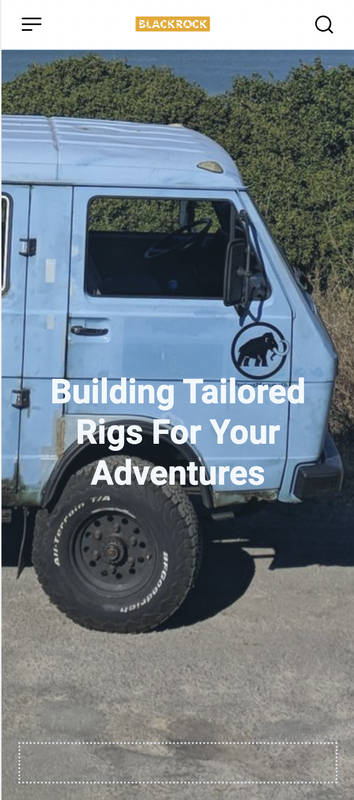
However, when I use my android phone to load up the website it is completely blank:

The website is http://www.blackrockbuilds.com
Anybody have any ideas?
Anamaria Hello,
Please go and select the viewport for mobile and with tagdiv Composer you can redesign it -> https://i.imgur.com/Aij8xoc.png. You can set the block where you want.
Thank you!
Bettina Hello @tassos!
Please check out this thread: https://forum.tagdiv.com/topic/the-mobile-version-and-amp-version-is-not-displayed-correctly/
Thank you!



