
- TutorialsFrom WPBakery to tagDiv Composer
- TutorialsWhat is Ajax preloading?
 Calin
Calin Hi vmertinos,
This question is a bit more complex, if css @media Rule is used for the responsive version, for the mobile theme plugin, our developers have implemented in the plugin a code to detect mobile devices, this code can be inspected on this path wp-content/plugins/td-mobile-plugin/Mobile_Detect.php
I hope this will help you!
Thank you!
 vmertinos
 OK, but answer ASAP please in my question.
“How exactly your mobile theme plugin does it detect the device type?”
 radioheadcastro
 That is not what I’m talking about.
The ad you said is a google ad. That appears randomly and changes every time.
I’m talking about an ad that we manually insert using a plugin called Ads Pro.
It used to work properly until we updated the theme.
It also works fine on desktop, only on mobile is not showing.
Here you can see the ad I’m talking about: https://snipboard.io/IVH92L.jpg
The one for Dental Park, that’s an ad space that is rotating with the same ads all the time. That’s supposed to be showing on mobile too.
 ialv
ialvHello,
I have a problem.
I have activated a template for the header (menu) from Cloud Library with a page that opens in modal.
On desktop and tablet it works fine, but on mobile the menu does not open.
Why is this?
The header is currently disabled because of this bug.
Pd. When I activate it and click on the menu in mobile, it tries to open but it stays blocked, as shown in the image below.
Thank you.
 pindextt
 I deactivated the mobile theme, but my website is not updated. And the influencer template is not working properly.
This is sample page-
https://pindextt.com/top-22-most-beautiful-and-talented-women-in-music-industry/#
 Anamaria
 Hi,
Please disable the mobile theme plugin.
Also, please check this topic where I explained each mobile version -> https://forum.tagdiv.com/topic/mobile-version-not-working-properly-2/ and choose what mobile version you want.
Thank you!
pindexttHi,
My website is not updated. And in the mobile version, the sidebar, header, and footer do not work properly. The template is not working correctly.
My website is https://pindextt.com/
Anamaria Hello,
To change the font and colour for the mobile menu please go in Theme Panel -> Theme Colors -> Mobile menu/mobile search => https://www.screencast.com/t/0CvSgXp9H to set a background image go in Theme Panel -> Background -> Mobile menu/mobile search => https://www.screencast.com/t/uvDejzbX to change the font from Theme Fonts => https://www.screencast.com/t/ANBQe7hQhJd
Hope this help you!
Thank you!
 tobiasinfo
Hello
The Google Pagespeed Insights recommends a smaller size for the AMP image, with the “srcset” attribute
Recommendation: Set an appropriate size for the images
I remember a few versions ago of Newspaper Theme, the mobile’s score in the Google test was very good.
Print: https://prnt.sc/Y_5h74J6frln
Do you have any solution for this problem?
 anthonyblfc
Hello, I have created my mobile pages using the Tagdiv composer. So I have the mobile theme plugin disabled. I am happy with the way my pages look. My problem is I can’t see any way to change the background colour or change the font and colour of the writing of my mobile menu drop-down menu after I click on the 3-line burger. The only way I can see that I can do it is by activating the mobile theme and doing it from the theme panel. But if I do it this way, it changes the whole layout of my mobile pages. Is there a way for me to do this with the mobile theme deactivated? Thank you
 kibiribi
Dear colleagues,
Have you faced with this problem?
When I click on button “Load more” I’ve got infinity loader – pages were not loaded on my mobile phone
But the same button works fine on my Win PC Chrome/Edge/FireFox/ browser.
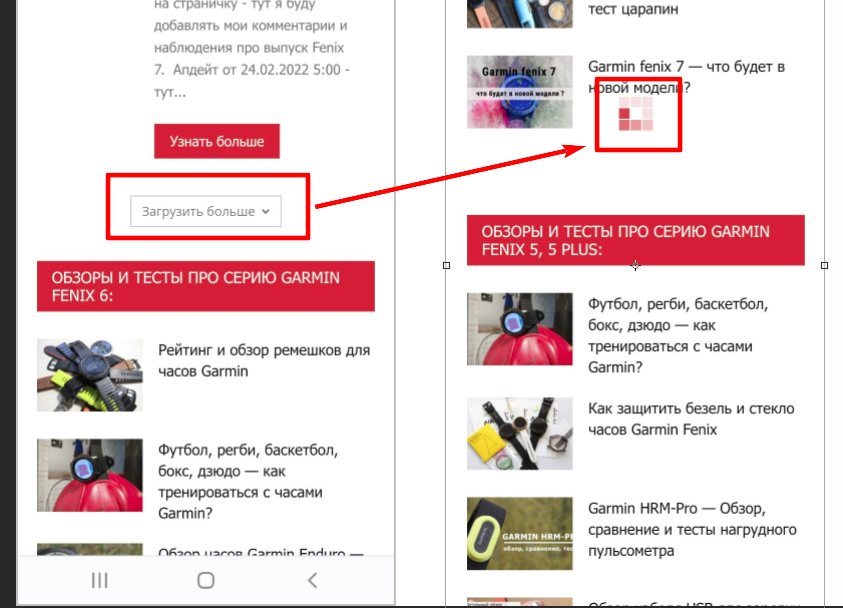
P.S. I’ve sent credential to the Tagdiv support dep.
 730promo
Hi
I am using the Mobile theme on Newspaper. When i try to goto the 2nd page of my latest posts it displays posts not from that period, although if i goto the 3rd page it shows what should be on the 2nd.
My website is http://www.lowkickmma.com
 Hello Daas
Hello Team,
When I’m activating the AMP Plugin and scanning the website, it shows an error. (Screenshot: https://prnt.sc/89KQezS4ZOQb) which says plugin compatibility issue (https://prnt.sc/ggnwjF_DGLy2). I wanted to keep the responsive mobile version and AMP version with the same design as the mobile responsive version without using Mobile Theme Plugin. But in the article, I saw that this option best works with Mobile Plugin and AMP. But while I activated the Mobile Plugin theme, the AMP option was fully removed from the WordPress dashboard navigation pane. Even I open it in a separate window to check if AMP opens after activating the mobile plugin, but it does not work (screenshot https://prnt.sc/fukkSMYiiL-0). I checked one website which uses the same theme, but their mobile website and AMP website UI are the same: https://theprint.in/. Can you please let me know who they did that?
Calin Hi,
Those unused javascript can be from extra plugin that you are using or maybe from some extra script that is set in the theme. You need to check the plugins you are using.
Also, you need to use some plugins for optimize.
For example if you are using the WP Rocket then you can use this guide -> https://wp-rocket.me/google-core-web-vitals-wordpress/remove-unused-javascript/
Another option will be to use the mobile theme plugin. This is special made for mobile design and will load less resource to make the mobile version faster.
I hope this will help you!
Anamaria Hello,
If you use Lite Speed Cache, then please check if this plugin has the option for mobile version cache.
We recommend using only one cache plugin, the WP Super Cache plugin with this configuration: https://forum.tagdiv.com/cache-plugin-install-and-configure
Thank you!
Anamaria Hello,
Seems you have an ad -> https://i.imgur.com/Ljqmbkq.png
Please let me know how you set the ad in the header for mobile.
Thank you!
Anamaria Hello,
Please provide the link to your website.
Also, please check if you have the mobile theme plugin activated, if yes, please disable it.
Also, please check this topic where I explained each mobile version -> https://forum.tagdiv.com/topic/mobile-version-not-working-properly-2/ and choose what mobile version you want.
Thank you!
 jrosas33
 Please let me know what you use for the mobile version. — I do not understand, I check my web on my cell phone. I attached two images, both from mobile version. The first one it is the home and the second one it is a post.
image.png
image.png
If the Google Adsense code is approved, then those should be displayed.
Can you please provide a link to your website and some screenshots related to the ad settings (how you set the ads code).
Screenshot both, adinserter to articles and theme panel ad options
image.png
image.png
vmertinosI am using on my website your tagdiv mobile theme plugin.
How exactly your mobile theme plugin does it detect the device type?
My problem is that some times randomly i have responsive theme template on mobile and not the tagdiv mobile theme template.
My plugin for caching is litespeed and i need your answer to fix the issue with the help of litespeed support team.
My website is on production level so answer me ASAP please.
 Jose I. Moneo
Hello,
I defined a desktop page which works fine but when I open the mobile page it shows a page if entries instead.
I am using Newspaper 11.5
Thank you
radioheadcastroHi, the header ad was showing correctly until we updated the theme.
Header ads are showing fine on desktop and tablet. You can take a look here:
 Rahul chauhan
How to reduce unused javascript for mobile theme
 Bettina
 Hello!
The AMP works better only with the Mobile Theme plugin. From my point of view, if you don’t use the Mobile Theme plugin, then there is no reason or benefit to AMP. Please read all about AMP here: https://forum.tagdiv.com/tagdiv-amp-plugin-tutorial/
It comes with its own templates/design for page, post, category, etc so your current templates from the desktop theme will get converted to the mobile theme layout. Documentation here:
– https://forum.tagdiv.com/the-mobile-theme/
– https://forum.tagdiv.com/mobile-theme-introduction/
Please read all about AMP here: https://forum.tagdiv.com/tagdiv-amp-plugin-tutorial/
Note that you can not customize AMP so much, because it comes with its own design.
There are some settings in the Theme panel -> Mobile Theme and Dashboard -> AMP only.
You can not add a shortcode as in the TagDiv Composer. Please note that you can’t customize the AMP pages with the TagDiv Composer.
Make sure the redirect mobile visitors to amp option is disabled.
Thank you!
Hello DaasHello team,
We want to use the mobile UI (we are using City Pro Template) in the AMP version. But when we are activating the Mobile Theme Plugin, there is a totally different UI. Is there any way we can convert the desktop UI to mobile UI +AMP? Here is our website: https://www.techgenyz.com/
Bettina Hello!
Add the element called “button” in the mobile viewport: https://www.screencast.com/t/XDQJedlggSB; there you can see your mobile version and edit or adjust the elements to look better.
Thank you!


