- TutorialsFrom WPBakery to tagDiv Composer
- TutorialsWhat is Ajax preloading?
 sqrter
I am using the newspaper theme with default pro.
This is my website.
In the mobile view (not AMP and not mobile theme, just mobile view), there is a white side on the right-hand side. And the contents just like shift to the left and out of the container.
No layout and CSS were modified, and no problem before update to the newest version.
Cannot solved even I install the previous version of the plugin and theme.
Thanks!
 Bettina
 Hello!
If you created the mobile pages with TagDiv Composer, then when you install Mobile Theme plugin, your pages will be overwritten by the plugin. That’s why you have these issues over here. More about Mobile Theme you can find here: https://forum.tagdiv.com/the-mobile-theme/ If you want to modify your pages on mobile with TagDiv Composer , then you should consider using mobile pages, instead of Mobile Theme.
Thank you!
 ozgunminare
Hello Dears!
I update mobile page with composer but always have to make clean cache for go on live.
Any suggestion to solve this problem?
Thanks!
 newspaper-user
My website is infotonline.com, can you please tell me how to enable header gradient before content.
I’m using Tagdiv Mobile Theme Plugin for my Mobile Theme.
Gradient like in this demo:- https://ibb.co/HTD7LX2
Is there any CSS Code for this feature, currently I’m forced to use blue background in my header instead of white because no gradient is coming in my mobile theme.
 Frydenborg
 How think I have found some of the answers here, I have found where to set text logo and mobile only shows the same as tagdiv composer if mobile theme is not enabled.
But in tagdiv composer, my title is “blank”, not there, and I cannot add it, any suggestions? Thanks.
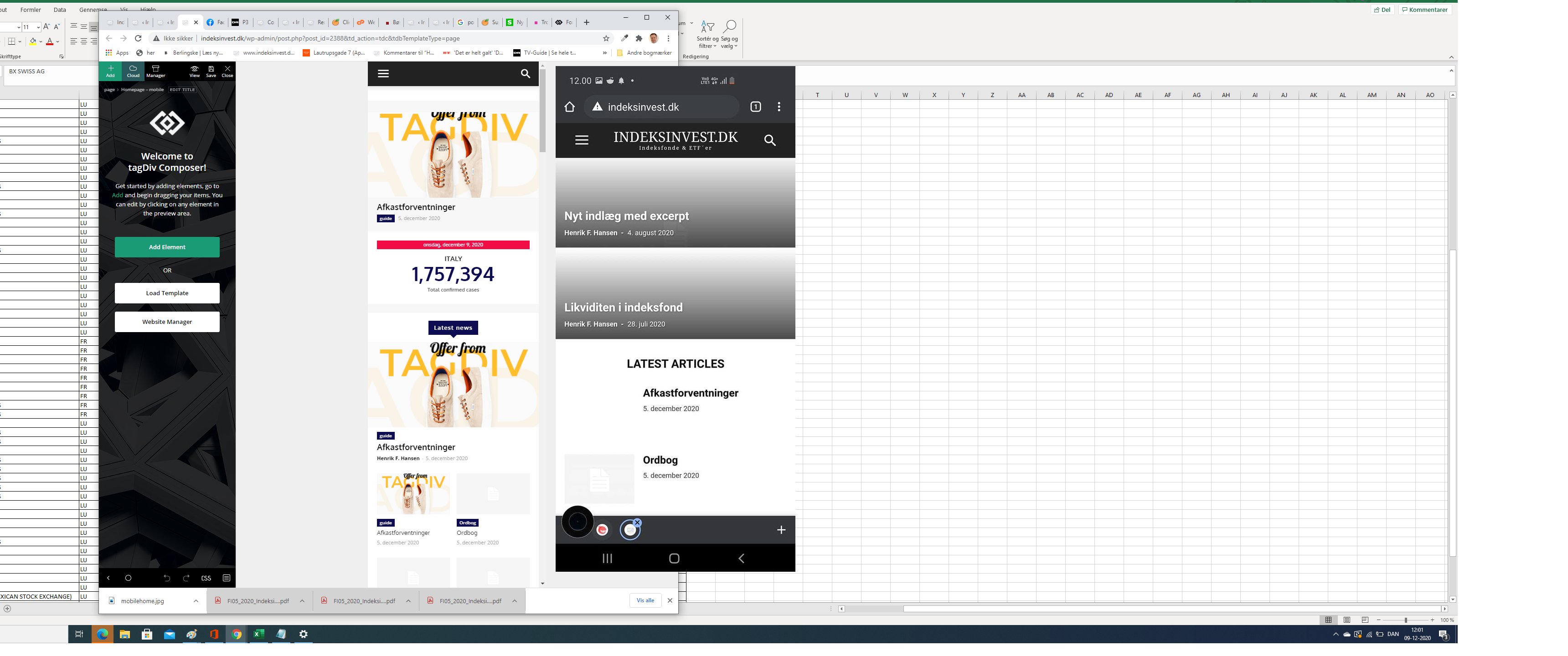
FrydenborgApparently, my site on my mobile (indeksinvest.dk) looks quite different from I see in tagdiv Composer when I edit mobilpage home (see screenshot), I have tried to delele cache.
1. How can I make the site looks the same at mobiles as the mobile home page template in tagdiv Composer?
2. How can I change text logo font at mobile pages?
 pyro2212
Hi. We are using plug tagDiv Mobile Theme without cloud library.We would like to have only in mobile posts or amp auto scroll (autoloading) feature. Is it possible?
 gimmydagar
 The problem with mobile menu loading fixed automatically;
This could be due to the latest update of newspaper theme,
Thanks for the support.
Bettina Hello!
I checked your website on desktop and mobile version and it seems ok, the menu is working very well. Did you solve the problem?
Thank you!
 partha
I run newsmag theme. The mobile theme renders a grid with 3 posts and a list of articles. I want to exclude some categories in the list of posts. Right now, it displays all the posts.
I could not figure this out…can someone help?
 Calin
Calin Hi,
Please provide a link where I can inspect those situations.
1. So the click is no longer work on those elements ?https://www.screencast.com/users/GiaHongIT/folders/Default/media/9c8ba1f6-558c-4783-bff6-eb6b0b2edb19
2. Here Here the footer looks like is the mobile version https://www.screencast.com/users/GiaHongIT/folders/Default/media/16c4b376-5ec2-4359-864b-2c605b0214e0
Thank you!
 duck1970
Hello, I tell you my problem. Until today I have not activated Mobile Theme. Today I have activated it and I have these problems at https://www.radiomarcabarcelona.com
1- In Home the mobile screen is not filled, it is missing on the right side. I attach a photo
https://www.radiomarcabarcelona.com/goodnews-design/1-mobile.png
2- Only the Home is shown, in the rest of the pages of my mobile version nothing is shown
I attach a photo
https://www.radiomarcabarcelona.com/goodnews-design/2-mobile.png
3- I have created my pages in mobile version, but everything remains the same, they are not shown
I attach a photo
https://www.radiomarcabarcelona.com/goodnews-design/3-mobile.png
What should I do to get an optimal version of my website for devices?
Thank you
 spervaiz
Hi! The normal font for articles and excerpts on my website at chicagomonitor.com on mobile is weird and chunky. I was wondering if there was a way to change it back to normal.
 Sankar
Hello everybody,
since the launch of Newspaper 10.3.8 and also now with 10.3.9 I am getting a “There has been a critical error on your website” message, when I visit my website. I tried to deactivate every plugin and the only solution was to deactivate the Mobile Theme Plugin from TagDiv itself. After deactiviting it, everything worked fine. I also tried to reinstall it, but it didn’t change anything.
Is this an known issue? Is there a workaround for it?
Any help would be appreciated.
Best regards,
Kevin
 Umut
Umut I solved it, it was the tagDiv Mobile Theme plugin.
UmutMy mobile is different that web page. How can I make my mobile as same as my pc page ?
 Topfgartenwelt
 So I got the Pinterest Button working again on the Desktop Theme after embedding it as a widget from design –> widget –> individual html but this doesn’t work for the mobile theme. What should I do to get that code working in the mobile theme:
script async defer data-pin-hover="true" data-pin-round="true" src="//assets.pinterest.com/js/pinit.js"> script
Greetings Kathrin
 kumel69
Hello!
I’m using the AMP and mobile version of the web, and I’m getting the desktop version, which looks like the mobile version…
 Patrick93
 Hello Amit,
thank you for your great work!
I read through your article (https://www.infophilic.com/get-almost-100-pagespeed-newspaper-theme/) and did a few things.
But I also have a few questions.
But first a question, why I came across this topic at all:
In the first miliseconds of the loading process of my website a different font flashes. This is extremely annoying. Do you know how to prevent this?
Look here: modusx.de (Screenshot: https://nimb.ws/TBdEAD)
1.) Have you ever tested WP fastest Cache? What is your experience with it? Especially compared to WP Super Cache.
2.) You say that Cloudflare can be used.
Is the free version useful here too?
3.) What is your experience with Gzip? Is it possible that Newspaper-Theme does not work with GZIP?
4.) By activating plugins my database has grown a lot. In my database there is a lot of data about plugins which I don’t use anymore. Does a large database damage the loading speed?
5.) A question about the part “Removing Font Awesome”. With the code snippet only the essential icons are loaded. But which icons are essential? All the ones I select in the theme?
6.) You write that there is also a funcion.php for the mobile theme.
Is it possible to overwrite it with a child theme or do you have to add new entries after every update?
For example: Removing Emojis, Removing Font Awesome or Preload Newspaper fonts.
7.) There are several ways to add custom CSS.
Where do you think it makes the most sense? In the Theme Panel under Custom Code? Or rather under WordPress Design > Customizer?
I look forward to an answer from you.
Best regards
Patrick
 teslamag
Hello,
Hope you are well.
I recently changed my footer and my logo header changed.
I don’t know why but it’s not the one configured in my theme panel which is displaying.
My theme panel parameter: https://www.tesla-mag.com/wp-content/uploads/2020/12/Capture-décran-2020-12-08-à-19.36.54.png
My mobile display: https://www.tesla-mag.com/wp-content/uploads/2020/12/IMG_62400E73EB71-1.jpeg
You can see by yourself at tesla-mag.com through mobile.
Thanks for your help,
Armand
Thanks for your help,
Regards,
Armand
gimmydagarHi,
I have been facing the issues with Mobile menu loading;
Wen I click on Menu icons, it takes minutes to open;
And I am not using any background image.
Website URL – https://www.placementoffer.com/
Please help.
 CarpFreakz
Hi,
I haven’t modified anything and yet my logo no longer appears in the desktop and mobile page header. All settings seem to be correct.
Link to the website: https://www.carpfreakz.nl/
Today i have also updated PHP, and the theme and plug-ins. That didn’t solve the issue so i put a back-up back.
Hope that you can help to solve the issue.
Bas
 ChandlerBing1985
 Hi Calin,
thank you for the reply. I tried to activate WP Super Cache. I would pre-load wp-content/themes/Newspaper/images/icons/newspaper.woff (also for mobile) and I found a simply guide to do it (https://www.infophilic.com/get-almost-100-pagespeed-newspaper-theme/#setup-cloudflare). It recommends to use Wp-Rocket for this option but when i tried to activate creates a crash with WP Super Cache. Is there another solution to pre-load that font or any other solution for increase the score on Page Speed Insight?
Thank u so much!
 Redlemon
Header:
Although I have opened Website Manager and set Mobile Menu Sticky as enabled, and saved, when I open the website on an actual mobile device and scroll down, the sticky header does not appear. Inside the TDC environment, when previewing the website on a mobile device, the sticky header is there and functions as set and expected.
Footer:
I open TDC and select the footer row. Then, right between the settings tabs and the search box, I click on the mobile icon to edit those settings. The styles and settings which are displayed in the TDC preview window do not represent the ones applied in reality. Yes, I’ve saved the changes, cleared the cache, minified JS and CSS versions, and even browsed the page from a new and single incognito session from an actual mobile device, and in chrome’s and firefox’s dev tools. For once, the background color is different (light blue in TDC vs Black in reality), and then the structure of the footer is different also.
In website manager, under the footer section, I only see two options; Global Template and/or No Footer. Currently applied I have the Footer Template – Default PRO.
Then in cloud templates I open the Footer Template – Default PRO to edit it, but “Edit with Tag Div Composer” button is not available. In the textarea I can only see gibberish, which I know is not gibberish really, but a nightmare to work with at the least.
Lastly, in the admin pages, under Newspaper > Theme panel > Footer, I see no other option other than the CLOUD LIBRARY TEMPLATE section, but the Footer Settings or any other section besides the CLOUD LIBRARY TEMPLATE, as described here ( https://forum.tagdiv.com/footer-templates/ ), are nowhere to be seen.
The theme version is 10.3.7
Please advise as you see appropriate.
 MattiaCallian
Hi, I’ve read something about this topic in the forum and I know I’m not the only one having this issue. I’m testing out the mobile theme in a staging environment, and it seems like the mobile theme is displaying quite often in the desktop on chrome especially. I’ve tried using wp super cacher as suggested in one of the discussions here, but this doesn’t work for me as it goes into conflicts with sg optimiser, which I need to keep using for front end optimisation (I tried deactivating the caching option in SG optimiser also). Is there a solution to this?