
- ApiPractical example – How to add a new Block and Module
- ApiAPI – Smart Lists – Introduction
- ApiAPI – Category top section style – Introduction
- ApiAPI – Category top section template – Introduction
- Apitd_api_module::update
- Apitd_api_module::add
- ApiAPI – Modules – Introduction
- ApiUsing the Theme API in plugins
 metooreporter
 Can someone please tell me how to access the mobile theme plug-in? Every time I click on the link by an admin, such as above, I get a 404 page not found message. Thank you.
 VoZz
VoZz Yes, like that. But I’m redesigning all my pages anyway and converting to tagdiv composer, so I will do just that. It might have something to do with me still using the classic composer.
Anyway, I didn’t know you can choose per page if you want to use the mobile theme. So that’s something I learned from this. Thanks!
 Vlad S
 Hello !
We are sorry for the inconvenience !
You mean to add spacing like this example: https://www.screencast.com/t/37XGDB34dkBq ?
If so, please re-edit your page in Mobile editor and see if the problem fixes.
The Mobile Theme had no changes within the last update. You can also check to see if the new version conflicts with your plugins.
If you have done all this and the issue is still there. Please contact us via email at contact@tagdiv.com and provide admin login, as well as cPanel or FTP if possible. We will take a look. Include a link to this topic in the email.
Thank you !
VoZz Hi Vlad,
Thank you for your quick reply, but I don’t think you understand me correctly. Also your last screenshot is not the correct one I think.
I have used the mobile theme for years and haven’t changed these pages. With spacing I mean all the line breaks etc. (I’m not sure if I use the right words) But instead of the text being on the next line it is all on the same line.
This is how I see the page on mobile: https://www.screencast.com/t/uWjEeBhlyjX
It’s all one paragraph, but there used to be blank lines in between, so different paragraphs.
Also a random other page: https://bit.ly/2Oxuw71 On this page the problem is smaller, but you can see that there is no space between the paragraph and the text. Before there was.
Vlad S Hello !
Mobile theme has a different non-editable design. The Mobile theme was specially designed for optimization on mobile devices. Unfortunately on mobile theme you cannot do much changes of design. If you want to have the same design as on desktop mode you can achieve that by simply disabling the mobile theme. So you will have to recreate your page in the Mobile Editor at the bottom of your page editor : https://www.screencast.com/t/tvLnK0Ae.
You can disable the mobile theme on certain pages if you want by going here:
You will have to edit your page from the Mobile editor of the page to fix the spacing. This is how your page looks to me: https://www.screencast.com/t/HgVM9URqqIEa
Thank you !
VoZzI’m using the Newspaper theme with the mobile theme. On my mobile pages many of my white spaces and breaks in the text are gone and now all the pages are messed up. I think it happend on the last update. One example: https://bit.ly/2YxKmlH
Please let me know how to fix this.
 alejandroman
Hi
I’m trying to activate the mobile+AMP setting and also select a theme to use in mobile (I want progmenu) but I cannot save any settings. I click save and it acts like its saving but never progresses beyond looking like its saving. Using version 9.74 and new required plug-ins.
Vlad S Hello !
Mobile theme has a different non-editable design. The Mobile theme was specially designed for optimization on mobile devices. Unfortunately on mobile theme you cannot do much changes of design. If you want to have the same design as on desktop mode you can achieve that by simply disabling the mobile theme. So you will have to recreate your page in the Mobile Editor at the bottom of your page editor : https://www.screencast.com/t/tvLnK0Ae.
You can disable the mobile theme on certain pages if you want by going here: https://www.screencast.com/t/HgVM9URqqIEa
You can find out more about the Mobile Theme options here: https://forum.tagdiv.com/the-mobile-theme/
Thank you !
 exmas22
So I enabled amp+mobile , but my contact page is a blank page on mobile, why is that? https://sakugacentral.com/contacto/ here is the page
 time8
time8 Hi!
Here is the link for such a post.
http://time8.softofficepro.org/2019/07/31/breached-indo-bangla-border-fence-is-threat-to-national-security-will-take-up-issue-with-centre-ajmal/
If you simply shrink the browser window from widest to mobile type, you will get to see the issue.
Wordpress setting for showing comments is disabled and the same setting in “Theme Panel” under Post Settings > Posts and Custom posts Types is also set to “off”.
 Simion C.
 Hi,
So the initial post that uses the influencer cloud template displays fine on mobile, the issue is happening when the next posts are auto-loaded. I could take a look at it, to see what happens. Please post a link to the post where the issue can be seen.
Or send us an email at contact@tagdiv.com and provide admin access, and details about how we can see the problem. Include a link to this topic in the email.
Let me know.
Thanks
 orangeed
Hi,
May can I know please why when I scroll down, then top… I see only blank site?
Thank you
Vlad S Hello !
The mobile theme plugin is located in the Plugins tab inside Newspaper as ou can see here: https://www.screencast.com/t/Qllw6iyy
Thank you !
 Calin
Calin Hi,
If you are using the mobile theme plugin, then the ads set in Theme Panel>mobile theme will be show om mobile device.
If you do not use the mobile theme, and you want to have separate banners ads, than you should set specific methods for each device https://forum.tagdiv.com/using-other-ads-non-adsense-ads/ -> http://prntscr.com/omu6di -> http://prntscr.com/omu6ld -> http://prntscr.com/omu73w
If you want to have more banners side by side you should use ad box with tagDiv Composer
http://prntscr.com/omubnx -> http://prntscr.com/omubbf
Thank you!
time8Comments and LEAVE A REPLY visible in responsive mobile view despite being switched off from the theme panel. However, full page view does not have the problem. Please help
 markangus
On the mobile version of my site http://www.expatessentials.net, there appears to be a problem in moving to the next page from a category page.
For instance, on the Blogs page when you click page 2, a 404 error comes up. Please see these screenshots: https://prnt.sc/oms5o4, https://prnt.sc/oms5sm, https://prnt.sc/oms5x6
Do you have any suggestions as to how I can fix this?
Thanks a lot,
Mark
 jamonkey
I’m using the auto post loading feature and while testing it on mobile I noticed that when you scroll past the sidebar into the new post the post is no running off screen and everything (images, text, comment box, and then sidebar again) are off cut off. The first post loads properly but the posts after it are cut off. Any thoughts?
I’m using the Single Post Influencer Template.
metooreporterCan you send me a link to the zip file I need to install the mobile plug-in? I cannot find it anywhere.
 zarengob
Links on mobile version dosen’t work. Also diferent menu items on mobile.
Please help
http://www.arengoratio.it/#
 sejpost
 Also, since we have two ads side by side in this ad location, how should the code look so that the ads can be horizontal side by side and still show the desktop or mobile version and proper links? So, there will be a total of 4 images and 4 links for two ad spots side by side…make sense? Many thanks for your help with displaying this for two ads. Example of what the mobile version looks like and desktop version of these two ads:
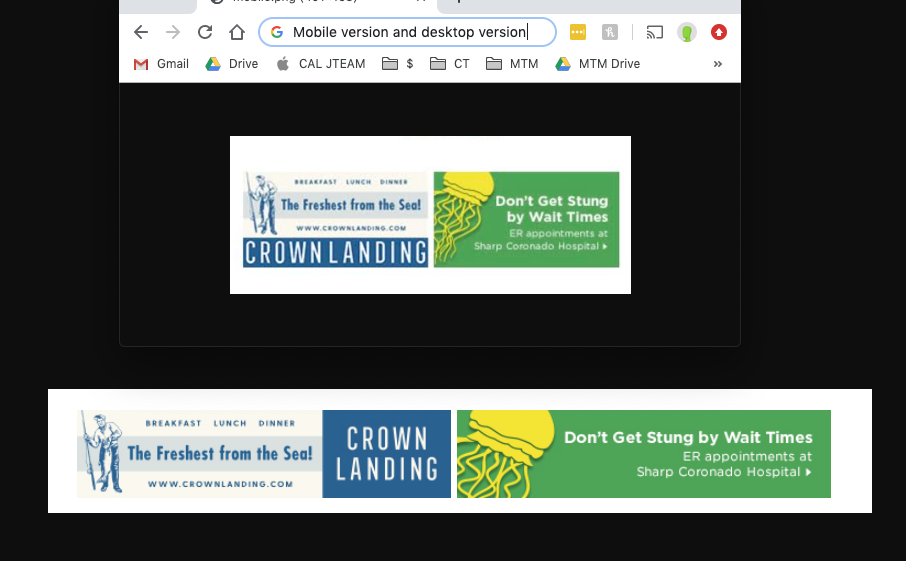
sejpost I don’t want the same banner with two links, I want the two different banners (desktop and mobile) in one (1) location to have two links. Can you assist with that? Depending on what the user is using access the site, they get one of the two banners and therefore the link that goes with each banner. Thanks.
Vlad S Hello !
Usually the issue about mobile version beign rendered on desktop is due to cache. Please make sure to use a cache plugin ( we do recommend using WP Super Cache: https://tagdiv.com/wp-super-cache-plugin-install-and-configure/ )
Let me know if this was helpfull !
Thank you !
 ARTTECHDESIGN
 Okay, thanks, but I can’t find the mobile editor on the page.
 d_alinus2018
 Hy again,
I test my website on google chrome incognito and i see that the desktop version it’s like on mobile vrsion!
can you test also: http://www.povesteata.eu
Many regards
Vlad S Hello !
The homepage on Mobile THeme displays only the latest articles so you cannot edit that.
WE are sorry for the inconvenience !
Thank you !
