

I have a client that wants to put two tagged links behind the two banners that occupy the same location (under each article). Here is the code that displays the desktop or mobile image based on the user’s device. However, how do I add a separate link for each image? Right now, they share the same link, but the client wants to have the desktop image have one link and the mobile image have another link (using google UTM tags):



<li><a href="https://www.sharp.com/hospitals/coronado/appointments.cfm?sem=2326&utm_source=coronadotimes.com&utm_medium=Display&utm_content=340X80%20Sting%20Ray&utm_campaign=SCOR_Online%20Scheduling" target="_blank"><img border="0" src="/wp-content/uploads/2019/07/Sharp-Coronado-articlefooter-web.jpg" /><img border="0" src="/wp-content/uploads/2019/07/Sharp-Coronado-articlefooter-mobile.jpg" /></a></li>
-
This topic was modified 7 years by
sejpost.

Hi,
In order to have the same banner with different links based on the client devise you should use the classes for specific device -> http://prntscr.com/omb5e4 you can check more about those kind of ads in our documentation https://forum.tagdiv.com/header-ads-adsense/
-> http://prntscr.com/omb65q
Hope this will help you!
Thanks.
I don’t want the same banner with two links, I want the two different banners (desktop and mobile) in one (1) location to have two links. Can you assist with that? Depending on what the user is using access the site, they get one of the two banners and therefore the link that goes with each banner. Thanks.
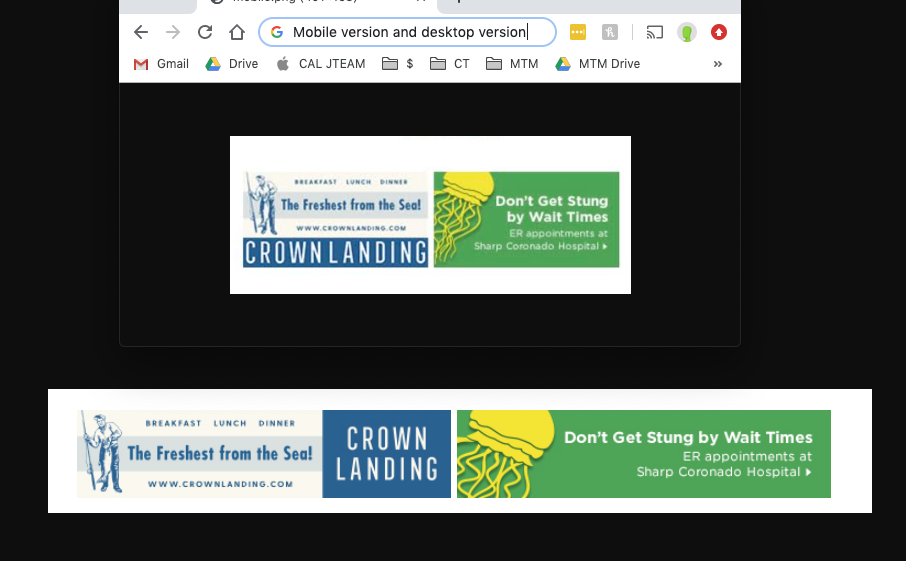
Also, since we have two ads side by side in this ad location, how should the code look so that the ads can be horizontal side by side and still show the desktop or mobile version and proper links? So, there will be a total of 4 images and 4 links for two ad spots side by side…make sense? Many thanks for your help with displaying this for two ads. Example of what the mobile version looks like and desktop version of these two ads:
Hi,
If you are using the mobile theme plugin, then the ads set in Theme Panel>mobile theme will be show om mobile device.
If you do not use the mobile theme, and you want to have separate banners ads, than you should set specific methods for each device https://forum.tagdiv.com/using-other-ads-non-adsense-ads/ -> http://prntscr.com/omu6di -> http://prntscr.com/omu6ld -> http://prntscr.com/omu73w
If you want to have more banners side by side you should use ad box with tagDiv Composer
http://prntscr.com/omubnx -> http://prntscr.com/omubbf
Thank you!

Can someone please tell me how to access the mobile theme plug-in? Every time I click on the link by an admin, such as above, I get a 404 page not found message. Thank you.
Hi @metooreporter,
Usually there are some plugin conflicts or the theme status is not made as in our theme requirement.
Please make sure that all the settings are like in our requirements, please follow the guide carefully
– https://forum.tagdiv.com/requirements-for-newspaper/
and please increase all requirements that are lower, and follow all steps.
Please make sure that you do not have a plugin conflict with untested plugins, please deactivate all non theme, also if you are using child theme, clear all cache and try again.
Mobile theme plugin documentation https://forum.tagdiv.com/the-mobile-theme/
If there is still a problem, please provide some more details and some screenshots.
Hope this will help you!
Let me know the results!
Thanks.
