- Apitd_api_single_template::update_key
- Apitd_api_single_template::update
- Apitd_api_single_template::add
- ApiAPI – Single Template – Introduction
- ApiPractical example – How to add a new Block and Module
- ApiAPI – Category top section style – Introduction
- Apitd_api_module::update
- Apitd_api_module::add
- ApiAPI – Modules – Introduction
- Apitd_api_block::update
- Apitd_api_block::add
- ApiAPI – Blocks – Introduction
- ApiUsing the Theme API in plugins
 Jaddy1219
Hi,
I just checked google search console coverage, I’ve got almost 3.46K pages have been created and excluded by google. I just resent sitemap then reduced to 450 pages. I have only 370 posts and 4 pages.
I checked that indexed page like https://www.myartylife.net/page/16/?cat=-1
This is not what I created and seems to be automatically created since I have installed Newspaper theme last year. I don’t really understand which google search console works and why /page/16/?cat=1 has been created.
Also, I found https://www.myartylife.net/category/blog-business/page/2/
is also crated seems to be copied I have original category page, blog-business: https://www.myartylife.net/category/blog-business/
I might have set wrong with page settings or noindex or no follow in theme or cloud template page setting.
Even this one is pretty bad :
https://www.myartylife.net/?cat=-1
What is /?cat=1 and indexed to google search console?
I have changed to another theme actually but I reinstalled Newspaper which I really like settings and design even in Japanese, this is beautiful layouts.
And I have sometimes missing my post in google search result which maybe affected by this huge number of indexed pages (not my intention of course).
Could you please help here?
Thank you.
 nradigan
I made new about us pages using a predesigned template from the cloud library and saved them, but now I how no idea where to find them so I can link them to the website. Could you please tell me where to find them?
 vampireprincess
I just experimented with a cloud category template, and after I connected it to
the cloud library template everything is just collapsed, I have blank page on my category page
and as well on every post. When I connect it back to the NO TEMPLATE still everything remain the same.
Help tomorrow evening this newspaper needs to bi LIVE.
I think the problem is connected to tagDiv Standard Pack, I even deleted it, and installed again but
everything remains the same.
vampireprincess Thanks for the answers, are you planning to add in the future the accordion style menu?
4. I done exactly what you said I received the API key but I still dont have the option in the social network panel
https://i.postimg.cc/prKk3kvH/1.png
5. Yes I know that, but on the category page I dont have permission to edit the design or template.
I even tried to download a category page from the cloud, but when I change something from that design and applied it as template to my category page, the page become unresponsive it become pure black page (completely blank).
My Idea was to completely redesign the cloud template and use the redesigned one, but as I told earlier it become unresponsive.
So I need to have a way to create my own category page with my own design. I know how to design it but I dont know how to assign the newly designed page as a template to my category page. because the only option I have is to assign a design form the cloud. So how can I create my own design and upload it to cloud? Or how can I edit the main factory made category templates?
https://i.postimg.cc/QdXkqw8Q/2.png
New question how can I change the background image of this two styles, because
when I add this style it just become a pure solid color
https://i.postimg.cc/Bn2qg7vC/7.png
-
This reply was modified 6 years by
vampireprincess.
 Calin
Calin Hi,
These are pages, not templates, there are only few in tagDiv Cloud Library, but you can build your own pages using tagDiv Composer.
-> https://i.imgur.com/crsxje6.png -> https://i.imgur.com/6Plh0dl.png ->
Thank you for your understanding!
Calin Hi,
You should be able to achieve that using tagDiv Composer and cloud templates from tagDiv Cloud Library. For category template you need to edit the posts loop -> https://i.imgur.com/cLfSwY1.png the settings are similar with these from flex block
Also if you want you can import sections or templates directly from the cloud ->
Hope this will help you!
Thank you!
Calin Hi,
You can achieve this using multiple cloud headers and tagDiv Composer, set global a cloud header with a specific add, on posts you can set on single post template from tagDiv Cloud Library a different header with a different add and so on.
Also if possible to be some plugins that can do this, unfortunately we didn’t tested any one of them, therefore we can not recommend one.
Thank you!
Calin Hi,
The multi-purpose icons can be set on pages and templates from tagDiv Composer, these need to be set using tagDiv Composer
Thank you!
 IslandJim
 Hi thanks for your support.
I should note I am on newspaper 10.3 and I am not using the Standard Pack.
I installed the Books CPT and created a post. When I view the post I am not seeing the breadcrumbs, sidebar, genre, or authors.
https://snipboard.io/rNqRsy.jpg
Settings:
https://snipboard.io/j7NwG2.jpg
Not seeing a way to set the page template:
https://snipboard.io/wzm07M.jpg
Thanks for your help.
 geraldinetay27
Hi, the same slider is appearing in every page.
http://travelholic.gigaquirks.net/
How do I set a different slider to show up on every page?
Also, are there any other templates I can use?
 adrgrid
Hi all,
I noticed Google search is serving my blog posts via AMP, which is what I was hoping for. However, my blog post AMP pages do not show my call-to-actions included on my sidebar and end of post (as defined in the template). This leads to my website not being able to capture leads. Plus, the AMP pages don’t render my subtitle.
I’ve found premium plugins (read: not free) that could create a CTA shortcode for AMP pages, but I’d rather see it in Newspaper. Is there any way to get my sidebar content to appear on AMP pages?
Thanks,
Alex
Calin Hi,
If you are using a single post template from tagDiv Cloud Library, then you need to edit it with tagDiv Composer click on the single post content -> https://i.imgur.com/lLMW3Ls.png and look in style tab https://i.imgur.com/PlXdukK.png -> https://i.imgur.com/4PKOLym.png
Thank you!
Calin Hi,
If I understand correctly you want to make a new search template, for this you need to import it from tagDiv Cloud Library -> https://i.imgur.com/6qiJe5w.png and edit it using tagDiv Composer -> https://i.imgur.com/nDj20ZC.png after that set the template in theme panel -> https://i.imgur.com/mAgr3IA.png
Hope this will help you!
Thank you!
Calin Hi,
The Default Sidebar is using widgets, so this will work only with the post style from standard pack (standard templates ) -> https://i.imgur.com/57rJEOR.png on single post template from tagDiv Cloud Library, the sidebar will not apply, for this you’ll need to use tagDiv Composer to edit the single post template .
Hope this will help you!
Thank you!
Calin Hi,
You can achieve this only using the subtitle from the post and a single post template from tagDiv Cloud Library, edit it with tagDiv Composer and set the subtitle where you want https://i.imgur.com/wmdMYCL.png -> https://i.imgur.com/tmUFxnr.png but please note that this one will be display only inside the article.
Thank you!
 Vlad S
 Hello !
You can achieve that by editing the page, select the ROW and set the Row Layout and width: https://www.screencast.com/t/GV0dIm1r After that add inner rows in each one and set the inner rows layout as you can see here :https://www.screencast.com/t/ZWfWafiY4u, after that you can use single image element and add the image as you can see here: https://www.screencast.com/t/EYEXGiK6ucju
This can be done a new page or on a template from the cloud library.
I hope this was helpful !
Thank you !
 victorramirez
This page isn’t working wehpa.com didn’t send any data.
ERR_EMPTY_RESPONSE
it popping this error http://wehpa.com/wp-admin/post.php?post_id=85&td_action=tdc&tdbTemplateType=page&prev_url=%2F%2Fwehpa.com%2F
 Yannickthepostie
Hi guys,
we updated our website from Default to Default Pro and struggle with a few points.
First off, when i import a new header (Header Template 51) all of my thumbnails of the homepage disappear. Is this a bug?
Furthermore thumbnails are gone for ‘related articles’. Do i need to regenerate them? Because the size from old to new hasn’t changed, but still no images are displayed.
PS: Which template should i use to get the nearest to the ‘Default’ post template?
Best,
Yannick
 citymagthess
Hello. I have installed the same footer template like 4-5 times now. Every time i save it its ok. If i need to edit anything, it kinda not recognises it as a template.
Meaning
In the Cloud templates page (wp-admin/edit.php?post_type=tdb_templates#/)
Every other template shows an edit template link. The footer template the specific link is missing.
I have created the plugin from template more than 4-5 times by now. If i press edit so i can edit it brings me to the normal editor and then by pressing the TagDiv composer i get
Error at zones: 6(models) : 0(dom). The model does not match the content Current state has involved an issue. You could try an UNDO operation (CTRL+Z / CTRL+SHIFT+Z)
 pavel_t
Hi, in my cloud template I use element Subcategories (list of subcategories) predefined in TagDiv Composer.
When I switch on option “Show image: Show”, it is not working. Only general “missing image” is shown (td-cloud-library/assets/images/medium_large.png) instead correct Category image even if there is set up image in WP Category edit page. Category title and description are shown correctly.
 renatols
Hi, I’m totally lost here. I tried to use the tagDiv Cloud Library to create a post page template from scratch, but what happens were that it open my main page (home). I want to create a new one and not edit an existing page.
For example I want to create post page (just like the default page) and use something like the ad box in the top right with questions, and this questons are anchor links for the (H1, H2,etc) in the same page.
Mainly I just to add this box (can be the widget) with questions, but only in the posts pages and do not in the home.
Can I do that?
Regards.
Calin Hi,
For this you’ll need to edit the single post template from tagDiv Cloud Library with tagDiv Composer -> https://i.imgur.com/obOSQWJ.png -> https://i.imgur.com/ZEJ5CoE.png
Hope this will help you!
Thank you!
 Sebastian Escobar
 Hi, my problem is with posts, no with pages, then I have to work with single cloud template with tagDiv Composer, but here the template looks good and I can see the side bar > http://compone.cl/wp-content/uploads/2020/02/sidebar-in-posts-historie.png
but in real view this don’t show > http://compone.cl/wp-content/uploads/2020/02/sidebar-don’t-show.png
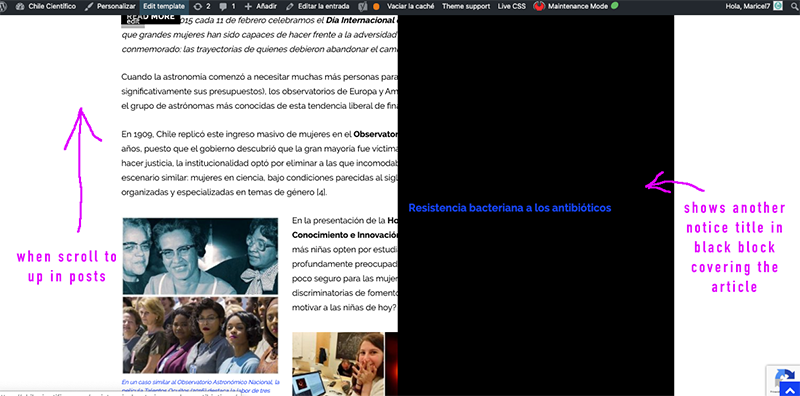
And the black box very similar to the main module of homepage in layout is shown when you scroll the post “up” on the screen > https://www.compone.cl/wp-content/uploads/2020/02/posts-black-block.png
(My site is unpublished because I am configuring these types of errors)
Calin Hi,
1. For a CPT you can try our test plugin from here -> https://i.imgur.com/BjAAWBT.png this custom post type from what i can see is working well and is displaying the breadcrumbs and post title -> https://i.imgur.com/3XtKp5A.png -> https://i.imgur.com/m2pBMgO.png
Also on pages the breadcrumbs and page title appear only if you have set the page template set on -> https://i.imgur.com/yZFIKz7.png -> https://i.imgur.com/Pwlt75O.jpg
2. For the sidebar please set the shortcode in a column text or text instead of the custom html, the shortcoeds work better for the with these elements.
Hope this will help you!
Thank you!
 qzconsulting
 I have replied to your email to ask for a workaround. Yours doesnt help much since there is no way to create a page template in your theme and replicate it accross other pages for a consistent look.
This is true for atleast GadgetsPro theme
-
This reply was modified 6 years by
qzconsulting.