- NewspaperWP Rocket and Newspaper Theme: Optimization Guide
- TutorialsDefault Block Settings Guide
- TutorialsOffset Feature
 Marius
 Hi,
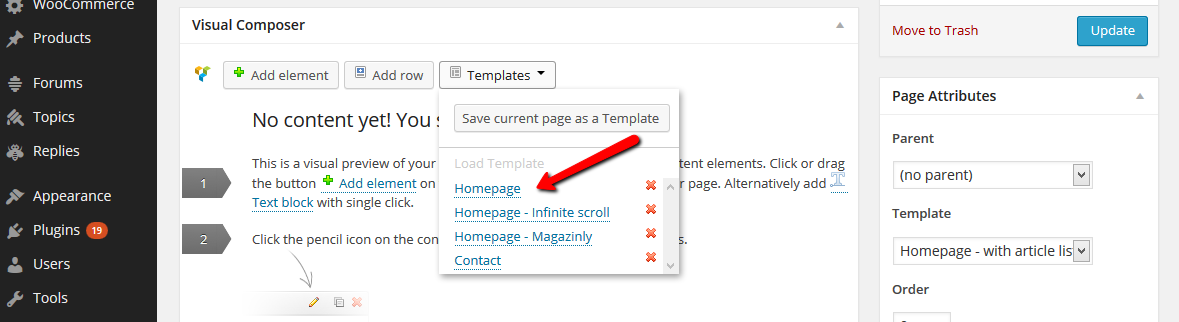
Is like that because you don’t use the right page template. Please edit your homepage and use a Homepage template instead of the Default. http://screencast.com/t/YmGOWSIzkSDE
You can see a diagram of each template to see how works https://forum.tagdiv.com/page-templates/
Thanks!
Marius Hi,
@r1kay the unique article works only on page templates. About categories we will improve that part in the future updates.
Marius Hi,
@r1kay the unique article works only on page templates. About categories we will improve that part in the future updates.
Thanks!
 Sokae
SokaeHey guys, since the template update to the new version 3.1 does not know how to place the adsense banner horizontally below the header to appear on my items.
Before the upgrade, would header.php and end it introduced the code but now if I do the same, the page is blank.
Thanks!!
Marius Hi,
Nobody asked for comments on pages and the issue is still on the list. We will take a look if is possible somehow to work on the default template.
Thanks!
 Gillbergh
Hi,
I made a template and a slider to play posts that I have made in my account. I chose all the categories I want the slider to display but when I open the page it says “No slides found, please add more slides”. Any idea on what may be happening?
 julingn
Hi,
I am using Simple Taxonomy to create and manage my taxonomies. Unfortunately the taxonomy title and description is not displayed on those pages. e.g. http://www.brettspiele-magazin.de/erscheinungsjahr/2014/
1.) Is it somehow possible to display “Erscheinungsjahr 2014” instead of “Archives”?
2.) Do you plan to integrate taxonomy pages in the template setting so that they can be customized with the same blocks list categories?
Regards,
Norman
Marius Hi,
Yes, if you instal the demo data, this will create the homepage to.
Do you need other pages?
Thanks for the message!
 Dave_The_BMXER
 Actually it seems the issue remains though I can see the other pages from the demo. Under my “pages”
Dave_The_BMXERI just installed this Theme and was working my way through the documentation to create a home page and I don’t see anything here
https://forum.tagdiv.com/wp-content/uploads/2013/10/Homepage10.png
Instead I see “No Custom templates yet”
Should these Templates have come installed?
Thanks
 yoluca
im having a hard time trying to remove the sidebar for all buddypress pages
Activate
Activity
Edit Profile
Friend List
Inbox
Members
Notification
Outbox
Send Message
i tried by setting the page template to > ” home page Blank ” … but the default sidebar is still there …
am i doing something wrong ?
thanks
Marius Hi,
Edit you homepage and use a Homepage template, not the default one http://screencast.com/t/jnEouuf1O
Thanks!
Marius Hi,
If you use that template you have to add some widgets in the sidebar. We used the Social Counter and some blocks. You can use the default sidebar or use a custom one.
For other tips you can take a look here: https://forum.tagdiv.com/newspaper-documentation/
Thanks for the message!
 hyorialba
I am studying your demo. Using the Visual Composer, I have copied the “Home” page exactly adding the “Big Slide” and “Block 2”.
I am using “Homepage – with article list” template.
The problem is besides my “Latest Articles”, I don’t see “Stay Connected” and “Latest”, it’s just blank.
While on the demo, it’s there.
Did you customize the “Default sidebar”?
 vorman
 My apologies the last set of codes was for Articles with a BG. Please see the following code that should reflect what you requested that I do. I am still having a problem on this page when I make your amendments.
<?php
/* Template Name: Homepage – with article list */
get_header();
td_global::$current_template = ‘page-homepage-loop’;
global $paged, $loop_module_id, $loop_sidebar_position, $post, $more; //$more is a hack to fix the read more loop
$td_page = (get_query_var(‘page’)) ? get_query_var(‘page’) : 1; //rewrite the global var
$td_paged = (get_query_var(‘paged’)) ? get_query_var(‘paged’) : 1; //rewrite the global var
//paged works on single pages, page – works on homepage
if ($td_paged > $td_page) {
$paged = $td_paged;
} else {
$paged = $td_page;
}
$list_custom_title_show = true; //show the article list title by default
$td_homepage_loop_filter = ”; //homepage loop filter metadata
/*
read the settings for the loop
—————————————————————————————- */
if (!empty($post->ID)) {
td_global::load_single_post($post);
//read the metadata for the post
$td_homepage_loop_filter = get_post_meta($post->ID, ‘td_homepage_loop_filter’, true); //it’s send to td_data_source
$td_homepage_loop = get_post_meta($post->ID, ‘td_homepage_loop’, true);
if (!empty($td_homepage_loop[‘td_layout’])) {
$loop_module_id = $td_homepage_loop[‘td_layout’];
}
if (!empty($td_homepage_loop[‘td_sidebar_position’])) {
$loop_sidebar_position = $td_homepage_loop[‘td_sidebar_position’];
}
if (!empty($td_homepage_loop[‘td_sidebar’])) {
td_global::$load_sidebar_from_template = $td_homepage_loop[‘td_sidebar’];
}
if (!empty($td_homepage_loop[‘list_custom_title’])) {
$td_list_custom_title = $td_homepage_loop[‘list_custom_title’];
} else {
$td_list_custom_title =__td(‘LATEST ARTICLES’);
}
if (!empty($td_homepage_loop[‘list_custom_title_show’])) {
$list_custom_title_show = false;
}
}
echo td_page_generator::wrap_no_row_start();
/*
the first part of the page (built with the page builder) – empty($paged) or $paged < 2 = first page
—————————————————————————————- */
/*
the main fake loop
—————————————————————————————- */
$more = 0; // fix read more
echo ‘<div class=”row-fluid”>’;
switch ($loop_sidebar_position) {
case ‘sidebar_left’:
?>
<div class=”span4 column_container” role=”complementary” itemscope=”itemscope” itemtype=”http://schema.org/WPSideBar”>
<?php get_sidebar(); ?>
</div>
<div class=”span8 column_container” role=”main” itemprop=”mainContentOfPage” itemscope=”itemscope” itemtype=”http://schema.org/Blog”>
<?php if ((empty($paged) or $paged < 2) and $list_custom_title_show === true) { ?>
<h4 class=”block-title”><span><?php echo $td_list_custom_title?></span></h4>
<?php }
query_posts(td_data_source::metabox_to_args($td_homepage_loop_filter, $paged));
get_template_part(‘loop’, ‘simple’);
echo td_page_generator::get_pagination();
?>
</div>
<?php
break;
case ‘no_sidebar’:
?>
<div class=”span12 column_container” role=”main” itemprop=”mainContentOfPage” itemscope=”itemscope” itemtype=”http://schema.org/Blog”>
<?php if ((empty($paged) or $paged < 2) and $list_custom_title_show === true) { ?>
<h4 class=”block-title”><span><?php echo $td_list_custom_title?></span></h4>
<?php }
query_posts(td_data_source::metabox_to_args($td_homepage_loop_filter, $paged));
get_template_part(‘loop’, ‘simple’);
echo td_page_generator::get_pagination();
?>
</div>
<?php
break;
//sidebar right
default:
?>
<div class=”span8 column_container” role=”main” itemprop=”mainContentOfPage” itemscope=”itemscope” itemtype=”http://schema.org/Blog”>
<?php if ((empty($paged) or $paged < 2) and $list_custom_title_show === true) { ?>
<h4 class=”block-title”><span><?php echo $td_list_custom_title?></span></h4>
<?php }
//
query_posts(td_data_source::metabox_to_args($td_homepage_loop_filter, $paged));
get_template_part(‘loop’, ‘simple’);
echo td_page_generator::get_pagination();
?>
</div>
<div class=”span4 column_container” role=”complementary” itemscope=”itemscope” itemtype=”http://schema.org/WPSideBar”>
<?php get_sidebar(); ?>
</div>
<?php
break;
}
wp_reset_query();

if(!empty($post->post_content)) { //show this only when we have content
    if (empty($paged) or $paged < 2) { //show this only on the first page

        ?>
        <div class="row-fluid">
            <div class="span12 column_container" role="complementary" itemscope="itemscope" itemtype="http://schema.org/WPSideBar">
                <?php
                if (have_posts()) {
                    while ( have_posts() ) : the_post();
                        //read the page settings
                        the_content();
                    endwhile; //end loop
                }
                ?>
            </div>
        </div>
    <?php

    }
}
echo ‘</div>’; //close the .row
echo td_page_generator::wrap_no_row_end();
get_footer();
?>
vorman Many thanks for the reply Marius. I did update the code and unfortunately it get a blank white page. Please see below. Also, I am using the Home Page – with Article List. I sincerely do appreciate your help here.
<?php
/* Template Name: Homepage – bg + with article list */
get_header();
td_global::$current_template = ‘page-homepage-loop’;
global $paged, $loop_module_id, $loop_sidebar_position, $post, $more;
$td_page = (get_query_var(‘page’)) ? get_query_var(‘page’) : 1; //rewrite the global var
$td_paged = (get_query_var(‘paged’)) ? get_query_var(‘paged’) : 1; //rewrite the global var
//paged works on single pages, page – works on homepage
if ($td_paged > $td_page) {
$paged = $td_paged;
} else {
$paged = $td_page;
}
$list_custom_title_show = true; //show the article list title by default
$td_homepage_loop_filter = ”; //homepage loop filter metadata
/*
read the settings for the loop
—————————————————————————————- */
if (!empty($post->ID)) {
td_global::load_single_post($post);
//read the metadata for the post
$td_homepage_loop_filter = get_post_meta($post->ID, ‘td_homepage_loop_filter’, true); //it’s send to td_data_source
$td_homepage_loop = get_post_meta($post->ID, ‘td_homepage_loop’, true);
if (!empty($td_homepage_loop[‘td_layout’])) {
$loop_module_id = $td_homepage_loop[‘td_layout’];
}
if (!empty($td_homepage_loop[‘td_sidebar_position’])) {
$loop_sidebar_position = $td_homepage_loop[‘td_sidebar_position’];
}
if (!empty($td_homepage_loop[‘td_sidebar’])) {
td_global::$load_sidebar_from_template = $td_homepage_loop[‘td_sidebar’];
}
if (!empty($td_homepage_loop[‘list_custom_title’])) {
$td_list_custom_title = $td_homepage_loop[‘list_custom_title’];
} else {
$td_list_custom_title =__td(‘LATEST ARTICLES’);
}
if (!empty($td_homepage_loop[‘list_custom_title_show’])) {
$list_custom_title_show = false;
}
//adds the filters for templates: ‘Homepage – with article list’ and ‘Homepage – bg + article list’
//include_once(‘includes/wp_booster/td_homepage_loop_filter.php’);
}
/*
big slide
—————————————————————————————- */
locate_template(‘parts/page-homepage-slider.php’, true);
echo td_page_generator::wrap_no_row_start();
/*
the content if we have one
—————————————————————————————-
02/06/2014 – Disabled this code ITPS Trevor
if(!empty($post->post_content)) { //show this only when we have content
if (empty($paged) or $paged < 2) { //show this only on the first page
?>
<div class=”row-fluid”>
<div class=”span12 column_container” role=”complementary” itemscope=”itemscope” itemtype=”http://schema.org/WPSideBar”>
<?php
if (have_posts()) {
while ( have_posts() ) : the_post();
//read the page settings
the_content();
endwhile; //end loop
}
?>
</div>
</div>
<?php
}
}
*/
/*
the main fake loop
—————————————————————————————- */
$more = 0; // fix read more
echo ‘<div class=”row-fluid”>’;
/*
//do the loop
$queryPost = Array(
‘posts_per_page’ => get_option(‘posts_per_page’),
‘paged’ => $paged
);
//hide featured categories
if ($td_featured_posts != ‘show_featured_posts’) {
$queryPost[‘cat’] = ‘-‘ .get_cat_ID(TD_FEATURED_CAT);
}
*/
switch ($loop_sidebar_position) {
case ‘sidebar_left’:
?>
<div class=”span4 column_container”>
<?php get_sidebar(); ?>
</div>
<div class=”span8 column_container”>
<?php if ((empty($paged) or $paged < 2) and $list_custom_title_show === true) { ?>
<h4 class=”block-title”><span><?php echo $td_list_custom_title?></span></h4>
<?php }
query_posts(td_data_source::metabox_to_args($td_homepage_loop_filter, $paged));
get_template_part(‘loop’, ‘simple’);
echo td_page_generator::get_pagination();
?>
</div>
<?php
break;
case ‘no_sidebar’:
?>
<div class=”span12 column_container”>
<?php if ((empty($paged) or $paged < 2) and $list_custom_title_show === true) { ?>
<h4 class=”block-title”><span><?php echo $td_list_custom_title?></span></h4>
<?php }
query_posts(td_data_source::metabox_to_args($td_homepage_loop_filter, $paged));
get_template_part(‘loop’, ‘simple’);
echo td_page_generator::get_pagination();
?>
</div>
<?php
break;
//sidebar right
default:
?>
<div class=”span8 column_container”>
<?php if ((empty($paged) or $paged < 2) and $list_custom_title_show === true) { ?>
<h4 class=”block-title”><span><?php echo $td_list_custom_title?></span></h4>
<?php }
query_posts(td_data_source::metabox_to_args($td_homepage_loop_filter, $paged));
get_template_part(‘loop’, ‘simple’);
echo td_page_generator::get_pagination();
?>
</div>
<div class=”span4 column_container”>
<?php get_sidebar(); ?>
</div>
<?php
break;
}
wp_reset_query();
if(!empty($post->post_content)) { //show this only when we have content
if (empty($paged) or $paged < 2) { //show this only on the first page
?>
<div class="row-fluid">
<div class="span12 column_container" role="complementary" itemscope="itemscope" itemtype="http://schema.org/WPSideBar">
<?php
if (have_posts()) {
while ( have_posts() ) : the_post();
//read the page settings
the_content();
endwhile; //end loop
}
?>
</div>
</div>
<?php
}
}
echo ‘</div>’; //close the .row
echo td_page_generator::wrap_no_row_end();
get_footer();
?>
Marius Hi,
Delete this code from here: http://screencast.com/t/Z3tGAAxvw
Scroll down in that file and add this code here: http://screencast.com/t/1PMe9ko4
wp_reset_query();
if(!empty($post->post_content)) { //show this only when we have content
if (empty($paged) or $paged < 2) { //show this only on the first page
?>
<div class="row-fluid">
<div class="span12 column_container" role="complementary" itemscope="itemscope" itemtype="http://schema.org/WPSideBar">
<?php
if (have_posts()) {
while ( have_posts() ) : the_post();
//read the page settings
the_content();
endwhile; //end loop
}
?>
</div>
</div>
<?php
}
}This is for Homepage – with article list template
Thanks for the message!
 simchris
 In case this helps anybody, if you search through my older posts, using the AddThis plugin with my async loading hack works very well for choosing the exact kind of icons and share/like buttons you wish to use at top and/or bottom of each post page.
For speed you can even just have the classic touch friendly “pill” which does drop down to select whatever share locale needed.
Much easier than hacking the theme templates.
 tcdraper
 Hi Maqabyah – Go to “Pages” in your wordpress admin area and edit the page that you have set as the homepage.
Scroll all the way to near the bottom and there is an option called “Show Only Unique Articles on this Template” The default is “Disabled.” Change that to “Enabled” and it should prevent the duplicates.
This is a new feature in Version 3 to prevent duplicate content, so that’s probably why it happened when you upgraded since the default is “Disabled”
 Popetrix
 I did. Thanks. I found the way to get rid of the icons (fixing my original problem. Now the visual composer won’t work. I use Chrome and Firefox to edit the pages and posts. When I use Chrome, Visual Composer won’t go past the “Loadin, please wait. . .” stage and when I use Firefox, the plugin loads after a long time and after it does and I edit the posts, the save button won’t work.
Should I close this post since my original problem was fixed and create a new one for the other issue?
Thanks.
 sbo
sbo This looks like a great plugin. I will try this out.
Is there any way of adding more social network buttons to the bottom of the posts? *I want to try and keep the plugins limited to keep the template from slowing down*. It currently has Tweet, Like, G+ and Pin.
Also, when clicking an image in a post, can I add those social share buttons on that page? Ex: http://tinyurl.com/mzdzhh3
Thanks in advance!
Marius Modules can be used on loops, on homepages with pagination(latest article), on category template, search templates, blog template, etc.
That can’t be used in visual composer, only with custom modification.
You can use Blocks with page builder, blocks are made from modules see here: https://forum.tagdiv.com/modules-and-blocks/
Thanks for the message!
 ishak.live
HI all I’m newly purchased this theme and this is a awesome theme. I have a problem when building a custom home page to my website.
Question 1
I’m able to add blocks to a row in Visual Composer. But unable to save the changes after I update block settings. I’m pressing the save button but nothing happens.It keeps idle. It is not closing the block setting dialog and changes are not saved. But cancel button works perfectly.
Question 2
I have similar problem with default templates provided with the theme. Those templates also not loading to the Visual Composer when I click on them.
Question 3
After I add a block I’m unable to delete the block. When I click on X(delete) button Alert box is showing but after I click OK it is not deleting.
How to solve this problems. I asked these three question in same thread because all three questions may have one solution to fix.
Additional Details
WebHosting : BlueHost
Thank you
Ahamed Ishak
simchris You can turn these off for the post pages from the theme customizer panel under “post options.”
For the modules used on indexes/home page, you actually would need to comment those out on each “module” found here:
themes/Newspaper/includes/app/modules/
e.g., in td_module_5.php
        $buffy .= '<div class="meta-info">';
            //$buffy .= $this->get_author();
            $buffy .= $this->get_date();
            $buffy .= $this->get_commentsAndViews();
        $buffy .= '</div>';
add the // in front of the third item. This is also where you can uncomment the author name if you want that to show on the modules.
Hope that helped! 🙂
 Radu
Radu It’s in themeforest’s queue 🙂
The new ad system
( please escuse the english… and quality, Radu A. will get better at this 🙂 )
http://www.youtube.com/watch?v=OYCUHzcrUeU
Panel tour
http://www.youtube.com/watch?v=OzUa-_FtsGw
The full update list
In this update we invested a lot in the user experience, back end of the theme and overall quality of the code. After 415 code commits to our source, this is the biggest update yet to the newspaper theme. Even with the added features the theme is faster than ever due to our WordPress Booster framework and a lot of code improvements.
* New panel
* New intelligent ad system ( you have to see it live to understand how easy is to use )
* New setting to allow disabling of ads on each device type
* New documentation
* New ad spot at the top of the content
* New ad spot at the bottom of the content
* Added support for the AdRotate plugin
* Added offset support on all the blocks and on the loop templates
* Added an unique article system that makes sure you have unique articles on the homepage regardless of what template and blocks you use
* Added support for background click ads
* Tool to import the category settings from version 2
* New theme framework (WordPress Booster) – documentation about the framework coming soon
* WordPress booster – major fixes and improvements in the way it interacts with WordPress. We fixed all the incompatibility issues with most of the plugins.
* WordPress booster – 10% less memory consumption (We spent a lot of time in xDebug and memory profiling tools)
* WordPress booster – 15% faster (The framework dynamically loads only the needed code for each page and we take full advantage of WordPress object cache)
* WordPress booster – new category settings api
* WordPress booster – new advertising api
* WordPress booster – new settings api
* WordPress booster – new faster and smarter datasource api
* The security of the theme has been audited by us and improved
* We reorganized the theme file structure
* tagDiv Speed booster plugin V2 – It now works with google ads and with bbpress plugin
* New child theme that includes the WordPress Boster framework
* All the modules can we overwritten by the child theme
* More parts of the site can be overwritten by the child theme now
* fixed bbpress sidebar issues
* fixed sidebar issues on page template with the right sidebar
* fixed category background image problem when the theme didn’t had any other settings
* fixed category background color layout issue
* fixed bbpress style issue
* added footer text color setting
* added top menu text color setting
* added sub footer text color setting
* usability fixed small targets on mobiles, the theme has now a perfect usability score on google pagespeed
* fixed random appearing issue that affected the javascript of the page ( uniqid() function from php is not reliable ).