
No search results were found in Documentation!
 Calin
Calin Hi,
Please notice that our theme has not been optimized for the RTL version and also, do not support this way, sorry! If you are disappointed about this case, we can provide a full refund, sorry!
For example in this case
https://www.screencast.com/t/McrM2nws
https://www.screencast.com/t/2AOF9AH1NW
results: https://www.screencast.com/t/hVfoSOBwn
Thank you for your understanding.
 reddisl
 Hello,
First of all regarding question 2: I’m not using the theme mobile , please see the picture and read what I wrote to understand what is my problem.
I gave that CSS code to help NEWSPAPER theme to support RTL in next update, I’m trying to find issues with RTL and fix them. the CSS code has no relationship with my 2nd problem.
 Catalin
 Hello,
1)I have checked your screenshots and I saw that you are using the RTL which is not tested with our theme and that’s why you bring some problems with the theme layout, sorry! Please notice that our theme has not been optimized for the RTL version and also, do not support this way, sorry! If you are disappointed about this case, we can provide a full refund, sorry!
3)Regarding page speed loading, please read my response from this topic from here -> https://forum.tagdiv.com/topic/website-loaing-slowly-need-better-pagespeed/
4)I have checked your website on mobile and the main menu button seems to work as expected.
5)Seems to work as expected -> https://www.screencast.com/t/mnMY0h90J
6)Regarding on lazy load, we will improve our theme in the next future updates.
Thanks.
 wdziedzic
Hello,
clicking on the smartlist navigation doesn’t lead to next image within smartlist but to next text paragraph
 NickDeBaerdemaeker
Hi,
I have been adding some additional custom field values (with the acf plugin), to the flex block 1 module located in /includes/modules/td_module_flex_1.php
I am trying to write a code that makes a span class disappear if the custom field is empty. Via css I’m adding a comma, since the field concertlocation comes behind earlier metadata.
However if I program it like the code below, the span class simply doesn’t show up at all. the this->post_ID is necessary since the data is to be shown on an overview page, where some articles don’t have that field “concertlocatie”. What am I missing here, anyone ?
                    <span class="td-author-date">

                        <?php if( $author_photo != '' ) { echo $this->get_author_photo(); } ?>

                        <?php echo $this->get_author();?>

                                                    <?php echo $this->get_date();?>

                        <?php $concertlocatie = the_field( "concertlocatie" , $this->post->ID ); //etc...?>

                        <?php if ( $concertlocatie ) : ?><span class="metacelocation"><?php echo $concertlocatie; ?><?php endif; ?></span>

                        <?php echo $this->get_comments();?>

                    </span>

                </div>
the css
.home .metacelocation:before,

.category-306 .metacelocation:before {

content: ', ';

text-transform: none;

font-weight: normal;

color: #aaa;

display: inline-block;

position: relative;

top: 2px;

}
reddislHello tagdiv !
1. How to remove latest articles in homepage? I’m using default demo, but I just want to delete latest article from front page but keep the same DEMO content!
2. As my website is in Arabic, and I didnt know that Newspaper doesnt support RTL, unfortunately among other errors there is this mistake in the theme.
== Below every post , there is “find related articles” , How can I fix this so that picture displays in left instead of appearing on right ( because they are hiding related articles titles ) this problem only appears when I navigate website with mobile.
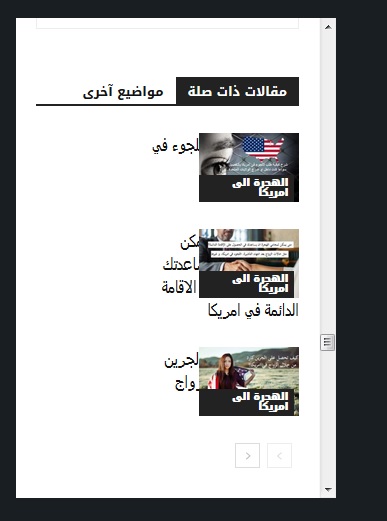
—- ————————————————————————–
I want to help NewsPaper in turning their theme into RTL support !
you might find this helpful! in the next update !
When website language turned to any RTL language , the menu is broken ! I used this CSS to fix it ! and PS Custom CSS in theme panel doesnt work at all!!!
#td-mobile-nav {
position:fixed;
}
.header-search-wrap {
display: none;
}
—– I hided search button because of an error in dispaly – it is mixed with menu button in the right! –
I will try my best to help TAGDIV !
 spu
spu Thanks,
Infinite load for homepage and category pages we are already using. I meant infinte load for articles, which is like one after the other with the URL changing with each scroll.
For infinite scrolling/loading for smartlists here is a great example which you can incorporate in your next update, with each scroll down the URL also changes.
https://tinyurl.com/ya7vdh94 (with each list item, the url also changes, giving the website another pageview)
For comparison based modules/themes here are two links –
1) https://themeforest.net/item/rehub-directory-multi-vendor-shop-coupon-affiliate-theme/7646339?s_rank=3
2) https://gadgets.techlomedia.in/
Some other tech themes do have these compare modules/widgets/pages in built.
Thanks for replying so early!
Cheers
spu Sweet! Fixed!
Now it finally works, just added the code to .htaccess and it works!
Thanks Calin, like I said before your support team is great!
Now just looking forward to infite scroll on pages and smartlists 😀
And maybe a comparison module like this in the future – http://rewise.wpsoul.nt/
Thanks again!
 camilaalves_jetss
 Hello Calin,
Thank you for your feedback.
I follow your guideline however I’m not been able to find the templates>single.php
The only one I was able to find is wp-content>plugins>td-amp>templates>td_smartlist_amp1.php
https://pipeify.com/wp-content/uploads/2018/11/Screen-Shot-2018-11-21-at-12.03.16-PM.png
https://pipeify.com/wp-content/uploads/2018/11/Screen-Shot-2018-11-21-at-12.03.02-PM.png
Please let me know where can I find this templates>single.php page to be able to proceed here and insert the sent code correction.
Catalin Hello Korni,
Please notice that you can use any post template you want if the smartlist structure is respected according to our documentation. Check here -> https://www.youtube.com/watch?v=tBmACum_0fU&t=9s
Thanks for the message!
 Simion C.
 Hi,
We will try to find a solution for full compatibility regarding the tagDiv composer and WPML. Sorry again for any inconvenience.
It is true that the theme does not support RTL. The design is not optimized for a RTL environment, so there will be various problems in this case.
When creating a RTL website it would be best to use a theme that has been created with this in mind, or has support for RTL. I can’t say I know how I can be of help unfortunately.
Thanks
 staticman
 HI,
OK – Thanks for this although FYI I think your guys need to speak with their guys because it seems (from my perspective) you are both making claims which are not true about each other!
So, I have now deactivated the WPML Translation Management Plugin and I can now create a page using the composer which is great…Thank you.
However…On a very different note….The translation I am doing is in Arabic and I am running into difficulties now due to the fact that wordpress is forcing the content to run Right to Left…Is there any advice you can give to help on this? I see that Newspaper does not support RTL html.
Thanks Again
 tangy
tangyI don’t want the main title of the page to be repeated on on all pages starting from the second page in smartlist 6. How can I do that?
Calin Hi,
Our theme is not recommended for RTL, maybe was some mistakes, please provide a link, screenshots or a referent were we claimed that our theme has RTL support.
Thank you for your understanding.
-
This reply was modified 7 years by
 Calin.
 eran
eran Hi Calin,
Thanks for your reply.
I did all the steps you mentioned and nothing worked. I tried changing the language of the admin panel to English and it fixed the issue – http://prntscr.com/lfturn. You claim your theme has RTL support so I would expect this to work just the same when the admin languge is set to Hebrew.
Can you please help me fix this?
 slueke
 Hi,
after some code screening and changing I was able to make it work.
Major code changes in:
wp-content/themes/Newspaper/includes/wp_booster/td_smart_list.php
– Restart the search and rendering for more smartlist code after line 140 on after_list array entry.
The jQuery selectors for the smartlist buttons in line 130+131:
wp-content/themes/Newspaper/includes/smart_lists/td_smart_list_1.php
wp-content/themes/Newspaper/includes/smart_lists/td_smart_list_3.php
PM if you are interested in details.
slueke Hello Calin,
I am not sure if I understand your answer right. According to your answer my Code looks like this:
<h3>Headline 1 Smartlist 1</h3>

Content 1 Smartlist 1

<h3>Headline 2 Smartlist 1</h3>

Content 2 Smartlist 1

<h3>Headline 3 Smartlist 1</h3>

Content 3 Smartlist 1

[td_smart_list_end]

<h2>Headline 1 Smartlist 2</h2>

Content 1 Smartlist 2

<h2>Headline 2 Smartlist 2</h2>

Content 2 Smartlist 2

<h2>Headline 3 Smartlist 2</h2>

Content 3 Smartlist 2

[td_smart_list_end]
If I now change in the Smartlist section of the editing panel the “Title tag” attribute from H3 to H2 the first smartlist is not rendered. Revert this change renders the first smartlist but not the second one.
sluekeHello,
is it possible to have more than one Smartlist in one article? If I inserted two smartest sections seperated by a [td_smart_list_end], only the first list is rendered.
Best regards,
Sebastian
Calin Hi,
1. Yest you can do a movie website, you just need to embed the movies or upload from your computer on the server.
2. Unfortunately our theme is not entire compatible with rtl, so is not very recommended to use for an Arabic website.
Sorry for the inconvenience.
Thank you for your understanding.
 Anonymous
I am creating my website just now since 2 weeks with Newspaer Theme – updated to 9.1
Some days ago I noticed that suddenly the very improtant Responsive check consisting of 4 small icons left site changed.
Only three of them are now visible: Desktiop viewport – Landscape viewport – Portrait viewport.
So its not possible anymore to check and edit proper the results I composed with the Composer.
Please find a screenshot here: https://ibb.co/bFuKtL
What can I do to fix this problem because its not possible to go on with the work.
And I do not want to loose the whole work.
Thank you for your help.
wdziedzicHi,
all smartlist types are showing the same image although different images are loaded in article:
 David
David Hi Calin, Sorry my Google subscription ended just shortly before you checked my site. This was not causing the issue and the subscription is active again. Could you please recheck my site? Thanks in advance!
 m.abdelmobdy
 thanx alot
my problem solved
all theme was rtl now
🙂
m.abdelmobdy Thank you very much
I need only your advice
I make your theme rtl
all things good with me in laptop…
but i mobile I found style.css in mobile folder
I make it rtl
but I don’t see any changes 🙁
would you please only advice me what was problem?
 noreddine24
when i use SmartList ads other ads as Article Top ad and Article Bottom ads disappeared.
how can i use them all together please ?


