No search results were found in Documentation!
 Siebren10
Dear Sir/Madam,
Suddenly, there are issues with the layout of my website (https://www.streamwijzer.nl/). The social counter, social sharing widget, header, etc. are not depicted correctly anymore.
The issues are not solved when I shut off plugins and only seem to be present in widgets and areas of the theme.
Do you know how to solve this issue?
Warm regards,
Siebren
 Calin
Calin Hi,
Thank you for sharing your thoughts with us!
For the moment, the subscription plugin is only at the beginning development, our developers are already planning to add other payment methods and many other options.
Also, if anyone has some suggestions we’ll pas them to our developers team.
Thank you!
 Bettina
 Hello @mauta!
This issue has been discussed already here: https://forum.tagdiv.com/topic/social-sharing-6/
Thank you!
 mauta
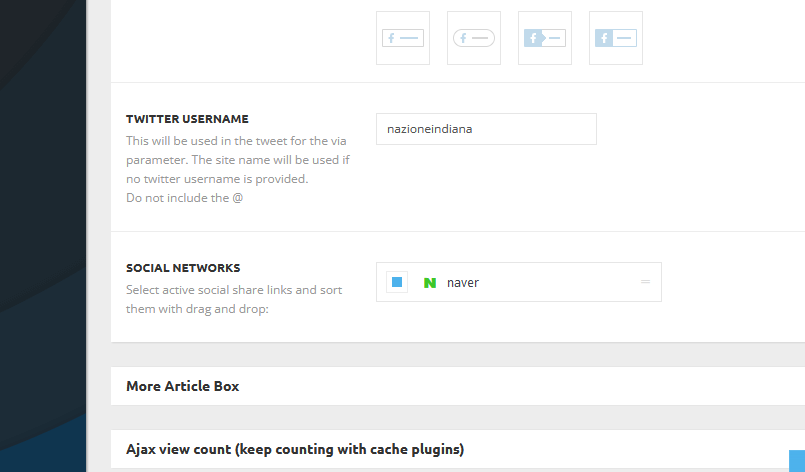
mautaHy, why in theme panel>post settings>sharing it’s impossible choose the social networks to display in posts?
Appears only the green icon N
https://www.nazioneindiana.com/wp-content/2021/12/social-networks.png
Thanks!
Bettina Hello @promes!
This issue has been discussed already here: https://forum.tagdiv.com/topic/social-sharing-6/
Thank you!
 promes
Hi,
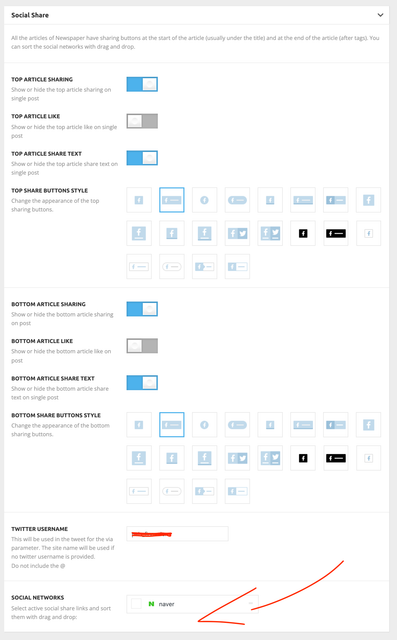
We have tried to enable social sharing in articles, but the only social network available is “naver”. Nothing else. How can we add the regular social networks? Thanks
 padix10
 Hey,
1. I tried to adjust the ‘Inner Row’ with the menu and the social icons but it doesn’t work, that dotted rectangle from the row still covers the last 4 words of the logo, and due to that these letters are not clickable – https://drive.google.com/file/d/1vgELI0R0hf-L4FofCMG3a6YnZ9exWRCD/view?usp=sharing
2. I added 22 on top and bottom in the padding zone for the whole menu, but it still makes smaller when I scroll the page
Thanks,
 fla971
Hello,
in the smartphone version of my site, in the footer I see the “voice report” symbol and not my logo, as I set up the page. I have already checked in the theme panel but unable to edit. What needs to be done?
In the preview of the Elementor editor you can see my logo, while on a smartphone you can see it “voice report”. Vedi allegati.
https://drive.google.com/file/d/14n_KosTUz-slBXVPCbkcdHSDR_sLq2ZV/view?usp=sharing
https://drive.google.com/file/d/1T7EjOyUe2IxXNfrVJtnGQIf_40xgsFfC/view?usp=sharing
 southfans
Hello There,
author avatar (profile picture) is not working properly
Please help me to sort out this problem.
here the issue link i am facing : https://drive.google.com/file/d/1BQJ0GW1hXUqOz80ZeXTtGl1QNBK5TKfd/view?usp=sharing
and also suggest me any compatible plugin for author avatar and co-author feature.
thank you.
Bettina Hello Jett!
Please make sure you have done all the settings from here:
– https://forum.tagdiv.com/social-icons/
– https://forum.tagdiv.com/social-sharing/
If those are not helping you, then please provide more information about the issue, screenshots or a video and your website link in order to help you efficiently.
A solution for sending a screenshot/video is this:
Download, capture, send: https://www.techsmith.com/jing-tool.html
After making the screenshot, you will have a link, paste it here.
Thank you!
padix10Hey, I have two new problems with my menu:
1. The menu is not clickable on the last 4 letters because of that ‘row menu’ – screenshot – https://drive.google.com/file/d/16eO981pHCDRGTGeQ8xox5u6b6qoLRggk/view?usp=sharing
2. When I scroll down the sticky menu doesn’t remain at the same size space above and below the logo (I want to have the same darker color height even on scroll, like it is in the beginning)
In this screen recording, you can see that the logo is not entirely clickable, and also the height color behind the menu is scaled down once the page is scrolled down – https://youtu.be/sTNyAXTLpGc
 mesutayvali
Hello,
I have updated my website from 8.7 to 11 for Newspaper theme. Since i have understood that Tagdiv composer slightly faster than tagdiv standart pack, i have started to use tagdiv composer. However, my question is related to the sidebars. From the Apperance => Components menu, i’m having limited options on the components as stated on the . I would like to know how i can add blocks of tagdiv where i have seen in the cloud templates without using tagdiv standart pack plugin.
Thanks in advance,
Kind Regards.
Mesut
 daringnesia
 honlim
 Here are my snapshots link to the images of the extra padding:
24 extra padding
honlimHi, When I add background color to inner column, it generate extra padding on the left and right (24px). How can I remove the extra padding?
I have include 2 images link below for your reference.
 suffolk_nick
 Hi Anamaria,
Was Flipboard social share request added to the list?
I am sure loads of Tagdiv users are keen to have this option to add sharing of posts to Flipboard. I know it is a huge way to drive views and engagement. It seems crazy its still not available to add to sharing options.
Fingers crossed
Nick
 jchoi
jchoi Thanks for sharing the guide for the block. I believe that means I can filter for more than just one “tag”.
What I mean is I would like to visually show more than one category in each post. So for example, if this post is tagged in multiple categories eg. Intestinal News and Cancer News, etc., I would like it to be shown in the post block like so: https://ibb.co/VBh7BFv
The categories would be like so: https://ibb.co/THs41Zt
 Lalit
LalitHi,
It’s very URGENT!
1) schema markup error:
I have tested many urls of tech news demo for schema markup rich results and found that all posts have errors on schema.
check the report: https://search.google.com/test/rich-results/result?id=eFqGthwMe2C13kT-ebenuw
Schema markup has missing field “url” for author schema. it is a warning but still, I want to know how to fix it.
check this video: https://drive.google.com/file/d/1wCylPWWZXIctPPUXmBimEs8LaqumTdo3/view?usp=sharing
2) Ad box bug
With tagDiv composer, edit the ad box element and in the ad content section, I enabled “Hide ads for admins/editors” but it is not working. Ad still visible to admin.
Moreover, Ad title: is not visible to logged-in users but shows to non-logged-in visitors.
check this video: https://drive.google.com/file/d/1rZq65SSf6QhDGUdabjGvzozd50x1f4qJ/view?usp=sharing
If it is a bug, please fix it asap.
Regards,
 Charter Party Disputes
Hello, I’ve noticed that when I’m sharing a link to the site I’m working on (https://staging.charterpartydisputes.com/) the preview shows a default image of the MAGAZINE PRO prebuilt website I’m using https://imgur.com/a/HLLAHGb
How can I change that? Ideally, I’d like to use our website’s logo.
 Paata
PaataHi!
I can’t see author’s page. In particular, when i click author’s link, Instead of the author’s page, it always goes on home page. Please watch the video given at the link where this problem is well seen: https://drive.google.com/file/d/1_4dToAPfhAueHMu-cJwJTGWhRnuaj7ac/view?usp=sharing
Consider, that, Cloud template is on. pleas see this link:https://drive.google.com/file/d/1eeypF9Rc6Qf0Zpb3iafiqXGaUykE7uzS/view?usp=sharing
Please, halp me to fix tsis problem. I want to see author’s page.
Sincerely,
Paata Tsagareishvili
southfansHi team
I want to rename the title of middle Block ” EVEN MORE NEWS” to “TRENDING ARTICLES”
here the img ref – https://drive.google.com/file/d/1e0G–B9FIFjgFPDZqgrmwnf_lYj4DIo4/view?usp=sharing
HOW can i do it ?
in widget section no footer widget is showing –
LalitHello, I am building a page – with a sticky row for the first row and want to make other row/column appear on the top of the first/sticky row.
I do some changes in the settings and successfully sticky the first row but when I scroll down, the second row goes behind the sticky row that should be assigned-above to the first/sticky row.
Hope you understand.
Please watch this video to understand – https://drive.google.com/file/d/1KYdBdg_hv4wsF_GdcPJZiUv1uMPht0wi/view?usp=sharing
Here is a similar example that I want to achieve – https://avada.theme-fusion.com/app/
Thanks
 Atithya
 I would be unable to share cpanel URL, I can share WordPress login. Sharing you via email
 nesma
nesmamy website is http://www.appsfiltered.com
the website is totally different in mobile devices from the design I made in tagDiv composer although there is no mobile page I made on the website.
https://drive.google.com/file/d/1ePLURbLAm7gpmnEU4mwdvrCJOOuO9Lae/view?usp=sharing
here is how the design looks in the composer
https://drive.google.com/file/d/1LNBtFCN-bH_F6I4zEtr5moE-QZ02u63d/view?usp=sharing
and as you see if you access my website from mobiles, it is totally different and bad design. I don’t know how it looks like that.
https://drive.google.com/file/d/1LNBtFCN-bH_F6I4zEtr5moE-QZ02u63d/view?usp=sharing
 avengerxp
 Hi Calin,
if you can look at this – https://drive.google.com/file/d/12CCQ1cKPeCyCH15LU22LSXLRVgiyif7W/view?usp=sharing
this is the App in dev form. when u go to news section and click on a post – the site menu is visible. we need to hide the menu. is there any way to hide the medu block.
Thank you