No search results were found in Documentation!
 Bettina
 Hello!
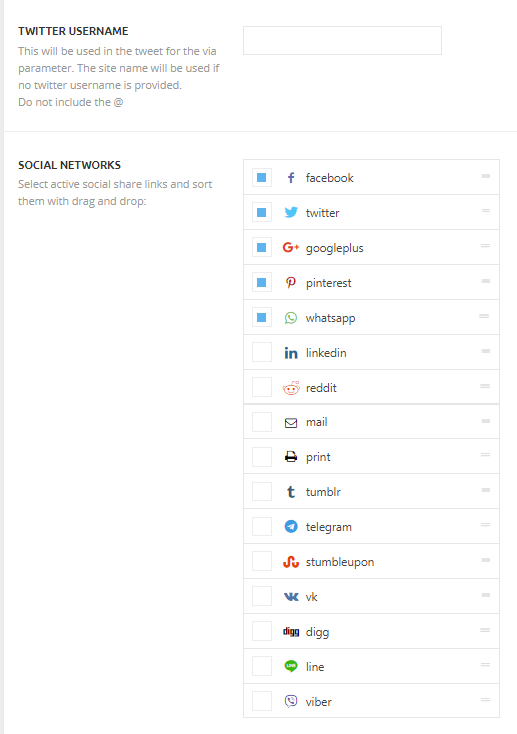
It should appear when you have that button checked and also the social icons active from Newspaper -> Theme panel -> Post Settings -> Sharing -> Social Networks.
Try to do this steps as quickly as possible, so your visitors do not notice the process:
1. disable TagDiv Composer
2. uninstall TagDiv Composer
3. clear cache (if cache plugin exists)
4. install TagDiv Composer
5. activate TagDiv Composer
6. clear cache (if cahce plugin exists)
Thank you!
 Yogesh kumar
Hi,
Social Media share Icon is not seeing in mobile. I am using the tagDiv mobile theme plugin. I have enabled the social media sharing icon for mobile devices from the theme panel, yet social media sharing buttons are not seeing on the mobile devices. Yes, but social media icons are visible in the desktop version.
 webinfratech1
My Website When i activated Mobile+AMP on my Website then when i am commenting then it showing Error “Your Submission failed. the server responded with code. please contact developer of this form”
please help me
 aiRYu
aiRYuhello, when I share post articles on different sites and chats, it’s not displaying the featured image. it’s only displaying the site logo.
sample url:
https://showbizbeat.com/2021/04/05/celebs-react-to-trending-lugaw-is-not-essential-issue/
 Patrick93
Hello,
I have created a 404 page.
Desktop it is also displayed but mobile is not loaded the mobile template. What could be the reason for this?
>> https://drive.google.com/file/d/1aMGya0XRi4N4spftz6O43UzH5ITe2WiF/view?usp=sharing
have a look:
https://m o d u s x . d e/asdfasdfasdf
Patrick93I have created a header for mobile and desktop.
But these are not linked. How can I link them together afterwards?
>> https://drive.google.com/file/d/1h7tIIKYJ2Zjjhwl6FNZM2rxq1L_uN_Zd/view?usp=sharing
Patrick93Hi,
i use Mobile Cloud Template for Footer.
How can i center the Footer Menue on Mobile?
>> https://drive.google.com/file/d/1c-C_BHWnvDaPiSSWNC-FN0hrwRES2MIN/view?usp=sharing
thanks!
Patrick93My navi is already cut off on the tablet although there is still enough space available.
I have spent several hours trying to fix the problem. Can anyone tell me what I’m doing wrong? >> https://drive.google.com/file/d/19WQou23hqMiAYzp3us2APVl8ZkxJllwS/view?usp=sharing
Patrick93 Hello,
thank you very much for the review.
I have not added any other font.
1. >> https://nimb.ws/PFE9hy
2. >> https://drive.google.com/file/d/1UCfnd5V8UinlYO7HZh2Xcn1r5yB_AE4g/view?usp=sharing
Why is the wrong font displayed even though I have Robot set?
 sowat
sowatI’ve installed the newspaper theme. I tried editing the front page with tagDiv composer, whenever I click the save button no of the updates are saved. I disabled all the plugins except the tagDiv ones but still no luck. I’ve inspected the network activity in the browser and found out “/wp-json/td-composer/save_post?uuid=a29a6079-b4ff-39ee-5970-0c0a51c3e685” returns a 404 status. I’ve not installed any firewall and caching plugin. Here is an image which will help you to understand my problem better.
Image Link: https://drive.google.com/file/d/1ypUOACqXS7WBA8_MQrrSyJSfG1sLS-l8/view?usp=sharing
Project link: https://krayonmag.com
Error Message:
{
“code”: “rest_no_route”,
“message”: “No route was found matching the URL and request method.”,
“data”: {
“status”: 404
}
}
 jacobevansj
 After updating to the new version of Am experiencing issues with my post thumbnails, when sharing WordPress posts on Facebook. There is no thumbnail attached to the Facebook post at all.
What can I do?
You can try test with the article on my homepage and see.
https://flashugnews.com/
 albertospoiler
Since we updated to version 10.4 and updated all the plugins, our cloud template pages, we cannot add or modify anything.
when activating the debug we see that when editing the page with
tagDiv Composer gets the error Undefined index: social_rel in /var/www/vhosts/wp-content/plugins/td-composer/legacy/common/wp_booster/td_social_sharing.php on line 954, any change is impossible the editor crashes.
We have increased the resources for the correct operation as specified in the version update
 Calin
Calin Hi,
To change the share buttons style you need to go in theme panel> post settings > sharing -> https://i.imgur.com/utVIRWo.png
If you want to use the widget social counter then you need to add an extra classes that are referring to the stile that you want to use -> https://i.imgur.com/NWIigfd.png
Style 1: td-social-style1
Style 2: td-social-font-icons td-social-style2
Style 3: td-social-colored td-social-style3
Style 4: td-social-colored td-social-style4
Style 5: td-social-boxed td-social-colored td-social-style5
Style 6: td-social-boxed td-social-colored td-social-style6
Style 7: td-social-boxed td-social-style7
Style 8: td-social-boxed td-social-font-icons td-social-style8
Style 9: td-social-boxed td-social-colored td-social-style9
Style 10: td-social-boxed td-social-colored td-social-style10
Also to ad a sidebar for the page you need to use the tagDiv Composer and add the sidebar widget -> https://i.imgur.com/6kS7JKU.jpg or use the page template on Page builder + latest articles + pagination -> https://forum.tagdiv.com/newsmag-page-templates/
Hope this will help you!
Thank you!
 reihyun
Hello,
I use Newspaper and Fitness theme.
and I wanna add new SNS share link button on post.
instagram and kakaotalk. (is Korean famous messenger)
I set it up here.
–> https://forum.tagdiv.com/wp-content/uploads/2015/05/sharing2.png
so Is there a good way?
thank you.
With appreciation,
Lee.
 thorayork
 Unfortunately, it did not help.
I know how to create a custom home page. I know how to edit widgets.
BUT
I cannot figure out on my own blog, how to style sharing buttons and sharing counter. I try to set page to have sidebar, but when I go to TagDiv composer, I only see the page content and add element above it. I deleted one of my pages content by mistake because of this. I read the documentation but only basic things are explained there. Either I am very stupid, or the theme is complicted.
It seems very easy on the video and there is access to the sidebar.Not in my case though.
Sigh*
Patrick93Hello,
I am using the tagDiv Mobile Theme Plugin for my posts.
Unfortunately the posts are not as customizable as I would like (e.g. header & footer).
For this reason I wanted to use Mobile Cloud Templates >> https://drive.google.com/file/d/1MJTe5sTmIqvAuaRqFfr7SFFG5PM6VlTw/view?usp=sharing
So far everything fits. The page looks good and I reduced the elements a lot, so there are only a few elements.
But the Pagespeed Insights result is very very bad. Have a look at the lab data:
Mobile Theme Enable >> https://drive.google.com/file/d/1Wt03kmaeJl7P-3SEgMED1BYI4ouWS-uH/view?usp=sharing
Mobile Theme Disable >> https://drive.google.com/file/d/1o8imOj1lPIgkgdX0FDmYMJpRKMZsTtuI/view?usp=sharing
How can this be? Did I do something wrong?
I have adjusted the posts so that they are exactly identical in content. Only the footer is different. And then such a big difference? 🙁
Info:
Yes, I have disabled and enabled caching and tested all possibilities. Unfortunately nothing helps.
 Mark Gilbert
Can anyone see why author is not showing top left What’s New column in iPad Portrait but is showing in iPad Landscape, Desktop and Phone here? – https://jazzjournal.co.uk
Here are screenshots of my tagDiv settings for these viewports – identical. https://drive.google.com/drive/folders/1pAeZKgXtVd3J6V_r-8EZ-BELYvb04fBz?usp=sharing
Thanks
MG
 RenMatsuda
 Just sharing that I finally managed to save the codes!
The problem was WAF setting that was in place in my web server.
Turning that off saved this issue, though I decided to put it back up after I made the change.
Thanks!
 Vlad S
 Hello @leytol !
Thank you for sharing this information. Indeed at the moment only using a custom method you can overwrite the entire templates.
If your post templates are manually set in the post than you can only manually change them. There is no bulk option.
Thank you !
 hyperbros
 Hello…
Mobile menu background color OK on Home Page
https://drive.google.com/file/d/11SrzBHpPJzz8jmscFRTWgF1EBNjAMx2T/view?usp=sharing
Mobile menu background color NOT OK on any other pages
https://drive.google.com/file/d/1b4r8-q2lBxkvCMj2OHnVRHZqKp6amdAt/view?usp=sharing
Block don’t filter correctly
https://drive.google.com/file/d/1btsDjNd2fcJyg9jJi4A_vDc8hYkRBfWh/view?usp=sharing
Pagination don’t work on home page (in desktop mode)
https://drive.google.com/file/d/1kOlBOpg6slDXaZLG3QHiVCJUTWSwgPYf/view?usp=sharing
-
This reply was modified 5 years by
hyperbros.
 sms-bridge-admin
Hi,
We created a duplicate copy of Scuba PRO single post template.
We applied it to all the articles we have for each country, example: Brazil and Indonesia
But whenever we try to use the template to change the filtering in Flex Block 1, the filtering is same with Brazil article and Indonesia article
Screenshot uploaded in google drive: https://drive.google.com/drive/folders/1Jd97S4t74tLI7dz5vBQwi_M7BzINWjbq?usp=sharing
 randhirek
Hi,
I have enabled Yoast seo, Have set card type to summary with large image.
on posts > Yoast social tab, have added image for Facebook and twitter.
Still when sharing on twitter images are not coming.
please help in fixing it.
site url – https://thewatchpost.info/government-in-exile-vs-shadow-government/
https://thewatchpost.info/molesting-mermaids-in-deep-waters/
 Anamaria
 Hello,
1. For me, looks fine => https://www.screencast.com/t/jIgjzVXO5 you need to zoom out to see like the demo your website.
2. For ‘SHOW AUTHOR NAME | SHOW DATE, SHARING, NEXT-PREVIOUS ARTICLE) ‘I don’t understand which settings didn’t work, normally if these are added with the tagDiv composer then these need to be edited with tagDiv Composer, the changes from the Theme Panel apply to the standard template, not to the single post template from the Cloud Library.
3. You need to select the mobile page =>https://www.screencast.com/t/3ySrS6ab , edit with tagDiv Composer, you can set the fonts => https://www.screencast.com/t/ZeXOZxEyOega
Thank you!
 chip303
After the update, the share buttons name show the wrong colors.
They are set correctly to #ffa301, but they are colored on the page itself.


 Anonymous
 Hi, Vlad!
All mobile versions of our sites have this warning in PSI:
https://paste.pics/C2PRB
In your new optimized demo, this message does not appear (in fact, it is labeled as passed audits):
https://paste.pics/C2PRV
As this was not a CSS problem, I highly doubt the new tool (CSS analyzer) did the trick. So, the deve team must have implemented a fix (but didn’t share with us in the update..).
About the TD Composer, already did that (deleting and reinstalling it). It solved the AMP sharing buttons issue, but not this one..