
- TutorialsFrom WPBakery to tagDiv Composer
 nermina
 Hello Simion,
works flawlessly. Thank you very much. 🙂
 rgard564
 This product has another problem that is broke right out of the box! All of the permalinks are prefixed with http:// and when you install a new SSL your sight will report insecure content is being run on it! You have to change all the permalinks to https:// or get the “really simple SSL plugin”! As I said this product is broken right out of the box!
rgard564 This product has another problem that is broke right out of the box! All of the permalinks are prefixed with http:// and when you install a new SSL your sight will report insecure content is being run on it! You have to change all the permalinks to https:// or get the “really simple SSL plugin”! As I said this product is broken right out of the box!
 Bogdan B.
 Hello,
Please make sure you increase your memory allocation like so: https://forum.tagdiv.com/system-status-parameters-guide/
Also please test without any plugins active. Please disable all plugins except the page builder, clear cache and reset cdn files if you use it. Please also check any custom code you might have added to the theme panel or the theme files. If you use a child theme, please switch to the main theme to make sure it does not affect the proper functionality of the theme.
Also please check with your host and the htaccess file for any blocked content on your site.
The https/ssl implementation also can influence the theme panel if not done properly.
Thank you!
 robert4web
 Hello!
On homepage I removed TagDiv Composer and then was all fine – everything on SSL.
When I want to use TagDiv Composer I get this error: Errors happened during tdcIframeData.init() -> bindViewsModelsWrappers()!
What is wrong?
Thanks.
Best regards,
R.
 Catalin
 Hello robert4web,
Unfortunately, until now, we do not have any report in this case, sorry! Also, we do not have an idea about your checked and notice that not every time, online checks return a correct result, sorry! Please read these guides:
http://www.wpbeginner.com/wp-tutorials/how-to-add-ssl-and-https-in-wordpress/
https://css-tricks.com/moving-to-https-on-wordpress/
https://yoast.com/dev-blog/move-website-https-ssl/
https://forum.tagdiv.com/topic/moving-to-ssl/
Thank you!
robert4webHello!
On my website I installed SSL certificate. When I check website with https://www.whynopadlock.com I get on home page this:
Insecure <form> call.
Found on line # 1817 in file: http://www.mydomain.com/index.html
Insecure <form> call.
Found on line # 2679 in file: http://www.mydomain.com/index.html
(Note: Chrome will show a security error for any secure page with an insecure <form> call on the page)
And when I am on the post is this:
Insecure <form> call.
Found on line # %2F%2Fwww.mydomain.com%2Fmy-new-post%2F&layout=button_count&show_faces=false&width=105&action=like&colorscheme=light&height=21 in file: http://www.facebook.com/plugins/like.php?href=https
Insecure <form> call.
Found on line # %2F%2Fwww.mydomain.com%2Fmy-new-post%2F&layout=button_count&show_faces=false&width=105&action=like&colorscheme=light&height=21.orig in file: http://www.facebook.com/plugins/like.php?href=https
Insecure <form> call.
Found on line # 2036 in file: http://www.mydomain.com/my-new-post/index.html
(Note: Chrome will show a security error for any secure page with an insecure <form> call on the page)
BTW, in IE and FF is OK. What is wrong? It is first time that I have problem when I move website to https.
Thanks,
Best regards
R.
 simchris
 Sounds like DNS error but checkup shows okay
https://mxtoolbox.com/SuperTool.aspx?action=https%3a%2f%2fbitcoinwarrior.net%2f&run=toolpage
Might be your own ISP.
Normal debug would be turn all extra post options OFF like related post, more from author, fly out, sidebar widgets; disable plugins; check server ERROR LOG for bad plugins.
Check system status in theme panel. You do need to have more RAM allocated to WP, longer timeout settings for php, etc.
You also need to setup your site/hosting properly for WordPress with things like GZIP/deflate, expiration headers, etc., which have nothing to do with the theme
https://gtmetrix.com/reports/bitcoinwarrior.net/O7Zrep1j
Need to fix bad requests, like
https://i0.wp.com/bitcoinwarrior.net/wp-content/uploads/2015/02/220x180.jpg?w=696&ssl=1
 airdailyx
 Chris, you’re right on the money with that one. I just checked and it appears that WP engine offers free SSL certs via Let’s Encrypt.
Thanks for the heads up!
simchris Note most web hosts now provide free SSL certs to enable https/TLS secure connections; using ‘Let’s Encrypt’ — so all sites should be https now as part of the ‘https everywhere’ movement.
Chrome has started to ‘warn’ site visitors about unsafe sites not loading via https; and any online form/login will get large ‘not safe notice’ as of October 2017 —
so ‘best practices’ now would to be always plan for https everywhere as the standard.
airdailyx I just thought I’d follow-up with the solution to my problem.
For context, I host my WordPress website on WP engine, which takes many precautions to prevent hacking and make WordPress more secure. One of the things it does is force HTTPS in the admin dashboard, even if the WordPress Address (URL) and Site Address (URL) options are set to HTTP URLs.
Unfortunately, the tagDiv Composer plugin loads the iframed version of the site (in the whole drag-and-drop editor interface) via the protocol specified via those WordPress options (found under Settings -> General), and not via the protocol that’s being used to access the dashboard.
Changing the protocol in both of those WordPress settings appears to have resolved the issue, but it seems that I’ll likely need to purchase an SSL certificate for the front-end of my website when it eventually goes live, so the change I made to those options doesn’t produce insecure content warnings.
I’ve asked tagDiv to just modify their plugin slightly to load the iframe via the same protocol as the parent (of the iframe) page, as that would resolve the issue in code, rather than having to do so via a particular setup of options (which are stored in the database).
As of now, I haven’t received a response on that, so who knows if that change will be implemented.
[EDIT] I also realized that once my site goes live at the real domain (and not a subdomain of wpengine.com), the admin interface will revert back to HTTP (unless I purchase and implement an SSL certificate, which could be used on the front and back end anyhow), so this is only really a problem during development, but that’s when I will be doing most of the work in the tagDiv Composer plugin anyway.
-
This reply was modified 8 years by
airdailyx.
 Bolumstar
I use Newspaper 8.1 theme. I have tried all I could to get secure https but i have a mix content warning. I have a valid SSL certificate – Certificate valid through: Apr 26 23:59:59 2018 GMT
Certificate Issuer: COMODO CA Limited
SSL Protocols Supported: TLSv1 TLSv1.1 TLSv1.2
However, my wp-admin page now logs in on secure https but my hope page doesnt.
my website is smartdepot.com.ng please I need help!
 Simion C.
 Hi,
Scanning the actual openweathermap website for insecure content does not produce any relevant information in this case. Please note that previously the SSL certification could only be available with openweather by paying a monthly fee to them. Now things have changed it seems, the SSL is available for free as well
– http://openweathermap.org/price
We have added this on our list and we will make the necessary modifications in the theme given a future update. If you want to try and make the modification, try it in the theme javascript file like this
– https://www.screencast.com/t/by8UnuFpZqd
– https://www.screencast.com/t/Yw0CqzTaCw
Thanks
 gundo
gundoHi There!
I love your theme – you guys did an AMAZING job!
I am, however, having problems with WordPress built-in cropping feature. I think it’s a WP core issue because it’s happening with featured images, product images, and images in post/pages. I believe WP can automatically crop an image without cutting out parts of the image correct?
For example, one of my images is:
https://1m3wnq4dk41o3xjsyg127meb-wpengine.netdna-ssl.com/wp-content/uploads/2017/10/Gundo-8413-True-Royal-Triblend.jpg
When WordPress crops the image it looks like this:
https://1m3wnq4dk41o3xjsyg127meb-wpengine.netdna-ssl.com/wp-content/uploads/2017/10/Gundo-8413-True-Royal-Triblend-600×600.jpg
See how the top and the bottom of the image is cut off?
Another issue is with Visual Composer. When I use the “single image” option and try to apply the size small, medium, full, thumbnail, to the image the image size does NOT change in the post – it stays the same (the full-size image).
Is there a setting in the theme panel I missed that says to maintain the image or something?
I could really use your help with this as I cannot move forward until this is fixed.
Thank you so much!
 sector
 i made the all setting which you prefer. But the problem is still continue. is that possible to related with SSL Certification? we have no httpS .
 dinahmight
Hi,
I am using a SSL Zertifikat and it seems that this leads to a problem when trying to use the tagdiv Composer.
When e.g. clicking in the backend the link “Edit with TD Composer” (https://picload.org/view/dglpgida/bildschirmfoto2017-10-04um01.1.png.html) for a page the composer is opened, but the content is not displayed (https://picload.org/view/dglpgidr/bildschirmfoto2017-10-04um01.1.png.html).
When using the developer Tools to check if there are any errors a security error is displayed with:
Mixed Content: The page at ‘https://www.mudradar.de/wp-admin/post.php?post_id=23&td_action=tdc’ was loaded over HTTPS, but requested an insecure resource ‘http://www.mudradar.de/?td_action=tdc_edit&post_id=23’. This request has been blocked; the content must be served over HTTPS.
The Url of the page I tried to edit is no longer https but http. When trying to copy the URL from the console and just add a “s” behind http manually and open it up in the browser only the frontend (without tag div composer) is shown.
How can I resolve this?
Best regards, Dinah
Bogdan B. In this case you will need to make a few more adjustments for the proper functionality of wp and the theme. Please read these guides:
http://www.wpbeginner.com/wp-tutorials/how-to-add-ssl-and-https-in-wordpress/
https://css-tricks.com/moving-to-https-on-wordpress/
https://yoast.com/dev-blog/move-website-https-ssl/
https://forum.tagdiv.com/topic/moving-to-ssl/
Thank you!
 seranoticia
 Hi. If indeed it was the only thing that changed … the SSL security certificate was installed
 haychart
Hi
When you view the above post on an iPhone the featured image appears upside down
Its fine on other phones, tablets and pcs
Completely stumped to why that one only
 bingdc
newspaper8 theme downloaded to my computer . tried add theme on wordpress, clicked on the zip file but after 4 attempts no luck just a endlessly spinning wheel.
wordpress eventually asks “do you really want to do this” after 10-15 mins of loading. that’s as far as I have got.
I have tried over a cellular data connection and a cable data connection neither worked
 BestForCh
 I find the solution. It was style.css
I have uploaded style.css, but is not working.
Nothing with SSL.
Thank you.
BestForChHi 🙂
After SSL is installed, and i start to use https, all my wordpress with Newspaper theme collapse.
Hmm, where can the problem be?
See: https://bestforchrist.com
 fenomeno0chris
 Seriously?
Im still waiting for a concrete solution and not just telling everybody use a new registration plugin. It is very hard to create a nice looking registration form, which is integrated that seamlessly like the default one.
You’re theme is one of the most selling WordPress themes out there and you can not provide your customers a great solution for basics like the registration process?
-.-
fenomeno0chrisFirst of all I want to thank all developers who were involved by creating Newspaper8!
They did overall a very good job. The theme looks good, loads fast and is feature rich.
Unfortunately Ive seen a lot of users like me, who are creating topics in this support site, to get a better registration form. The included Ajax login system is unsafe, unstable and it has a lot of features not build in. Im still waiting for a concrete solution and not just telling everybody use a new registration plugin. It is very hard to create a nice looking registration form, which is integrated that seamlessly like the default one.
Since yesterday Im getting hundreds of Emails, that UserXY with a “@webstviza.com” email-domain has changed his password. There is no option to add a blacklist for that domain. I know that this is not a huge deal, because I can certainly get a plugin for that issue. But nonetheless it is very unprofessional and awkward to let users register without creating their own password and let them wait to get an email, so they can change it. Ive never seen a serious website, which handles the user registration that way.
Please listen to me and add those features urgently:
– Blacklist support for excluded email-provider
– Captcha support for more security
– Set password directly in the registration form
– Individually customizable “welcome for registration” page
– Profile support (changing avatar and base information)
Honestly, check out the current registration path:
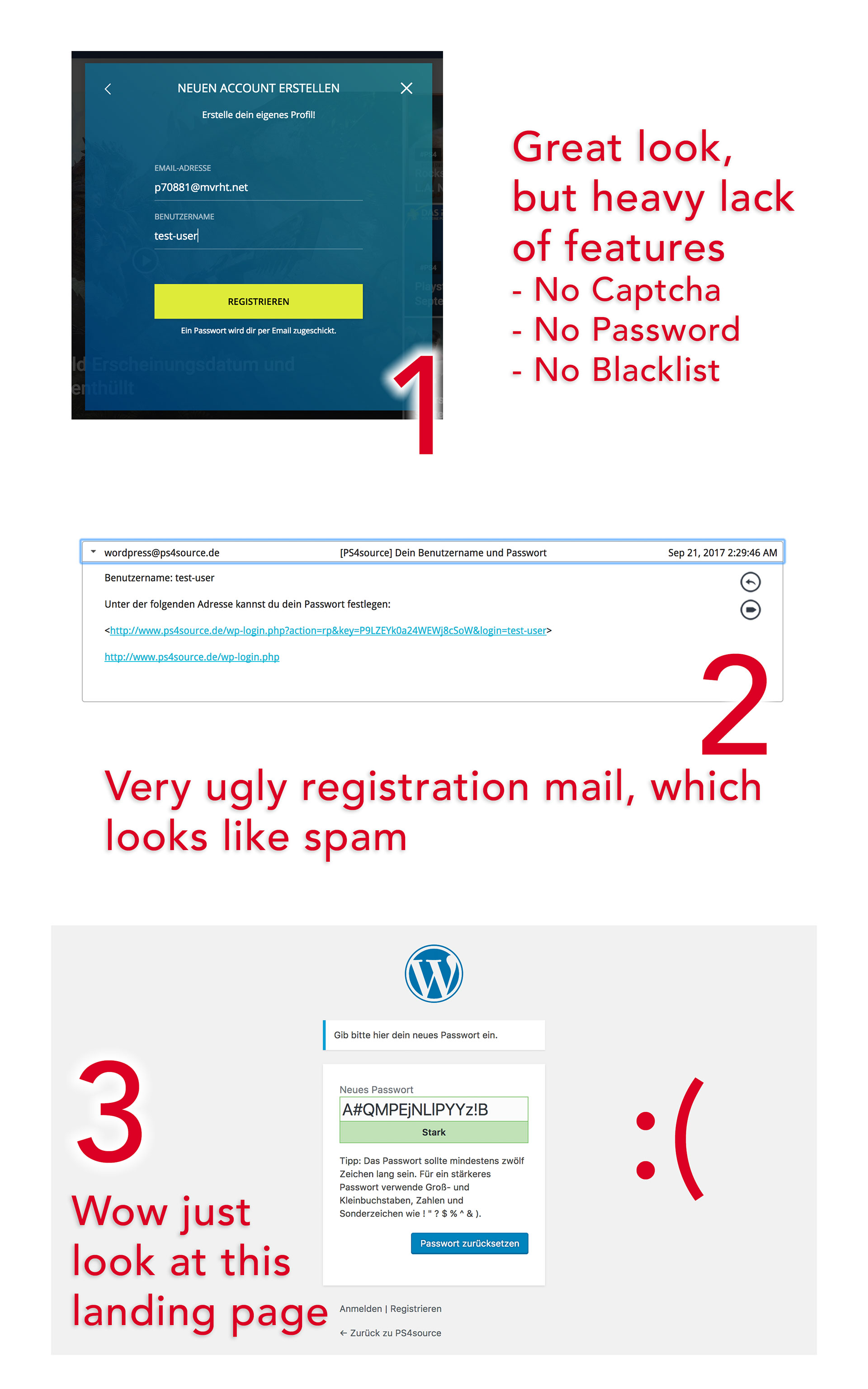
simchris You don’t need a plugin for SSL.
You need
a) SSL/TLS certificate on your web host
b) you need to have your host panel setting for domain setup to 301 redirect all https queries to https
c) you need to search/replace your post meta in phpmyadmin for instances of http/yoursite and replace with https/yoursite
d) you need to make sure any items in theme panel like logo are https links
e) you need to add explicit https URL to your wp-config.php file (see wordpress codex on how to edit wp-config); and add the https admin required line.
f) ideally you should have an htaccess entry to redirect all http queries to https, if your hosting panel doesn’t yet have that option
That is *correct* way to move your site to https — plenty of tutorials online.



