Vlad S
 Hello !
It looks like you are using a mobile templates. For that you will have to edit using tagDiv composer and set a header from here: https://www.screencast.com/t/yWrfNPUtDe
Thank you !
 andreawebarts
 you need to update the theme, it s been since the deprecation of wrordpress you never fixed it
https://madamefigaro.cy/wp-content/plugins/td-composer/legacy/Newspaper/js/td_wp_admin.min.js: jQuery.fn.resize() event shorthand is deprecated
https://madamefigaro.cy/wp-admin/js/common.min.js: jQuery.fn.delegate() is deprecated
https://madamefigaro.cy/wp-admin/js/media-upload.min.js: jQuery.fn.resize() event shorthand is deprecated
https://madamefigaro.cy/wp-content/plugins/wordpress-seo-premium/js/dist/api-client-1461.js: jQuery.isFunction() is deprecated
https://madamefigaro.cy/wp-content/plugins/td-cloud-library/assets/js/js_files_wp_admin.min.js: jQuery.fn.click() event shorthand is deprecated
https://madamefigaro.cy/wp-content/plugins/td-composer/legacy/Newspaper/js/td_wp_admin.min.js: jQuery.fn.mousedown() event shorthand is deprecated
https://madamefigaro.cy/wp-content/plugins/td-composer/legacy/Newspaper/js/td_wp_admin.min.js: jQuery.fn.click() event shorthand is deprecated
https://madamefigaro.cy/wp-content/plugins/td-composer/legacy/Newspaper/js/td_wp_admin.min.js: jQuery.fn.change() event shorthand is deprecated
https://madamefigaro.cy/wp-content/plugins/td-composer/legacy/Newspaper/js/td_wp_admin.min.js: jQuery.fn.scroll() event shorthand is deprecated
https://madamefigaro.cy/wp-content/plugins/td-composer/legacy/Newspaper/js/td_wp_admin.min.js: jQuery.fn.focusout() event shorthand is deprecated
https://madamefigaro.cy/wp-content/plugins/td-composer/legacy/Newspaper/js/td_wp_admin.min.js: jQuery.fn.keydown() event shorthand is deprecated
https://madamefigaro.cy/wp-content/plugins/td-cloud-library/assets/js/js_files_wp_admin.min.js: jQuery.fn.change() event shorthand is deprecated
https://madamefigaro.cy/wp-content/themes/Newspaper/includes/wp-booster/wp-admin/js/tagdiv-theme-plugins-setup.js: jQuery.fn.load() is deprecated
 mjb
mjb First of all, my apology for my hard language in above post.
Ok, I have found the solution for this. I’m not sure that I have exactly do the right steps, but somehow the problem is solved.
I shared my findings below:
at the [newspaper] > welcome
click, install and activate the recommended plugins
1. tagDiv Mobile Theme
2. Official AMP for WP
then go to [theme panel] > [mobile theme] > [mobile settings] > USE MOBILE THEME FOR
> select “AMP” > save settings
then go to [wordpress menu bar] > users > select and edit your user
at the “Toolbar” > make sure you select “Show Toolbar when viewing site”
at the “AMP Developer Tools” > make sure to enable “Enable AMP developer tools to surface validation errors when editing posts and viewing the site”
then you can start editing the mobile page.
in this newspaper theme, editing the main page for desktop pc and mobile are 2 different design
the mobile page requires another separate creation and editing.
therefore the “mobile” edition of the “page” is needed to be created.
there are 2 ways (which I know so far) to create and edit the “mobile” version of page.
==============
1st way:
==============
[wordpress bar] > [pages] > find your page (the home page) and select [edit with TD composer]
in short, edit the page with “TD composer”.
now you hav enter the TD composer editor, at the left panel where you can see “Welcome to tagDiv Composer”, at the top, you should be able to see either [create mobile page] or [edit mobile page].
there, you go, click on that button, you’ll start creating mobile version of the page.
==============
2nd way:
==============
while you have already log in, go to the page (in this case, the home page), at the top center toolbar, at the green button [edit with TagDiv composer], at right side, you will see the option to create or select the mobile page version.
for more information on this guide, you may refer to this tutorial guide:
https://tagdiv.com/newspaper-10-3-7-update-brings-customizable-and-fast-mobile-pages/
 Anonymous
 Hi!
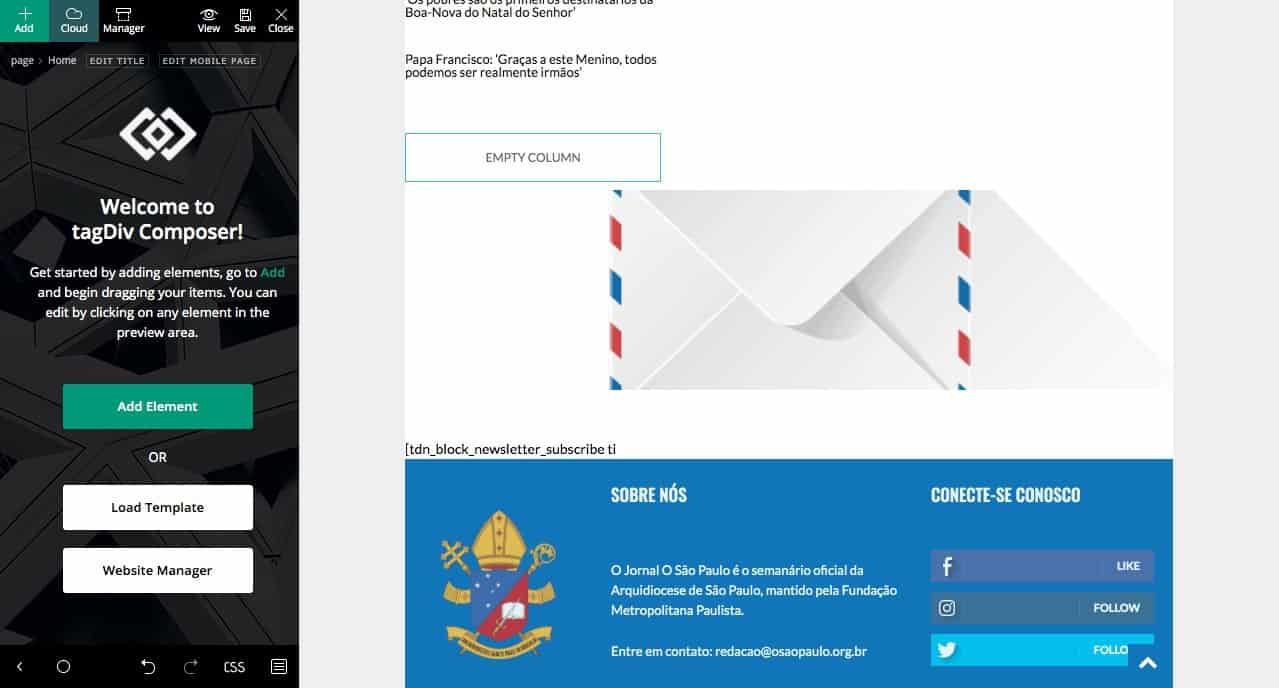
I think that TD Composer is broke..
https://osaopaulo.org.br/wp-content/uploads/2020/12/Schermata-2020-12-27-alle-18.28.07.jpg
I saw a bug in my homepage, tried to enter td composer to fix it; and I cannot edit the part that is broke. Already deactivated some plugins, and nothing has changed..
 what-the
Is this possible?
Thanks!
 hansennn
Okey, so ive gotten a few problems lately
First off. tagDiv Composer, won’t update when there is a update, i have to go and rename it manually to get the new update.
and now with the new 10.3.9.1 update, the tagDiv Cloud Library failed to even load, so it crashes the site.
An error of the type E_COMPILE_ERROR was caused in line 135 in the file /home/1/w/weednorge/www/wp-content/plugins/td-cloud-library/td-cloud-library.php. Error message: require_once(): Failed opening required 'includes/tdb_functions.php' (include_path='.:/usr/share/php')
also, the iThemes Security plugin just stopped working, and deactiveded itself? would like to not need to make a fresh install, but i will if theres nothing to do about it.
 harshilbansal
I am using Default Pro Demo and building my website on top of that. In the posts section, Edit with TD Composer is not showing. And I think that option should be there for posts too.
My website link is http://ulaunch.in/, in case you need to look at anything.
Regards
Harshil
 redshoes
Hello there! I need to place custom shortcodes on my homepage and can’t find out how-to do that.
In previous version i just used “text with header” block, but for now as soon as i try to “edit content”, – it’s empty and there’s no “save” button, so content remains the old one.
 Zakaano
Hello; i just purchase and install the theme ; but the TD composer is not loading at all…infinite download…what to do ?
 fabioweb90
 Sure thanks: https://ibb.co/NrsbR4D that is here
/vhosts/sviluppo/wp-content/plugins/td-composer/mobile/single.php
and this plugin for generate shortcode from widget
https://it.wordpress.org/plugins/amr-shortcode-any-widget/
Let me know thanks
 Calin
Calin Hi,
I think that you can set the file path and exclude from been Optimize, the js files that our theme is using are on this file path wp-content/plugins/td-composer/legacy/Newsmag/js
Hope this will help you!
 AlbertoJR
 Hi again.
I have searched through the code and found the following at (td-composer/legacy/common/wp_booster/td_video_support.php)
Line 104: <iframe class=”td-youtube-player” width=”600″ height=”560″ src=”‘ . ‘https://www.youtube.com/embed/’ . urlencode_deep( self::get_youtube_id( $videoUrl ) ) . ‘?enablejsapi=1&feature=oembed&wmode=opaque&vq=hd720&’ . $autoplayParam . ‘&’ . $controlsParam . ‘&’ . $loopParam . self::get_youtube_time_param( $videoUrl ) . ‘” frameborder=”0″ allowfullscreen=”” allow=”autoplay”></iframe>
It seems that that widht is hardcoded.
Has it changed in a recent update?
Thanks in advance.
 foreclosurepedia
 This is the code on Inspection:
<span class=”tdm-btn-text”>DONATE TODAY!</span><i class=”tdc-font-fa tdc-font-fa-group-users”></i>
The a href is not being set. Can I do this manually as the TD Composer is failing?!
foreclosurepediaHaving issues in that when I program the URL for a Button and save, it reverts to # no matter what I do using the TD Composer.
 Jose
JoseWhen I do a test, this pre-load request appears:
https://matrix4.es/wp-content/plugins/td-composer/assets/fonts/td-multipurpose/td-multipurpose.ttf
But, I do not use any multiporpose element.
So why should I load this font?
the page: https://cutt.ly/ehNfPiF
Should I remove any components to avoid it?
Thanks
fabioweb90 Thanks i fixed. Is it possible to add more widget (https://ibb.co/mhkQ6Cg) in single post? currently i see only related artcile https://ibb.co/JrztTkT
maybe with a shortcode directly in /wp-content/plugins/td-composer/mobile/single.php ?
Thanks
 Anamaria
 Hello,
tagDiv Composer is a page and cloud builder, it can be used only for pages and cloud templates, therefore you can use it on a single post template from tagDiv cloud library to adjust the layout, but not to write the post content, for this you need to use the WordPress editor.
You can still edit the page with TD Composer in WordPress->Pages => https://www.screencast.com/t/AMOjYCA7Q7p, or in front side, as you said.
Thank you!
 Amit
Amit The correct path for the theme javascript is /wp-content/plugins/td-composer/legacy/Newspaper/js/tagdiv_theme.min.js
For images, consider using any lazy load plugin which uses placeholder. Currently, Newspaper theme is missing browser-level image lazy-loading. [i.e. loading=”lazy” tag]
After you make any changes to the blog, clear all cache and give it some time before you make a speed test.
Greetings
Amit
fabioweb90 Ok thanks i have following settings
https://ibb.co/NxZ8CJy
https://ibb.co/7vs1yWT
and this path works fine for me wp-content/plugins/td-composer/mobile/single.php
Now i have issue with javascript section. https://ibb.co/hF4RTHy
i print a simple alert but is not displayed. What is wrong?
Css is rendered correctly
Thanks
Calin Hi simchris, now the view of posts are stored in database, also I think that the code for this is set in td_page_views.php on this path wp-content/plugins/td-composer/legacy/common/wp_booster/td_page_views.php but before to make any changes or updates, pleas make a full backup to your website and database.
Hope this will help you!
Calin Hi,
If you are using only amp plugin without mobile theme then yes, the file that need to be edited is wp-content/plugins/amp/templates/single.php
If you are using the mobile theme plugin with amp, then the file that need to be edited is this one wp-content/plugins/td-composer/mobile/single.php
Thank you!
foreclosurepedia Deleted with TD Composer
 Oswald
Hello,
Having some trouble on a multisite.
When I hit the “Edit content” button of a “Text with title” the wheel turns forever and won’t open on a subsite of a multisite.
Also: I sometimes cannot access the login page of the mainsite, it shows a “page not found” error. When I wait a few minutes it works again.
I have lots of errors when I activate the wp-debug (not sure if this is the same problem)
For example:
Notice: Undefined index: tdb_templates in /kunden/522361_56182/webseiten/rbt/plugins/td-composer/legacy/common/wp_booster/td_wp_booster_functions.php on line 2844
Notice: Undefined offset: 0 in /kunden/522361_56182/webseiten/rbt/plugins/td-composer/legacy/common/wp_booster/td_module.php on line 365
Could you please help?
Thanks in advance
 GoodTimesKW
 I should add that the site works fine. WP back end works fine I can change and edit plugins and all other aspects no problem. This 502 error only happens when I click edit page or Edit with TD Composer.
 khfilipovic
Hello,
After updating to the latest Newspaper theme, my website https://blondeintheair.com has become distorted in size and there is code and other things written on the bottom of my page:
“Fatal error: require(): Failed opening required ‘/home4/oshhi0/katharinefilipovic.com/wp-content/plugins/td-standard-pack/Newspaper/’ (include_path=’.:/opt/cpanel/ea-php74/root/usr/share/pear’) in /home4/oshhi0/katharinefilipovic.com/wp-includes/comment-template.php on line 1554
There has been a critical error on this website. Learn more about debugging in WordPress.”
When I open my home page in the TagDiv Composer, it says:
“Error at zones: 6(models) : 5(dom). The model does not match the content Current state has involved an issue. You could try an UNDO operation (CTRL+Z / CTRL+SHIFT+Z)”.
What should I do?
Thanks,
Katharine