Sophia_FACES
 My website was down due to permalinks failure. Now sorted it. Finally got my website back. Activated both amp and mobile theme plugins.
However I am unable to preview the AMP version. I am not getting the AMP link on top of my post to view the AMP view. Or the AMP flash icon in preview page.
Also update of post keeps failing and saving a post takes too long.
Sophia_FACES Finally got my website back. Activated both amp and mobile theme plugins.
However I am unable to preview the AMP version. I am not getting the AMP link on top of my post to view the AMP view. Or the AMP flash icon in preview page.
Also update of post keeps failing and saving a post takes too long.
 alimbolar
 Hi Vlad
Thanks for the prompt response and update.. really appreciate it..:-)..
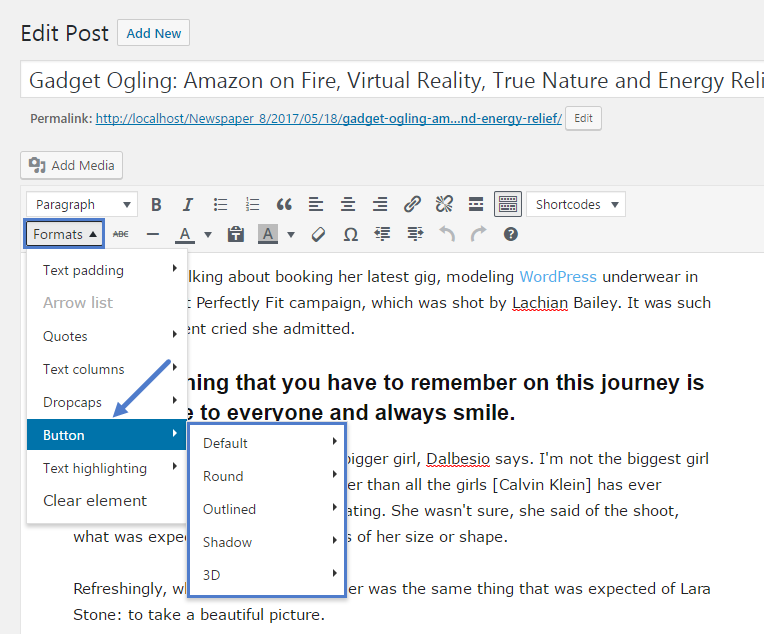
I got your point about the way to make buttons using Gutenberg but my point was that I could not see the Formats button as it’s shown on this screenshot on my wordpress.. Do I need to do something to get the FORMATS button?
https://forum.tagdiv.com/wp-content/uploads/2017/05/button_1.png
Regards,
Alim
 Calin
Calin Hi,
Please provide some details about the way you made the update, the update should not make any changes in theme settings from theme panel and pages/posts settings only the settings from theme files will be lost.
Make sure that you do not have a plugin conflict, please deactivate ALL plugins except tagDiv plugins, also if you are using child theme or cache plugin, deactivate them, clear all cache and try again.
Also please provide me a link to your website to can inspect these problems, in this way i will be able to provide an working answer.
Thank you for your understanding!
 Vlad S
 Hello !
Please make sure that you have uploaded properly the Newspaper Theme. Normally that notification should not be there: https://forum.tagdiv.com/how-to-update-the-theme-2/
Thank you !
Vlad S Hello !
Please note that there is indeed a bug. You can’t see that the AMP plugin is active but the plugin is. This issue will be fixed in the future update.
Thank you !
Calin Hi,
Please update the Newspaper theme to version 10.3.2 -> https://tagdiv.com/update-newspaper-theme/
Also please clear all cache and check again.
Let me know the results!
Thank you!
Sophia_FACES Now my dashboard is back but all the posts on being clicked still showing 404 Error. I can see that all the posts are there in posts tab. I tried to edit one post but it does not update or save. It says update failed.Nor is the preview option working. It shows error 404.
Calin Hi,
Please note that by default the big grids do not display the excerpts, this can be done only if you make changes in theme files, also these changes can not be set in a child theme, therefore will be lost when you’ll make a theme update, the only way is to set back the code after you make the update.
This is a similar topic -> https://forum.tagdiv.com/topic/i-cant-add-post-excerpt-in-home-page-big-grid-1/
Thank you!
Calin Hi wasyo and adminsensei,
1. Our theme made a request for updates once at 3 hours (using timezone UTC GMT+0) now was change to 1 hour, also the dates are get from here https://github.com/CSSEGISandData/COVID-19/tree/master/csse_covid_19_data and these are update frequency at list once per day.
2. In order to change the yellow background color you need to edit the page with tagDiv Composer, click on the row and check the css tab -> https://i.imgur.com/zSFRxz3.png
To add covid-19 statistics, you need to edit the page using tagDiv Composer and search for covid element -> https://i.imgur.com/sj8jnzJ.png -> https://i.imgur.com/mISOTZq.png
Thank you!
Calin Hi,
I just find a better solution please replace the code from this file wp-content/plugins/td-composer/mobile/parts/logo.php with the code from this pastebin this will check if is homepage and will add an h1 only on homepage -> https://i.imgur.com/RDb52Md.png
But please note that all these settings in theme files will be lost after you’ll make a theme update.
Hope this will help you!
Thank you!
Calin Hi,
Unfortunately for the moment there is no option to add more custom ads in theme panel, and all changes that you’ll make in theme files will be lost when you’ll make the theme update, also most of these files that need to be edited can not be set in a child theme, also this is a custom implementation that is not covered by support theme.
Support Policy -> https://forum.tagdiv.com/support-policy-2/
If you still want to implement it, please check this similar topic for how to add more
custom ads in theme panel -> https://forum.tagdiv.com/topic/add-more-custom-ads-3/ is possible that these files to be moved in tagDiv Standard pack in legacy > Newspaper and in tagDiv Composer > legacy > Newspaper.
Thank you for your understanding!
Calin Hi,
We recommend to enable only the fonts you are using, if you are using only default fonts, then you disable the Google fonts if you do not use none of theme and you are using custom fonts -> https://i.imgur.com/IZGhOga.png, then you can disable both.
If you are using now a free theme, then all what you” have on your website will be text and indeed this will be load very fast, but with our theme, you’ll have blocks, images, modules, effects…
From what I see here -> https://i.imgur.com/oAdxdn2.png most of the css is form tagDiv Standard pack, we write an article about the theme plugin -> Newspaper Theme 10: Standard Pack or tagDiv Cloud Templates?, we recommend to replace the elements from standard pack and disable it, in this way the theme will load only the needed css, not entire css like standard pack.
Let me know the results!
Thank you!
Vlad S Hello !
That indeed is a bug but the plugin will activate, it’s just that you won’t see it being active. Our developers are already on this and it will be fixed in the next update.
Thank you for your understanding !
 ludyma
Hello, I need help before updating, I have the 9 demo demo and I have bought the 10, the problem is that I have modified the News Magazine template, the question is if I upload the zip to the one there? Or as I do since the option to update does not appear in the menu as in this tutorial https://tagdiv.com/update-newspaper-theme/
There is also no way or option to avoid the modifications made.
I hope you help me.
ludyma Hello, I just bought newspaper X, I had the demo newspaper 9 and I don’t get the update option, the question is if I use this update system https://tagdiv.com/update-newspaper-theme/
In wordpress what happens to the one I have, all the template modified, there is no option to save.
Will the template delete or respect me?
Or there is another method to avoid losing the modifications made in the News Magazine template.
 mrsky28
So, I know last version you guys added the automatic theme update via the Update section in WordPress.
I updated via SFTP, but the notification to update to the latest version is still there. Could be a glitch.
 HIGHLIFE
 I don’t have the proper format so I can update my ads….
My customers are furious and I can’t get this …. Whats is the problem?
HIGHLIFE this all the code that was left.
<div class=”td-all-devices”><
really sucks that this update wiped everything
 kirby-axon
Hi,
I recently tried read through your documentation on how to install the slider revolution plugin. it seems you may have to update the doc as there were a few stages that wasn’t similar to my screen. For example, to import the slider, I did not have a import slider, there was however a manual import option so I selected that. Then it asked me when I completed the installation I need to select the settings symbol, and select a category to extract posts. However, there was no settings options for me?? Therefore I am unsure if its even set up right? then it said to unlock the plugin I need to register my purchase code, which I assumed was my newspaper purchase code so I put that in and it told me it was invalid? For something that is supposed to be so simple, it has proven very difficult instead.
 satyajs
Hi Team,
We are in a crisis situation now, our gym website wefitindia.com was running a very old version of Newsmag theme, we tried updating it, but now it has become completely bad. Please help.
We have to update it to 4.9.3. At the time of corona we were trying to provide online guides to our members, but this thing had really brought us down. Also moving forwrd I have asked my team to create a dev environment instead trying live updates. Please support us now.
regards
 nfzambrano
Hi.
For some time we have noticed that the Instagram module that we placed on our home page (https://eldiariohabla.com) stopped updating. It no longer places the images of the new posts. A few hours ago some images also started to disappear. For example, the logo and one of the posts. In the case of the logo, when trying to load it manually, we get the message: “URL signature expired”.
What can we do to correct this problem?
Thank you very much in advance for your help.
P.S .: We don’t know if it’s related, but the Social Counter module doesn’t update the number of followers on Instagram.
 sscom
sscom Hi,
I want to some similar changes to Grids and Blocks. If they are saved under /wp-content/plugins/td-standard-pack/Newspaper/includes/modules/ are they still save when the theme updates? I ask, because it’s not in the themes-folder, so I probably cannot apply these changes just to a child-theme?
How could I handle this best, to be save for the future?
Thanks a lot in advance.

 Topfgartenwelt
 Sorry, it doesn’t work. One time it shows me the correct mobile version and minutes later you can see the desktop-version again. Please, give me a working solution! I bought the theme awaiting that I get a working mobile version like you promise it in your advertisement. But the mobile theme isn’t working.
Now I have deleted Disable Gutenberg but the problem still exists. If I do any change on the blog, even wright an new article, the mobile theme is lost!!! So I have to update the homepage-settings again that I see the mobile theme again. What is the solution therefore?
Greetings Kathrin
-
This reply was modified 6 years by
Topfgartenwelt.
 Josan
Josan Indeed we need more custom ad slots and if possible, also need an option to change the name of custom ad slot to identify it.
If we manually edit td_config.php file to add more slot than what about future updates? when I will update the theme file will be replaced with updated version and I have to manually edit again it to add custom slots.
I hope you understand.
Thanks