No search results were found in Documentation!
 moi_rajky
 Hi Simion
thanks for your reply. It took a long time testing but I found out that the problem was caused by an outdated version of the WPML Multilingual CMS plugin. After updating it to a fresher version, the Save button works fine.
I hope this helps others to save time debugging!
Cheers
Matej
 Catalin
 Hello Aureyepss,
Unfortunately, this kind of plugin is not tested with our theme and also, we cannot say for sure if it will work or not with the theme, sorry! We cannot provide any support for untested plugins, sorry!
Another alternative for you would be to try installing the WPML plugin because this has been tested with the theme and it seems to work as expected with it. For more information about this, please check our useful manual here -> https://forum.tagdiv.com/using-theme-translations-together-wmpl/
Thanks for your understanding!
Catalin Hello sailung,
If you want to have more than one theme languages version, you should try using the WPML plugin which allows you to do this. For more information about this case, please check the following topic here -> https://forum.tagdiv.com/using-theme-translations-together-wmpl/
Hope this helps!
Thanks for your understanding!
 barronlau
 Hi Catalin,
Thats what this site is, it is a brand new site clean install. Its the same problem as the other site I tried to use the theme. Other the WPML and woocommerce I have no other plugins. Please help as the issue is consistent.
Here you can see the content under the side bar
http://prntscr.com/gnx9ca
Again if I disable Visual Composer its ok, it goes away.
Catalin Hello Jules,
Please keep in mind that if you want to translate your description from About US section from Footer, notice that you can do it from WPML Plugin, but it’s needed to make some adjustments through it in order to achieve as you wish.
First of all, you should install the WMPL and then go to it in String Translation section and then, press the Translate texts in admin screens, like this -> https://www.screencast.com/t/DvZ8tStcO7A Please notice that all of the theme’s setting is loaded in the td_011 field and the footer text which you want to translate it is saved in the tds_footer_text meta key, which should have to be checked from here -> https://www.screencast.com/t/YXh36jIo. So, after this, if you will select this field, where you can create your translations and what exactly you want to bring when a language is active, like this -> https://www.screencast.com/t/eUCPJpvuyE
Hope this helps!
Thanks for your understanding!
 Bogdan B.
 Hello,
The only tested and recommended plugins to use with our theme are these ones:
WP Super Cache- caching plugin
Contact form 7- used to make contact forms
bbPress- forum plugin
BuddyPress- social network plugin
Font Awesome 4 Menus- icon pack, supported in the theme menus
Jetpack- plugin with lots of features *it may slow down your site
WooCommerce- eCommerce solution
WordPress (Yoast) SEO- SEO plugin
Wp User Avatar- Change users avatars
WPML – multilingual plugin
Anything beyond this list is not tested and I cannot say for sure if it will work or not.
Thanks.
 AlexSoyer
 Hi,
I understand, but it was said that Newspaper was compatible with WPML, so we bought it too; but now we really need to translate our website and we are stuck…
Do we have any alternatives?
Catalin Hello Jules,
Please notice that all the text in the future can be controlled from here -> https://www.screencast.com/t/1GYSjsePmLx All the support of our theme for WPML, please check here -> https://forum.tagdiv.com/using-theme-translations-together-wmpl/
Thanks for the message!
Bogdan B. Hello,
What is a power builder? Is it an external plugin?
The only tested and recommended plugins to use with our theme are these ones:
WP Super Cache- caching plugin
Contact form 7- used to make contact forms
bbPress- forum plugin
BuddyPress- social network plugin
Font Awesome 4 Menus- icon pack, supported in the theme menus
Jetpack- plugin with lots of features *it may slow down your site
WooCommerce- eCommerce solution
WordPress (Yoast) SEO- SEO plugin
Wp User Avatar- Change users avatars
WPML – multilingual plugin
Anything beyond this list is not tested and I cannot say for sure if it will work or not.
Thanks.
Bogdan B. Hello,
The only tested and recommended plugins to use with our theme are these ones:
WP Super Cache- caching plugin
Contact form 7- used to make contact forms
bbPress- forum plugin
BuddyPress- social network plugin
Font Awesome 4 Menus- icon pack, supported in the theme menus
Jetpack- plugin with lots of features *it may slow down your site
WooCommerce- eCommerce solution
WordPress (Yoast) SEO- SEO plugin
Wp User Avatar- Change users avatars
WPML – multilingual plugin
Anything beyond this list is not tested and I cannot say for sure if it will work or not.
Bogdan B. Hello,
Please use this subtitle: https://www.screencast.com/t/Zoy3r6CB9vfY
This is found in the post edit screen.
If you use an untested plugin:
The only tested and recommended plugins to use with our theme are these ones:
WP Super Cache- caching plugin
Contact form 7- used to make contact forms
bbPress- forum plugin
BuddyPress- social network plugin
Font Awesome 4 Menus- icon pack, supported in the theme menus
Jetpack- plugin with lots of features *it may slow down your site
WooCommerce- eCommerce solution
WordPress (Yoast) SEO- SEO plugin
Wp User Avatar- Change users avatars
WPML – multilingual plugin
Anything beyond this list is not tested and I cannot say for sure if it will work or not.
Thank you!
Bogdan B. Hello,
The theme has no option to translate the date and time of WP. Please check this link for a possible solution: https://wordpress.stackexchange.com/questions/231469/modify-date-format-to-german
or
https://wpml.org/forums/topic/need-to-display-post-date-in-current-language/
Thanks.
 jules
julesHello,
I installed WPML in my website and I can translate everything except the footer of the footer of the theme. I have searched in the strings but I can’t find it .Can you guys help me include it in the Strings or any other way to stranslate it . This is extremly important
AlexSoyerHello everyone,
I just used WPML for our website, it works very good!
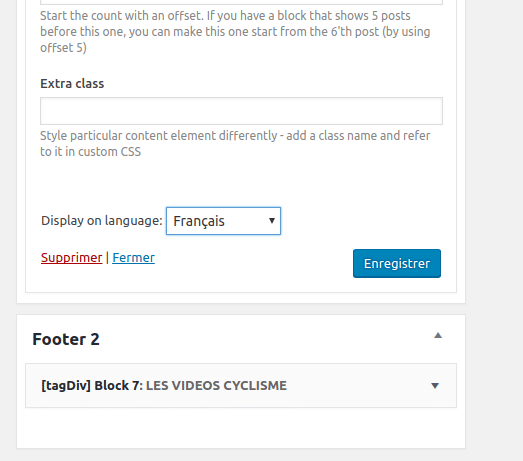
But on tagDiv widgets, the selectbox rollbacks to “All languages” everytime I choose a language and save.
I tested on other widgets, it works very well.
https://todaycycling.com/wp-content/uploads/2017/09/footer-2-widget-roolback-englush-french.png
Thank you
 GregWasThere
 Hello,
sorry there is a problem with the theme and WPML. I am looking for how to remove the roll out on the main menu, and there is no option. The configuration for the main menu is exactly the same and no custom CSS.
Do you know if there is an option on the theme to remove that ? and myabe it’s a bug ?
Look the screenshot : https://www.nextstephub.com/next/
Thanks
-
This reply was modified 9 years by
GregWasThere.
Catalin Hello GregWasThere,
Please notice that we do not know about this issue to be a problem with WPML and until now, we do not have any bad reports in this case, sorry! This plugin has been tested with our theme and it seems to return good results, without any problems. Check your plugin list and if you are using some untested plugins, you should remove all of these because it’s possible to be a plugin conflict which causes this problem, sorry! Also, you should check the menu functionality for both menu bar to be the same and to have the same options available, like the mega menu.
Hope this helps and let us know how it goes!
Thanks for your understanding!
GregWasThereHello,
I installed WPML for the french version of my website.
But I have a problem with the main menu, I don’t have the same menu look with the “>” to see articles on a category, just when you put your mouse on a one category
https://www.nextstephub.com/
https://www.nextstephub.com/fr/
Why ?
GregWasThereHello,
I use WPML plugin for the translation of my website. But I didn’t find how to translate the theme setting like footer text or upload a new logo. I didn’t find information about newsmag theme on wpml support. Can you help me ?
 Simion C.
 Hi,
Maybe these topics would be useful, for more information
– https://wpml.org/faq/language-setup/
– https://wpml.org/documentation/support/troubleshooting-string-localization/
Thanks
 storytraveller
Hello,
I need to translate the footer text & the footer copyright text with WPML, but cannot find the strings. How can I do that?
Thanks 🙂
 natalis
I use WPML multilingual plugin, but I don’t use Affiliate plugin for external URL links for example https://sk.wordpress.org/plugins/wp-auto-affiliate-links/#description, because doesn’t distinguish language.
Which can I use Affliate plugin?
Thanks
Catalin Hello najarfermin,
You should try using the WPML plugin for your website because it should work as expected and for Newsmag theme, according to our documentation here -> https://forum.tagdiv.com/using-theme-translations-together-wmpl/ All of the modifications which were made in Newspaper were implemented and in Newsmag.
Thanks for your understanding!
Simion C. Hi,
I believe that is how it should work. The search will depend on the current language. The WPML limits the search to that language and shows the search results page in that language only. The theme uses the default WordPress search functionality.
Thanks
 jnachillo
Hi, i have a webm still under construction, and i found a problem that i don’t know if is caused by the construction or by the theme. I have two languages, spanish (main) and english, and when i look for an english word in the spanish front end, the results search show nothing, i have to navigate to the english front end and do the search again in order to show the english results. Is it so? the search box only work according the language that is active?
I’m using the WPML plugin.
Simion C. Hi,
Maybe you can try the solutions from these topics
– https://wpml.org/forums/topic/warning-you-are-trying-to-edit-a-translation-using-the-standard-wordpress-edito/
– https://wpml.org/forums/topic/translation-warning/
Thanks