

Hi, in theme panel > theme colors, i change the colors, but, after download a prebuilt website, the colors don’t change. Where can i change that colors?
Example, i download the prebuilt website named “news hub pro”, but i want to change background to white (ok), text to black (i don’t know where), and red backgrounds to green (i don’t know where). Like i said, y have change all this colors into theme panel > theme colors, but only change the black background to white, the rest colors don’t change anything.
I need help for this.
Regards.

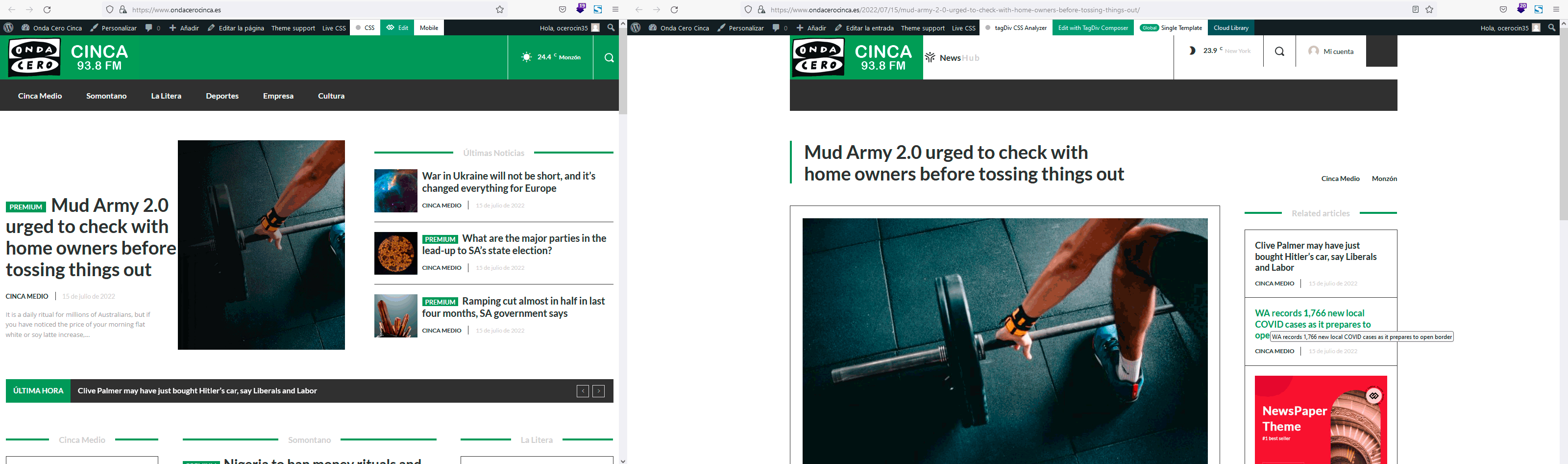
Hi, look the left screen (is the home page) and see the header, and look the right screen (is a single post page) and see the header, you can see that are different, and i want the same, the global header for all, and the global header is the header that you see in the left screen.
Regards.
Hello!
Please edit an article with the TagDiv Composer, and set the global template in the Website Manager: https://prnt.sc/O9w-gcKrSCtS
Thank you!
Hello!
You need to edit the article normally with Gutenberg, lock the content, and choose a locker here: https://prnt.sc/kyWul6rLzXlr
Then you’ll have the badge automatically in those articles when you set up the locker: https://forum.tagdiv.com/lockers/
Thank you!
