Hello,
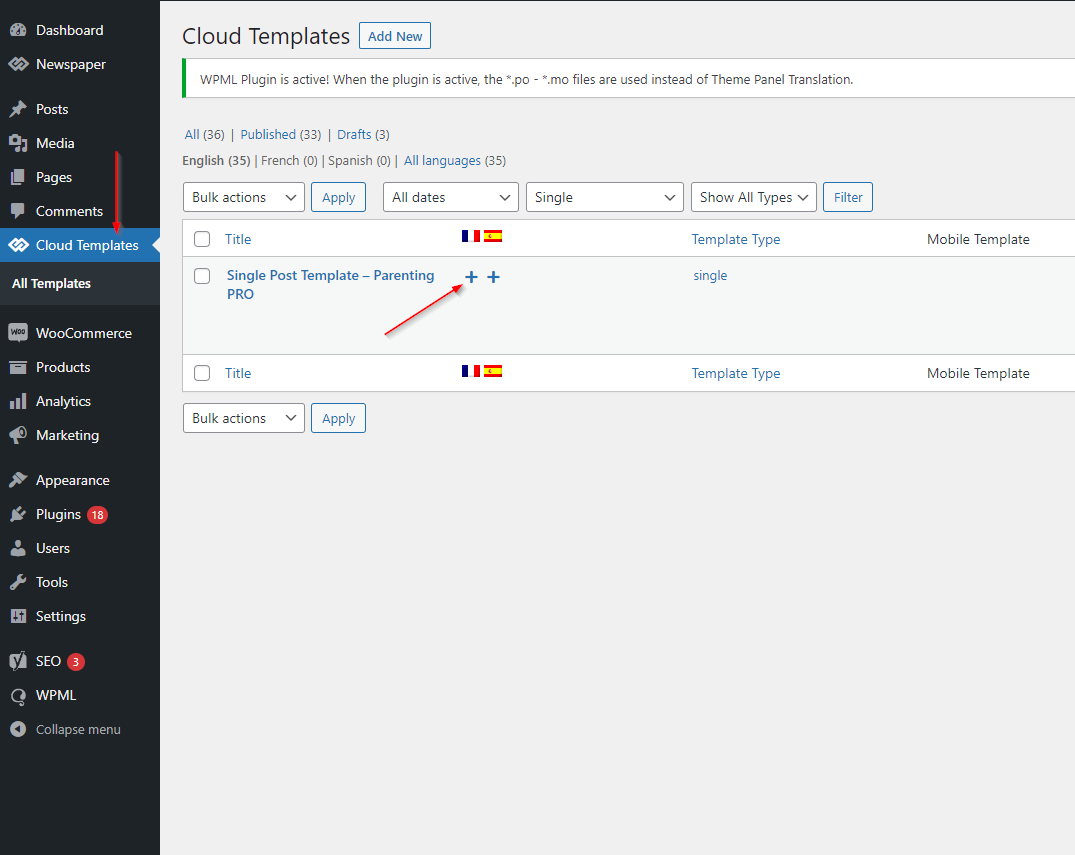
We followed your guide here for our WPML setup: https://forum.tagdiv.com/using-theme-translations-together-wpml/, but there is a problem because according to your guide it was easy to translate each “cloud templates” that we have defined: https://forum.tagdiv.com/wp-content/uploads/2017/04/wpml-3.png. Except that your guide is not up to date because this poster no longer exists in the wordpress with the theme today, it is this display now: https://share.cleanshot.com/1ygN7qmp
how can we duplicate our models from our default language in all languages and then translate them?
We have enabled the whole automatic translation system with WPML and some parts do not translate: https://share.cleanshot.com/p55bn9KH
– Some parts in the header and footer are not translated automatically
– The bio of the authors is also not translated automatically
– Exclusives are not displayed in other languages.
– Subscription pages are not translated either
– Images are not showing in articles
Any ideas to help us solve the problem?
Good morning,
We only have one problem left to solve and we need you.
All “cloud template” models have been translated except 1.
The default template of “Homepage templates” cannot be translated into several languages, i.e. you cannot create a “homepage template” per language, because your theme only accepts one “hottempage template” by default for all languages. WPML does not know how to translate everything that is put in these fields:
Screenshot 1 : https://share.cleanshot.com/5tJC5QtG
Screenshot 2 : https://share.cleanshot.com/fXyNWqBR
Screenshot 3 : https://share.cleanshot.com/KFbBf1zf
…
And also impossible to translate some other elements of the “popup-menu” page: https://share.cleanshot.com/1CqhnD0Z
All the custom fields of the template are not translatable for WPML, it does not detect them…
How to solve this problem?
-
This reply was modified 3 years by
dlicoppe.
When we make corrections it does not show on the site… https://share.cleanshot.com/HCw7rdlR

Hi,
Indeed, there were a few changes to the cloud templates. You need to translate the English (original language) header for each language in part – https://i.imgur.com/CDmeHCf.png you should have them for each language cloud template – https://i.imgur.com/4agmUtg.png
A much simpler and faster alternative is to duplicate the cloud template you want to use in another language, edit it and select the desired language – https://i.imgur.com/z1CqgBo.png (edit the name) – https://i.imgur.com/dPX8ROs.png – https://i.imgur.com/Lc81IgP.png This method needs to be used to translate all cloud templates.
The pages are created with tagDiv Composer which is a page builder, when WPML is used it cannot translate everything that was built with the page builder and must be edited for each language separately. Please open the page in the editor and click on translate – https://i.imgur.com/TXH6y1c.png
When you make the corrections, make sure you are on the page with the language you are editing, and if you use the cache, or object cache, please clear it.
Thank you!
it does not work…
Here is the proof that the page is modified and translated into English:
1. https://share.cleanshot.com/LkWhzvW3
2. https://share.cleanshot.com/SklQDDvN
We make the changes in English: https://share.cleanshot.com/KfgQkKdx
we record and nothing…
it returns to the original text, it does not take into account our modifications…: The test is always in French from the popup menu on all languages: https://share.cleanshot.com/q25CJ35y
There must be something wrong with your theme…
We can give you access, but be careful not to delete items!!! Because the last time you were given access, you deleted content from us…
We noticed there are many fields of your templates in the “pages” which are not translatable… why? ON is busy redesigning your entire theme on the “pages” part. Your theme is not suitable for multilanguage. All these types of fields in pages that are not linked to cloud templates cannot be detected by WMPL… ?
https://share.cleanshot.com/Ky94b8Mh
-
This reply was modified 3 years by
Hi dlicoppe,
As I mentioned above, after you translate a page or a cloud template from one liba to another, they cannot be translated automatically like a post, the layout will be read and the text will usually be changed using tagDiv Composer.
If you want, we can connect to check if there is a problem, but as I said, the texts must be translated manually with tagDiv Composer on each language because they are set in templates and pages with shortcodes.
Thank you!
you don’t understand… we translated the texts directly in tagdiv composer but it doesn’t save our changes… this is never taken into account. Yes, you can watch by logging into our site indeed. And there’s this problem that we can’t solve: https://forum.tagdiv.com/topic/problem-with-the-homepage-display-bug/