

 byothe
 Hello @Calin,
I have been working hard on this matter, and it appears the problem was coming from LS Cache (a cache plugin for wordpress)…
Problem solve. Thanks
Still have other problems with 12.3 though…
byothe ok thank you
I am sending the mail to contact
byothe Hello @Anamaria
I’ll do that but I have a few questions :
– will the put back the site in the state it was before disabling plugins
– will the site stay without the plugins for long ?
Thanks
byothe oh thanks ! Problem was the mobile version !
It worked !
byothe Hello
I tried to purge all caches and make a hard refresh…
I even tried to use Hide my ass, a proxy web to navigate on my site and the problem is still there with 12.3.1
I reinstalled 12.3.1 on my site so you can experience the problem yourself…
Thanks
byothe Hello Calin,
I was on 12.3.1 and it dind’t change anything
I rolledback to 12.2 and now I am waiting to see if it changes anything…
I’ll let you know
-
This reply was modified 3 years by
byothe.
byothe Yes but the problem happens for other people on the forum too…
byothe byothe I just did the rollback to 12.2 and now sticky menu works like a charm…
so this is a bug
byothe ok thanks
I just did the rollback to 12.2 and now sticky menu works like a charm…
-
This reply was modified 3 years by
byothe ok ok… good move ! Is it easy to do the rollback ?
and which version did you go back to ? 12.2 ?
-
This reply was modified 3 years by
byothe well…
When I go to your website, the sticky menu seems to work fine…
https://ibb.co/7XvXb7h
byothe In Pic 1 it’s fine even though I don’t understand why the menu doesn’t fill more of the page width and immediately adds items to More
-
This reply was modified 3 years by
byothe Yeah but you don’t provide any real answer… Problem appeared with one of the last update of your theme.
The theme become more and more buggy…
byothe Hello SamRe
I can confirm that the sticy menu doesn’t work for me either since last version of theme…
byothe Hello @Patrianto
Have you been able to find a solution ? If, so can you share it as support won’t really help…
byothe wow thanks ! What a fast support !
It worked !
Thanks a lot !
byothe Ok I found the problem… It was caused by AIO WP Security plugin…
byothe not sure to understant the problem…
But still I have a lot of pictures that doesn’t looks fine :
Here its blurry :
https://byothe.fr/analyser-les-statistiques-de-nimporte-quel-compte-twitter-avec-tweetdeets/
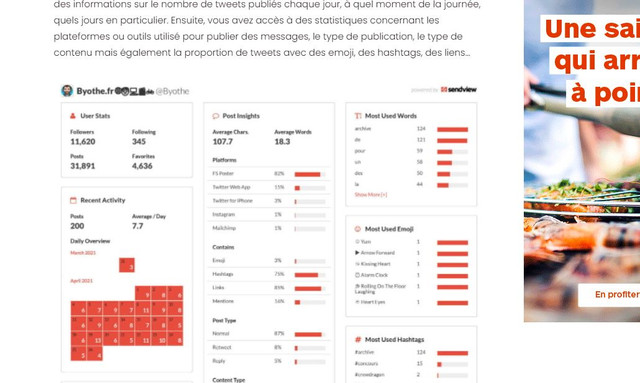
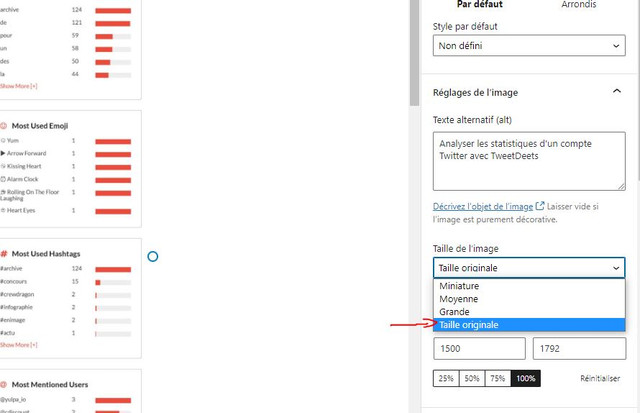
But when i change the option “image size” from “big” to “original size” it looks better
How can I have this by default :
byothe hmm…
I am speaking of any pictures in my articles… the featured Image seems to work relatively fine compared to the pictures in the articles
byothe Hello Anamaria
I am not sure that the screen capture is the right one…
Where can I check that images are in full size ?
Regards
byothe No that’s not the problem… I have a URL on my header and I want the header to look like a link you can clic (URL color, color change when you pass the mouse over…)
byothe For example, I would like this header to look like its a clicable link (as there is a URL on it)…
https://ibb.co/LkWD4Nb
-
This reply was modified 4 years by
byothe I think the problem here is how do you make the header (H2/H3) look like an hyperlink when it’s an hyperlink ?
byothe I am interested to… nothing in the documentation…
