

 dmxsta
 This is the email I received
Hi,
We have updated tagDiv Composer(for standard templates) and tagDiv Cloud Library(for cloud templates) plugins with a fix for this issue. I hope it will work properly also for you.
This is the result on our live demo – https://www.screencast.com/t/HB9VnceTbTie
We have modified the review schema and on the testing tools these are the results – https://search.google.com/test/rich-results/result?id=Tg2H4gLUQ4oFMtafIAOmNQ – https://validator.schema.org/#url=https%3A%2F%2Fdemo.tagdiv.com%2Fnewspaper_pro%2Ftd-post-laptop-with-128-bit-processor-32gb-of-ram-and-24mp-front-camera%2F
The only warning is related to missing field “aggregateRating”, but this is optional and practically this was the cause of this issue (votes number instead of the author).
You can take a test and let us know how it goes. Just deactivate and delete tagDiv Composer and tagDiv Cloud Library plugins and reinstall them from Newspaper > Plugins – https://www.screencast.com/t/w5Vg8hoeH
Please make a full backup before.
dmxsta I sent an email to the “custom work team” and they realized this should have been fixed a long time ago so fixed it free of charge.
If you need things fixed this seems like the way to go, obviously the support team here can’t relay the information properly.
dmxsta I’m glad you managed to fix PART of the review schema, the numbers are displaying properly, however, why are we stuck with “1 vote” and not the author’s name like every single other review site has?
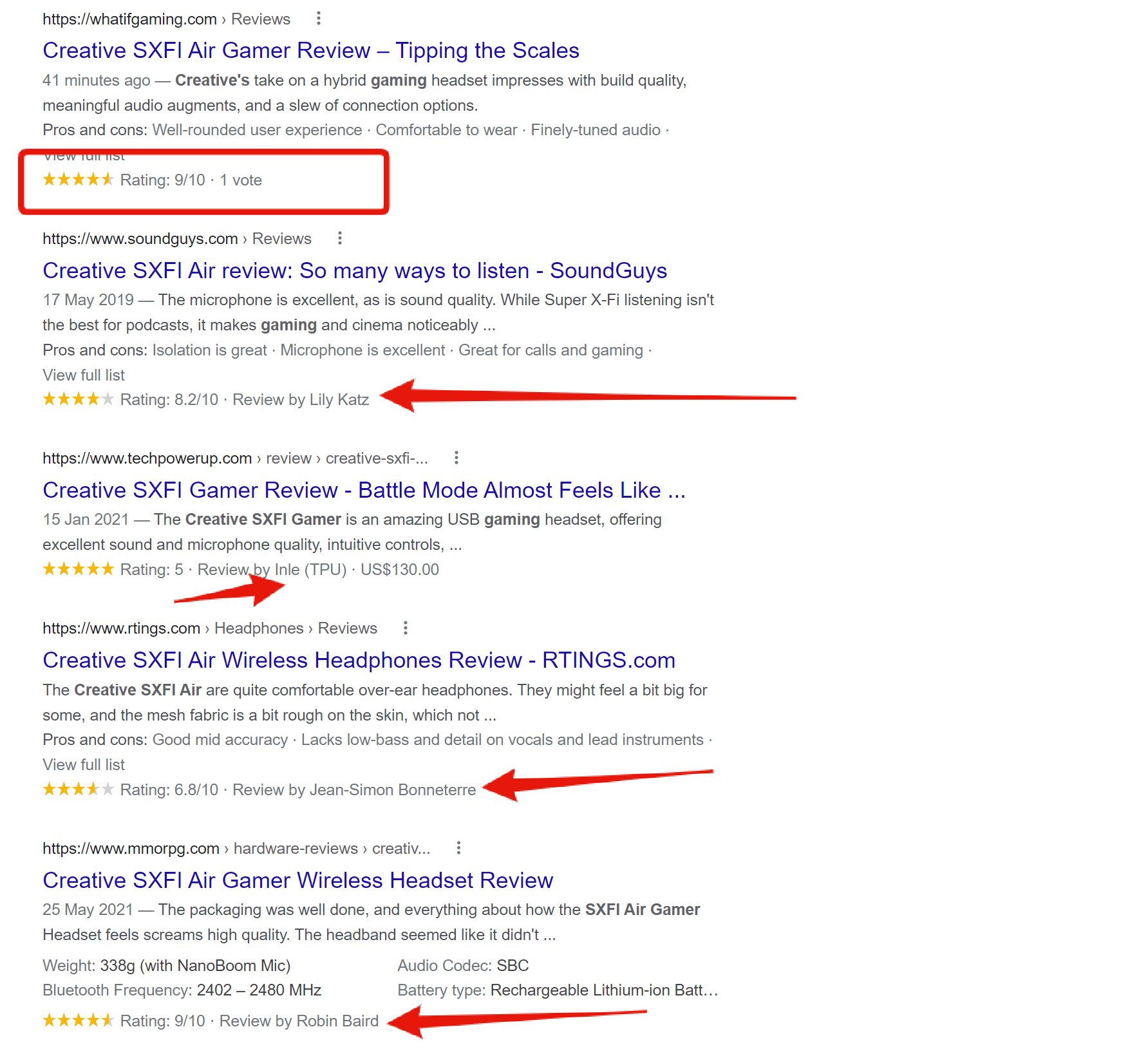
It seems strange to do something so half-heartedly when it’s so so simple, maybe you are not relaying the information properly to the dev team? It just doesn’t make sense to me.
PLEASE can we revise the review schema and make it right!
I’d love to be able to speak with the dev team myself or even pay someone on your team to fix it for me. It’s making our review site seem super unprofessional and just needs fixing ASAP.
Thank you!
-
This reply was modified 4 years by
dmxsta.
dmxsta Hi Calin,
Thanks for the reply.
Yes, the 5-star display system is working but this is not the problem in question. The problem is with the points system that you have been made well aware of.
So you are saying the schema will be fixed for the points system in the next update? I was told there would be “improvements” last time and it was still not fixed.
Thanks!
dmxsta Hi,
So it’s been over a month since I started this thread and still no update.
This fix is so simple I can even give you the code which needs to be added, I really don’t understand why a theme that is advertised as a “review theme” cant fix their review schema which has been broken for years!
Please push the developers into fixing this problem, we both know it is WELL overdue.
Thanks
dmxsta Hi Calin,
Yes, I am referring to the Google schema which is broken. Why let users choose between stars and points if the points system is broken and doesn’t display on Google correctly?
I don’t get how the developers can’t fix something so simple, it’s been asked time and time again by paying customers, however, tagDiv refuses to listen to these issues.
This theme can’t be used for a review site and Newspaper theme is being falsely advertised, such a disgrace from a top-selling theme.
dmxsta This has not been fixed
dmxsta Hi Bettina,
It’s been 3 weeks and we still can’t get an update on something so minor?
Newspaper theme promises that the theme is great to run a review site, however, it’s impossible to run a quality review site when the schema is broken. This is very basic stuff and should have been fixed a long time ago when we were first promised
For a best-selling theme, Tagdiv treats its paying customers very poorly and it’s totally unacceptable.
dmxsta Have we got any updates on this?
It’s such a simple fix and should have been revised a long time ago, we were promised a fix in the last update but didn’t get one.
dmxsta Hi Bettina,
Thanks for passing this on to the developers, please let me know as soon as you hear back from them.
Kind Regards
-Dan
dmxsta I am also experiencing the same issue still, hoping for an update soon.
dmxsta Hi Alex,
I totally agree with everything you are saying, I can’t believe that they are refusing to fix a KNOWN problem, a problem that has been known for a very long time!
Clearly, they do not care about their existing customers anymore, they are FALSE advertising, how can we use something that is BROKEN!
I’ll be writing a report on a public forum for everyone to see how they treat existing customers, I’ll forward you the link soon.
This needs to be fixed ASAP.
dmxsta Hello Calin,
Thanks for getting back to me.
This is a shame as it’s a big part of why I’m using this theme, in fact, I actually purchased this theme as the sales page says the following:
This bestseller theme is perfect for blogging and excellent for an e-commerce, shop, store, WooCommerce, news, newspaper, magazine, publishing or review site.
Let’s be real, you cant run a review site on the newspaper theme when the schema doesn’t work and I’m getting a ton of errors in the search console, this is false advertising and should be removed from the sales page.
I can’t imagine this would take long to fix either.
I think this should be pushed to the developers and needs to be fixed ASAP. It’s very unprofessional that the developers are aware of this problem and have been for a long time but refuse to fix it.
Thanks.
dmxsta It would be great if you could look into fixing the review schema, what’s the point in letting people make reviews out of 10 when the Google schema displays it out of 5. Very unprofessional…
dmxsta Hello Betinna,
Everything is up to date including all plugins, however, I am still having this issue.
dmxsta We are still having this problem WEEKS later with no fix, this is not good enough TagDiv!
Please fix this problem
dmxsta Hello Anamaria,
I’m talking about the headings in the backend, the Gutenberg editor.
Please see an example here: https://gyazo.com/12bb2b5bb5b51d5d0dafb8ec7ebec432
You can see that all of the headings are the same size, before the update the size was dependent on the heading number. The front end displays the heading sizes fine.
Thanks.
dmxsta I still seem to be having this issue after the latest update, do you know what could be causing this issue?
Thanks!
dmxsta Hello,
Thanks for the information, do you know when the update will be released?
Thanks!
dmxsta Hey,
I must have missed that spot, thanks for the help!
-Dan
dmxsta Hello,
So could you not at least help in terms of which files to edit?
If you have knowledge of how the theme works this should be a very easy answer for you.
Thanks.
dmxsta Hello,
Okay thank you for the reply, I have a developer working with this. Could you just point him in the right direction of the custom work that’s needed?
Uninstalling the mobile theme is not really an option for me as it significantly increases mobile speed.
Thanks for the help.
-Dan
dmxsta Hello Bettina,
There is not only CSS changes I have CSS with HTML changes also with custom template
dmxsta Hello Ana,
Thanks for getting back to me, I had google recrawl the URL and it fixed the error, however, it’s still showing the two warnings.
Can you assist me with fixing those warning messages?
Thanks very much
Regards,
Dan
dmxsta Thank you Anamaria!
Appreciate the help!
– Dan
