

 Eighthats
 Hello,
I was checking in this request.
Can you provide an update on the reported issue?
Eighthats Hi Calin,
You currently have admin access to the site and we don’t use cpanel but I can grant you access to our hosting panel for sure. I will send that email out in just a moment.
Eighthats Thank you for your reply. We have tried to restore the page from a revision but encounter the same error. Furthermore this issue occurs on any page we try to edit so it seems that it isn’t isolated to one page. I have changed the header and footer to a different template with the same results and I have disabled any new plugins we have added. This issue still remains.
Please advise on the next steps. Thank you
Eighthats Hi Bettina,
That seems to have done the trick! Thank you for your help here.
Eighthats We were just trying anything we could to get the posts to come back to the category template, and this worked but it removed the template from the list so we cannot edit it.
Eighthats WP = 6.6.2
PHP = 8.1.29
Newspaper: 12.6.7
This error has occurred on multiple category templates intermittently, displaying the same way.
We have many plugins across the site, things like Advanced Ads Pro, and Advanced Custom Fields Pro, but when we disable those plugins, it doesn’t fix the problem.
Perhaps it is related to the following:
When editing the 6G category (the link I provided that was previously not working), we tried using “Edit” instead of “Edit with TD Composer.” We were then able to assign the category in the Gutenberg editor which resolved the problem BUT made the category template disappear from Cloud Templates on the back end.
It’s strange, sometimes when I click the “Edit” button on a category in the Cloud Templates, it shows the Gutenberg block editor, and sometimes it shows the “Classic Editor” without categories available. Something seems broken here… images attached.
I figured it out, I had to manually delete all cache files via SFTP.
they were not actually being cleared out by any of the options offered by the server or the plugins on the site.
Eighthats Also, after clearing the object cache on the server, it appears correctly or logged in users. but not for logged out users.
Eighthats This issue has popped back up for me.
Under appearance > Menu
I have updated the Mobile Menu to include a few more pages. It is named Mobile Menu on the back end of the website.
This is the menu that was already being used as the global header.
I have saved the menu and when the page reloads it is still updated.
When i update the template, it does not save / show which menu is selected.
The front end does not update at all.
Even after updating the template to select the menu again, the front end mobile menu is no showing content that matches any of the menus found under appearance > Menus.
Two pages were added to the mobile menu:
Rohde & Schwarz 6G Technology & Testing
5G Manufacturing Forum 2022
and they are not showing on the front end.
All caching has been turned off completly. as well as many other plugins have been turned off so we can troubleshoot.
Eighthats Additional Problem:
When using the post Loop on element on the home page, with numbered pagination,
if you click any of the numbers, it goes to a blank page.
I had to change it to a load more button for now, but i’ll pull a copy onto staging to show and then link it here.
Eighthats I recently had similar issues and found a solution to the problem.
Flex box elements using AJAX to pull in posts were causing major issues with database queries.
I changed to the post loop for the main content area, and removed any blocks using ajax from the footer.
All performance stats on the site dropped by 50% pretty much right away.
Aug 24th – 10am-11am
Response time: 1.36s
CPU Utilization: 97%
Memory Usage: 13GB
Aug 31st – 10am-11am
Response time: .592s
CPU Utilization: 46%
Memory Usage: 7.5GB
Our site has about 100,000 posts and around 500,000 unique visitors per month.
For anyone else having these issues:
Don’t use any blocks / elements with ajax to pull in post data unless you absolutely have to.
Eighthats Looks like the flex block using ajax was absolutely the problem.
I changed to the post loop for the main content area, and removed any blocks using ajax from the footer.
All performance stats on the site dropped by 50% pretty much right away.
Aug 24th – 10am-11am
Response time: 1.36s
CPU Utilization: 97%
Memory Usage: 13GB
Aug 31st – 10am-11am
Response time: .592s
CPU Utilization: 46%
Memory Usage: 7.5GB
For anyone else having these issues:
Don’t use any blocks / elements with ajax to pull in post data unless you absolutely have to.
Eighthats Ok.
Which element / module can I use to pull in the latest posts using a different style of pagination?
I am currently using Flex Block 1 and i dont see an option for non-ajax pagination
Eighthats What would you suggest for “Or replace that block with a post loop element and use numbered pagination?”
However, I do think you should acknowledge that the way the tagdiv elements that query the database are doing so in an inefficient manner.
Eighthats We are still experiencing severe issues with our site due to the slow queries caused by the TD_composer.
Similar to these other tickets:
https://forum.tagdiv.com/topic/very-slow-query-because-of-most-popular-news/
https://forum.tagdiv.com/topic/performance-issues-on-large-database/
even when testing the site with only tagdiv plugins enabled, the queries take quite a long time and will cause the site to timeout if there is high traffic.
This issue is critical and we have absolutely narrowed it down to the theme, its page builder, and the way it loads in posts per page.
Caching, optimization, server resources, plugin conflicts, etc have all been tested.
Eighthats I have replied to the support email with access credentials for the staging version of the site.
Eighthats 
Eighthats Email has been sent. It will come from Team@eighthats.com
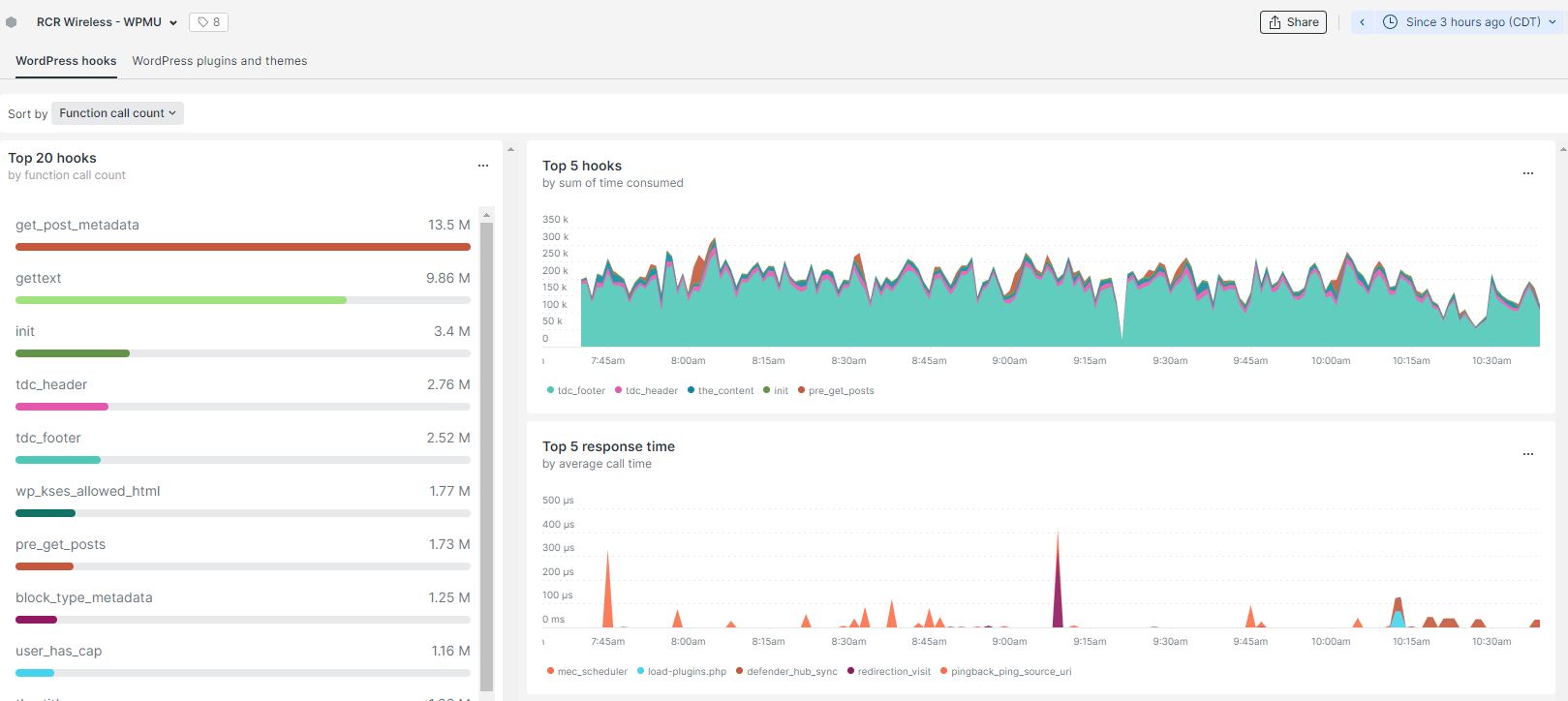
Eighthats I am also seeing
3 day count for function calls:
get_post_metadata – 147m
td-composer 200m
-
This reply was modified 4 years by
Eighthats.
Eighthats I have reached out to your team with the requested information.
Eighthats I am currently pulling a copy of the site into a staging environment to do further testing, by disabling all plugins.
Eighthats Hi Calin,
I have disabled all caching on the site, even at the server level, and I am still seeing the issue with the mobile menu. It will not save which menu is selected, and only serves up the default site mobile menu.
