ermannaro
 email sent, thanks for the help
ermannaro Your code does not solve the problem even if it is correctly applied.
The problem is not in the format of the iframe but in the class that is associated… see image:
https://tinyurl.com/y4edtu3t
Question is… why this link have this class (see image):
https://tinyurl.com/yyclq9j2
and this link have this other class? (see image):
https://tinyurl.com/yyc9scn5
I would always this class wp-embed-featured-image square
but in article I haven’t any control.. I copy/past only the link…
is there a code to force this class always?
ermannaro nothing changes unfortunately…
ermannaro That’s exactly what I’m saying… why some posts are displayed with that wrong layout and others are no?
As you can see from your image attached to the previous post, the image that is used by the template for that type of display is 150px and is enlarged in fullscreen, damaging itself.
While in the first iframe, WHICH I have inserted in the same way, that is copying/pasting the link of the article, the image remains 150px in the correct layout without stretch.
I would like to understand why some included articles have the correct layout and others don’t.
So that I can make sure that they are all shown in the correct way, … correct layout …
The example article to see is: https://www.viviliberamente.com/5-tipi-di-meditazione-consapevole-per-ridurre-lo-stress/
and I’ve disabled the content copy protection so you can see the code better to help me.
Thanks a lot
ermannaro I was just asking because the iframe content is shown differently depending on the article.
In some we have a large image and text below and for other articles small image and text on the side.
ermannaro for amazon iframes seems solved by adding this code:
iframe {
    border: 0 !important;
    margin: 0 !important
    overflow: hidden !important;
}
but the iframes that the template automatically creates when I add an internal link still have the scroller… see the image:
https://tinyurl.com/y564euhe
I also never understood why the template when I add an internal link to another article sometimes shows me the article in the iframe as in the image above and some other times in this other way:
https://tinyurl.com/y4hz48zl
any other idea?
-
This reply was modified 4 years by
ermannaro.
ermannaro Hi, I try to explain myself better.
I’ve always used amazon affiliate links on my site and the code is autogenerated by amazon.
The iframe has always shown up fine in the pages without doing anything.
Now since a few days, (I don’t know if after the last update), I got out the borders on all the hundreds of iframes contained in the hundreds of articles of the site.
So I couldn’t edit any single iframe, and anyway it seems that already the iframes contain frameBorder=”0″ and even adding scrolling=”no” the iframe keeps both borders and scrolling.
Strange thing is that the iframe in editor mode displays fine:
https://tinyurl.com/y3puf8ub
This is iframe in image:
<iframe style="width: 120px; height: 240px;" src="https://rcm-eu.amazon-adsystem.com/e/cm?ref=qf_sp_asin_til&t=karmaweb-21&m=amazon&o=29&p=8&l=as1&IS1=1&asins=B01NAASUGT&linkId=00e79f71f5cc507353aef3ded3894b50&bc1=ffffff<1=_blank&fc1=333333&lc1=d143be&bg1=ffffff&f=ifr" frameborder="0" marginwidth="0" marginheight="0" scrolling="no">
</iframe>
ermannaro Update point 1:
The links now work, but the image is always obscured.
Also is there a way to open the image in popup? If I use link to the image it opens the page for me without the possibility of going back and that’s not good …
Thanks
ermannaro Hi, have you been able to find the access data to the site in the email I indicated?
Do you prefer that I send a new email?
ermannaro hi,
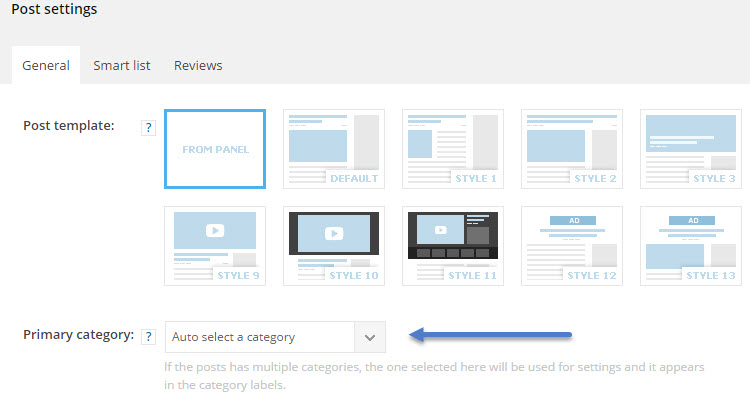
I replied via email in detail to explain that I can’t find this setting in the template.
https://forum.tagdiv.com/wp-content/uploads/2016/06/primary_category.jpg
Thank you!
ermannaro Yes, at the moment there are old posts loaded on the site. For new items the customer knows that he will have to upload optimized images, however we would like a setting as similar as possible to the demo block “flex box 1”, in this block the images (of any size) are cut perfectly.
I have sent the email with the access data to the site for other problem. Please look for the mail with the subject “megamenu problem” of November 16th is the last.
I await good news 🙂
Thanks
ermannaro Thank you
ermannaro ermannaro ok money wasted, i hadn’t read that it only works with visual composer.
I installed visual composer and the pages of the site no longer worked so I put everything back as it was and installed this other one which works with short code.
But I can’t get it to look like your block completely.
See image below.
https://www.awesomescreenshot.com/image/5678169/cd47913f1d7a1cc79aa689cbee4464b4
Can you help me with the css to get the vertically aligned and cropped images and the category title?
Thanks
ermannaro No trial available, I buy it.
The instructions say this… see the picture:
https://www.awesomescreenshot.com/image/5675857/6ca9e6dc1e0629cd1e5d80d3d90bd5ba
But in your composer tagdiv I don’t understand how to insert it in the home.
Please help me
On November 11th I sent a never with subject: “installing demo problems” in which I indicated the site name and access data.
Thanks
ermannaro ermannaro solved thank you!
ermannaro ok thanks, I wrote the email explaining everything and reporting below what you wrote to me.
I await a reply via email and hope for a resolution of the problem.
Thanks
ermannaro unfortunately these solutions are not good for my client.
But if I buy this plugin:
https://codecanyon.net/item/jellywp-post-carousel-slider-visual-composer-addons/17273500?_ga=2.260632644.813805016.1605094505-1966936646.1605015549
using your tagdiv composer (which I still don’t understand), will I be able to integrate this plugin in the opening home instead of the current block?
Or will the tagdiv composer not allow me to insert plugins external to yours?
tnx
ermannaro for ads sorry it was a simple cache problem… but for instagram images I don’t know…
I don’t see images…
ermannaro No, I didn’t explain myself well.
I know that everyone sees pinterest images.
Only I DO NOT see them on any of my computers and I would like to understand why.
If you see the screen posted here: http://bayimg.com/haNBbAAGm you will notice that I don’t see them.
—
for the google problem instead …
I removed the “auto placed ads” script from my google ads account and entered the new script … this:
</ Script>
<ins class = “adsbygoogle”
style = “display: block”
data-ad-format = “fluid”
data-ad-layout-key = “+ 1s + sa-1n-4h + ee”
data-ad-client = “ca-pub-2371193746759686”
data-ad-slot = “1409917260”> </ ins>
<Script>
(adsbygoogle = window.adsbygoogle || []). push ({});
</ Script>
but I still see the banner space (even if it’s empty sometimes), under the header …
see image up
why?
ermannaro for ads ok…
I deactivated google auto placed and placed normal ads. For now I still see the wrong positions but maybe we just need to wait.
Then I was wrong … I don’t see the INSTAGRAM photos (not pinterest sorry), as you can see also from the photo attached in the previous post.
While I believe others see them …
why?
ermannaro Tnx Catalin,
I’ve just seended email…
tnx
ermannaro The only thing I understand is that you do not want to help me or you can not help me.
The whole lesson on the fact that it is not recommended does not help me.
My client has always done so since he installed your theme years ago and wants to keep doing that.
May I go beyond the fact that it is not safe?
Then, we are not stupid … we know that if the site from which you copy take away the images these will not even see on our own. And this is good for us !!!
Now for the third time I will explain that:
if I copy / paste IN ADMINISTRATION a text and photos from another website, THE IMAGES DO NOT SEE !!!
ATTENTION: The images DO NOT SEE ON MY WEBSITE BUT ON THE STARTING SITE YES !!!
ALWAYS LOOK AT THE SAME IMAGE ATTACHED IN PREVIOUS POST.
TO VISIT THE IMAGE WE MUST DELETE THE IMAGE NOT DISPLAYED AND MANUALLY INSERT THE LINK OF THE IMAGE OF THE OTHER SITE — (THE IMAGE LINK !!!)
I ADD ANOTHER THING:
My client also has a license for your other theme “NEWSPAPER” and says that in that theme the texts that copy / paste from other sites ARE READY CORRECTLY !!! In the same way, YOU SEE THE PROJECT ALSO IN THE “NEWSMAG” THEME BEFORE THE LAST UPDATES!
Now, if you did not understand, WE ARE NOT INTERESTED THAT IT IS NOT SAFE, we are interested in being able to copy and paste the images from other websites DIRECTLY IN THE PHYSICIAN THAT WE ARE CREATING, AND IT DOES NOT MATTER THAT IF THE DEPARTURE SITE WILL CANCEL YOU YOU WILL NOT SEE MORE NEMMENOUS IN OUR!
Unfortunately for my client this feature is very important for this reason I would like to insist as he is annoyed that THIS HAS COULD DO IT FREE FOR A LONG TIME AND NOW CAN NOT BE MORE
Thank you
ermannaro works… tnx!!!