GoingFor2
 Okay. I tried a few of those options already, I’ll try the other ones and let you know what happens. Thank you.
GoingFor2 It doesn’t just happen to me though. Readers are the ones that pointed it out to me at first. Some were getting security warnings from their browsers that my site wasn’t safe. Others were getting the “bot check”.
GoingFor2 Forgot to subscribe to the emails.
GoingFor2 Yea. I discovered it’s an issue with my cache plugin. I disabled it for now until I can figure out which setting is causing the issue. Thank you.
GoingFor2 Now it appears my whole mobile site is broken. I even tried deactivating the mobile theme, and that didn’t seem to help. So I tried deactivating all my plugins, and still nothing. The Desktop version seems fine.
GoingFor2 Looks like whatever I did yesterday worked. My cache must not have cleared properly. However, it looks like whatever I did, the author name isn’t showing.
GoingFor2 Cancel this, I found another feed with the correct code. TY
GoingFor2 Email sent. Thank you.
GoingFor2 A work around currently is to put the post in “pending” or “scheduled” and then hit preview. It only messes up when it’s in draft.
GoingFor2 No. I haven’t been able to figure it out and no one has answered me yet.
GoingFor2 Here is what it looks like in preview. It seems to only do it when the post is in “draft”. If the post has already been published or even if its “scheduled” the preview works fine.
GoingFor2 Is there a way to have a “Desktop” version and “Mobile” version like I do for Pages? I really like the way the Smart List looks on desktop, but I have it just just up the regular way on mobile.
GoingFor2 Sorry. Forgot to give the URL. My site is GoingFor2.com. But you can see the issue with this URL: http://goingfor2.com/nfc-west-division-preview-mock-draft-fantasyfootball/
If you view it on desktop, it produces the desired results, but on the Mobile theme it make every “heading 3” a slide. I’m using Smart List 4, which shouldn’t do that.
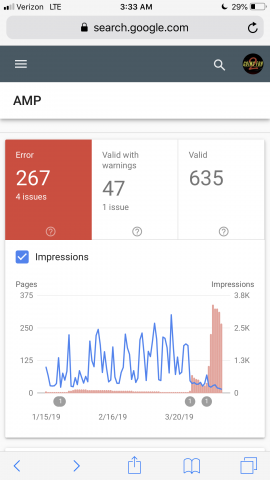
GoingFor2 Okay. I understand that it’s not recommended I downgrade, but I would still like to do so. I tried everything you’ve mentioned from turning off plugins, checking and re-checking my setup. None of its working and I’m losing traffic and google Ranking because of it. Everything thing worked perfect before the upgrade, as you can see from the photo. If you could explain how I downgrade. Thank you.
GoingFor2 Okay. It looks like AMP is showing up properly now, but is it possible to revert back to the older version? Take a look at this image, I’ll give you one guess as to when I upgraded to the new version. Right about the time you see my impressions take a nose dive and my errors skyrocket. Here is the image: http://goingfor2.com/wp-content/uploads/2019/04/9ADB38E9-4EE1-4261-B205-29028F44ABAE.png
GoingFor2 Okay. I will do my as that way, it now that AMP is activated, the AMP version of my site is broken. All the social icons show up as just hyper links and the footer is all hyperlinks. And there is no menu showing up either.
GoingFor2 Okay. I activated my AMP. I’m using AMP+Mobile. I currently do not have an amp ad set up as I originally thought that was the issue. But even after removing it, i was getting the script error. I know that AMP ads are different and I was using them properly. They worked fine before the update. Now, they do not.
Does the “mobile ads” need to be in AMP format? Before they were separate.
GoingFor2 I check with the Ad provider and they should be fine on mobile. I don’t see any errors when the code is posted, just nothing shows up. When I replace it with an Adsense code, it works fine. Here is a post that should have the ad show up after the 3rd paragraph, but as you can see, it does not. It does, however, show up on desktop (or it did last time I checked it). The ads you do see are all Adsense ads. http://goingfor2.com/false-report-about-carson-wentz-by-joe-santoliquito-is-simply-poor-nfl-journalism/
GoingFor2 The non-Adsense ads are from a company called Media Strike. They show up in the desktop version when they are wrapped. I’ve tried put one in all of the “mobile theme” locations, but they don’t show. But if I put an Adsense ad in that same spot, it works fine. I’ve tried putting them wrapped and unwrapped. Still nothing shows, but only in the mobile theme.
GoingFor2 Okay. I was able to narrow it down to one plugin. Luckily it was a non-essential plugin. Just for future reference in case anyone else has this issue, it’s the “YouTube Embed Plugin” that creates the conflict.
GoingFor2 Awesome. Thank you. And I’ll look into the Thumbs issue. Appreciate it.
GoingFor2 For what its worth, I’m not getting the second ad either.
GoingFor2 Nevermind. I see now that it only shows up when you scroll down, which actually works better because I have a sticky ad that drops down, the blank space keeps my menu from being covered up by the ad. Thank you anyway.
GoingFor2 Sorry. My link is GoingFor2.com. It only shows up on the mobile site. Thank you.
GoingFor2 To my knowledge, pages have always been like this on the mobile theme. Or at least any pages that use the Page Builder because the mobile theme doesn’t work with the page builder.