

 grillingmachine
 I was able to restore an older backup, and my website’s design is now functioning correctly again. However, I would like to prevent this issue from happening with future updates.
Could you please advise on the best practices to ensure that design settings are preserved during theme updates? Are there specific precautions I should take or settings I need to check before updating?
Thank you for your assistance!
grillingmachine Hey guys,
please have a look at the following huge different loading results:
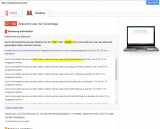
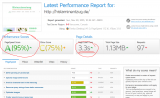
would i have any disadvantages (bad google ranking,…) because of the bad googlepage speed?
i have tried so many speed plugins, but the pagespeed on gmetrix AND google stays everytime at the same. What could be the reason for that?
website link: http://www.histaminentzug.de
-
This reply was modified 10 years by
grillingmachine.
-
This reply was modified 10 years by
grillingmachine Now i could activate the speedbooster plugin with your guide,
but the pagespeed is still only at 58.
please have a look at my website, histaminentzug.de, something has to be wrong with it.
Before i updated it to v.6.5.1 , the speed was at 78…
thank you!
grillingmachine Now it works, thanks 🙂
grillingmachine That doesn’t work 🙁
I put it in my Custom CSS Field, but there’s is no change, even when i empty the cache
grillingmachine Thank you, that works 🙂
grillingmachine grillingmachine Ok, thanks that works 🙂
But it would be nicer if i could do this in the themepanel, maybe an the future?
grillingmachine my website: http://histaminentzug.de
grillingmachine thank you Lucian, it works 🙂
grillingmachine Nice, it works, thanks 🙂
grillingmachine grillingmachine Ah so simple, thanks 🙂
grillingmachine RESOLVED!
It’s no wordpress plugin, it comes directly from facebook:
https://developers.facebook.com/docs/plugins/like-box-for-pages
There you can generate the code for your site.
I put the wrong code -> HTML5 code in a text widget box
It works fine with the IFRAME-Code 😉

