

 haipo
haipo Same here…
I set the default image
But the list shows The default “no-thumb” from template.
See this link:
https://haipo.co.il/tag/incorrect-signage
–
My settings:
https://haipo.co.il/wp-content/uploads/2024/08/Settings-in-template-scaled.jpg
–

haipo Hi,
Is there any resolution regarding the option to remove the website field in the comment form?
It is important as it create links from user comments to external websites
–
Thanks
Yaron
haipo Hi Bettina,
I deactivated all plugins but I still get the same bad results in mobile.
I will send mail to the support inbox now.
Thank you
Yaron
haipo Hi Bettina
In Tagdiv – mobile, images fly out of the frame – example:
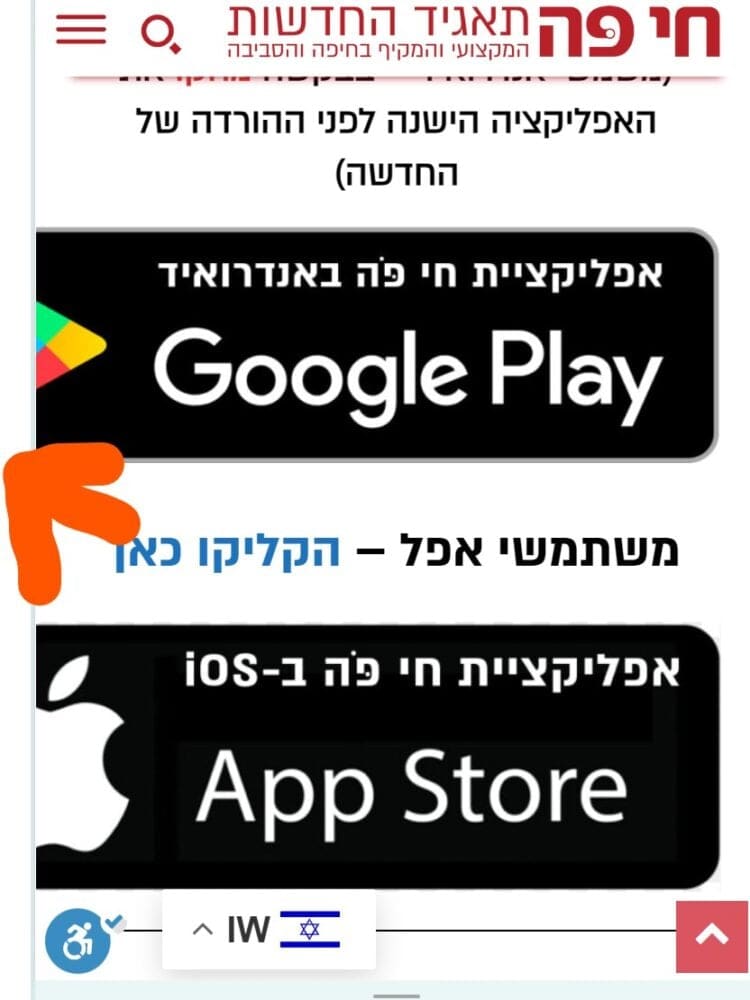
–
In my old version (publisher) – the frame alignes the images – example:
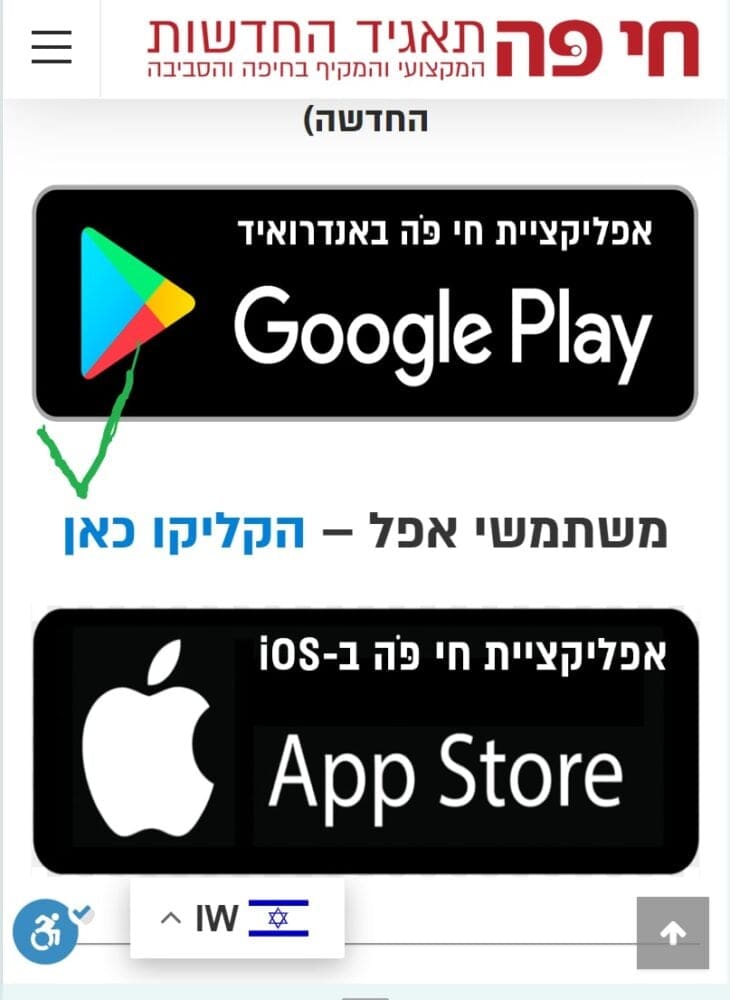
haipo Hi Bettina
I can’t do that as I have 100,000 pages already
And it work perfect in my old template
As you can see the same page looking good in my old template:
https://haipo.co.il/item/135665
–
Looking like error in TAGDIV
https://dev2.haipo.co.il/item/135665
–
This should be aligned in you CSS.
-
This reply was modified 2 years by
haipo.
haipo Hi Calin,
When analyzing your search SQL, I see 2 SQLs statements which are very slow
Both of them take ~3 seconds/
Can you look at them please?
–
Query SELECT
Caller
All
Time
Total: 126 / 128 6.0610
38 SELECT SQL_CALC_FOUND_ROWS wp_posts.ID
FROM wp_posts
WHERE 1=1
AND (((wp_posts.post_title LIKE ‘%יעקב%’)
OR (wp_posts.post_excerpt LIKE ‘%יעקב%’)
OR (wp_posts.post_content LIKE ‘%יעקב%’)))
AND ((wp_posts.post_type = ‘post’
AND (wp_posts.post_status = ‘publish’
OR wp_posts.post_status = ‘private’
OR wp_posts.post_status = ‘advanced_ads_expired’))
OR (wp_posts.post_type = ‘page’
AND (wp_posts.post_status = ‘publish’
OR wp_posts.post_status = ‘private’
OR wp_posts.post_status = ‘advanced_ads_expired’))
OR (wp_posts.post_type = ‘attachment’
AND (wp_posts.post_status = ‘publish’
OR wp_posts.post_status = ‘private’
OR wp_posts.post_status = ‘advanced_ads_expired’))
OR (wp_posts.post_type = ‘tdc-review’
AND (wp_posts.post_status = ‘publish’
OR wp_posts.post_status = ‘private’
OR wp_posts.post_status = ‘advanced_ads_expired’)))
ORDER BY wp_posts.post_title LIKE ‘%יעקב%’ DESC, wp_posts.post_date DESC
LIMIT 0, 4
WP_Query->get_posts
Main Query
3.0252
111 SELECT SQL_CALC_FOUND_ROWS wp_posts.ID
FROM wp_posts
WHERE 1=1
AND wp_posts.ID NOT IN (486438)
AND (((wp_posts.post_title LIKE ‘%יעקב%’)
OR (wp_posts.post_excerpt LIKE ‘%יעקב%’)
OR (wp_posts.post_content LIKE ‘%יעקב%’)))
AND wp_posts.post_type IN (‘post’, ‘page’, ‘attachment’, ‘tdc-review’)
AND ((wp_posts.post_status = ‘publish’))
ORDER BY wp_posts.post_title LIKE ‘%יעקב%’ DESC, wp_posts.post_date DESC
LIMIT 0, 4
WP_Query->get_posts
2.9084
-
This reply was modified 2 years by
haipo Hi Calin,
I did as you said:
Disabled Plugin web2application
Removed the images
Reduced to 5 replies in a loop
But still get 6.5 seconds
I tell you that someting isn’t working well
can you please help meon this one?
This is the only bug left in my DEV system, abd it is a “show stopper” before going live with TAGDIV.
https://dev2.haipo.co.il/?s=%D7%99%D7%A2%D7%A7%D7%91
haipo Hi Bettina,
Thanks for your reply
However, as I wrote you, I have over 100,000 pages\
Adn now I’m preparing a migration to TAGDIV
And some images are not aligned with the mobile width
I cant scan 100,000 pages
I need a central CSS fix for that, as your mobile code is missing some images.
–
Thanks,
Yaron
haipo Hi Calin
I did many tests, and installed the Query monitor
Can you please recheck your SQL?
I get several warning related to your SQL.
And the search results is extremely slow.
I have my own host and all my DB is in memory.
–
Please be so kind to recheck your SQL here:
https://dev2.haipo.co.il/?s=%D7%90%D7%91%D7%99%D7%94%D7%95
–
I also sent TAGDIV a login details to me DEV site.
–
Thanks,
Yaron
-
This reply was modified 2 years by
haipo Hi Anamaria
Your code works perfect.
I suggest to fix the RTL source by the product developers.
Thanks ♥
Yaron
haipo Hi Anamaria, Your CSS cose works perfect
Thanks a lot ♥
Yaron
haipo Hi Anamaria
I did as you instructed
but still the mobile menu is diverted.
You are invited to check my control pannel and see that you have a CSS problem when working RTL.
Of course that I can build the menu upside down for mobile but this is not a good solution
haipo Link to my DEV site:
https://dev2.haipo.co.il/
haipo Hi Calin
I did as you said but it didnd help.
I narrowed down to post
Limit to 5 results
Change the image to 300X0
But still the serch is super slow
–
I have my own instalation with fast DB.
You can see here:
https://dev2.haipo.co.il/?s=%D7%99%D7%A2%D7%A7%D7%91
–
Maybe some other idea?
–
Thanks,
Yaron (haipo)
haipo Sure
You already have it in your inbox
Yaron
haipo Same here – I’m using super cache
The site is fast, but the search results is extremly slow
Note: the first search is slow and the second search on the same search term is very fast.
Is there anything I need to do to make it faster?
–
See this example in my DEV system:
https://dev2.haipo.co.il/?s=%D7%99%D7%A8%D7%95%D7%9F
haipo Hi Anamaria
This solution cannot be done when we run a newspaper site
Because we load many images per day
We must have a default setting for images.
Not only that, but WE are in a situation of migrating the template from old one to TAGDIV
So all the images must have the default setting
(And the basic setting is RTL, so LTR captions will not work)
-
This reply was modified 2 years by
haipo One more question regarding the image in a post:
is there a way to control the image?
Shadow, streach to fit the post, round corners etc…?
haipo Hi Anamaria,
Thanks for sharing.
The fetured image captions is fine
But my problem is with the direction of the post images
(Those inside the text area)
I can’t find the way to alighn the captions RTL…
Can you guide me how to do that?
Thanks,
Yaron
haipo Great!
It works
Thank you Anamaria
haipo It works 🙂
Thanks
haipo Hi Bettina
Done
I send you the credentals by mail.
Thanks a lot
Yaron
haipo Hi Anamaria
You solved the issue
I moved the menu to the “ZONE” and now it works as expected
Thanks
Yaron
haipo Hi Anamaria
The problem is here again
and now I can replicate the root cause, but I don’t manage to fix it:
If I add a sticky row and add a menu in it, then the mobile menu disapears.
I tried to bypass this problem with no luck.
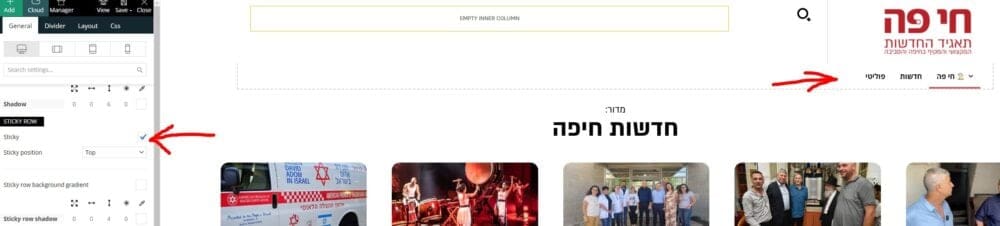
–
Maybe you have a resolution for that?
–
Thanks,
Yaron
haipo Resolved by reloading the header template again from the cloud template and customizing again
