

 Jenny
Jenny Hi Anthony,
I referred the problem to the hosting company (Cloudways) and they purged some of their files causing the problem, so the issue is now resolved. You may want to look though, so the link is https://jamaicanlifeandtravel.com/
Regards
Jenny Ms Anamaria,
Based on your responses thus far, I am beginning to doubt if you understand the nature of the problem I am seeking support from tagdiv to resolve. All the articles you have referred, and which I have read, are providing suggestions to speed page loading. THE PROBLEM I AM REPORTING IS THAT 4 NEWSPAPER THEME FILES, WHICH I HAVE SHOWN IN THE GTMETRIX REPORT I SENT YOU, ARE BLOCKING FILES FROM BEING LOADED. Which one of the articles you have referred addresses that problem? The Newspaper Theme is developed by tagdiv, and I cannot, and even if I could, I would not meddle with the theme. Perhaps this matter should be referred to your technical team. But this matter needs to be resolved sooner than later because it is having a bad impact on my mobile users in particular.
Jenny Hi,
You have not addressed the problem. The attachments I sent you show 4 Newspaper files affecting my site’s performance. HOW DO I ADDRESS THOSE FILES.
Regards,
Jenny Thanks much.
Jenny Hi Vlad,
I have been unable to set up author box with tagdiv composer. As you can see from the attached image, info entered in Header Settings do not register. Also, where do I find info for the General Settings? I have not been able to find directions in your Documentation to help me.
Jenny Hi Vlad,
Thanks for the help. Perhaps tagdiv make the template more user friendly by removing the single image constraint, thereby allowing the use of different images with the same template. Then it would be a true template.
Jenny Hi Vlad,
You asked for link to site, but there is nothing there to help with the issue I outlined because I could not use a malfunctioning template. What I suggest you do is to test cloud template #43 and you will find the BUG causing the problem outlined in my earlier mail.
Jenny Thanks for the help.
Jenny Hi Calin,
I have resolved the problem by restoring a backup of the site and installing the last tagdiv Newspaper update.
Regards
Jenny Hi Calin,
Thanks for you help but if you read and understood the entire thread of my interaction with tagdiv, you would have realized that the issue re the Themes Update is merely a symptom of the real problem,first reported on August 13th inst. Why would I need to activate a theme, which was already activated two years ago, and which has survived numerous updates? Anyway, I have re-activated it as you suggested and the problems I reported on August 13th still remain to be addressed.
Best regards,
Jenny
Jenny Hi Vlad,
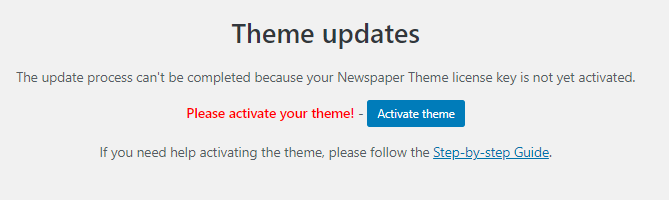
I went on the site just now and saw the following notice in the UPDATES panel of the Theme. I assume from this that even the validation key for the theme was wiped out during the update, which from the notice was incomplete. What should I do?
Jenny Hi Vlad,
Disappointed to hear that my email to tagdiv contact was not found. I have resent the email because I want the technical staff to have a look and try to identify the source of the problem. I have not followed your suggestion re a manual update because if that is the solution, it means that I will feel compelled to go through that process every time there is an update. I hope this matter can be addressed in short order, given all the circumstances.
Regards
Jenny When can I expect to get a response to this case which I referred to contact@tagdiv.com on the 14th inst.?
Sincere regards
Jenny Thanks much. The relevant info has been sent to contact@tagdiv.com.
Jenny Despite what you say about database, I lost links to logos and favicon, all footer info, ad placeholder links, and some social media links. Could that have been caused by a hack?
Jenny Neither the settings nor any plugin is the source of the problem. As I mentioned, CTRL+S works. Also, as you may have noticed, at least 5 other users, beginning with moses, are experiencing the same problem.
Jenny Can’t save changes in tagDiv composer. Clicking the SAVE button results in a never-ending buffering image on that button.
Jenny Got it. Thanks.
Jenny Problem solved after deactivation and deletion of Gutenberg plugin.
Jenny The site is not public as yet, so I would have to send you password details privately. How can I do so?
