

 kibiribi
 Thanks for the confirmation, please close the post.
No more questions.
🙂
kibiribi  kibiribi
 Thanks for your comment – it helps for post – https://prostobzor.com/uk/garmin-8-braclety-dovgyna/
But in this case, I need to fix the menu – acc. to this page –
But it doesn’t work for Template menu header
I’ve added lang. switcher to menu – it doesnt show in the header –
screenshot – 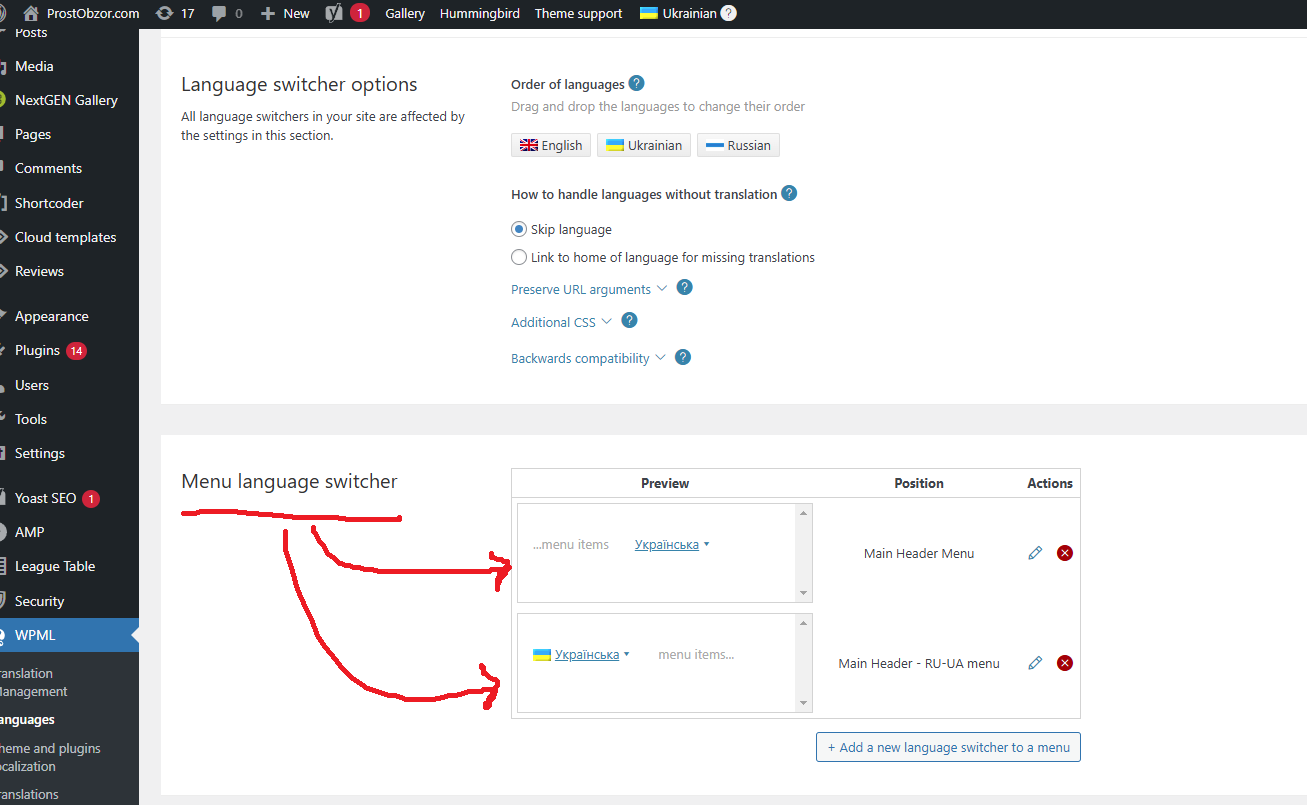
Do you have Tagdiv step-by-step instruction how to add WPML switcher to the Header menu?
kibiribi ok, I’ve imported.
When import of new footer was done an old footer was visible for me.
Screen 1 – https://prnt.sc/BTm4eW2xP4Hu
Screen 2 – https://prnt.sc/jtd0rfBJbXgM
I’ve got WPML with 2 languages
How to manually edit footer for each language?
Could you advise?
I hope, this is the last question :-))
kibiribi The final question: Why can’t I edit created before footer in the Cloud library – menu Edit ?
screenshot – https://prnt.sc/ecdy2JrEHgcP
kibiribi Hi, Anamaria!
It’s clear for me, thanks for the link,
But it’s not clear for me:
When I import Gossip Pro footer what happened with created before footer?
Will it be replaced?
kibiribi It’s ok but how to remove everyday alerts in this case?
kibiribi Did you solve your problem?
I fixed my problem partially with help of Smush Pro WP Plugin (this is paid version)
kibiribi Hi, Anamaria!
Thanks for your reply.
May I ask you special recommendation for Mobile version.
I use this version of Template mobile support. screen – https://prnt.sc/HFz2IS-jqL4v
How to speed up mobile page in this case – what to remove from Template?
kibiribi I tried to run Google Page Speed tests – https://pagespeed.web.dev/analysis/https-prostobzor-com/apwgkuhc64?form_factor=mobile
they told me – I’ve got a problem with First Contentful Paint and Largest Contentful Paint
kibiribi It was error after activation.
But when I run page refresh – this error was disappeared.
kibiribi I’ve got a result after disable – delete – install new version of add-on tagDiv Composer
Error thrown
Class ‘td_util’ not found
========
Next Page refresh show me Plugins page – /wp-admin/admin.php?page=td_theme_plugins
site works fine
Itheme Security told me – it’s ok.
kibiribi Thanks for your reply!
One more question: If I want to transform all WP images from JPG –> WebP manually.
Is it possible to replace Database setting with filename.JPG to filename.webp?
How to be with Template?
kibiribi I want to Run WP Plugin for it – Smush Pro (https://wpmudev.com/project/wp-smush-pro/). Is it compatible for Newspaper Template?
May I start optimization?
kibiribi Buy the way –
When I test NewsPaper Mobile Template of by Google Page Speed – I’ve got Bad results – screenshot – https://drive.google.com/file/d/1jd1XcRXTmaaPWrGhFCiP5KU3HGIN28Uz/view?usp=share_link
I tried:
1. Mobile 2. Mobile + AMP 3. AMP – result the same
But all the same NewsPaper for PC looks not so bad- screen – https://drive.google.com/file/d/1dZNogMBYH06Nh30Hhy3eR-38_INpY8ss/view?usp=share_link
source – https://prostobzor.com
kibiribi Thanks for your reply, Calin.
I’ve sent details to support email.
kibiribi Dear support team, “Load more” problem occurred again for Android mobile phones.
For iPad works well.
I tried to turn off Mobile add-on. It didn’t help me 🙁
Could you check?
Credentials were sent to support email.
kibiribi ok, I’ve sent my credentials to the tech. support.
Could you check?
kibiribi Mobile version https://prostobzor.com
please look at footer title or subtitle below whie logo
kibiribi Thanks – I tried to scroll and find – there is no such word – this is full video of my section translation – https://drive.google.com/file/d/1HCrSkLJRM0YCAjHd1x8VBlKHXY8vcaBk/view?usp=sharing
kibiribi But this word in not searchable in translation section
see a screenshot – https://drive.google.com/file/d/1qoyar5sg_p-kPUIVJGb4_1ws63O1NFfe/view?usp=sharing
I can’t find it
kibiribi Thanks a lot for your support.
Fixed.
kibiribi I’ve solved after Server changes
Domains > example.com > Apache & nginx Settings
fastcgi_buffers 8 16k;
fastcgi_buffer_size 32k;
proxy_buffer_size 128k;
proxy_buffers 4 256k;
proxy_busy_buffers_size 256k;
kibiribi Thanks, but you didn’t read my message 🙁
I told before: “All was done – Cache cleared, CloudFlare was activated to the Debug mode, Plugins folder was renamed.
Server error log is empty.”
After that I’ve paused CloudFlare, but WP-admin got me 502 error.
This is not problem of CloudFlare coz service is disabled.
Any workaround ?
kibiribi is it ok to use this article for help ? https://wpml.org/documentation/theme-compatibility/create-multilingual-wordpress-websites-using-the-newspaper-theme-and-wpml/
