Peter_86
 Great. Thank you Calin!
Kind regards,
Peter
Peter_86 I have deactivated Yoast SEO and gallery works as it should. But the fact is that this error occurred after WP 6.9. update. Before I had Yoast SEO enabled with Newspaper theme and there were no problems.
So is this just Yoast SEO issue or is this issue in correlation between the theme and SEO plugins in WP 6.9. environment – I saw that problems with images were with Rank Math SEO plugin as well.
I think developers should connect and find out who needs to make changes to put things back together as they were in older version of wordpress.
Kind regards,
Peter
Peter_86 Hello,
the only difference is if I disable litespeed cache, that photos become larger like in Antoine’s case. If I enable litespeed cache, photos become smaller (like they should be in gallery view) but still one below the other instead one next to eachother.
Kind regards,
Peter
Peter_86 Is there a way I could give you credentials? I am not a programmer and I would not like to crash the site since it is live news portal.
Kind regards,
Peter
Peter_86 No, we use Yoast Seo.
Kind regards,
Peter
Peter_86 If I put your code into custom CSS I got this result: see image
This is the post where gallery is inserted: https://www.modre-novice.si/aktualno/letnarjeva-crno-bela-kronika-mekinjske-druzine/
Any suggestion? Thank you for your help.
Kind regards,
Peter
 Peter_86
 Help checking that out would be very much appreciated 🙂
This happened after WP update to 6.9.
Kind regards,
Peter
Peter_86 Thank you! 🙂
Peter_86 Hello:
I would like to add icon next to category names (see image)
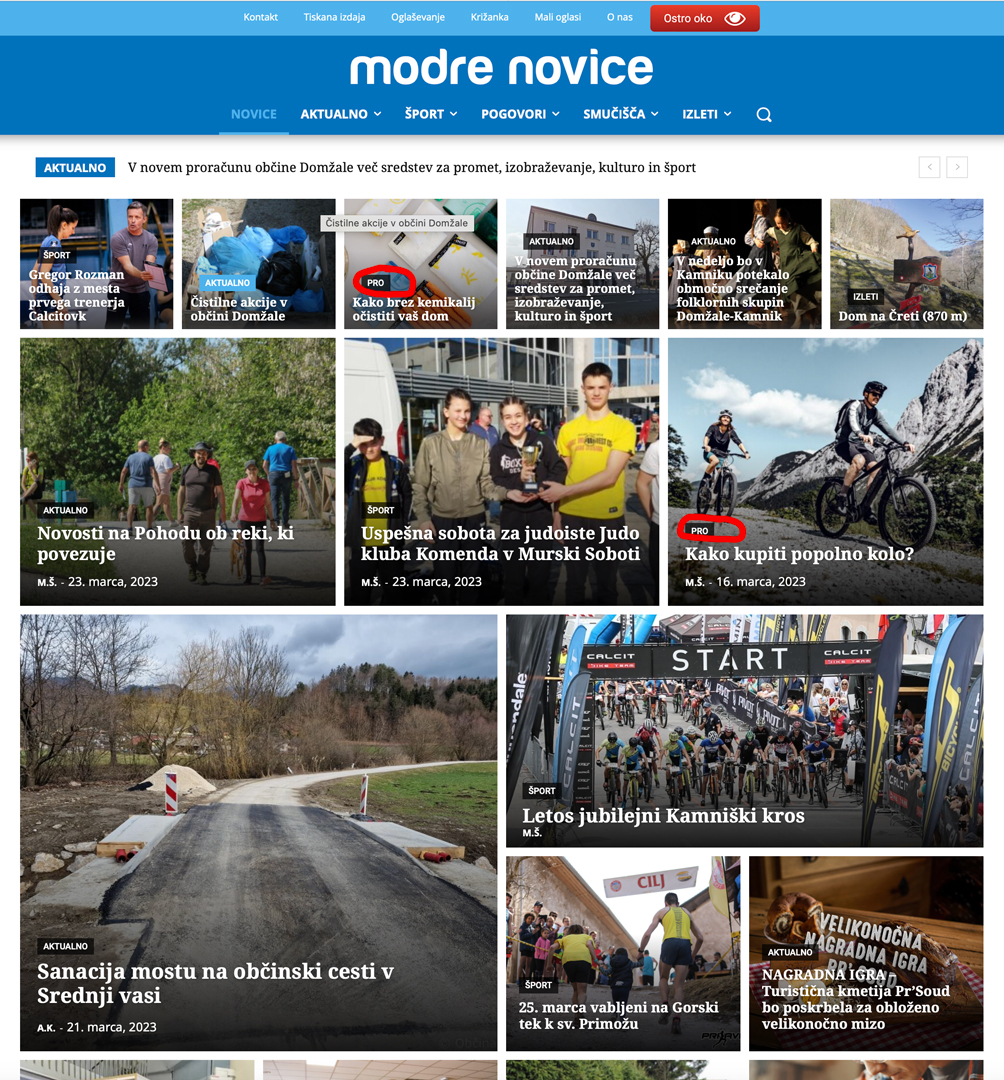
Something similar as they have here:

link to icon:
https://www.modre-novice.si/wp-content/uploads/2023/03/kovanec-ikona-01.svg
thank you!
Peter
Peter_86 Wait what? I need to search through code to find element or row that is hidden on all breakpoints? I have tested but this but I can’t find an element through code now.
Why give an option in menu to hide something and than not give a simple option to unhide it back?
I think this should be one of the priorities of your programmers to make this possible to edit in menu. Is it hard to create one tab or something that appears when you hide specific element and there you can than choose to unhide it?
Kind regards,
Peter
Peter_86 Great! Haven’t thought of that. Thank you 🙂
Peter_86 This is the error:
Internal error: The system tried to use an att that does not exists! class_name: tds_button8 Att name: “button_tdicon” as “1-button_tdicon”
/home/xxxxxxxx/public_html/wp-content/plugins/td-composer/legacy/common/wp_booster/td_style.php
I have 3 buttons with name: tds_button8 I have removed icons from buttons but it was the same. Now I have inserted them back.
Peter_86 Hello,
I have all the plugins installed and activated after update. The link you gave me is for post revision not for page – is the same procedure for page too?
Error that I get is on page, not on post.
On front end this page looks ok. This error is shown only in tagDiv composer.
Since there the error is specified in the popup, could one of your developers take a look what could be done to fix it? I am not a programmer/developer so I would be happy to get some programming help from one of your developers 🙂
Cheers,
Peter
Peter_86 Hello,
I have used text with title element to paste the shortcode in. Place this (text with title) elements where you desire, create Ad groups and rotations, paste shortcodes of each group/rotation into desired place.
When you create Ad in ad manager, you set the group/rotation to appear in and it will be on the desired position.
It should work.
Cheers,
Peter
Peter_86 Hello,
I use plugins option of placements for post articles. On homepage i use shortcodes.
Best regards,
Peter
Peter_86 Hello, yes I am using plugin wpadvancedads. It is very simple to use. You create ad places using short codes, than you “inject” ads into those places with ad manager of the plugin.
The design of the ads is made by myself (I am graphic designer). If you’ll need help with the ad design we can connect 🙂
Cheers, Peter
Peter_86 Thank you, looks like it’s fixed now! Thank you! 🙂
Best regards,
Peter
Peter_86 Great! Exactly what I was trying to achieve. Thank you very much! 🙂
Best regards,
Peter
Peter_86 Hello,
If I don’t use stated tags, than same advertorial can appear on 2 or on all 3 flex blocks at once. That Is why I use tags as a aditional filter option on 3 modules/blocks that are used for showing adverts on homepage.
Is there option to hide these specific tags from showing on single page of the advert even though it is assigned to it with some kind of CSS and .class? Maybe If one of your coding experts could help? 🙂
Thank you!
BR, Peter
Peter_86 Hello,
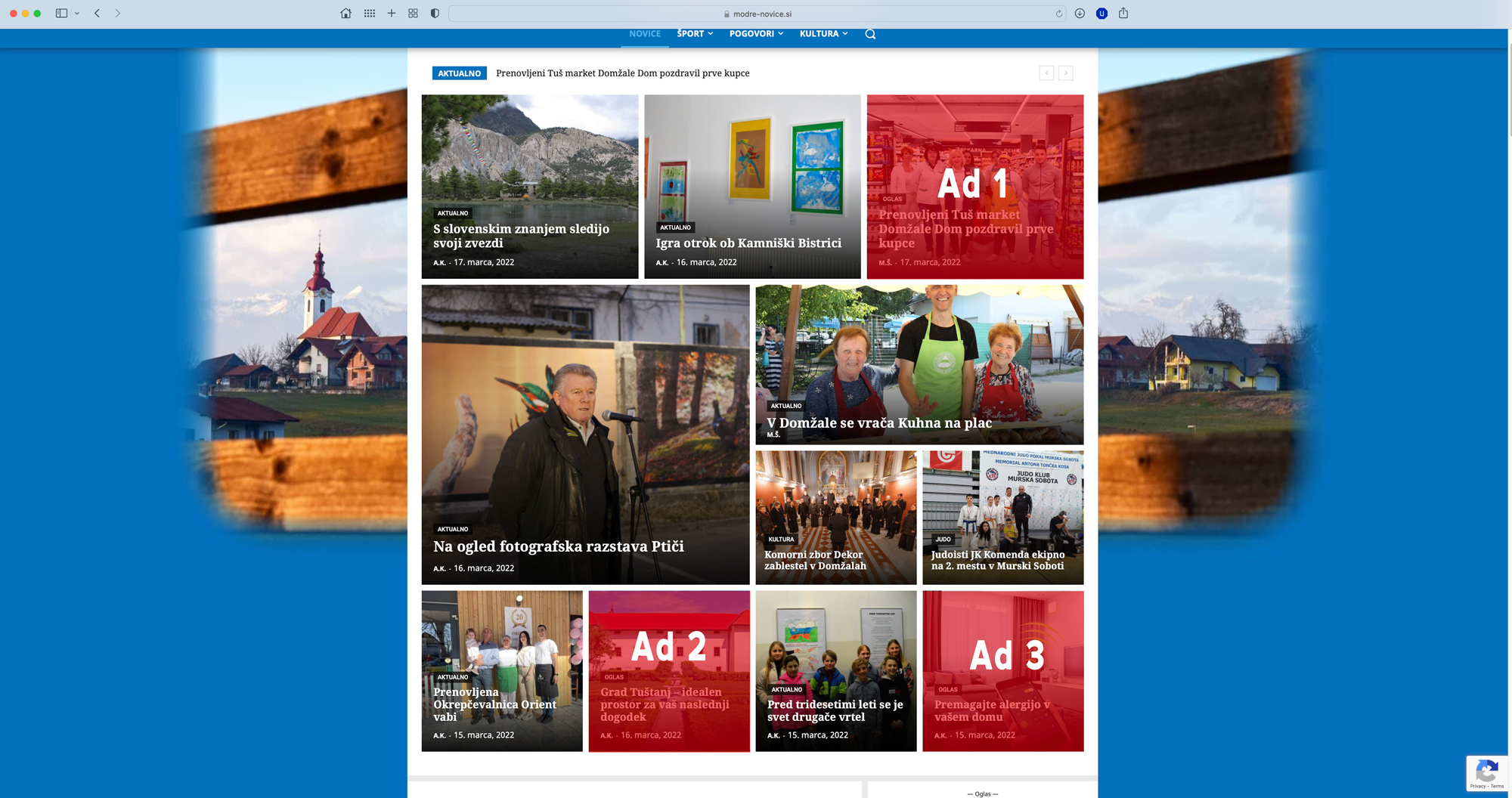
this is the link to advertorial (payed content): https://www.modre-novice.si/oglas/prenovljeni-tus-market-domzale-dom-pozdravil-prve-kupce/
I am using 3 tags for ads just as a filter option. So advertorials always appear at specific places on hompage of the portal: https://www.modre-novice.si
For Ad 1 element I have category filter set as Oglas (ad), post tag Oglas 1 (Ad 1) and sort order to random, so only here all posts with these settings would appear. Same goes for Ad 2&3 elements, only tags here are Oglas 2, Oglas 3 …
See image here: https://www.modre-novice.si/wp-content/uploads/2022/03/ads-homepage.jpg
I would like to hide just these 3 tags (Oglas 1, Oglas 2, Oglas 3) on landing pages of the advertorial posts (payed content).
See image here: https://www.modre-novice.si/wp-content/uploads/2022/03/advertorial-single-page.jpg
I hope I was clear what I am trying to achieve 🙂
Thank you!
Peter
Peter_86 Hello, I have found the solution under – settings > permalinks > (at the bottom) basis for categories, basis for tags …
thank you,
Peter
Peter_86 Hello,
I am talking about cloud templates. For example when you click on category of the article on this page: https://www.modre-novice-izdelava.si.ir-image.si
Category “dogodki”: https://www.modre-novice-izdelava.si.ir-image.si/category/dogodki/
How can I translate word “category” in the link above?
I don’t have page for this under pages. I’ve customised cloud template for categories. So how can I change link in such occasion?
BR, Peter
Peter_86 Thank you for your help 🙂
Br, Peter
Peter_86 Just to be clear: I am not talking about related articles. I am talking about other posts that appear when you scroll down to the bottom of the post you are reading. I would like to disable infinite post scrolling.
Peter_86 Yes but it appeared by itself. I didn’t find the solution. When I was writing this topic, It was not visible. Not on cell phone, not on desktop. Don’t know why.
Br, Peter