RKdium
 Thank you very much for the answer Callin!
Ok, so there is no solution so far :/ Option 1 is a pain and with solution 2 you cannot use the tagdiv composer.
Maybe a more or less simple solution would be to have the ability to embed a page in a sidebar with a special developped TagDiv-Widget.
Best,
Roman
RKdium Hi!
This answer is a year old, so I’d like to know if there has been an update. Is this still the only method to have different Sidebars on different posts?
When using the DEFAULT template for posts , there is an option (below the Gutenberg editor) to choose which sidebar you want to display. With Custom Template, this option disappears.
It is pretty painful and gets really complicated to create a new template for every post you want a different sidebar (15 different idebars > 15 templates !). You change one thing in one template, and you got to make 15 changes to make everything look the same. Any chance there is an easier method? Could you offer this option in custom templates?
Thanks a lot,
Roman
-
This reply was modified 3 years by
RKdium.
RKdium Problem solved. Topic can be deleted, it seems that I had a malware infection which is now repaired.
RKdium Great, thanks a lot, it works with this method! 🙂
RKdium Thanks!
RKdium Hello Vlad,
sorry for the late reply!
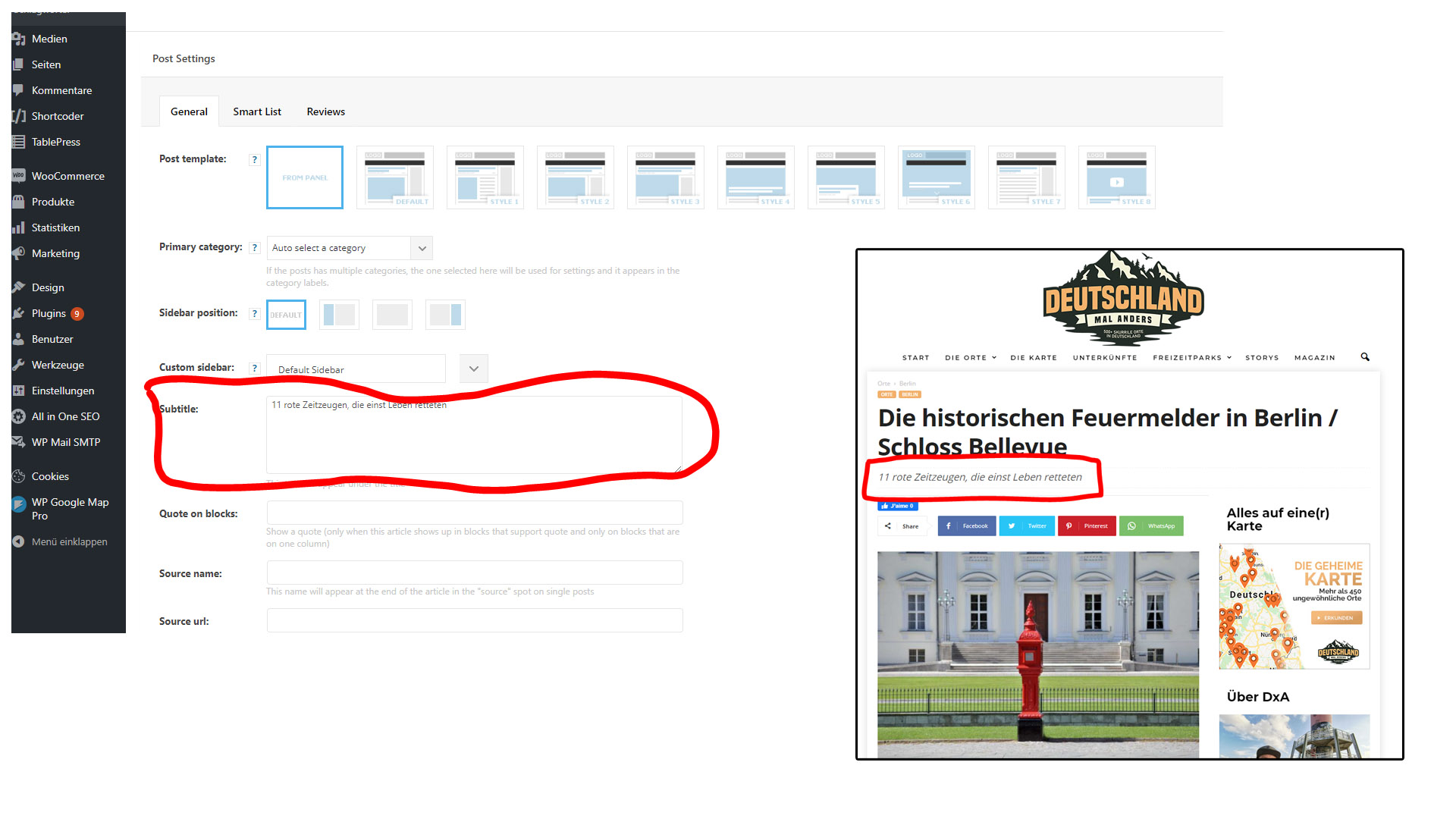
By subtitles I mean the article subtitles you can insert in Newsmag.
Please see on the screenshot here: https://www.deutschlandmalanders.com/wp-content/uploads/2021/05/Subtitles.jpg
If I move from Newsmag (currently used) to Newspaper, will those subtitles by taken into account / work in Newspaper, or will I have to enter them all again?
Thanks a lot for your answer,
Best,
Roman
RKdium Hi Vlad,
i think you answered by mistake another thread here, that wasn’t my question 🙂
Best,
Roman
RKdium Thanks Vlad,
it seems to be a conflict with another plugin – it worked when disabling all other plug ins.
Best,
Roman
RKdium Hi Anamaria,
thanks for all the input.
Problem seemed to be the child theme.
Reinstall of td-composer and use just TagDiv plugin didn’t change anything.
I then switched to parent theme, reinstalled the td-composer plugin and then it worked. However, changing back to the chuld theme messed things up again. I am using the parent theme now, as i do not really have a use for the chuld theme. However, this may be perhaps be a problem for people having a child theme with heavy mods.
Thanks a lot for your quick help,
Roman
RKdium EDIT: The menu seems to work while being logged out.
BUT BIG PROBLEM: When logged in, menu drop downs don’t work and impossible to drag the menu items + when logged in, the Newsmag theme panel does not respond.
RKdium Use the search feature in the forum (“gdpr” “dsgvo”), they already answered twice 🙂
RKdium Hi guys,
I am having the same issue here: https://www.londonmalanders.com/test-2/
In Theme panel > Font > Pages, H2s on pages are set to “Source Sans Pro” and Content to “Source Sans Pro”, 17px.
However, while using the “Text with Title” element in the tagdiv editor, the H2 is “Roboto” and the content is in font size 15px (while using the Source Sans Pro font).
Is there a possibility to change this via the Theme Panel or do I need to use Custom CSS to fix this?
(I used HTML to fix it on the homepage: https://www.londonmalanders.com/)
Thank you for your help,
Roman
RKdium Hi,
any official advice from the TagDiv Team? (no offense Chris – your posts are great 🙂 )
I’ve read in another thread that AMP will be implemented in Newspaper a future update. So is it recommended to use the Mobile Theme for the moment and wait for the AMP-update of the theme?
RKdium Hi Simion,
thanks for your answer.
It is indeed a feature that is sometimes missed.
Any plans of implementing this in the future?
Best,
Roman
RKdium Hi there!
Just wanted to say that I have the same problem here – more than 250 outgoing connections per 5 minutes, also with host OVH. I disabled the bottom Instagram thing (showing the Instagram Pics before the footer) and it was fine again.
Not a big problem, but it would be nice if you could fix this in the future 🙂
RKdium Hi guys,
thanks to both of you for the replies.
Unfortunately the code solution doesn’t work.
Bogdan, the thumbnail is enabled in the theme panel.
I’ve have checked the post you posted:
https://demo.tagdiv.com/newspaper/wordpress-news-magazine-charts-the-most-fashionable-new-york-couples-in-2016/
It does indeed work for the first picture (the featured image). However the second picture shown on the page (girl doing selfie) is not the 696px thumbnail. It screens the full size picture (900 x 560). Same thing for the fourth picture (greek island view).
Is there any way to show the 696px thumbs or is it just possible with the featured pic?
-
This reply was modified 9 years by
RKdium Hi Arved,
thanks a lot for your reply!
I tried locating the code. However, i can only find the following strings in td_wp_booster_functions.php:
	// content width - this is overwritten in post

	if (!isset($content_width)) {

		$content_width = 640;

	}
				switch (TD_THEME_NAME) {

					case 'Newspaper' :

						$td_temp_image_url = wp_get_attachment_image_src($image_id, 'td_1068x580');       //1021x580 images - for big slide

						//change image type and width - used to retrieve retina image

						$thumbnail_type = 'td_1068x580';

						$thumbnail_width = '1068';

						break;
			switch (TD_THEME_NAME) {

				case 'Newspaper' :

					$out['size'] = 'td_1068x580';

					break;
			switch (TD_THEME_NAME) {

				case 'Newspaper' :

					$out['size'] = 'td_696x385';

					break;
However, none of them matches exactly the ones you posted. The following string is nowhere to be found:
$content_width = 696;
For you information, i am using version 7.8 of the theme.
Maybe you have another idea? Has this been changed in the new version?
Maybe someone from Tagdiv can help?
Thanks a lot!
RKdium RKdium I’ve heard some rumors in the bar at the corner of the street, saying that you are going to release an awesome teaser-screenshot of version 5 tonight… Is that true? ^^
RKdium Just found the solution –> Widgetised Sidebar 🙂