srikant
 Hi support team,
please guide me.
srikant Ya, it’s very helpful, Thank you so much.
Regards
Srikant
srikant Hi Simion C
changing the Post settings style default to style 2 Do the job for me.
This is such an annoying issue started after recent theme upgrade, But now it looks good. And A Big Thank you for your hand holding support.
Regards
srikant
srikant Hi I am not using any CSS code in the theme panel or not usea any child theme.
Also Tried to disable all plugins Include ( theme tagdiv plugins ) the problem remain same
Next tried to active only theme plugins ( which i get bundled with the theme ) clear browser cache, cookies.
Open the web page but still its results the same.
Also Tried purge CDN files, As per my knowladge disableing the Cache plugin ( CDN service get disconnected ) so i dont think its related to CDN cache. by the way i have purged CDN cache on my side.
As per your suggestion added the Custom CSS : https://snag.gy/jzmgxN.jpg
but the problem is still there.
Even i have check the same on my mobile, its also showing centered
Tell me what i have to do ?
srikant Hi,
I am not using any custom code there. this problem started only after theme update.
As before its working/displaying properly.
can you help me to resolve the issue?
Yes, I am using the custom google ad codes inside the post As this screenshot: http://prntscr.com/k8uum5 But it’s not new I am already using the same google ad codes on every post from last 6 month as there is no problem at all but now from recent theme upgrade it’s causing the issue.
Regards
srikant
srikant That means The theme has no option to stick the sidebar only right?
Check the post form my different blog : https://windows101tricks.com/fix-your-pc-did-not-start-correctly/
while scroll down the post the sidebar get sticky I want the same option only. Is there any way to make it possible ?
Regards
srikant
srikant Hi Catalin,
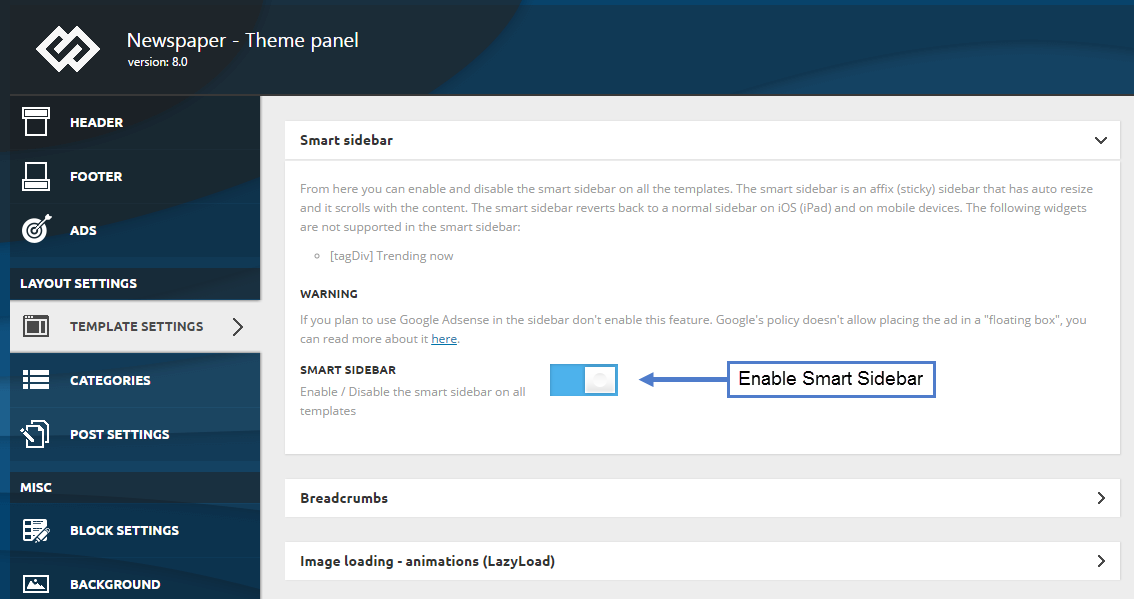
Thanks for the reply, I am aware of this smart sidebar option.https://forum.tagdiv.com/wp-content/uploads/2017/05/smart_sidebar_1.png But What about this warning message? I am using Google Adsense on the sidebar.
And the second thing I don’t want the floating popup sticky sidebar. I am only looking for the option to stick the current sidebar.
Hope you understand my query.
Regards
srikant
-
This reply was modified 8 years by
srikant.
srikant @epickenyan Post Title is ok Now, But the Post title With Meta Description Like this http://prntscr.com/hzb4xl is Good for SEO.
srikant Hi balipuspanewscom,
Fallowing This link https://forum.tagdiv.com/topic/problem-with-google-sharing/ delete the Company Name / Person name on yoast SEO Dashboard.
I found this helpful.
srikant Hello Epickenyan
Fallowing This link https://forum.tagdiv.com/topic/problem-with-google-sharing/ delete the Company Name on yoast SEO Dashboard Worked for me
But Still the Meta description is not There ( only showing the post Title )
srikant Yes i have first Clear the Cache then Deactive All Installed plugins, Only Yoast SEO plugin is activated : http://prntscr.com/hzty65
After that on Different Computer ( Run ccleaner to clean browser history etc ) then open The web URL and Try to Share on G+ and The results are same : http://prntscr.com/hztx3z
Still There is no Post Title and meta Discription……….
srikant Hi Simion C,
Thanks for support.
I am already using Yoast SEO, And as you mention i am added my social profile on there http://prntscr.com/hzb39v and filled : http://prntscr.com/hzb3p7
for Social sharing : http://prntscr.com/hzb3yn
And there is no issue on Facebook, Twitter, Pintrest sharing only found problem on Google plus Sharing …
I think A bug causing the problem. Request to look at this issue, because With out google Shareing The Blog post is very useless ( for SEO purpose, Google didnt find the Title, and discription how it will be rank on google ? )
Aside : on my different website ( windows101tricks.com ) i am using Soledad Theme From last 1.5 year, There i didnt do any modification for post sharing purpose.
This is perfectly working ex : http://prntscr.com/hzb4xl
Thanks
srikant
srikant I am already using Yoast SEO plugin And Set Necessary Things on Social media section http://prntscr.com/hydo48
And when i share On Facebook and Twitter its showing properly Only found issue on Google Share
srikant Newpaper Theme Doesn’t Have the og:image, title and description tags ?
Because i am using Different Theme ( soledad theme ) on my another blog ( https://windows101tricks.com )and there is no such issue like this.