

 steveroberts
 Thanks; sent via email.
steveroberts I do have a partial screenshot of my home page before my host resolved the problem for me. If helpful, please let me know how I can get that to you. Thanks!
steveroberts Yes, something is definitely messed up with the update. Had my host restore a previous version. Frustrating…
steveroberts I’m not sure I understand your answer.
My question is: how will disabling AMP affect the appearance and performance of my web site on mobile devices?
Thanks!
steveroberts Thank you for your response.
How will disabling AMP affect the performance and appearance of my site on mobile devices?
steveroberts Thank you for the investigation.
This is a recent problem. It has not manifested previously.
Is there any way to fix this without disabling AMP?
I know that TagDiv recommends AMP. What happens if I turn it off?
steveroberts Thanks for your help.
As far as I know, I don’t have Google Analytics on the site. I cannot find any plug in that would indicate such.
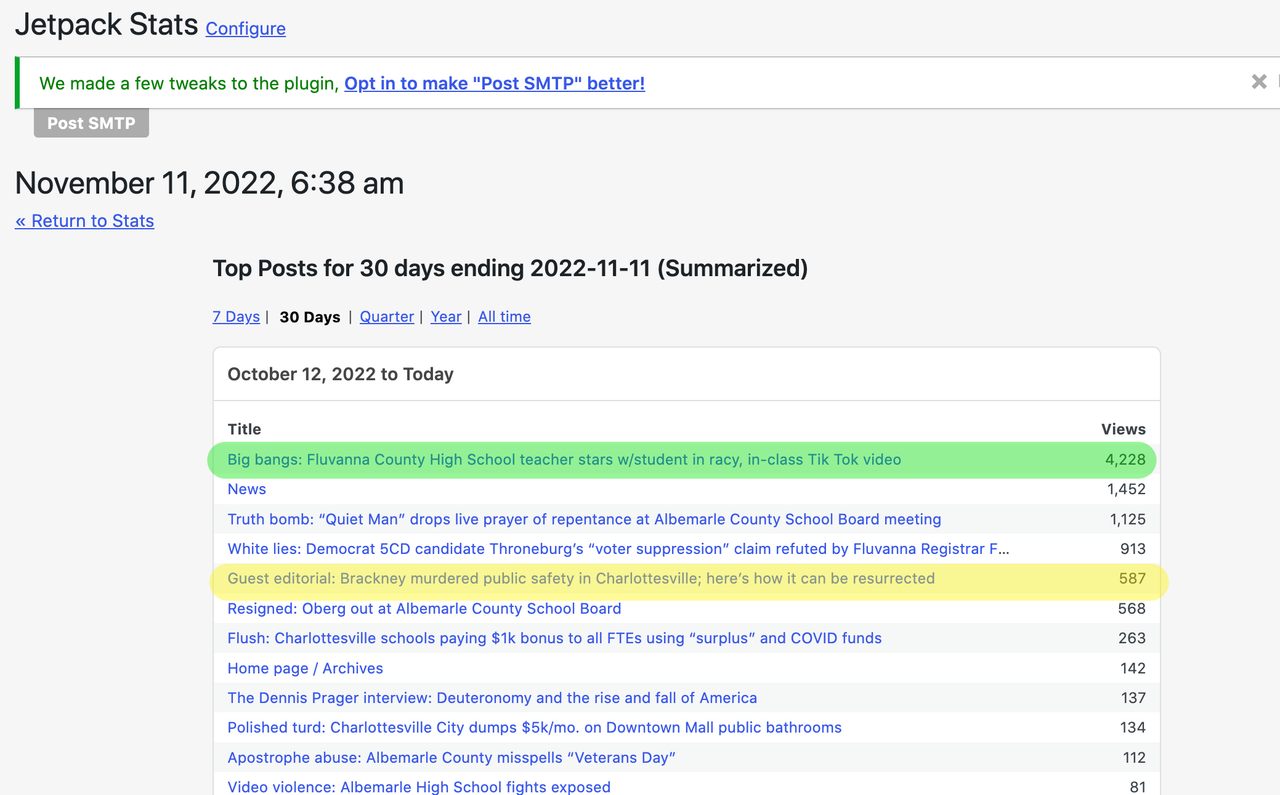
Jetpack Stats, which is installed, has shown about 900 site visits in the past two days. 587 of those are showing as viewing the post below. Yet, as of this morning, the post itself is showing only 193 views.
Another post is showing 4,228 views in Jetpack Stats, but the on-post display indicates only 1,114 views.
Something is not working correctly, and this is new. Previously, the post counts were reflecting accurately.
steveroberts Thanks for your prompt response. I am using a cache and the box you pointed out already was turned on.
This is a recent problem and only manifested after the most recent Newsmag theme update.
The counter is WAY off, not even close to counts coming in from WP Stats.
Any other ideas would be appreciated.
steveroberts Hello,
I turned off the AMP plugin and that seemed to solve the problem.
Will the mobile theme still function without the AMP plugin?
Thanks for your help.
steveroberts Thanks for your response.
This is a self hosted video, and I inserted the link into the post. When published, the post only shows linked text, not the video itself.
I want to embed a self-hosted video into a post.
steveroberts Worked perfectly; thank you!
steveroberts Hello,
That works, except, it changes all lists in my entire site. I just want to be able to apply the lettered list selectively.
How would I do that?
SR
steveroberts Thanks for your response, but this does not work. I’m using “classic editor” so my screens are different.
I’m in “text” mode. For example
- a. Focus on the real diversity that is important on college campuses—diversity of thought—rather than diversity of race, ethnicity and gender which has proven to be divisive.
- b. No further building renamings, statue removals, etc. A society that incessantly does this is a society in decline.
The “numbers” do not change to letters.
Please clarify.
steveroberts Yes, exactly what I needed. Thanks!
steveroberts You are terrific; thanks. Just what I was looking for!
BTW, do you have a tutorial for using the Live CSS feature?
SR
steveroberts Super helpful; thanks. Example 2 was perfect for the numbered lists.
Now, is there a way to indent the second line of the numbered list so that it aligns with the text, and not with the number itself?
steveroberts Hello,
I just highlighted the text and clicked on the block quote button. Since the list was inside the block quote, I wanted it to assume the color and formatting of the blockquote.
Here is a direct link.
steveroberts Thanks for your response.
I’d like to match the list formatting (color and size) to the block quote formatting. Here’s how it presently appears: https://postimg.cc/KK7tdLKt
-
This reply was modified 5 years by
steveroberts.
steveroberts I’m using a numbered list in a block quote, but the numbered list is not assuming the text formatting properties of the block quote text. How may I change the appearance of a numbered list within a block quote?
SR
steveroberts Thank you for your response. Please consider this a feature request.
BitChute is a growing platform, and it would be helpful for you to embed this functionality into your theme.
steveroberts Super helpful; thanks!
steveroberts Worked perfectly; thanks!
steveroberts Problem appears to be resolved. Thanks very much for your assistance.
steveroberts Thank you for the code. However, it does not correct the problem. I added it to Custom CSS on the theme panel, then tried the site in four different browsers.
The ad headings are still indented.
Please advise.
Thank you!
steveroberts Hello,
Please click on the link above where there is a picture showing the issue. The ad “header” that says “Donate on Paypal” (and the one that says “Support our Sponsors”) is offset from the left (indented) several pixels more than the one that says “Stay Connected.” In other words, the left edges of these black banners do not align.
SR
