


How do i change my website to box version of the theme
https://forum.tagdiv.com/background-introduction/
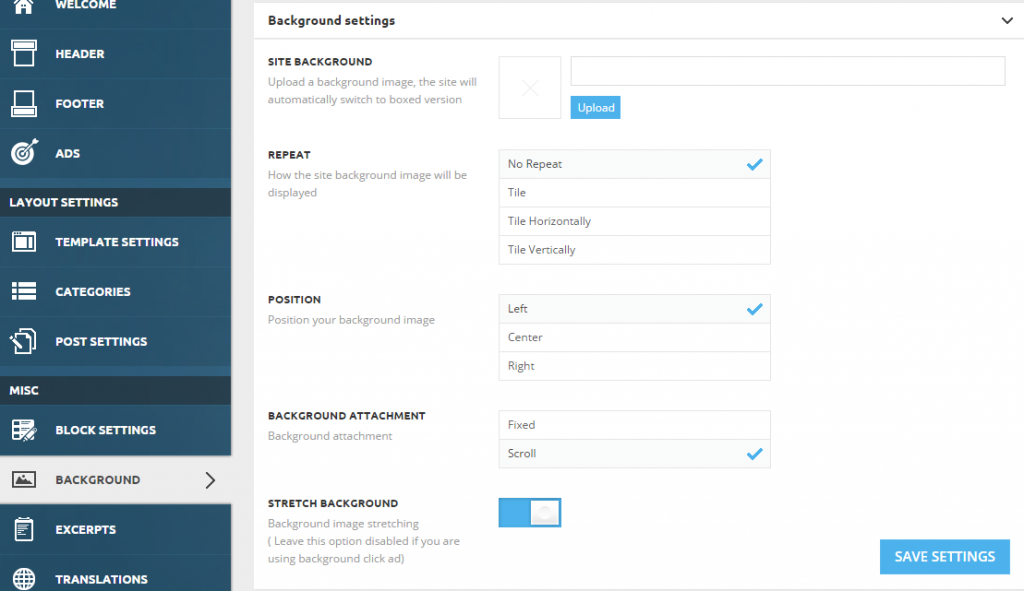
Site background – The theme will automatically transform the site into a boxed version.
or Use a Color
You can set it from Theme Panel > Theme Colors > General Theme Colors

Note: When you set a color or an image as a background, your website will automatically change to the boxed version.

Hello,
If your settings cannot change, it probably means you did not increase your memory limit. Please use this guide:
https://forum.tagdiv.com/system-status-parameters-guide/
Thank you!


Hello,
The difference is because block 4 does not use module 4. A block is a container for 1 or more modules but the numbers do not match. Please use this section to figure out which block uses which module: https://www.screencast.com/t/ja4MN2l6Kb8i
You cna also use the browser inspector to see the module sin a block as they have classes with the module name
Thank you!

Hello,
Here is a list that might help you decide which block to use: http://demo.tagdiv.com/newspaper/block-1/
Our theme provides 25 blocks to choose from. I’m sure one of them will fit your needs.
Thank you!
Hello,
This is a caching issue so please disable any at all caching . contact the host and have them disable any hosting side cache, clear cdn files and temporarily remove the cdn and clear cache from the cache plugin and disable that also. Then only use wp super cache and these settings: https://forum.tagdiv.com/cache-plugin-install-and-configure/ and if you use a cdn server, https://forum.tagdiv.com/cloudflare-cdn/
Let us know hot it goes.
Thank you!
