
No search results were found in Documentation!
 dan009
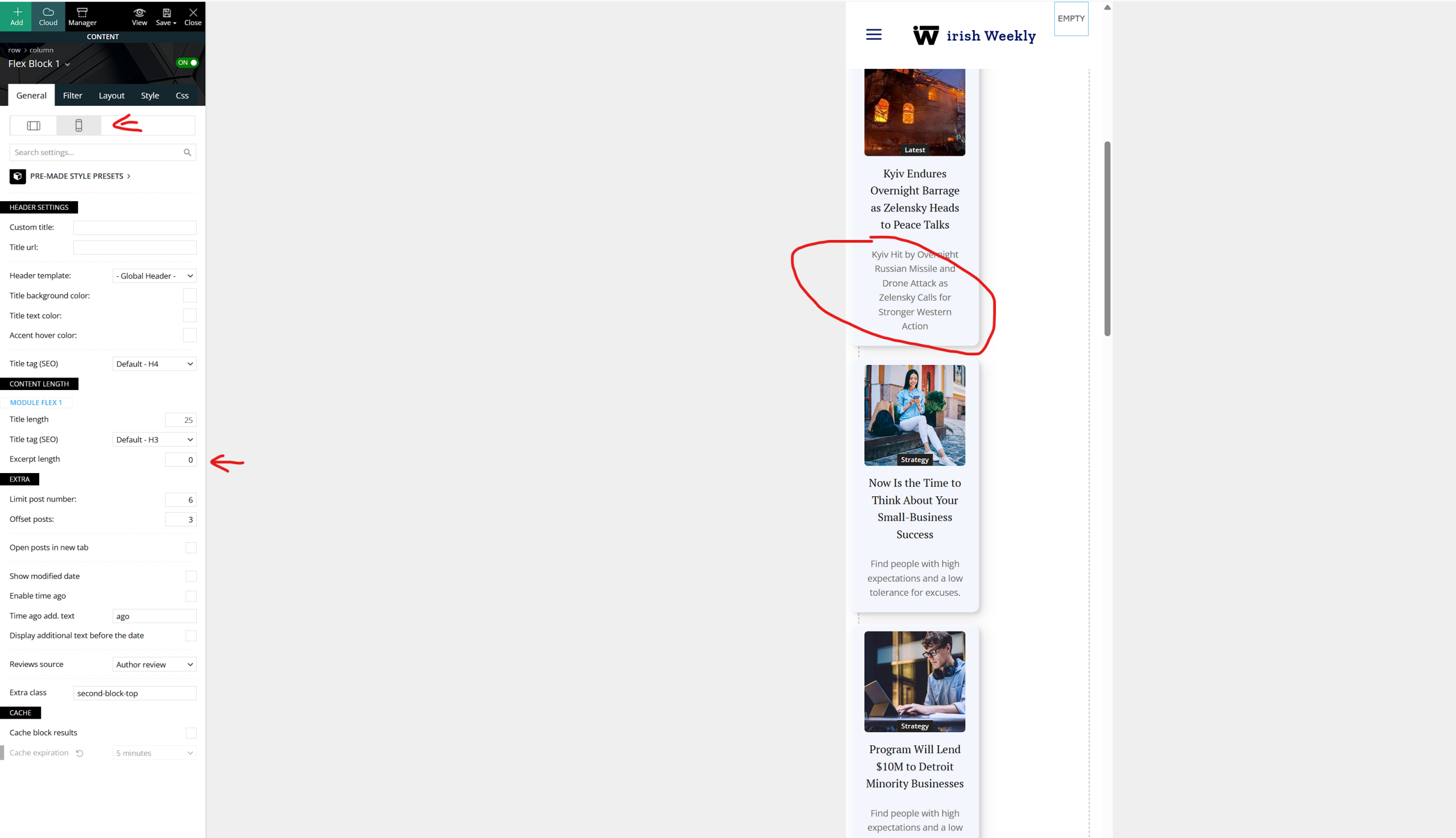
 View attached what I mean
I have a dedicated mobile page.
Image
 Littletwos
is there any example theme demos that show a method or way to “insert” recommended products within the article – outside of the actual ads; like for example talking about dog leads and then have a box that recommends one with link to it on amazon etc.
 patrickpriest
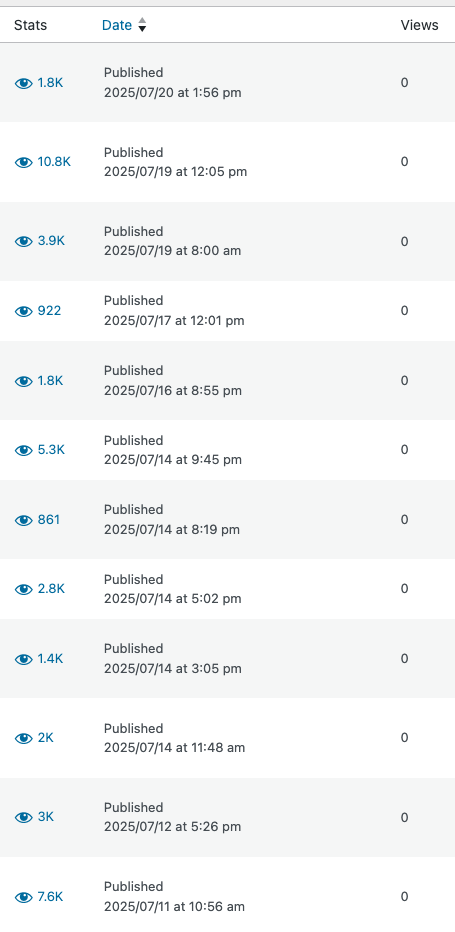
On my articles, it seems the view count is pulling from the “Views” within WordPress, however they are displaying as 0. Which is what I see in my WordPress dashboard.
However, I use JetPack, which shows my articles are getting thousands of views.
How can I make Newspaper pull the “Views” data from the JetPack number and not the default WordPress views number?
I have attached a photo to show that the numbers are vastly different.
 andresugai
Hello TagDiv Support Team,
I hope this email finds you well.
I am experiencing a significant performance issue on my WordPress site, which uses the Newspaper/Newsmag theme and the TagDiv Composer plugin.
After noticing very high page load times on several pages on the site, I used the Code Profiler diagnostic tool to identify the cause. The results from the profiler indicated that the WP Offload Media plugin (formerly known as Leopard Offload Media), which I use to offload my media files to Amazon S3, is consuming an excessive amount of execution time (approximately 4 seconds) during page loads.
To diagnose the cause of this excessive consumption by WP Offload Media, I ran plugin isolation tests. I temporarily disabled other plugins to see which of them, when disabled, caused the execution time of WP Offload Media to decrease.
The tests clearly revealed that the high time consumption by WP Offload Media occurs only when the TagDiv Composer plugin is active.
I have attached the following screenshots from Code Profiler to illustrate this point:
Screenshots: https://imgur.com/a/TpPDo10
Screenshot 1 (With TagDiv Composer active): Shows the execution time of plugins with TagDiv Composer active. WP Offload Media appears at the top of the list with approximately 4 seconds of execution time.
Screenshot 2 (With TagDiv Composer disabled): Shows the execution time of plugins with TagDiv Composer disabled. The execution time of WP Offload Media drops dramatically to approximately 0.06-0.15 seconds, indicating normal behavior.
While disabling TagDiv Composer solves the performance issue with WP Offload Media, it is not a viable solution, since the layout of my pages (built with Composer) depends on it and breaks when disabled.
Based on these results, it seems that there is either a direct performance conflict or an inefficient interaction between TagDiv Composer and WP Offload Media that causes this excessive CPU consumption during page load when both are enabled.
I would like to know if you have any knowledge of this compatibility issue with media offload plugins for S3 (such as WP Offload Media) or if there is any specific setting within the Newspaper theme or TagDiv Composer that should be adjusted to mitigate this conflict and allow both plugins to work optimally together.
I would greatly appreciate your attention and any guidance or solution you can offer to resolve this crucial performance issue.
Thanks for your help!
Best regards,
André Sugai
andre@tutoriaisphotoshop.net
https://www.tutoriaisphotoshop.net
 nearview
Hello,
We are experiencing an issue with inline ads appearing after X paragraphs when using the Block Editor. Specifically, the ads are being placed inside <figure> tags, which causes them to shrink to the size of the <figure> container instead of displaying at full width as intended.
I have attached the following screenshots for reference:
1. How the ad appears when using the Classic Editor.
2. How the ad appears when using the Block Editor.
3. How the ad is supposed to look when I adjusted the position from 3 paragraphs to 4 to prevent it from being placed directly after an Instagram embed.
4. The source code showing how the ad is being injected into the <figure> container for clarity.
I suspect this issue may be related to how the theme determines paragraph count and what qualifies as a paragraph. It seems that when using the Block Editor, <figure> elements are not being treated as block elements/paragraphs.
Could you please escalate this to your development team to ensure they are aware of the issue and determine if a fix can be implemented in an upcoming update?
Thank you for your time and assistance.
 awilbanks
 Lazy load has been deprecated in Jetpack. I turned off the site-accelerator and no thumbnails show. It strips this part off of the code (https://i0.wp.com) and leaves you with only this part (https://marvel-photos.s3.amazonaws.com/wp-content/uploads/2024/09/19024255/hasbro-marvel-legends-kang-the-conqueror-696×696.jpg) which isn’t loading.
-
This reply was modified 1 year by
awilbanks.
awilbanks I see what is happening. The homepage is pulling (for example) data-img-url=”https://i0.wp.com/marvel-photos.s3.amazonaws.com/wp-content/uploads/2024/10/14015757/hasbro-marvel-legends-hercules.jpg?resize=696%2C696&ssl=1″
When you hit load more, the thumbnail code looks like this – style=”background-image: url(‘https://marvel-photos.s3.amazonaws.com/wp-content/uploads/2024/09/19024255/hasbro-marvel-legends-kang-the-conqueror-696×696.jpg’)”
So what is the difference in the “load more” code? Why is it stripping the i0.wp.com/ from the url of the image?
 mhariush
 hi Calin. thanks for the response.
the one in the image are the patterns, we had made it and it’s connected to our amazon affiliate links. they are seen in mobile view but not in desktop view, that’s why i don’t know what’s the reason behind.
the ads from wordads.co is below that pattern an i can’t see them
 DJ Promotion
 Hi Calin,
Thanks for the feeddback.
I followed Chris’s suggestion and it seems to be ok, I have a huge amount of unused images on the server. Will the plugin remove them in the current situation? I use Imagify, but I don’t see here the “delete unused” option.
The problem here is more unusual because I migrated the Uploads folder to Amazon S3. The WP Media(Joom United) plugin should have deleted the files on my server, but it didn’t. So now I have the same (a lot) files on my server and on AWS S3.
BTW. one more question:
What folder should we set so that Imagify works properly? In my opinion it should be: > … wp-content/uploads/
not > ….wp-content/themes/Newsmag/
 info@simonebarbone.net
 Here from System Status in Theme Option:
php.ini configuration
Server software i Apache
PHP Version i 7.4.33
post_max_size i 256M – You cannot upload images, themes and plugins that have a size bigger than this value. To see how you can change this please check our guide here.
max_execution_time 120
max_input_vars 3000
SUHOSIN installed false
PHP extensions
mbstring available
GD library available
WP version i 6.3.2
WP multisite enabled i No
WP Language i en_US
WP Memory Limit 256 MB/request
WP_DEBUG False
Caching plugin WP Rocket – we recommend WP super cache
Here are the plugins:
Ad Inserter
Settings | Deactivate
Ad management with many advanced advertising features to insert ads at optimal positions
Version 2.7.31 | By Igor Funa | View details | Safe mode
Disable auto-updates
Automatic update overdue by 1 week. There may be a problem with WP-Cron.
There is a new version of Ad Inserter available. View version 2.7.32 details or update now.
Select All In One WP Security
All In One WP Security
Settings | Deactivate
All round best WordPress security plugin!
Version 5.2.5 | By All In One WP Security & Firewall Team | View details
Disable auto-updates
Select Asset CleanUp: Page Speed Booster
Asset CleanUp: Page Speed Booster
Deactivate | Getting Started | Settings | Go Pro
Unload Chosen Scripts & Styles from Posts/Pages to reduce HTTP Requests, Combine/Minify CSS/JS files
Version 1.3.9.3 | By Gabe Livan | View details
Disable auto-updates
Select Better Search Replace
Better Search Replace
Deactivate
A small plugin for running a search/replace on your WordPress database.
Version 1.4.3 | By WP Engine | View details | Upgrade to Pro
Disable auto-updates
Select Broken Link Checker
Broken Link Checker
Cloud | Local | Docs | Deactivate
Checks your blog for broken links and notifies you on the dashboard if any are found.
Version 2.2.3 | By WPMU DEV | View details
Disable auto-updates
Select Classic Editor
Classic Editor
Deactivate | Settings
Enables the WordPress classic editor and the old-style Edit Post screen with TinyMCE, Meta Boxes, etc. Supports the older plugins that extend this screen.
Version 1.6.3 | By WordPress Contributors | View details
Disable auto-updates
Select CookieYes | GDPR Cookie Consent
CookieYes | GDPR Cookie Consent
Deactivate | Settings | Support | Premium Upgrade
A simple way to show your website complies with the EU Cookie Law / GDPR.
Version 3.1.6 | By CookieYes | View details
Disable auto-updates
Select Easy Custom Sidebars
Easy Custom Sidebars
Deactivate
Replace any sidebar/widget area in any WordPress theme (no coding required).
Version 2.0.1 | By Titanium Themes | View details
Disable auto-updates
Select Easy Table of Contents
Easy Table of Contents
Deactivate | Settings | Support | Upgrade | Website
Adds a user friendly and fully automatic way to create and display a table of contents generated from the page content.
Version 2.0.57.1 | By Magazine3 | View details
Disable auto-updates
Select Elementor
Elementor
Activate | Delete
The Elementor Website Builder has it all: drag and drop page builder, pixel perfect design, mobile responsive editing, and more. Get started now!
Version 3.17.1 | By Elementor.com | View details
Disable auto-updates
Automatic update overdue by 1 week. There may be a problem with WP-Cron.
There is a new version of Elementor available. View version 3.17.2 details or update now.
Select Essential Addons for Elementor
Essential Addons for Elementor
Activate | Delete
The Essential plugin you install after Elementor! Packed with 40+ stunning free elements including Advanced Data Table, Event Calendar, Filterable Gallery, WooCommerce, and many more.
Version 5.8.13 | By WPDeveloper | View details
Disable auto-updates
Automatic update overdue by 1 week. There may be a problem with WP-Cron.
There is a new version of Essential Addons for Elementor available. View version 5.8.14 details or update now.
Select Fixed Widget
Fixed Widget
Settings | Deactivate
Use the fixed widget plugin to create sticky widgets that stay in the visible screen area when the page is scrolled up or down and boost your conversions.
Version 6.2.3 | By Thomas Maier, Max Bond | View details
Disable auto-updates
Select Genesis Simple Edits
Genesis Simple Edits
Deactivate
Genesis Simple Edits lets you edit the three most commonly modified areas in any Genesis theme: the post-info, the post-meta, and the footer area.
Version 2.3.1 | By StudioPress | Visit plugin site
Select Header Footer Code Manager
Header Footer Code Manager
Settings | Deactivate
Header Footer Code Manager by 99 Robots is a quick and simple way for you to add tracking code snippets, conversion pixels, or other scripts required by third party services for analytics, tracking, marketing, or chat functions. For detailed documentation, please visit the plugin’s official page.
Version 1.1.36 | By 99robots | View details
Disable auto-updates
Select Hotjar
Hotjar
Deactivate
The fast & visual way to understand your users.
Version 1.0.16 | By Hotjar | View details
Disable auto-updates
Select HTTP2 push content
HTTP2 push content
Settings | SEND SUGGESTIONS TO IMPROVE | Deactivate
Push all CSS and JS file throuhg http2 server, plugin add extra files that you want to push like images font files and other
Version 1.9.71 | By Pi websolution | View details
Disable auto-updates
Automatic update overdue by 1 week. There may be a problem with WP-Cron.
There is a new version of HTTP2 push content available. View version 1.9.72 details or update now.
Select Imagify
Imagify
Settings | Bulk Optimization | Documentation | Deactivate
Dramatically reduce image file sizes without losing quality, make your website load faster, boost your SEO and save money on your bandwidth using Imagify, the new most advanced image optimization tool.
Version 2.1.2 | By Imagify – Optimize Images & Convert WebP | View details
Disable auto-updates
Select Inline Related Posts
Inline Related Posts
Settings | PREMIUM | Deactivate
Inline Related Posts AUTOMATICALLY inserts related posts INSIDE your content, capturing immediately the reader’s attention
Version 3.3.1 | By Data443 | View details
Disable auto-updates
Select Lightweight Social Icons
Lightweight Social Icons
Deactivate
Add simple icon font social media buttons. Choose the order, colors, size and more for 42 different icons!
Version 1.1 | By Thomas Usborne | View details
Disable auto-updates
Select myStickymenu
myStickymenu
Activate | Delete
Simple sticky (fixed on top) menu implementation for navigation menu and Welcome bar for announcements and promotion. After install go to Settings / myStickymenu and change Sticky Class to .your_navbar_class or #your_navbar_id.
Version 2.6.5 | By Premio | View details
Disable auto-updates
Select Post Duplicator
Post Duplicator
Deactivate
Creates functionality to duplicate any and all post types, including taxonomies & custom fields
Version 2.31 | By Metaphor Creations | View details
Disable auto-updates
Select Post Tags and Categories for Pages
Post Tags and Categories for Pages
Deactivate
Simply adds the stock Categories and Post Tags to your Pages.
Version 1.4.1 | By curtismchale | View details
Disable auto-updates
Select Post Type Switcher
Post Type Switcher
Deactivate | Sponsor
A simple way to change a post’s type in WordPress
Version 3.2.1 | By Triple J Software, Inc. | View details
Disable auto-updates
Select Post/Page specific custom CSS
Post/Page specific custom CSS
Deactivate | Settings
Post/Page specific custom CSS will allow you to add cascade stylesheet to specific posts/pages. It will give you special area in the post/page edit field to attach your CSS. It will also let you decide if this CSS has to be added in multi-page/post view (like archive posts) or only in a single view.
Version 0.2.4 | By Łukasz Nowicki | View details
Disable auto-updates
Select Redirection
Redirection
Settings | Deactivate
Manage all your 301 redirects and monitor 404 errors
Version 5.3.10 | By John Godley | View details
Disable auto-updates
Select Sensei LMS
Sensei LMS
Activate | Delete
Share your knowledge, grow your network, and strengthen your brand by launching an online course.
Version 4.18.0 | By Automattic | View details
Disable auto-updates
Automatic update overdue by 1 week. There may be a problem with WP-Cron.
There is a new version of Sensei LMS available. View version 4.19.1 details or update now.
Select Sercanto
Sercanto
Deactivate
Sercanto Widget Plugin
Version 1.0 | By Sercanto | Visit plugin site
Select Shortcodes Ultimate
Shortcodes Ultimate
Deactivate
A comprehensive collection of visual components for WordPress
Version 5.13.2 | By Vova Anokhin | View details
Disable auto-updates
Select Simple Author Box
Simple Author Box
Configure Author Box | Deactivate
Adds a responsive author box with social icons on any post.
Version 2.52 | By WebFactory Ltd | View details
Disable auto-updates
Select Site Kit by Google
Site Kit by Google
Settings | Deactivate
Site Kit is a one-stop solution for WordPress users to use everything Google has to offer to make them successful on the web.
Version 1.111.1 | By Google | View details | Rate Site Kit | Support
Disable auto-updates
Automatic update overdue by 1 week. There may be a problem with WP-Cron.
There is a new version of Site Kit by Google available. View version 1.113.0 details or update now.
Select Sucuri Security – Auditing, Malware Scanner and Hardening
Sucuri Security – Auditing, Malware Scanner and Hardening
Deactivate
The Sucuri plugin provides the website owner the best Activity Auditing, SiteCheck Remote Malware Scanning, Effective Security Hardening and Post-Hack features. SiteCheck will check for malware, spam, blocklisting and other security issues like .htaccess redirects, hidden eval code, etc. The best thing about it is it’s completely free.
Version 1.8.39 | By Sucuri Inc. | View details
Disable auto-updates
Select tagDiv Cloud Library
tagDiv Cloud Library
Deactivate
Access a huge collection of pre-made templates you can import on your website and customize on the frontend using the tagDiv Composer plugin.
Version 3.0 | built on 05.10.2023 12:50 | By tagDiv | Visit plugin site
Select tagDiv Composer
tagDiv Composer
Deactivate
Create everything on your website right on the frontend with this drag and drop builder. Perfect for articles, pages, headers, and footers. No coding skills required.
Version 4.4 | built on 05.10.2023 12:50 | By tagDiv | Visit plugin site
Select tagDiv Opt-In Builder
tagDiv Opt-In Builder
Deactivate
Generate leads and increase conversion rates with opt-in content lockers and subscription lists. tagDiv Opt-In Builder helps you easily create content lockers, subscribing lists (membership) and gives your visitors a compelling reason to enter their email address (opt-in) to unlock your content.
Version 1.5 | built on 06.10.2023 12:11 | By tagDiv | Visit plugin site
Select tagDiv Social Counter
tagDiv Social Counter
Deactivate
Displays your activity on social networks with style. Use it as a cool widget or shortcode.
Version 5.4 | built on 06.10.2023 12:11 | By tagDiv | Visit plugin site
Select tagDiv Standard Pack
tagDiv Standard Pack
Deactivate
Standard Pack Support
Version 2.1 | built on 06.10.2023 12:11 | By tagDiv | Visit plugin site
Select Tawk.to Live Chat
Tawk.to Live Chat
Settings | Deactivate
Embeds Tawk.to live chat widget to your site
Version 0.8.1 | By Tawkto | View details
Disable auto-updates
Select The Moneytizer
The Moneytizer
Settings | Deactivate
Plugin of the ad network The Moneytizer that facilitates the integration of your ad tags
Version 9.5.20 | By The Moneytizer | View details
Disable auto-updates
Select To Top
To Top
Settings | Deactivate
To Top plugin allows the visitor as well as admin to easily scroll back to the top of the page, with fully customizable options and ability to use image.
Version 2.5.2 | By Catch Plugins | View details | Support Forum |
Disable auto-updates
Select UpdraftPlus – Backup/Restore
UpdraftPlus – Backup/Restore
Premium / Pro Support | Settings | Deactivate | Take Tour
Backup and restore: take backups locally, or backup to Amazon S3, Dropbox, Google Drive, Rackspace, (S)FTP, WebDAV & email, on automatic schedules.
Version 1.23.10 | By UpdraftPlus.Com, DavidAnderson | View details
Disable auto-updates
Automatic update overdue by 1 week. There may be a problem with WP-Cron.
There is a new version of UpdraftPlus – Backup/Restore available. View version 1.23.11 details or update now.
Select WP Reset
WP Reset
Open WP Reset Tools | Deactivate
Reset the entire site or just selected parts while reserving the option to undo by using snapshots.
Version 1.98 | By WebFactory Ltd | View details | Support | Plugin Homepage | Rate the plugin ★★★★★
Disable auto-updates
Select WP Rocket
WP Rocket
Settings | FAQ | Docs | Support | Deactivate
The best WordPress performance plugin.
Version 3.9.3 | By WP Media | Visit plugin site
Auto-updates disabled
Select WPForms Lite
WPForms Lite
Get WPForms Pro | Settings | Docs | Deactivate
Beginner friendly WordPress contact form plugin. Use our Drag & Drop form builder to create your WordPress forms.
Version 1.8.4.1 | By WPForms | View details
Disable auto-updates
Select Yoast SEO
Yoast SEO
Get Premium | FAQ | Settings | Deactivate
The first true all-in-one SEO solution for WordPress, including on-page content analysis, XML sitemaps and much more.
Version 21.5 | By Team Yoast | View details
Disable auto-updates
 cjr
cjrHi,
Im trying to insert amazon native ads on my newspaper theme but I don’t see them. Which block do I need to use in order to get that working?
I have installed autooptimize and wprocket.
 Calin
Calin Hi,
If the Amazon ads are set with the “Custom HTML” widget then you can use a css code to center them. If you can provide me a link to a post or page where I can inspect an amazon ad, I can make the css code for you (you can also set a class on custom HTML elements so the code will be applied only on the elements that are using that class).
Thank you!
Calin Hello,
You need first to remove the banner and only after that, the ad code will be used – https://forum.tagdiv.com/ads-adsense-overview/ -https://i.imgur.com/Ne1i8TF.png – https://i.imgur.com/Aq8nvth.png – https://i.imgur.com/rPzDMiL.png
Setting Google ads or Amazon use width auto and they will fit better for all sections, which will be set
Thank you!
 PIF21
PIF21Hello,
I’ve added some Amazon ads between my text with the “Custom HTML” widget. The ads align left and I do not see an option to center the ads. Do you know how I might center these ads? Thank you.
PIF21Hello,
I’m having problems trying to change the header advertisement on my website. Currently the header advertisement is the default Newspaper banner “Image Ad.” The size of the banner Image Ad has been modified from its original size because I made the logo next to it larger–this subsequently shrunk the image ad to 575 Width x 90 Height. I’ve tried to add html ads, such as Google Adsense html or Amazon ad html in the Custom Ad tab within Element options, however Custom Ad doesn’t seem to to override the Image Ad. Also, the Custom Ad html code I enter does not save when I press Save.
How would you recommend removing the default Newspaper header banner ad and how would you recommend adding custom html such as Google Adsense or Amazon ads? Do the Width and Height dimensions of the Element or Column have to match the ad for it to save and appear? Thank you.
 toolrev
Amazon’s “Custom” native ads have stopped showing in custom HTML blocks and custom ad boxes across my site toolrev.com. First intermittently in the sidebars, then across all posts. Amazon “Text+Image” ads will work but Native Custom Ads, new or old, will not. Any help is appreciated.
 nikhilwad
Hello, I am trying to place ads (amazon affiliate), custom code but no ads appear. I even have installed ads inserter but none of the ads show up. Is there a solution or am I doing things wrong?
 Alex_sh
Hi guys,
We activated the Newspaper theme and added the license to it.
However, we get the following error in the Prebuilt Websites tab – “An issue has been encountered while trying to validate your license key”.
Also, in the My License tab, there is no option to assign a domain to the key.
Could you please guide us in what we are doing wrong?
Thanks,
Jane
 fredredwoods
 Hello —
With all respect, I find your answer to not be helpful.
I understand that the iframe width works for you. I watched the video of you inserting the embed code directly as HTML. I already tried that — the problem is with that method too.
Previously it worked for me, and now it does not.
Disabling the plug-ins is not practical — it would shut down many pages of my site. But if that’s what I need to do to convince you that I have a problem here, then I’ll do it in the middle of the night some time.
But I sincerely doubt that one of these plug-ins is affecting the iframe width. The video width works on Pages — it does not work on Posts.
You have programmers there. Can’t someone look at this page and figure out what is wrong?
Please help.
Thank you.
—————————–
Here is a simple test page:
https://arcata1.com/?p=3044&preview=true
It consists of:
<p>Here the Youtube code is inserted directly as HTML.</p>

<p> </p>

<p>width = 315</p>

<p> </p>

<p><iframe title="YouTube video player" src="https://www.youtube.com/embed/612uI4Z7jsc?start=7065" width="315" height="177" frameborder="0" allowfullscreen="allowfullscreen"></iframe></p>
Here is a list of my Plug-ins. Many are back-end, and only affect the editing, or fixing thumbnnails, etc. The music players were added yesterday — the video width problem occurred before that.
A2 Optimized WP
Admin Menu Editor
Advanced Editor Tools (previously TinyMCE Advanced)
CP Media Player – Audio Player and Video Player
Duplicator
GTranslate
Jetpack
mb.miniAudioPlayer
PDF Embedder Premium
PDFjs Viewer – Embed PDFs
podcast player
Post Type Switcher
Regenerate Thumbnails
Regenerate Thumbnails Advanced
Relevanssi
Select Show modified Date in admin lists
tagDiv Cloud Library
tagDiv Composer
tagDiv Newsletter
UpdraftPlus – Backup/Restore
WP Downgrade | Specific Core Version
WPForms Lite
Yoast SEO
YYDevelopment – Show Pages ID
Here’s a description of the plug-ins:
A2 Optimized WP
A2 Optimized – WordPress Optimization Plugin
Admin Menu Editor
Lets you directly edit the WordPress admin menu. You can re-order, hide or rename existing menus, add custom menus and more.
Advanced Editor Tools (previously TinyMCE Advanced)
Extends and enhances the block editor (Gutenberg) and the classic editor (TinyMCE).
CP Media Player – Audio Player and Video Player
CP Media Player – Audio Player and Video Player allows you to post multimedia files on your website or blog in a simple way while providing compatibility with all major browsers such as IE, Firefox, Opera, Safari, Chrome and mobile devices: iPhone, iPad, Android.
Duplicator
Migrate and backup a copy of your WordPress files and database. Duplicate and move a site from one location to another quickly.
GTranslate
Translate your website and make it multilingual. For support visit GTranslate Support Forum.
Jetpack
Security, performance, and marketing tools made by WordPress experts. Jetpack keeps your site protected so you can focus on more important things.
mb.miniAudioPlayer
Transform your mp3 audio file link into a nice, small light player. ! IMPORTANT – if you customized the skin for the previous version you need to regenerate it from here.
PDF Embedder Premium
Embed mobile-friendly PDFs straight into your posts and pages. No third-party services required. Compatible With Gutenberg Editor WordPress
PDFjs Viewer – Embed PDFs
Embed PDFs with the gorgeous PDF.js viewer
podcast player
Host your podcast episodes anywhere, display them only using podcast feed url. Use custom widget or shortcode to display podcast player anywhere on your site.
Post Type Switcher
A simple way to change a post’s type in WordPress
Regenerate Thumbnails
Regenerate the thumbnails for one or more of your image uploads. Useful when changing their sizes or your theme.
Regenerate Thumbnails Advanced
Regenerate thumbnails fast and easy while removing unused thumbnails of existing images; very useful when changing a theme.
Relevanssi
This plugin replaces WordPress search with a relevance-sorting search.
Show modified Date in admin lists
Shows a new, sortable, column with the modified date in the lists of pages and posts in the WordPress admin panel. It also shows the username that did the last update.
tagDiv Cloud Library
Access a huge collection of pre-made templates you can import on your website and customize on the frontend using the tagDiv Composer plugin.
tagDiv Composer
tagDiv Composer – Create everything on your website right on the frontend with this drag and drop builder. Perfect for articles, pages, headers, and footers. No coding skills required.
tagDiv Newsletter
Easily add newsletter subscription fields for your visitors with the tagDiv Newsletter plugin for WordPress. It brings you 8 beautiful styles to choose from.
UpdraftPlus – Backup/Restore
Backup and restore: take backups locally, or backup to Amazon S3, Dropbox, Google Drive, Rackspace, (S)FTP, WebDAV & email, on automatic schedules.
WP Downgrade | Specific Core Version
WP Downgrade allows you to either downgrade or update WordPress Core to an arbitrary version of your choice. The version you choose is downloaded directly from wordpress.org and installed just like any regular release update. The target version WordPress allows you to update to remains constant until you enter a different one or deactivate the plugin either completely or by leaving the target version field empty.
WPForms Lite
Beginner friendly WordPress contact form plugin. Use our Drag & Drop form builder to create your WordPress forms.
Yoast SEO
The first true all-in-one SEO solution for WordPress, including on-page content analysis, XML sitemaps and much more.
YYDevelopment – Show Pages ID
Simple plugin that show you the pages and posts #id number
 Bennettheyn
 Hi,
I followed the instructions and set it up. Do you know how long it will take before the ads show up on the sidebar? Also, is there a way for you to confirm I set it up correctly. It should be on all posts. Example:
https://parker-marker.com/blogs/amazon/specialty-amazon-prime-discount-for-seniors/
 Bartje
Hello Guys,
I’m writing this down because we have some serious issues with uploading images to our website.
I think it’s good to explain the situation as good as possible.
We have a really big site containing for about 40.000+ images. Since a couple of weeks ago we’ve ran into some issues with the disk space since we didn’t used a CDN for the images. After some investigation we decided to buy the plugin ‘WP Offload Media’, which uploads existing images to Amazon S3, as well as new uploaded images.
It took a while to upload all those images but fortunately this solved the disk space issues. However, since we are using this particular plugin, we are running into some serious issues. Even at a small sized image (50kB) it takes about 30+ seconds to upload. The first thing we did is contacted the plugin developer of WP Offload Media. They did some trial and error and recorded a screen where you can see the testing:
Their feedback below:
After a lot of trial and error, I believe I have now found the plugins that is causing the slow upload speed.

I'm not sure why, but if you deactivate them, the upload speed becomes less then 10s -
Kindly see the following video for comparison -
[video src="https://p-d0FK22zG.t2.n0.cdn.getcloudapp.com/items/6quZvxvA/5f33d57f-9997-4889-a141-01f241137685.mp4" /]
The plugins in questions are -
SportsPress
SportsPress voor Voetbal
tagDiv Cloud Library
tagDiv Composer
tagDiv Standard Pack
If all of these 5 plugins are deactivated, the upload speed is less than 10s.
If you enable SportsPress, it will just to 20s.
and if you also enable tagDiv, it will jump to 30s.
Unfortunately, since these are third-party plugins, what we can only advice is to deactivate them during an upload.
We really would appreciate if you guys could look into this big issue for us since it’s not possible to work with.
Looking forward to your reply and thanks in advance!
Jordy
 Tom C
Tom CAfter the 11.4.1 update, I still do not see this fix on my website.
I am still having the following two issues:
1. Missing Create an Account checkbox on WooCommerce Checkout page
2. Login prompt on iOS devices continue prompting on every page, even while being logged in
Screenshots of the above two items will be shown below


Issue 1 happens on desktop browsers.I fixed this issue previously by changing some CSS on the checkout page (outside of the WooCommerce code, it was the theme CSS, which is what this update is supposed to fix).
Issue 2 only happens on mobile iOS browsers. I fixed this previously by editing some code in one of the mobile menu / mobile header files.
I have made a thread on these items before. I have also previously fixed these items as well. It is not related to any other plugin that I need to disable, etc. I made changes to the NEWSPAPER THEME FILES which resolved both of these issues.
However, with each theme update, my changes get replaced with the new theme files.
I have asked politely before and ask again PLEASE SHARE WITH THE DEV TEAM AND STOP DEFLECTING IT AS ANOTHER PLUGIN ISSUE.
Thank you,
Thomas
https://jailbirds.com/
 ermannaro
 Hi, I try to explain myself better.
I’ve always used amazon affiliate links on my site and the code is autogenerated by amazon.
The iframe has always shown up fine in the pages without doing anything.
Now since a few days, (I don’t know if after the last update), I got out the borders on all the hundreds of iframes contained in the hundreds of articles of the site.
So I couldn’t edit any single iframe, and anyway it seems that already the iframes contain frameBorder=”0″ and even adding scrolling=”no” the iframe keeps both borders and scrolling.
Strange thing is that the iframe in editor mode displays fine:
https://tinyurl.com/y3puf8ub
This is iframe in image:
<iframe style="width: 120px; height: 240px;" src="https://rcm-eu.amazon-adsystem.com/e/cm?ref=qf_sp_asin_til&t=karmaweb-21&m=amazon&o=29&p=8&l=as1&IS1=1&asins=B01NAASUGT&linkId=00e79f71f5cc507353aef3ded3894b50&bc1=ffffff<1=_blank&fc1=333333&lc1=d143be&bg1=ffffff&f=ifr" frameborder="0" marginwidth="0" marginheight="0" scrolling="no">
</iframe>
Tom C Hello Bettina,
I did not solve the issue. It only stops when I disable the signup form from the theme panel, but I would like to use that (it is connected to the side/mobile menu as pictured here: https://jailbirdsmedia.s3.us-east-2.amazonaws.com/wp-content/uploads/2021/10/27012031/IMG_9376.jpg). And when it is disabled, it appears like this: https://jailbirdsmedia.s3.us-east-2.amazonaws.com/wp-content/uploads/2021/10/27012045/IMG_9375.jpg
So unfortunately, if I don’t want the repeated login prompts popping up, it can stop with that sign in piece disabled.. and since I want to keep that, I have this log in prompt for iOS Safari browsers that save their password on iCloud Keychain. I am thinking this is also somewhere in the CSS, but I am not sure what to do for this one.
Thank you.
Tom C Hello Bettina,
Thank you for your message, and I hope you are doing well. I have spent the night going through inspecting elements and CSS and have resolved my situation (which was related to CSS within a plugin from tagDiv – the tagDiv Shop plugin).
1. The Apple Pay button does not show up on the product or checkout page in Safari’s desktop browser, but it does show up in the Safari mobile browser.
For Item #1, I went inside the Plugin Editor –> tagDiv Shop –> assets –> css –> td-woo-front.css and made the following changes:
(Approximately Line 509)
/* margin-right: 40px; */
/* margin-left: -30px; */
(Approximately Line 443)
flex-flow: column;
(Approximately Line 419)
margin: auto;
width: fit-content;
2. Also on the checkout page, there should be a checkbox to choose to subscribe or unsubscribe to our mailing list; but the checkbox is missing, therefore eliminating the chance for customers to opt out of subscribing.
For Item #2, from inside the same CSS file (td-woo-front.css), I made the following change:
(Approximately Line 528)
/* -webkit-appearance: none; */
I will attach some screenshots below for what I found. Please share this thread with the dev team just so that they may be aware for when they release any future updates.
3. My iPhone & iPad repeatedly prompts me to login with saved password (as mentioned above), and it does not do this on any desktop browsers.
For Item #3, it is still unresolved and would be glad to get any help for this. I think it has something to do with Auto Focus for the Signin form input fields. I see they have Autocomplete attributes. Even after being logged in, I still get the login prompts, because the sign in forms are still in the header.
Link to screenshot of log in prompt: https://jailbirdsmedia.s3.us-east-2.amazonaws.com/wp-content/uploads/2021/10/25145811/IMG_FD6F530F3B4B-1.jpeg
Link to screenshot #1 of CSS inspection: https://jailbirdsmedia.s3.us-east-2.amazonaws.com/wp-content/uploads/2021/10/25145350/Screen-Shot-2021-10-25-at-2.11.31-AM.jpg
Link to screenshot #2 of CSS inspection: https://jailbirdsmedia.s3.us-east-2.amazonaws.com/wp-content/uploads/2021/10/25145407/Screen-Shot-2021-10-25-at-2.26.14-AM.jpg
-
This reply was modified 4 years by
Tom C.



](https://2create.s3.eu-west-1.amazonaws.com/uploads/6691efe23879b37934f8d46d6ce5aaf6/1658927776309.png)
](https://2create.s3.eu-west-1.amazonaws.com/uploads/332a7e8dfe7d5616ed5c38ea646f93d2/1658927801101.png)