- NewspaperWP Rocket and Newspaper Theme: Optimization Guide
- TutorialsFrom WPBakery to tagDiv Composer
- TutorialsOffset Feature
- TutorialsWhat is Ajax preloading?
 Catalin
 Hello champagnemigraine,
Please keep in mind that each Big Grid and block is created from one or more modules, as you can see here -> http://screencast.com/t/6AcOjq2tMta So, if you want to change the functionality fo the Grid you should change the modules. Please notice that all of these you should do it yourself because we cannot provide custom work at the moment and if you are not aware of the steps in this regard, you should consider hiring a freelancer/developer to help you! A useful tutorial can be this -> https://forum.tagdiv.com/create-custom-code-using-the-browsers-inspector/ because there you’ll learn how you can use the Inspector Browser.
Thanks for the message!
 Bogdan B.
 Hi,
Well the option should be there in 7.5 as well. Here is an example from our end: http://screencast.com/t/6pxHIHVXgVd
Make sure you have the theme options available from the screen options: http://screencast.com/t/aIKqWcRopp
If the option still does not show up, you can try to disbale all plugins except visual composer, clear cache and reset cdn files. We have seen plugins and other issues prevent theme options from showing up. The mega-menu option for one.
I hope this helps.
Thank you!
Catalin Hello lyndonb,
Please keep in mind that the theme only displays the video, and that’s all. If this was recorded in the landscape mode, the video will fit all the black spaces and if the video was recorded in portrait mode the video will be loaded portrait and you will have these two black edges. This is not theme related, sorry! It is just video related. Look at this example -> http://screencast.com/t/fnUWQnd09
Thanks for the message!
 champagnemigraine
Hi,
I am using a big grid to display my most recent posts. I would like to customise the grid slightly. For example, I would like to add a feature that the opacity changes when hovering over a single blog post. So far I have only figured out how to change the opacity on hover for the entire grid (by giving it a custom class name and then adding relevant css). Is there a way to change the styling for individual items within a big grid?
 replay35
Hello,
My users complain that they can not click on the menu on the mobile theme. If they click for example on flights, they do not show flights. NO article is being loaded there?
Do you know whats going on?
http://www.the ticket guy.nl is the website theticketguy.nl
Thankyou!
 nkodgh
Hello,
1. How can I change the theme name to for example, “Othername” so I get themes/Othername/style.css instead of themes/Newsmag/style.css.
2. Is it possible to have the frontpage side-bar as a smart-side bar? How do I do that?
Thank you
 simchris
 Helps to read up on how WordPress works on the official ‘codex’ on WordPress.org
All ‘posts’ have a unique ID that never changes; this helps WP redirect a story to the right page under circumstances where you change your permalink structure (which are only redirects from ID URL).
So, you can always visit a page from the story ID, regardless of “pretty permalinks” —
However, it causes no issues to have such links as they still “land” (or “resolve”) to the correct post content.
This is one of the reasons the “canonical” tag was invented; to ensure that there is one single “official” URL for your post/page which should be considered the “real one” regardless of any other link version (e.g., an /AMP/ version is also a redirect, but not canonical).
Upshot – nothing to worry about if links still work under the ?=1234 — they should and are supposed to. This is the true “permanent” link for your story regardless of what you change the slug to, the pretty permalink redirects, etc.
The pretty permalink structure is “SEO friendly,” so you’re fine. Make sure your “canonical” tag also shows that pretty permalink (name-of-post) in your meta data. That’s all you need to worry about 🙂
And, of course, the actual content is more important than the URL of the story.
-
This reply was modified 9 years by
simchris.
Bogdan B. Hello,
Please provide an example of how you are implementing the video.
As for the menu items, your menu items are created as custom links pointing at # you will need to add urls’s to them if they are to point anywhere on mobile or desktop.
Thank you!
Bogdan B. Hello,
The sidebars are sensitive to the names you assign to them. The sidebars will get stripped of content if you use any symbols or language specific characters. Please only use standard characters not any symbols such as!@#$%^&*(){}L:”><? as this will cause an error. The names cannot be seen anywhere else so you can use any name for them without language characters or symbols.
Let us know how it goes.
Thank you!
 mdimran899
 Hi,
Thanks for the update.
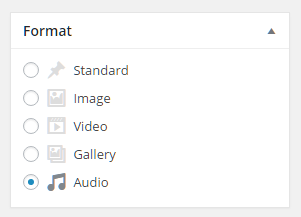
can you please let me know when i’m posting why posting format’s shows only two default & video.
how can i add the post format like below link shows.
https://www.mattcromwell.com/wp-content/uploads/2016/07/PostFormats-Metabox-1.png
currently in my wordpress showing only 2 formats
Standard & video.
how to add the other format as attached
Bogdan B. Da, putem fie daca ne scri pe email si ne oferi date de login, fie ne oferi un link la site si un link la contul de youtube deoarece exista cateve exceptii la youytube din cauza unor conturi numerice. Daca ai un astfel de cont, trebuie adaugat doar numarul acela lung din url in campul plugin-ului.
Multumesc.
Bogdan B. Hi,
Glad you found it. It is difficult for us to guess the issue without an example. We can only test our theme in it’s default state. We did not get any such errors so we could not recreate the error. That is why Catalin asked for a few examples so we can see the errors and try to figure out where they come from.
Have a nice day!
Bogdan B. – tagDIv
 Edward
 Edit your Main Page.
In Visual Composer section (example):

How to use Visual Composer see there: https://forum.tagdiv.com/how-to-use-visual-composer/
-
This reply was modified 9 years by
Edward.
EdwardHi!
How to increase the distance between paragraphs in a Numbered and Bullet List?
Example:

Thank you!
Catalin Hello Viachaslau1974,
Please try to edit the theme core files corresponding to your category template used by you. For example, if you are using the category post template style 1 you should edit the td_ategor_template_1.php like this -> http://screencast.com/t/KHG5nCRitA
Hope this helps!
Thanks for the message!
 TahneeKarla
Hello 🙂
Sorry in advance if I’m posting this question in the wrong place!
I’m trying to make my homepage slider like yours on your Travel Demo, http://demo.tagdiv.com/newspaper_blog_travel/
But for me, it is not showing every slider’s Post Title & Author name.
See screenshot on: http://imgur.com/a/SCJMQb
I can’t figure out what setting I’m missing that’s making it be selective with only showing particular slider Post Titles. I also want to know how I can make it show URL information when I hover my mouse over a slide?
Thanks for your help!! 🙂
 lenusmedia
Hello team, grat work with newspaper. Could you help me in optimize css for printer version of articles? I am working on http://www.ilfattovesuviano.it and I have added a “versione stampabile” link (printer version in English).
I have tried to optimize my CSS to render a good versione but I have few issues. Any help will be appreciated.
Bogdan B. Hi
To add a new custom ad you have to edit the following files like here:
– td_panel_ads.php – http://screencast.com/t/csyUpkoa – http://pastebin.com/v9xwLdQz
– td_block_ad_box.php – http://screencast.com/t/mRzwOa0Q5
– td_config.php – http://screencast.com/t/m3REo5pm
Result should be like here: http://screencast.com/t/FxYioNcpNS
This was just an example for custom ad 6. To add more custom ads follow the same steps but make sure you update properly the ad-spot ids.
Thanks!
Catalin Hello dexro57,
Please keep in mind that our theme has a list with some available blocks. Please try to check here -> http://demo.tagdiv.com/newspaper/block-7/ and you should choose any like it to your website. For example, you can try using the Block 7. For more information about Block settings, please consult here -> https://forum.tagdiv.com/block-settings-guide/ and here -> https://forum.tagdiv.com/how-to-use-visual-composer/
Thanks for the message!
Bogdan B. Hello,
Can you please provide an example of where this happens? I cannot see it on our end. The subcat dropdown woirks as expected for us.
Thank you!
 melcu
melcuSalut,
Ma tot chinui sa setez facebook-ul si youtube in Social Counter.
Am reusit cu twitter & instagram nici o sansa insa cu cele doua !
Ma puteti ajuta?
Catalin Hello datomnz,
If you want to make your mega menu items to be similar to the ‘Travel’ menu example, I suppose, right? If you want to do that please consult the topic here -> https://forum.tagdiv.com/topic/mega-menu-with-grid-columns/ because there you will see all the steps which are needed to take in this regard for achieving this layout.
If you want to display more levels in our theme and you are not aware of all steps in this regard, please consider hiring a freelancer/developer to help you because we cannot provide customization services at the moment, sorry!
Hope this helps and let us know how it goes!
Thanks for your understanding!
 kostaskir
Hello,
Concerning the mega menu css classes, I found almost everything in order to adapt the required colors and fonts.
There are only two things that I cannot change.
1. There is a vertical white line between the sub-categories and the images on the right. I want to make it disappear or to change color. Which class should I modify ?
2. The second is the next-previous arrows. Which class is responsible to change colors ? or to hide it.
I tried the below css but I managed to hide only the arrows. Is still functional and the borders are still there 🙂
.td_block_mega_menu .td-icon-font{
display:none;
}
Thank you in advance for your precious support !
Catalin Hello anteck,
If you want to hide your main menu you should use a bit of CSS code, for example, try the code below and place it in Theme panel->Custom CSS area.
The code is ->
#td-header-menu{

display:none;

}
If is not what you mean, please provide more details.
Thanks.
Bogdan B. Hello,
Please provide an example of what add you want to insert and where. our theme was built to work with adsense but if you want to add a custom non adsense ad we recommend using this method: https://forum.tagdiv.com/using-other-ads-non-adsense-ads/
Thank you!