- NewspaperWP Rocket and Newspaper Theme: Optimization Guide
- TutorialsFrom WPBakery to tagDiv Composer
- TutorialsOffset Feature
- TutorialsWhat is Ajax preloading?
 hllt-dmi
 Hey,
we still have this issue. How can we fix those? (mobile menu & mobile search). Thanks!
 oneplus
Hi there,
i want to float image at center in latest news loop and have all the information in on line. Is it possible ?
[url=https://postimg.cc/hXbf7CRm][img]https://i.postimg.cc/hXbf7CRm/sample.png[/img][/url]
 JustOneForTheRoad
Hi
My website is http://www.justonefortheroad.com and I have done an audit and unsurprisingly have encountered a few issues. Some I am able to sort and others are beyond my levels of expertise.
The two that are concerning me just now are as follows:
Canonical Issue
I believe my homepage is suffering from an issue here however when I try to set up a 301 redirect through YOAST Redirections I am unable to redirect the http:// version to the https:// Obviously I am doing something wrong and maybe its not this URL that needs redirecting. Can anyone shed some light on what actions I need to take. Remember I am no expert!!
Mobile Header
When viewing some POSTS on Mobile I am getting a giant search magnifying glass or large white space in the header area. Its strange because I had a couple of URLS suffering from this but they now seem to be working. One that currently is not right (however who knows it might change) is on my mobile https://www.justonefortheroad.com/autumn-in-berlin/ (search magnifying glass issue) and https://www.justonefortheroad.com/the-authentic-tenerife/ (space issue)
I did not create this website and I have asked the technical guy who did and he cannot see anything wrong and suggested I raise this ticket.
Any help appreciated so thanks in advance
Rupert
 noku-devs
 Thank you for the prompt response, however, the issue is not with creating the page, but with inserting the content. Once I create the page in the secondary language, tagDiv Composer gives me the error that I reported. I am attaching a video as an example.
Have a good evening.
https://static.noku.io/assets/video-uploads/cryptonomist-error-tagdiv.mp4
-
This reply was modified 2 years by
noku-devs.
 marty84
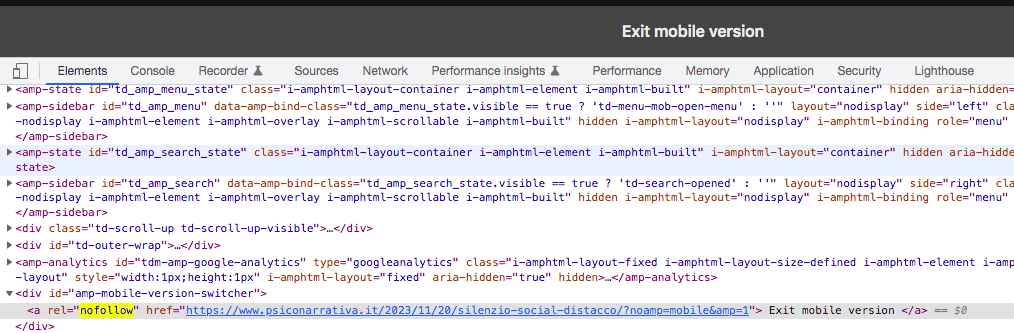
 Ok, I solved it. You had to activate it in Post Settings > Featured images > “Show Featured Image”. But, the “Exit Mobile version” problem, nofollow and noamp, persist!
marty84 Also Amp does not take the image of the item. Why?
https://www.psiconarrativa.it/2023/11/20/silenzio-social-distacco/?amp=1
marty84 HI,
Thanks for the reply.
I have disabled it as shown in the image. I did this yesterday following other forum threads. However, the “Exit mobile version” entry does not disappear and neither do the nofollow and noamp.
https://i.postimg.cc/8z0dZ0qg/Schermata-2023-11-29-alle-10-00-18.png
 kickinthetires
Hi,
I have featured images on blog posts that are not utilizing the full height of featured images. Roughly only 30-50% of the height on featured images are appearing, cutting the image short.
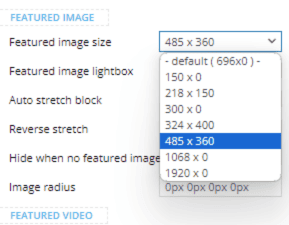
For example, I have a post template set up using the default post template from the Newspaper 12 theme: Single Post Template – Default PRO. If I edit the featured image element, I have the following options for “Featured image size:”
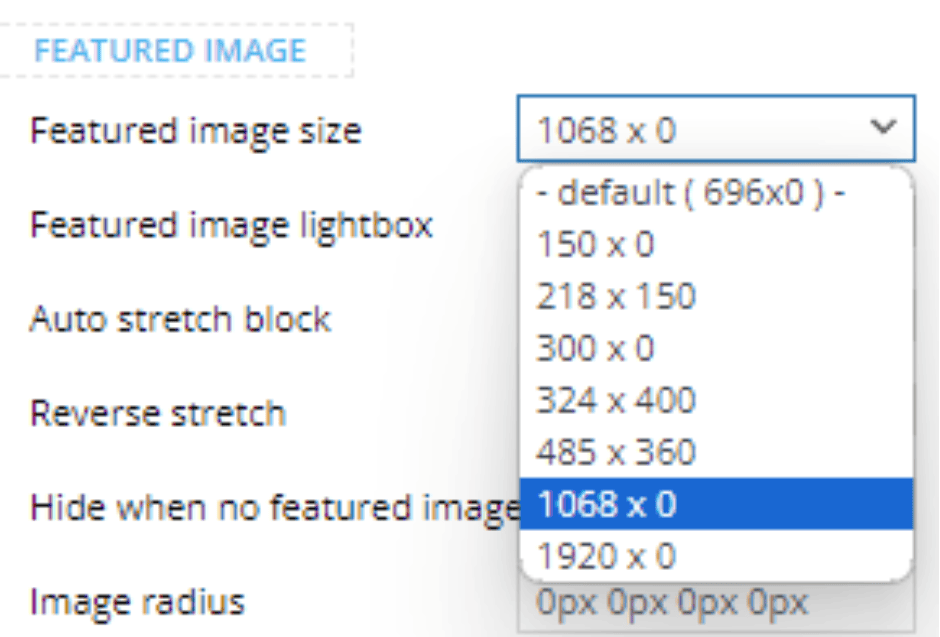
As you can tell, half of these options have a “0” in the height pixel for the default featured image size. When one of those options are selected, the height of the image is significantly cut short.
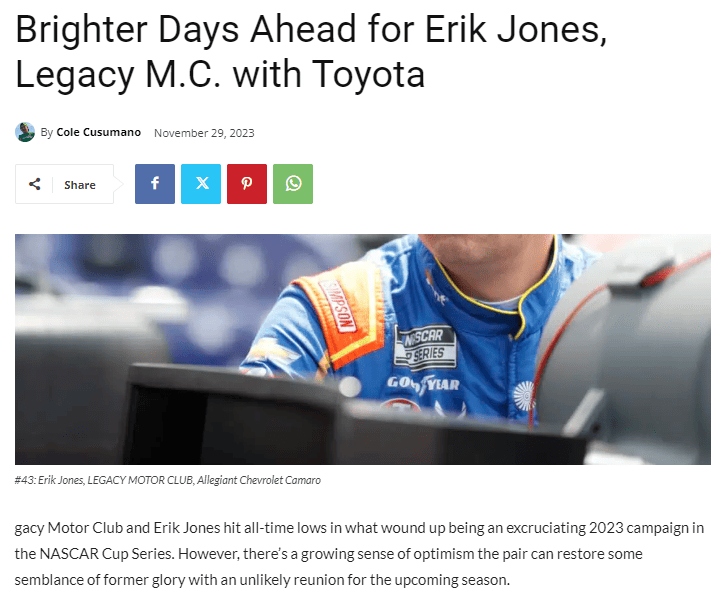
To test that theory, I decided to choose one of the smaller options that have a number other than “0” in the height section, and the image is fixed.
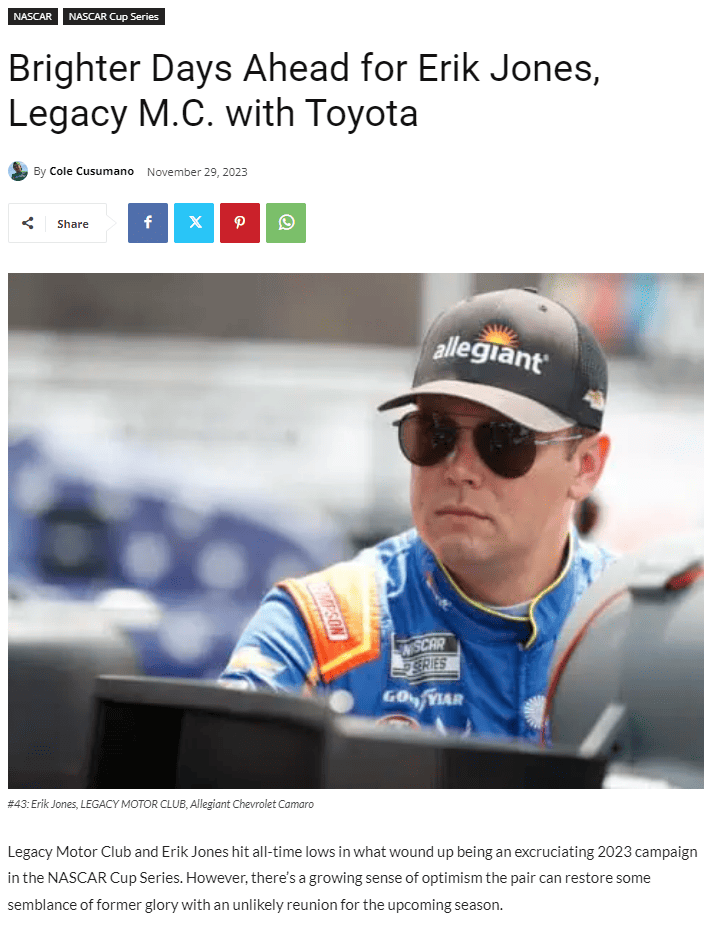
To add an extra twist, this is only happening to new posts. Older posts do not have this issue.
I’d like to use one of the larger image size options because the smaller size looks bad on larger devices. Does anyone know a fix for this?
Website: https://kickinthetires.net/
Example of broken featured image in blog post: https://kickinthetires.net/nascar/brighter-days-ahead-for-erik-jones-legacy-m-c-with-toyota/
 Mystic
 We have developed in-house a shortcode and want to deploy it in a Block (Say Block 15) on the landing page of Newspaper Default scheme. Can you pl. share a sample code? Assume the name of the shortcode is [ExampleShort]
marty84Hello,
I would delete from my page (example: https://www.psiconarrativa.it/2023/09/10/viktor-frankl-crescita-sofferenza/?amp)
Exit mobile version
an I would understand because the image modal not appear in ?Amp
I have activing in my theme only AMP, not mobile+amp
And I wuold delete in code on my page for example: https://www.psiconarrativa.it/2023/09/10/viktor-frankl-crescita-sofferenza/?noamp=mobile& and attribute: “nofollow”
 c386
c386Hi,
The theme has an option to inject an ad after the selected number of paragraphs.
Is there a way to get it to avoid certain blocks? For example, if I have content in columns, the paragraphs within are still analysed by the theme, causing the ad to be injected in awkward places.
Here is an example: https://imgur.com/a/bHO7YD9
There must be an easy way to make sure column blocks are exempt, but I’ve yet to find it. Any help would be appreciated.
Thanks!
 AndreVC
Hi! I recently purchase this template and for the first couple of days it works very well.
However, for the last few days, I can’t save any changes that I made on the template, on my homepage, for example.
Sometimes a error message appears on top: “Erros at columns elements” and I lose the capacity of edit any block. In this cases, I’ve to recovery the last revision using Elementor.
This is the URL: https://exploraromundo.com/
 Anamaria
 Hi,
Please disable the tagdiv mobile theme plugin.
Using our theme you can choose from 3 mobile versions
-> mobile responsive => https://www.screencast.com/t/oJ2ShOp47
-> mobile theme plugin => https://forum.tagdiv.com/the-mobile-theme/
-> mobile page => https://tagdiv.com/newspaper-10-3-7-update-brings-customizable-and-fast-mobile-pages/
If you created the mobile pages with tagDiv Composer, then when you install the Mobile Theme plugin, your pages will be overwritten by the plugin (the mobile theme comes with its templates for page, post, category, etc so your current templates from the desktop theme will get converted to the mobile theme layout, the page content is made without builders in mobile editor => https://www.screencast.com/t/xbgZG8kH also, the options that are provided to edit the mobile theme version are limited (this keeps the things simple)).
This is a video about Responsive Newspaper Theme, AMP & Mobile Theme, Mobile Pages & Templates -> https://www.youtube.com/watch?v=SpGkOnJeNZY
So, the mobile responsive is what you see when that you select the viewport on phone => https://www.screencast.com/t/matV17hH, so some settings may apply for each viewport(where is the border blue), and others are not(where the border is black).
The mobile page has the mobile templates from Cloud Library => https://www.screencast.com/t/YCcZ8rL8
The Mobile responsive version of the theme and the mobile page editor can be edit with tagDiv Composer, the mobile theme plugin cannot.
For example, you can have the mobile theme plugin activated and use the mobile page/mobile responsive version for the homepage/pages, but for the categories pages/404 page, you can’t use the mobile page/mobile responsive version if you have the mobile theme plugin activated.
So, if you want to design the pages with tagDiv Composer, you can use the mobile page or mobile responsive version.
Thank you!
Anamaria Hello,
Unfortunately, there is no option because the amp works with mobile theme and has a different structure.
Using our theme, you can choose from 3 mobile versions
-> mobile responsive => https://www.screencast.com/t/oJ2ShOp47
-> mobile theme plugin => https://forum.tagdiv.com/the-mobile-theme/
-> mobile page => https://tagdiv.com/newspaper-10-3-7-update-brings-customizable-and-fast-mobile-pages/
If you created the mobile pages with tagDiv Composer, then when you install the Mobile Theme plugin, your pages will be overwritten by the plugin (the mobile theme comes with its templates for page, post, category, etc so your current templates from the desktop theme will get converted to the mobile theme layout, the page content is made without builders in mobile editor => https://www.screencast.com/t/xbgZG8kH also, the options that are provided to edit the mobile theme version are limited (this keeps the things simple)).
This is a video about Responsive Newspaper Theme, AMP & Mobile Theme, Mobile Pages & Templates -> https://www.youtube.com/watch?v=SpGkOnJeNZY
So, the mobile responsive is what you see when that you select the viewport on phone => https://www.screencast.com/t/matV17hH, so some settings may apply for each viewport(where is the border blue), and others are not(where the border is black).
The mobile page has the mobile templates from Cloud Library => https://www.screencast.com/t/YCcZ8rL8
The Mobile responsive version of the theme and the mobile page editor can be edit with tagDiv Composer, the mobile theme plugin cannot.
For example, you can have the mobile theme plugin activated and use the mobile page/mobile responsive version for the homepage/pages, but for the categories pages/404 page, you can’t use the mobile page/mobile responsive version if you have the mobile theme plugin activated.
So, if you want to design the pages with tagDiv Composer, you can use the mobile page or mobile responsive version.
Thank you!
 Media_Ex
 It looks like My host found the problem; this is what they send to me:
——
We have identified a query that causes high load and leads to blocking. This query is executed during the publication of a new post, as it additionally indexes all previous posts.
The problem seems to be typical for large WordPress sites. There are plugins created for WP that change the indexing method, improving query performance, for example: https://wordpress.org/plugins/index-wp-mysql-for-speed/
From our side, we can offer you a dedicated MySQL server.
—–
Can You confirm that https://wordpress.org/plugins/index-wp-mysql-for-speed/ can resolve this problem? or maybe you have a better solution?
And what do you think about dedicated MySql? Did we need this, or plugin can to resolve this problem?
When we create a new post, MySql makes a huge load and disconnects our database.
Our WordPress has over 116.000+ posts
-
This reply was modified 2 years by
Media_Ex.
 astindia
Hi, I’m encountering issues with my AMP settings. I aim to maintain the same design across both AMP and non-AMP versions. How can I achieve this consistency?
 Calin
Calin Hello,
If the button has the same link for all posts, then you can edit the post template in code and set the file in child theme – https://forum.tagdiv.com/newsmag-child-theme-support/
For example if you are using post template 1 you can edit the loop-single-1.php or the single_template_1.php (deepens where you’ll like the buttons), the path in theme files is wp-content/plugins/td-composer/legacy/Newsmag/parts/single/ and in child theme the path for files should be /Newsmag-child/parts/single/loop-single-1.php and single_template_1.php
I hope this will help you!
Anamaria Hello,
Please let me know what version you use the mobile theme or mobile page.
Using our theme, you can choose from 3 mobile versions
-> mobile responsive => https://www.screencast.com/t/oJ2ShOp47
-> mobile theme plugin => https://forum.tagdiv.com/the-mobile-theme/
-> mobile page => https://tagdiv.com/newspaper-10-3-7-update-brings-customizable-and-fast-mobile-pages/
If you created the mobile pages with tagDiv Composer, then when you install the Mobile Theme plugin, your pages will be overwritten by the plugin (the mobile theme comes with its templates for page, post, category, etc so your current templates from the desktop theme will get converted to the mobile theme layout, the page content is made without builders in mobile editor => https://www.screencast.com/t/xbgZG8kH also, the options that are provided to edit the mobile theme version are limited (this keeps the things simple)).
This is a video about Responsive Newspaper Theme, AMP & Mobile Theme, Mobile Pages & Templates -> https://www.youtube.com/watch?v=SpGkOnJeNZY
So, the mobile responsive is what you see when that you select the viewport on phone => https://www.screencast.com/t/matV17hH, so some settings may apply for each viewport(where is the border blue), and others are not(where the border is black).
The mobile page has the mobile templates from Cloud Library => https://www.screencast.com/t/YCcZ8rL8
The Mobile responsive version of the theme and the mobile page editor can be edit with tagDiv Composer, the mobile theme plugin cannot.
For example, you can have the mobile theme plugin activated and use the mobile page/mobile responsive version for the homepage/pages, but for the categories pages/404 page, you can’t use the mobile page/mobile responsive version if you have the mobile theme plugin activated.
So, if you want to design the pages with tagDiv Composer, you can use the mobile page or mobile responsive version.
Thank you!
Anamaria Hello,
1.
In order to disable the option “Exit mobile version”, you need to disable this setting: https://i.imgur.com/LxpDtB2.png
The excerpt option is not added to work for mobile theme and amp, only mobile page and responsive version.
You can change the text for about us here -> https://i.imgur.com/qmC40ri.png and follow us here -> https://i.imgur.com/zHHi7Ck.png
2. Yes, is the same page without mobile theme and amp.
Yes, it is used mobile theme. We have 3 options:
Mobile – Displays content using the Mobile Theme on small screen devices (no AMP)
Mobile + Amp – Displays content using the Mobile Theme on both mobiles and AMP
AMP – Uses the responsive version of the theme on small screen devices and Mobile Theme only on AMP.
For forum is used bbpress but this is made custom.
Thank you!
 Mededgemea
We have noticed heavy CPU usage with our website where the newspaper theme is used. We could understand from log analysis that there is heavy request from amazonbot. Below log entry is logged every second. Can you please help me how to stop this?
23.22.35.162 – – [26/Nov/2023:17:13:29 +0000] “GET /?ajaxCalendar=1&calendar_size=%E2%80%9Dsmall%E2%80%9D&id=1226704376&mo=11&yr=2023 HTTP/1.0” 200 65519 “-” “Mozilla/5.0 (Macintosh; Intel Mac OS X 10_10_1) AppleWebKit/600.2.5 (KHTML, like Gecko) Version/8.0.2 Safari/600.2.5 (Amazonbot/0.1; +https://developer.amazon.com/support/amazonbot)”
 scollen
Hi there
What is the difference in setup between these two tagdiv url’s:
1. https://tagdiv.com/category/documentation/?amp
– I see this url has AMP enabled.
– Does AMP always create the “Exit Mobile Version”? Is there a way to disable that?
– You have absolutely no excerpts in your AMP version. How would one include excerpts in the AMP version?
– Can you point me to the URL that explains where and how to adjust the ‘About Us’ and ‘Follow Us’ adjustments that you made?
2. https://tagdiv.com/category/documentation/
– This is exactly the same page with AMP disabled, correct?
– This is using a mobile theme or not using a mobile theme?
Another question, what forum software/plugin are you using here?
Thank you!
 PolyMoly
https://demo.tagdiv.com/newspaper_chained_news_pro/
Other theme ex.) Bridge you can click some buttons to import your Select Theme from the various demo contect Live Preview examples.
How can I import to appear like this demo?
Thank you
 10v3eternal
Hi, I’m encountering a significant issue on my WordPress site (d5technews.com) with the ‘Newspaper’ theme. I’m facing 404 errors across all pages for ‘text.js’ and ‘mode-less.js’ files within the td-composer plugin, which may be related to the css live feature. Despite the files being on the server, these errors persist.
Examples of the errors include:
mode-less.js - 404 on 2023-11-25 17:09:53 (Homepage)

snippets/text.js - 404 on 2023-11-25 17:09:53 (Homepage)

mode-less.js - 404 on 2023-11-25 17:26:30 (Homepage)

snippets/text.js - 404 on 2023-11-25 17:26:30 (Homepage)
…[additional examples if needed]…
I’m seeking advice on:
Possible reasons for these site-wide 404 errors, especially given the files are present
Any specific issues within the ‘Newspaper’ theme or td-composer plugin, particularly concerning css live, that might be causing this
Recommended steps to diagnose and fix this issue
Your expertise and any guidance you can offer would be immensely helpful in resolving this urgent problem.
 nolandolce
Hello, the email field is missing in our comments section at the bottom of our posts. How do I get it back?
example:
https://rareparenting.com/gift-guide-for-kids-with-disabilities-holiday-2023/
It’s not possible for anyone to leave a comment because email is required, yet the field is missing.
Also, in general, how does someone log into the website?
Thanks!
 mashmedia
Hi, in the footer of RTL demo, I’m trying to change the title position of the widget but for some reason I can’t see an option allow me to that.
Also the category widget there so option to change the the horizon align from left to right..
You should add Horizon align to this both widgets because in Arabic for example everything should be from right to left.
Thanks in advance.