- NewspaperWP Rocket and Newspaper Theme: Optimization Guide
- TutorialsFrom WPBakery to tagDiv Composer
- TutorialsOffset Feature
- TutorialsWhat is Ajax preloading?
 Andrei L.
 Hi
Please make sure that you have some posts which match with your category/tag/slug filter. As a post be displayed in block must match all filters that you have set. For example if you set Category filter: A, Tag filter B, the post must be in category A and also have the B tag in order to be displayed in block.
Hope this help.
Thanks!
 Bogdan B.
 Hello,
That is because the panel ad spot does not accept PHP code. You can use a plugin to achieve our goal, of if you do not want to use plugins you can modify the theme files but it will require php knowledge. You can modify for example td_block_ad_box.php and use the ad box element on your website.
Thanks.
Andrei L. Hi
1. 2. The article title is catted off at the default value from excerpt field, so you can increase that value for each module to display a longer title: http://screencast.com/t/9IAtoPinrTgj – http://screencast.com/t/aySHeQPGKiN From the same section you can set the excerpt length: http://screencast.com/t/n3iUghF0S – http://screencast.com/t/y8igxG1q
3 You can increase excerpt’s font size from theme panel > theme fonts: http://screencast.com/t/Kh2HobGviGn
4 The image position is given by the block’s layout, so you can use a block which display the image on left, like block 7 for example: http://demo.tagdiv.com/newsmag/block-7/
5 You can deactivate more article box from theme panel > post settings: http://screencast.com/t/SLZG6E9lz
Thanks!
 Catalin
 Hi mikezenmx,
For change the logo is an option for it in Theme panel like this: http://screencast.com/t/ZVwya5rObB . The theme does not have an option to re-size the slide show/block. Please provide more details about this problem and give me an example (screenshot) what you want to change. I need this for give you an accurate response.
Thanks.
 ibomax
.td-hover-1 .td-big-grid-post:hover .td-module-thumb .entry-thumb {
transform: none !important;
-webkit-transform: none !important;
-moz-transform: none !important;
}
this code helped me to disable zoom efect at pictures, theme / custom css. I have another question, for blocks… please check bahisokulu.com / i have lifestyle news block, and it has tabs like Business Featured Futbol Haberler ect. How can i add one more like this, because when i tried to add these texts not appearing, for example:
i want one block with all / news / sport ect… tabs to collect all categories under my news… Simply please tell me how can i add and customize this kind of blocks.
 Alin [tagDiv]
 Hi,
I’m not sure if I understand well. Do you wan to say that when you access an articles from your fb page the images are not loading?
I have checked this but did not found any issues for you posts. For example this one – http://ecoronado.com/news/2015/10/25/trick-or-treat-at-the-coronado-retirement-village/ the content image is displayed on my Ipod, of course the featured image is not displayed as you hide it for post content. This works exactly like on desktop.
Please provide more details if this is not what you mean, maybe I did not get it well.
Thanks!
 jhulsbrain
Hi,
Instead of CATEGORY FORM LAYOUT from the theme (this link), i use a PAGE TEMPLATE created using the page creator (this link).
My reason is that, i am working my SILO STRUCTURE. I have a page (same slug) with the CATEGORY.
My issue is I can’t have the TITLE and BREAD CRUMBS same as the default category format. However, if i use a PAGE CLASSIC format – i have both the TITLE of the PAGE as well as the bread crumbs. (see this link).
Thanks…
Jhuls
Bogdan B. Hello,
You can try to use a plugin. Something like: https://wordpress.org/plugins/wp-splash-page/screenshots/
It is just an example, we cannot say for sure which one will work best with our theme as we have not tested these plugins. There is a number of them to chose from. Try them out and see which one works best.
As for the ads, the theme does not have a transitioning options. You will have to use a plugin again. People use the adrotate plugin successfully with our theme.
I hope this helps.
Thank you!
Alin [tagDiv] Hi,
Increase the posts limit from block settings(to 6 for example) – http://screencast.com/t/xNqYSxlp
Thanks!
 web-mania
Hello there!
Wonderful theme, working like a charm up to now!!
I have 2 questions/issues though, that i need your guidance to fix!
1) Social Counter is not updating for some reason.
Plugin Version 2.1
Theme Version 4.2
WP Version 3.9.2
It was working fine up to a certain point where it stropped updating, when i went to change the ID (e.g Facebook) to test it, it shows “0” likes (therefor putting back the previous Facebook id shows “0” again)
How can I fix this??
2) Updating WP, Theme and Plugins
Theme Version 4.2
WP Version 3.9.2
Many plugins need to be updated too. The issue is that we have made it multi-site and we have done quite a lot of modifications. As the client is a newspaper portal you understand it is very risky and we can just go down for couple of days. So my question is, if we just go into maintenance for couple of hours and update theme and plugin (maybe WP too) will we lose anything? Is the latest update changing anything that might affect our update and lose anything? Is there anyway you can advice to apply the updates with the minimum risk of losing anything modified?
Thank you very much in advance!!!
Alin [tagDiv] Hi,
You can move the reviews code in the post template that you use. For example you could place it bellow the post title – http://screencast.com/t/nh0wockO – http://screencast.com/t/JgcxfoOR
If need another customization and you want to change the reviews function you can find it in td_reviews.php file – http://screencast.com/t/dIIUZcXLHy14 or get someone to help you with this as we cannot provide custom work – http://screencast.com/t/dIIUZcXLHy14
Thanks!
jhulsbrainHi,
The PREVIOUS and NEXT in the POST NAVIGATION contains only TEXT MESSAGE (like POST TITLE of the previous or next posts).
Can we have a image on it? It would look better i guess of having the image/pix of the posts?
Thank you.
 tripledm
Hello,
I was super excited and ready to copy the content of y old custom fields form quadrum theme to the newspaper theme video field then I realised, it’s not just the URL that needs to copy 😉
META KEY for old field is “quadrum_video” and the meta_value is the video URL: https://www.youtube.com/watch?v=FDiHbIsIqLE , as example.
Newspaper theme has parameters with it.
META KEY for newspaper theme is “td_post_video” and the “meta_value” is stored like this:
a:1:{s:8:”td_video”;s:43:”https://www.youtube.com/watch?v=FDiHbIsIqLE”;}
PLEASE can you help me with the SQL query that will copy the URL from the old field to the new field with the new formatting.
Thank you in advance!!!
 bullet550cc
Hi Team,
GaadiWaadi.com is one of the fastest growing Automotive News website in India, we moved to Newspaper theme back in April 2015. Everthing is now shorted out with the theme but there are 3-4 errors that causing many problems in UI of visitors.
1) Gallery : How to put google ads in Gallery with next/Previous option
2) Smart list 8 giving so many errors, is any option is there with Page no. like Page no. 1 , 2 ,3 10 (next/previous)
3) on homepage, we are showing latest 8 articles, whats if the user wants to see more articles ? is any option with next page or Page no. 2,3,4,5,…1000
4) How to set next page option for long articles, like showing 2000+ article in 3 pages (1,2,3) without using H2,H3,H4
5) How to customize the category page ?
 axelpetur
Hello
In your video https://www.youtube.com/watch?v=iuENF-Oeg2Y&list=PL6CsDkMaejhrfEuAth6JVYLPmFwFzNFwY there is an “Format” option I don’t find on my site. I only get the first bar with “B I . . . ”
What do I need to do to fix ?
 simchris
  alendia
Hello,
I got problem with my Social Counter Plugin, it can’t show fans number of my Facebook Fanspage and Twitter. I have 39k fans for Facebook and 643 follower for twitter. i’m using Newspaper v6.5.1 and Social Counter v3.0
i writed the correct facebook id (programbisa) and twitter (programbisa).
I have tried everything, such as disable all plugin except Visual Composer and Social Counter in case of plugin conflict, Reinstall Social Counter Plugin, and Delete all cache. But still no luck. Could you please check it?
Social Link:
https://web.facebook.com/programbisa
https://twitter.com/programbisa
Website:
http://programbisa.com
Hope to hear from you.
Thanks.
 playmyrequest
Is there a block that has just the title and excerpt with no image?
Ex.
TITLE
author & date
This is my excerpt that is however long the except is.
TITLE
author & date
This is my excerpt that is however long the except is.
Thanks for your help.
Scott
 cbur2107
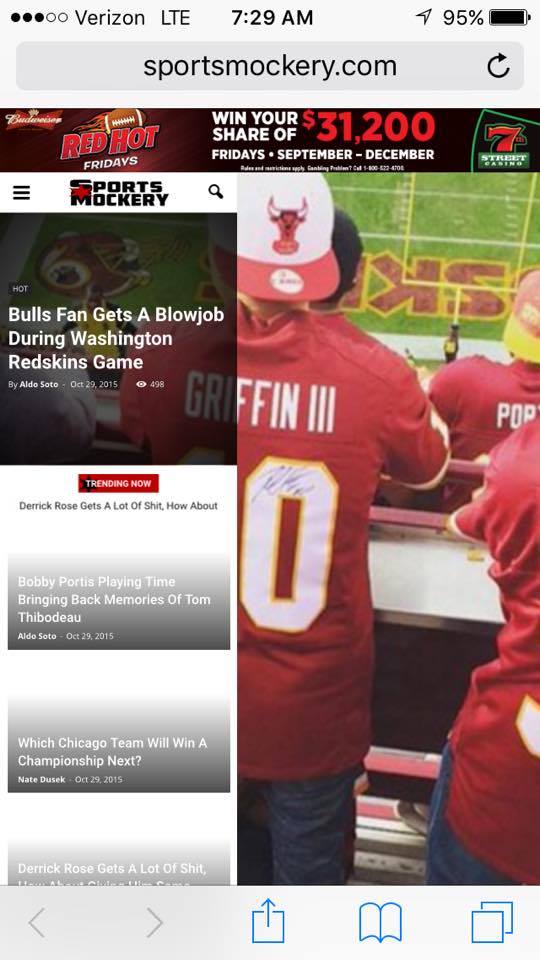
The homepage post widget for the homepage is great, only problem is it totally messes up my mobile.
Example: http://sportsmockery.com/wp-content/uploads/2015/10/12204794_905692468634_52261014_n.jpg
Do you know why this happens? I really want to use the homepage post on my site.
Thanks in advance.
 navi88
When I put in custom css in the backend, in the fields designated for that, they load in the front end, but there is problem with speed. The theme first load from it’s style.css then it loads from backend. I think theme has custom css wrongly implemented. Can you please check this?
example:
In custom css field i put h1 {color:red} and it loads color black first then red 3 seconds later.
Alin [tagDiv] Hi,
You can edit the code and add a condition so the Demo installation option to appear only for you. For example use is_author function and add you author id – http://screencast.com/t/a9qVYc2f – https://codex.wordpress.org/Function_Reference/is_author
Thanks!
Alin [tagDiv] Hi,
You will need custom modifications for this. I will provide an example for desktop screens as the thumbnails are to small on tablets and phones and it will not look fine. If you need this also for those devices I suggest to get a freelancer to help you.
You can add an extra class to the row and use it to target block 15 if you want this only for that page – http://screencast.com/t/gqXHi6ubETDr and use this custom css in Theme Panel > Custom Css – http://screencast.com/t/h6vs0VDn
@media (min-width: 1020px) {

.yourclass .td_block_15 .entry-title {

position: absolute;

top: 35px;

text-align: center;

padding: 3px;

}

.yourclass .td_block_15 .entry-title a {

color: #fff;

font-size: 13px;

}

}
Thanks!
 lighterside
 Thanks Bogdan, and I understand all that. I’m using the same inspector in chrome and not seeing my code.
Those examples you screencapped are Newspaper CSS entries, not mine.
If you look at my code in my original post, it is different than what’s on your screenshots.
Can you please re-read and let me know?
Thank you sir.
cbur2107 Video format.
Play button on homepage.
No featured image.
 Torge
Torge Hi Lucian,
I just upgraded to Newsletter v6 and I couldn’t find the right place to tweak the code so that the shortcodes are working in the category description again. Could you maybe update your solution so that it works in v6? That would really be much appreciated.
Edit: I just answered my own question. Found the right place to change in includes/wp_booster/td_category_template.php. There change line 175 to
return '<div class="td-category-description"><p>' . do_shortcode($this->current_category_obj->description) . '</p></div>';
Thanks & best,
Torge
-
This reply was modified 10 years by
Torge.