- ApiPractical example – How to add a new Block and Module
- Apitd_api_top_bar_template::delete
- Apitd_api_top_bar_template::update_key
- Apitd_api_top_bar_template::update
- Apitd_api_top_bar_template::add
- Apitd_api_single_template::delete
- Apitd_api_single_template::update_key
- Apitd_api_single_template::update
- Apitd_api_single_template::add
- Apitd_api_footer_template::delete
- Apitd_api_footer_template::update_key
- Apitd_api_footer_template::update
- Apitd_api_footer_template::add
- Apitd_api_smart_list::delete
- Apitd_api_smart_list::update_key
- Apitd_api_smart_list::update
- Apitd_api_smart_list::add
- Apitd_api_thumb::delete
- Apitd_api_thumb::update_key
- Apitd_api_thumb::update
 BlackandWhiteTradingLtd
https://www.awesomescreenshot.com/image/53023044?key=2d16f80a4c57ec16ea926acb90298e10
-
This reply was modified 1 year by
BlackandWhiteTradingLtd.
-
This reply was modified 1 year by
 marijn390
We often write articles that are related to previously posted articles on our website. We therefore look for a possibility to link dedicated related articles in the new message with for example the button ‘Read more’. Sometimes it also happens that this is not necessary. Therefore this section should not always be visible.
Do you have any ideas on how I can set this up and that it is not too complicated for the editors who write to link messages? I know there are options for custom fields but I have no idea where to start.
 Davidpinto
Hi,
I deactivated the plugin AMP and the Mobile Theme, because I would like to create a template only for mobile.
I tried with this guide: https://tagdiv.com/newspaper-10-3-7-update-brings-customizable-and-fast-mobile-pages/
and i created a template HomePage Mobile.
https://i.postimg.cc/PxcpTMwW/Screenshot-2025-02-18-alle-16-56-50.png
But I’m confused, because when i see on iPhone I have the flex verison of desktop mode.
the site is http://www.davidpinto.it
thank you
 jrh
jrhHow do I set a featured image on a page–not a post. Currently, it displays the Old Fashion logo when submitting to social media platforms, even though I deleted it through the theme panel / Logo & Favicon settings.
The
https://johnrhall.com is the URL to the site and homepage.
Thank you
 Bettina
 Hello!
Ensure the Mobile theme and AMP plugins are disabled, clear the cache, and try again. If the problem is still there, then make a test and deactivate ALL plugins except tagDiv ones. Also, if you are using a cache plugin, deactivate it, clear all cache, and try again.
Let me know the results!
Thank you!
Bettina Hello!
I meant it’s not giving any error, so it is not working correctly. It’s a loop there.
They should be required fields. Check an example for the checkbox and the settings: https://app.screencast.com/JjrNlOITndmWW. It is from the APP demo.
Thank you!
 songs
songsI try to update the newest version 12.6.9, after click on udate button i got error massage “Page don’t find 404” link after my domain name is “update-core.php?action=do-theme-upgrade&update_theme=Newspaper” . Same error is showing on new wp update v6.7.2 “update-core.php”. Anyone have this problem?
 digicom
Hi,
We usually insert 2 suggestions for posts to read in each of our articles, but for some time now a text like this has appeared below the suggestion for an posts to read :
2025-02-17 15:54:16 Type: Msg: File: Line:
as you can see on this posts for example https://magazine.pagesjaunes.online/douala-une-femme-perd-la-vie-des-suites-dune-agression/, and also on this screenshot : https://www.transfernow.net/dl/link-newspaper
Please help us remove this text from our posts.
My site URL : https://magazine.pagesjaunes.online/
 valerio88
 Hi Bettina,
I managed to solve the issue by deactiving the mobile theme plugin and AMP.
Now, even though comments are disabled only on my homepage appears the ‘leave a comment’ section. The area is not selectable on tagDiv Composer and I don’t understand how to remove it. Can you help? Thanks
My webiste is ulisse.blog
-
This reply was modified 1 year by
valerio88.
 admanu
Newspaper – News & WooCommerce WordPress Theme Regular License : how many site i can use?
 Freestate
Hello,
I have a cloud template for categories and a matching mobile template.
In Composer, everything is always displayed as I would like it to be. However, when you visit the website and switch between two categories, the display is absolutely not identical. The same template is used, but different headers, for example. What could be the reason for this?
 giulian
Hi,
Using NewsPaper, with it’s latest version, we have a big issue with Google core web vital INP as none of our pages pases this rule. After investigating, I’ve seen that it is related with the offcanvas menu on mobile.
Since this is the theme’s native module, it probably happens on all of the inslations, happens on both of ours (prod & staging).
I don’t know if you are aware of the issue and if there is a solution for it. In case you don’t know it, to test it properly, you need to set up the environment settings to lower settings (slower network and CPU).
Didn’t find how to post images, and I preffer not to share the website publicly.
Let me know if you need any other info.
Bettina Hello!
Uninstall the Mobile theme and AMP if you have another layout on your mobile viewport.
Can you please provide your website link?
Thank you!
 Anamaria
 Hello Gus,
Please follow the steps from this topic https://forum.tagdiv.com/topic/error-at-zones-6models-1dom-the-model-does-not-match-the-content-currene/ if you have a child theme; please use the main theme.
Usually the “Invalid reply from server endpoint error” is caused by insufficient WP_Memory_limit, if you’ll set it to 256M, and is still not working, please double it and check the rest of the settings from our guide -> https://forum.tagdiv.com/requirements-for-newspaper/ also make sure that you are using SSL and you have a good bandwidth, the one from our server is 1GB/s and the one that I use at home is 500MB/s, if you have low bandwidth, then you can access parts of the cloud, this can be done from the frontend, for example, if you are on a post -> https://i.imgur.com/4G74M7F.jpg or from tagDiv Composer -> https://i.imgur.com/2F6MhfI.png or from backend -> https://www.screencast.com/t/wekHmc7kJ8J
Thank you!
Bettina Hello!
Uninstall the Mobile theme and AMP plugin.
Thank you!
Anamaria Hello,
AMP is deprecated as of January 2023-> https://developer.bigcommerce.com/docs/storefront/wordpress/platform-integration/enabling-amp so we don’t longer recommend it.
You have the mobile theme version now, so you can disbale the plugins to check the responsive version.
Using our theme, you can choose from 3 mobile versions
-> mobile responsive => https://www.screencast.com/t/oJ2ShOp47
-> mobile theme plugin => https://forum.tagdiv.com/the-mobile-theme/
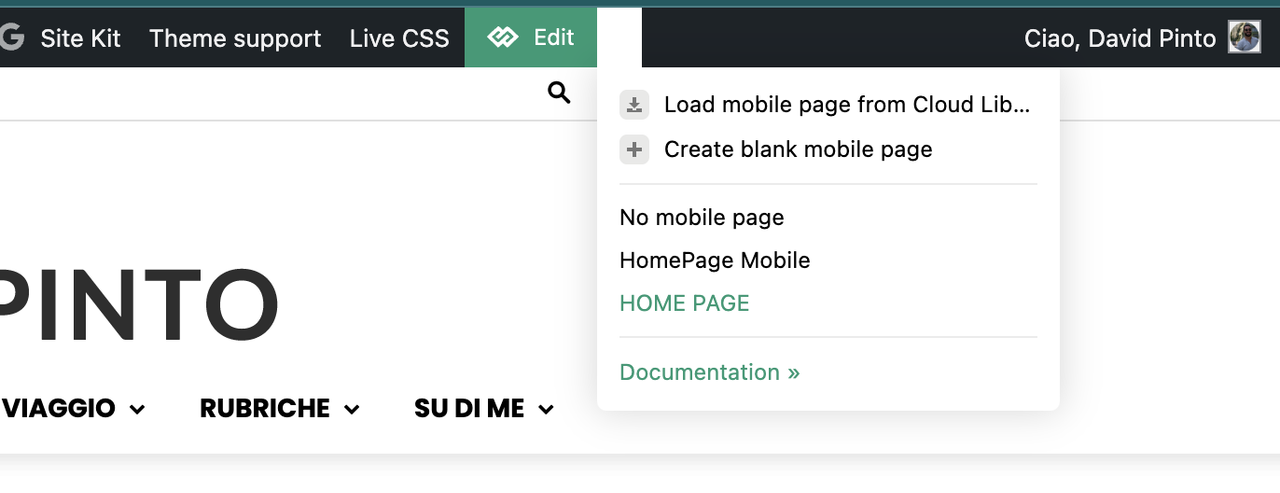
-> mobile page => https://tagdiv.com/newspaper-10-3-7-update-brings-customizable-and-fast-mobile-pages/ The option that you need to use.
Suppose you created the mobile pages with tagDiv Composer. In that case, when you install the Mobile Theme plugin, your pages will be overwritten by the plugin (the mobile theme comes with its templates for page, post, category, etc, so your current templates from the desktop theme will get converted to the mobile theme layout, the page content is made without builders in mobile editor => https://www.screencast.com/t/xbgZG8kH also, the options that are provided to edit the mobile theme version are limited (this keeps the things simple)).
This is a video about Responsive Newspaper Theme, AMP & Mobile Theme, Mobile Pages & Templates -> https://www.youtube.com/watch?v=SpGkOnJeNZY.
So, the mobile responsive is what you see when that you select the viewport on phone => https://www.screencast.com/t/matV17hH, so some settings may apply for each viewport(where is the border blue), and others are not(where the border is black).
The mobile page has the mobile templates from Cloud Library => https://www.screencast.com/t/YCcZ8rL8
The Mobile responsive version of the theme and the mobile page editor can be edit with tagDiv Composer, the mobile theme plugin cannot.
For example, you can have the mobile theme plugin activated and use the mobile page/mobile responsive version for the homepage/pages, but for the categories pages/404 page, you can’t use the mobile page/mobile responsive version if you have the mobile theme plugin activated.
So, if you want to design the pages with tagDiv Composer, you can use the mobile page or mobile responsive version.
Thank you!
 digitalbusiness
 Hello, I don’t know what the problem is. However, after activating the Mobile theme and AMP plugins, I cannot activate the Mobile + AMP option. It turns continuously in vain, as seen in the screenshot: https://prnt.sc/I4W9YWSKc5Ko. This is how the website is presented on the desktop version https://prnt.sc/7I_vMMQ73HUs. See how it is presented now on the mobile version: https://prnt.sc/aCXd9vCosQTy. It isn’t very good with the Newspaper theme logo. Please, help me to fix it.
-
This reply was modified 1 year by
digitalbusiness.
digitalbusinessHello, I don’t know what the problem is. However, after activating the Mobile theme and AMP plugins, I cannot activate the Mobile + AMP option. It turns continuously in vain, as seen in the screenshot: https://prnt.sc/I4W9YWSKc5Ko. This is how the website is presented on the desktop version: https://prnt.sc/7I_vMMQ73HUs. See how it is presented now on the mobile version: https://prnt.sc/aCXd9vCosQTy. It isn’t very good with the Newspaper theme logo. Please, help me to fix it.
 ifoxsolutions
 Thanks, Anamaria for the quick reply.
I am already using “AAA Option Optimizer” plugin, I just want to make sure is it safe to disable auto load for td_011_settings & td_011. will it break the site or is it required for the site to function properly?
Thanks
 nearview
We are experiencing an issue with the Subcategories widget in Newspaper Theme Version 12.6.9 on our site. The widget is currently displaying an excessive number of nested subcategories, which seems to be a change in behavior from previous versions.
Our category structure includes deep nesting in some areas, such as the Expert Insights category (example: https://incompliancemag.com/topics/resources/expert-insights/). The widget should ideally display only the direct subcategories of the current category, but instead, it is pulling in multiple levels of nested categories—sometimes 5-6 levels deep.
We have set the widget to limit the number of subcategories to 8, but this setting does not appear to restrict the depth of the category hierarchy. We believe this may be a bug because, in previous versions, the widget behaved as expected by only displaying the immediate subcategories of the selected category.
Expected Behavior
For the Expert Insights category, the Subcategories widget should only display:
Expert Insights
– Blogs
– Columns
– Past Columns
Currently, the widget is pulling in every sub-subcategory under Expert Insights, which is not the intended functionality.
Steps to Reproduce
– Navigate to the Expert Insights category page.
– Observe the Subcategories widget displaying deeply nested categories rather than just direct children.
– Adjusting the “Limit” setting in the widget does not resolve the issue.
Expected Functionality
The widget should only display direct subcategories of the current category or if that has changed there should be an option to limit the depth of subcategory levels displayed.
Can you confirm whether this is a bug or an intended change in behavior? If it’s a bug, is there a fix or a workaround we can apply?
Thanks for your help!
 Greg
GregHello Support Team,
Since updating to version 12.6.9, I have noticed an issue. Every time I load a page, a black-and-white screen appears for about 0.1 seconds before the actual content loads (see attached screenshot).
I suspect this might be related to the WP Super Cache plugin, which is also recommended by you. To troubleshoot, I have taken the following steps:
Deactivated WP Super Cache → The issue persists.
Cleared all cache (WP Super Cache & Cloudflare) → No improvement.
Reactivated WP Super Cache and cleared cache again → The problem remains.
This issue did not exist before the update. Could you please advise on what might be causing this and how to fix it?
Thank you for your support!
Best regards,
Greg

 Aragosta
 Hi,
I assure you that there is some problem not attributable to the cache or plug-in conflict, since I deleted the cache and also entered anonymous browsing and also deactivated all the plugins leaving only the necessary “tagDiv Composer” and “tagDiv Cloud Library”.
The example you shared you can see it from the backend, in fact it works for me from there too but if I see it from the front end it doesn’t work.
ifoxsolutionsOn the Site Health page, it shows Autoloaded options could affect performance, and upon checking I see its showing td_011_settings & td_011 I think it’s for tagDiv so want to know if is it required to autoload Newspaper settings/options?
 mottoyou
 Hi Bettina,
Thank you for your reply!
Unfortunately this doesn’t help to solve the problem and it seems that you didn’t read my whole explanation carefully…
As I said, the problem doesn’t occur only with LiteSpeed, but also with WP Super Cache. So, as stated, this is not specifically related to LiteSpeed.
Of course I don’t use multiple caching tools, as I know that this is not a good technical approach and creates conflicts.
I tested WP Super Cache on a clone of the site (without LiteSpeed installed / activated), to see if the problem keeps coming up. I confirmed that it does!
I listed the entire troubleshooting process to show the conditions under which the issue occurs. Disabling all the other plugins doesn’t help either, as the problem persists. Only disabling the standard Cache eliminates the problem, in both situations: using either LiteSpeed or WP Super Cache.
I also don’t think it’s host-related. I tested with LiteSpeed on Hostinger and on the cloned site with WP Super Cache on Bluehost. Again, the problem persists!
The Object Cache is enabled in LiteSpeed, as it’s available with Hostinger, but the problem doesn’t appear when that’s enabled, nor does it disappear when that’s disabled. The error only goes away if the Page Caching is disabled.
I don’t have the Object Cache enabled with WP Super Cache, so another reason to understand that it has nothing to do with it.
I don’t use AMP or the Mobile Theme plugin. The entire design is just responsive.
The only thing I’m not sure about is the ESI section in LiteSpeed : https://prnt.sc/6O6fFh0PqBaU
I understand that this section gives you the chance to somehow exclude or set a different TTL for parts of the pages, to avoid serving outdated / wrong information.
However, enabling ESI causes the site to display incorrectly, so it doesn’t help in my case.
I was thinking of making use of ESI Nonces (https://prnt.sc/KDVCieNE_XTs | https://prnt.sc/J93A51NqhNPb), but again, I’d need to know what to exclude there. So again, it’s something related to the theme.
I know you have so many clients to respond to every day and I always really appreciate your whole team for all the work you’ve done and continue to do, but please pay more attention to the problem and its details. Otherwise, we’ll continue to ping-pong with the messages, taking each other’s time, risking not finding the right solution.
Maybe it’s a bug of this Header feature (“Don’t load on mobile / desktop”) and you could try testing at your end as well, using LiteSpeed, WP Super Cache or any other caching plugin.
Looking forward to your input!
Thank you!
 Whambam32
 Hi Anamaria,
I’ve disabled all plugins except tagDiv, cleared all cache and the problem is still appears.
wp-admin/admin-ajax.php?td_theme_name=Newspaper&v=12.6.9
You do not have sufficient permissions to access this page.
In private mode, of course. Admin user doesn’t face it.
-
This reply was modified 1 year by
Whambam32.