
- NewspaperWP Rocket and Newspaper Theme: Optimization Guide
- TutorialsFrom WPBakery to tagDiv Composer
- TutorialsOffset Feature
- TutorialsWhat is Ajax preloading?
 fmm1982
Hi,
I’ve installed WPBakery Page Builder and enabled it for posts and pages.
Everything is fine but I’m experiencing a strange issue when adding elements with CSS animations capable.
Even if I set the CSS animation to “none”, items are always appearing with a default animation.
As an example, I created a posts with WPBakery and added a tabbed content with just 2 tabs. Every time I switch between them the content enters with an animation. CSS animation is set to NONE in every section of the hierarchy. (main tabbed element > tabs > text).
Regards,
F.
 katiazev
 1. You are talking about sidebar widgets, but I’m referring to sidebars. For example, if I create a custom sidebar (regardless of how many widgets) this sidebar will be gone with the new theme. And this is a problem, as all posts related to that sidebar will be with no sidebar.
2. Regarding menus. I think the fact that I only added categories or links to your menus (e.g primary) is the reason for my problem. So I need to create a new one and give it a name. Mea Culpa!
Thanks a lot for your time and keep up the good work!
 simchris
 Again, it’s a simple hit counter; it increments each time page is loaded, it does not do anything else.
You need to use a stats/reporting product to understand ‘actual’ traffic to your site. The hit counter is only useful as general reference. And yes, if your traffic drops, it will not count as many times.
So, good to
a) check to see if you have console errors in chrome; run the audits;
b) check your search console on Google (etc) for errors/warnings
c) if your traffic is loaded over /amp you might not be tracking ‘hits’ — you would need to test that
d) note that Google may no longer show your site in SERPS if not mobile optimized and https — without https and mobile optimization via the lighthouse audit in Chrome, they may not move your site to ‘mobile first in SERPS’ and you *will* lose traffic
 McDohl
 Yes, the issue is the same, all of the cloud template on theme panel is revert back to default template right after I make another change and save it. You can try it. Just change all of template in theme panel with cloud template and save it, back to your dashboard, make another change in theme panel, for example, remove your adsense code from your header and save it. Refresh the page by clicking theme panel again, and check the template section, you will see all of the cloud template is revert back to theme default template.
 TrashTalk
 I already putted the amp version of google ads on the site but still getting error when viewing on mobile amp
simchris It’s a simple hit counter. You likely want to start looking at “actual” traffic stats, which most web hosts offer via your hosting panel, to see “actual” visits to your site. The hit counter will be mix of ‘bots’ and ‘actual views’ — and may drop if the host/server starts blocking ‘bad bots’ (we do that here).
For example once we installed Fail2Ban to stop bad bots pummeling our site; a story in a niche site might drop from 15,000 over first couple of days to as little as 1,000 hits/views once the bots taken out of the views/counter.
Just some feedback. 🙂
 Margherita
 Hi,
strange because I’ve never installed it.
But should I use AMP?
Thank you
 awtown
On the site business-stability.com, I’m using the TagDIV Composer to create the pages. On the homepage there is too much whitespace. How is that made smaller?
For example, above the headings Preserve the Success and Keep the Cash Flowing there is too much whitespace.
How can that be controlled? In the Column or Element it appears as though there is a lot of extra room above the title. For that element I’m using the Text with Title element.
After installing Newsmag, I started creating the pages with WPBakery. But, then noticed there was too much whitespace on the homepage – the exact situation mentioned above. If I wanted to use WPBakery again how would I control the whitespace there? There are some settings on the rows and columns, but they don’t seem to remove space, just add space.
After reading your material about TagDIV Composer it convinced me go with your composer. But, maybe that wasn’t a great idea.
So, how do I control the whitespace in either situation? TagDIV Composer. WPBakery.
By the way, I’m not running both concurrently. The WPBakery plugin is deactivated now.
 Calin
Calin Hi,
You can have only one loge, or text logo or general logo, if you’ll remove the logo image will appear the logo text.
Example: -> https://www.screencast.com/t/KCXH9iYIP5T
Results: -> https://www.screencast.com/t/qHceg7Z0G1o
Thanks.
Calin Hi,
If I understand correctly you refer at this plugin https://www.screencast.com/t/dvf47rV4NKMi , if is so then all you need to do is to set this shortcode
[sitemap]
from here https://www.screencast.com/t/3pMO0d4zb in a column text in the cloud template, example:
https://www.screencast.com/t/oN3QAGGTI
https://www.screencast.com/t/ls7me1dOiRjN
See the results: https://www.screencast.com/t/IwPbyIcLI0z
Hope this will help you.
Thank you.
 Simion C.
 Hi,
At the time of checking all your posts seem to return a 404 error
– https://www.screencast.com/t/mBcfyJpdMJ
If the website resources are loading slow sometimes, or are blocked for some reason (by a robots file for example), there will be warnings or the page in question will be declared not mobile friendly
– https://support.google.com/webmasters/answer/6352293?utm_source=search_console&utm_campaign=sc-mft-test
Some more topics I found and could be useful in this matter
– https://support.google.com/webmasters/answer/6153277?hl=en
– https://kb.yoast.com/kb/fix-blocked-resources-google-search-console/
– https://mor10.com/robots-txt-might-be-ruining-your-mobile-friendly-ranking-with-google/
– https://www.ostraining.com/blog/general/google-mobile-robots/
– https://moz.com/blog/why-all-seos-should-unblock-js-css
Simion C. Hi,
From what I can see AMP is not active currently on the website. Maybe an AMP plugin was active previously if Google detected it, that would explain it. You can remove those URLs from Google if you don’t want to use AMP
– https://support.google.com/webmasters/answer/1663419?hl=en
– https://support.google.com/websearch/answer/6349986?hl=en
 pbc
pbcHi, I need cpt taxonomies to be shown on theme blocks, like here:

I went over all posts in forum, related to the topic, I understand that theme doesn’t support this by default.
I have a friend, who can code this functionality for me. Can you please list here all the files/dependencies he need to go over? If there any references, everything relevant, please mention them here, this topic has high demand, and will benefit everyone interested.
And another question, is there any third party plugin I can use to make this work? Or every plugin will be limited by theme, and I can’t get it to work without customizing theme code?
Thanks
 Catalin
 Hello,
Please re-check your ads because the main reasons which might trigger this error are to have some ads incompatible with AMP. All of these should have to be compatible with AMP and for this. Please access your Adsense account and create AMP compatible ads for the amp version of your site: https://support.google.com/adsense/answer/7183212?hl=en -> https://www.ampproject.org/docs/reference/components/amp-ad
Hope this helps and let us know how it goes!
Thank you!
 Zakkery
Hi, today I have been updated theme to latest version. After checking I found that google think my site isn’t mobile friendly.
I do not installed any new plugins. Of course I didn’t do any changes inside theme.
In fact site totally mobile friendly, but google think’s not.
Could you help me resolve it?
https://search.google.com/test/mobile-friendly?hl=ru&id=7tO9ytA94vICDYh7q8lx6w
Domain: https://ratatum.com
 Edward
 Install the tagDiv AMP plugin: https://forum.tagdiv.com/tagdiv-amp-plugin-tutorial/
MargheritaI state that I do not know if the facts are related, but only after I upgraded to version 9.1 of the theme, I have many 404 errors on mobile. I noticed that pages after the url have /amp/. Is this something related to TagAMP? Because I’ve never activated it but I do not even understand how this “extension” could be.
website: http://igizmo.it
Thanks for your time and help!
example list google search console: https://ibb.co/fEkAhq
Simion C. Hi,
1. The sidebar widgets should be moved in the inactive sidebar section
– https://www.screencast.com/t/leGAmP4U7la
Uninstalling a demo or installing a different one would be considered like changing the theme I believe. So all the sidebar widgets will be moved in the inactive section, by WordPress, not deleted. Then they have to be re-added in sidebars and the sidebars set again.
2. The menus are reset as well, menus you created won’t be deleted but you will have to set them again from the menu location management setting for example.
3. Only the categories the demo imported will be deleted, along with dummy posts, theme panel settings etc. Uninstalling a demo will remove everything the demo imported, including categories if you installed it with content. Categories you created won’t be removed.
There will be some work to be done when you switch demos, setting sidebars again, the menus etc. I can’t say if something can be done in this matter and stop this from happening.
Thanks
Simion C. Hi,
The layout for the default post templates (which can be used for CPT) will be according to the sidebar position (left, right, no sidebar).
The width of the actual containers is set in the theme stylesheet in general, not just for the post templates. For example a template with a sidebar
– https://www.screencast.com/t/qQSgnWTMC
– https://www.screencast.com/t/o5UPSqysp
Modifying the values in the stylesheet will have general effects.
The content inside these containers is dependent on these values, changing them may damage the content.
However you could experiment with CSS targeted specifically for the custom post type. The CPT name will be shown as a class on the body. So for example
– https://www.screencast.com/t/TfkXRCmK
Code used in example here
.single-td_book .td-pb-span8.td-main-content {

width: 75.66666667%;

}

.single-td_book .td-pb-span4.td-main-sidebar {

width: 24.333333%;;

}
Thanks
Calin Hi,
I don’t explain myself correct;
If you are log on Facebook in the browser, example chrome, and I visit your web page, the like button will work as aspect.
If you are not log on that browser you’ll be redirect to log in on Facebook, after that you need to refresh the post, in this way will be load the new information about your Facebook profile, if you don’t do that the Facebook button will not work as aspect.
Also if you like you can disable the like button and implement other one, please read more about it here: Like Button for the Web
Thank you for your understanding.
 Marcus_S
Is it possible to set a specially
Is it possible that if I assign an article to a specific category, I can also automatically set a specific subtitle here?
I plan, that I then specify a text, and here then attach the current date.
Example: Headline
Subtitles’ … from the date
TrashTalkCan someone please help me fix the error of my website? I already activated the AMP version of my website for almost 2 weeks now and I thought the ADS in AMP version is working but when I checked it again, I see it Blank. Can someone please help me to fix the issue?
Sample – https://recipenijuan.com/coconut-macaroons-recipe/amp/
I also checked the Inspect Element and this is what it I saw –
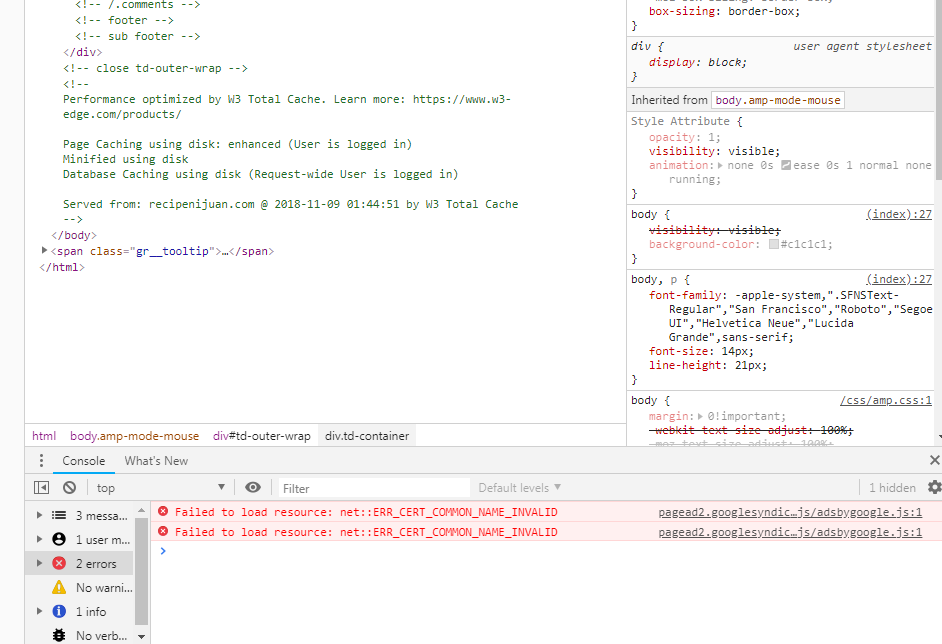
This is what I have on my AMP settings :

Please Help me Fix the issue please..
 guischarf
 Hello, Catalin. Thanks for your answer. I had read the documentation when I wrote, but have not found information about various topics which are very important. For example:
- How do I create new blocks using pre-existing modules
- How do I insert new blocks or modules in the header area. Header seems to be all presets just controlable through parameter twicking
- Is Tag Div and WPBakery the same thing? If not, why I do not see a TagDiv menu on WordPress back office, but do see a WPBakery one?
Thanks again for your response.
Guillermo
Simion C. Hi,
You could use a Facebook comments plugin, I haven’t tried any but try to install a few and make tests. Try this one for example
– https://forum.tagdiv.com/topic/facebook-comments-7/
Thanks
Simion C. Hi,
Our AMP plugin does not have a menu at the moment. The design for this plugin is based on the Yoast SEO website with no menu
– https://yoast.com/social-media-optimization-with-yoast-seo/amp/
Maybe in the future a menu will be implemented in the plugin, can’t say for sure.
Thanks
