
- TutorialsDefault Block Settings Guide
- NewspaperWP Rocket and Newspaper Theme: Optimization Guide
- TutorialsFrom WPBakery to tagDiv Composer
- TutorialsOffset Feature
- TutorialsWhat is Ajax preloading?
 Simion C.
 Hi,
If you want to have posts displayed on a block sorted by popular (that means post views) you must activate that feature from the theme panel – https://www.screencast.com/t/s6bXjWU9vCS This feature needs post views to be active for the sorting to work. The jetpack stats module sorting needs the jetpack plugin. It uses jetpack to return the proper posts. More about this here – https://forum.tagdiv.com/7-days-post-sorting/ There are a multitude of sort orders to choose and pick what you want and would suit your website better (latest, popular, alphabetically, random etc)
When filtering categories and posts please make sure there are some left for the block to display posts from, do not exclude them all. You should keep in mind also that if you decide to use the multiple categories filter, the standard category filter will be ignored.
Thanks
 Catalin
 Hello m0re,
If you are referring to the pages or post pages? If you want to sort the authors on this block, you should check the Visual Composer like this -> https://www.screencast.com/t/9BIP5CDJ From where do you want to remove the authors? Please give me an example on your website so I can identify it the section and also, so I will be able to provide a more accurate response/code. Sorry for this, please provide more details about this.
Thanks for your understanding!
 Ingente
Hi, I want to add a custom URL on tittle´s VIDEO PLAYLIST BLOCK, but there isn´t any option for do it. 🙁
Help me please! 🙁
 giulian curl
 <?php
if (in_category(array(‘salute’))){
echo do_shortcode(‘[td_block_ad_box spot_id="custom_ad_1"]‘);
}
else{
locate_template(‘parts/header/ads.php’, true);
}
?>
Use header-style-7, and with this code works fine.
-
This reply was modified 9 years by
giulian curl.
 AndroidKosmos
Hey,
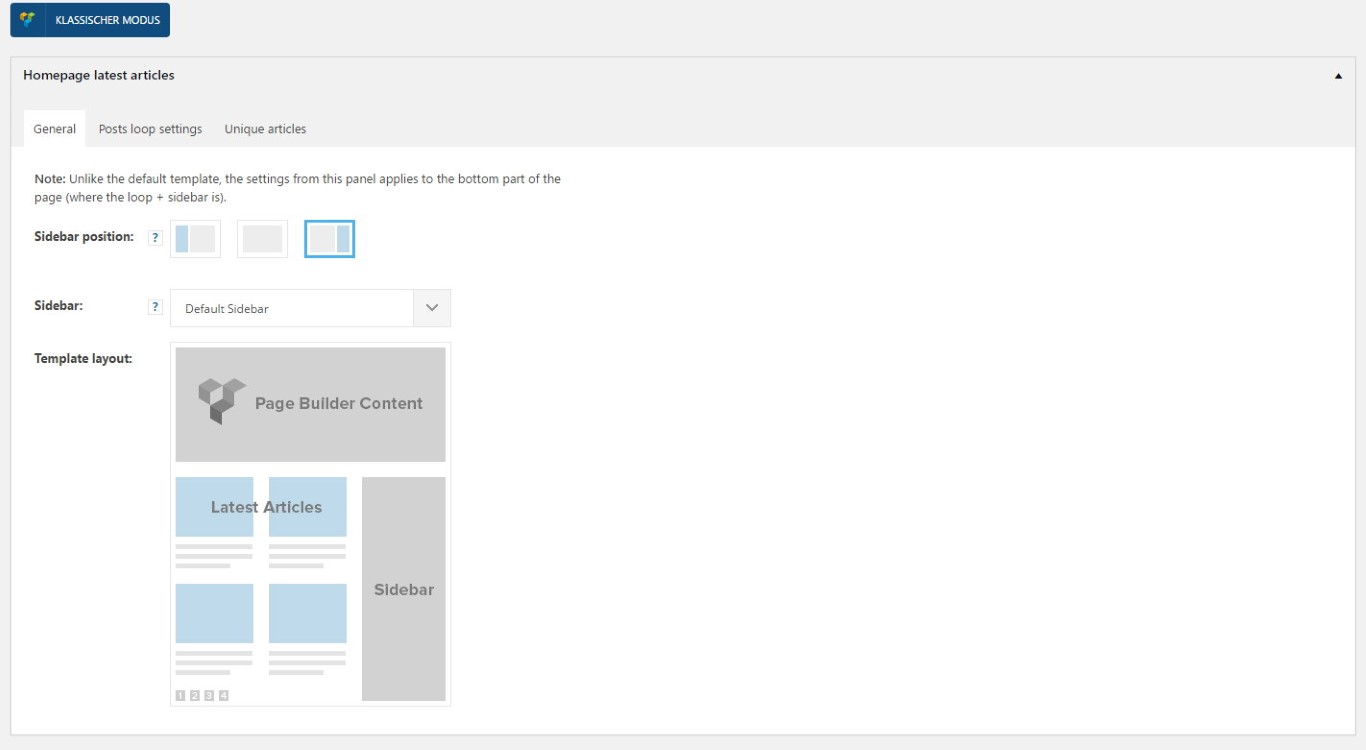
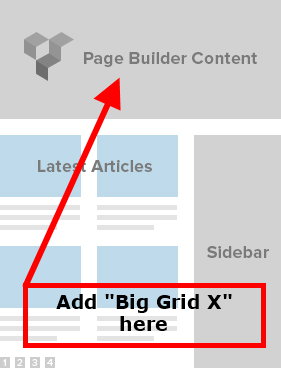
i’ve changed my frontpage completely and now use your “Hompage latest article” function, because i want a blog-style only. So is it possible to get one of your “Big Grid Blocks” above the latest articles?
Then i could deactivate the “visual composer” completely, because visual composer slow down the webpage and use so many scripts i don’t need.
Simion C. Hi,
I have tried to replicate your setting with block 10 and block 9 below it set a limit of one post – https://www.screencast.com/t/BAYI5NPvC7pi with bigger font size and this is the result – https://www.screencast.com/t/dnz45Y3mH the content ocupies all the space available – https://www.screencast.com/t/8LEi0m81wmC1 in that module.
You can set a limit of one post in each block settings – https://www.screencast.com/t/b1Gw4QlXX
Maybe what you are trying to say is that you want those blocks with one post occupy the entire row – https://www.screencast.com/t/E0p470RBc8 If that is the case you must set the row to full first – https://www.screencast.com/t/ld8bF1FiGqZ1 then enter this code in Theme panel->Custom Css
.td_block_10 .td-block-span4 {

width: 100%;

}

.td_block_9 .td-block-span4 {

width: 100%;

}
However this would apply to all the block 9 or 10 set on a full row in your page if you have any. In that situation please provide a link and I will try to give a solution but if not, the code should work fine. Hope that I did not misunderstand what you are saying but if I did please correct me.
Thanks
 dennis
how do i remove dates on block 9 and decrease the font plus reduce the margin between one title to another
Simion C. Hi,
You can use this code for the top and menu borders, enter it in Theme panel->Custom Css
.td-magazine .td-header-style-1 .td-header-top-menu-full {

border-top: none;

}

.td-magazine .td-header-style-1 .td-header-gradient::before {

height: 0;

}
Result – https://www.screencast.com/t/cyTQ1svzUF
And this is for that block (VIDEOD) title border color, it will make it black
.td_uid_6_589031fc95a90_rand .block-title {

border-color: black!important;

}
Result – https://www.screencast.com/t/zQj8RQas
Or if you want to make them all black the code is this
.block-title {

border-color: black!important;

}
Result – https://www.screencast.com/t/Tk6oWvqP
Also if you want to make the recent commnents widget title black as well use this
.widgettitle:after {

background-color: black!important;

}
Result – https://www.screencast.com/t/UJr7r06ZkPCr
If I misunderstood something please corect me, and I will try to provide other solutions.
Thanks
Catalin Hello someseeds,
In order to remove more from author you can use 2 methods:
The css method:
.td_block_related_posts .td-related-right {

display:none;

}
or you can edit the theme files: comment out or delete this part: http://screencast.com/t/Okmq7lxTDzGd
For your second request, if you want to change the background-color for the Related Articles tab you should use the code below and place it in Theme panel->Custom CSS area.
.td-related-title .td-cur-simple-item {

background-color: red;

}
The result you should see here -> http://screencast.com/t/mKqMSHeV
Thank you!
Catalin Hello krismali,
You should use the code below and place it in Theme panel->Custom CSS Area. I have noticed that you have some plugins for security and most likely that’s why the code not working.
The code is ->
.td-grid-style-2 .td-tiny-thumb .td-module-meta-info {

display: block!important;

}
Thanks for your understanding!
 mayaguez
 Thanks Simion!
Questions:
1. I read in the Block Setting’s Filter that it is recommended to select/set The Sort Order for “Most Popular” to the jetpack (24-48hrs) method, however I do not see this selection in the dropdown. The only selection with the wording of “jetpack” is Popular but says “Jetpack+stat module required”, “does not work with other settings/pagination”. Do not understand what this means!
Question: Is it ok to select this Sort Order? Which one would you recommend?
2. Regarding the Sort Order for Must Read which one would u recommend since my site (for now) does not provide for Reviews nor Comments?
3. I would like to exclude certain Post categories from Latest Articles/Post. I read the instruction and did what I believed was to be done, that is I entered the “posts ID’s” that I wanted to exclude with a minus (-) sign (To exclude categories from this block add them with ‘-‘ (ex: -9, -10) in the Multiple Category Filter Box but in doing my Latest Articles/Post displayed NO POSTs, so I guess what I did was wrong.
Please explain how to exclude Categories?
Thanks!
 Pallieterke
Hello,
I am getting this issue with the Revolution slider on my website http://sceptr.net/.
Revolution Slider Error: You have some jquery.js library include that comes after the revolution files js include.
This includes make eliminates the revolution slider libraries, and make it not work.To fix it you can:
1. In the Slider Settings -> Troubleshooting set option: Put JS Includes To Body option to true.
2. Find the double jquery.js include and remove it.
The issue is not constant but it pops up anytime and disappears after 1 or 2 reloads. But it never gets totally solved. I have tried putting ‘JS Includes To Body option to true’. Also, in the Global settings I have set ‘Insert JavaScript Into Footer’ and ‘Load all JavaScript libraries’ to ON after researching online.I have also increased the Upload File size and Post size to 32M. Still the issue keeps on popping up.
As the issue is not constant, it is impossible to try switching the other plugins ON/OFF and seeing effects.
Thanks.
 Anonymous
Hi,
Is it possible to change the pagination with the number pagination like 1 2 3.. ??
Thanks in advance,
Regards,
Deniz
 ben.hinc
 I understand. We are using one of the smart list styles on desktop that does not do this to images and we find that using a smart list is the best solution available for presenting this kind of information.
I have done a lot of customizations to both the main and mobile themes by tweaking the source code directly. All of these customizations have come from you and your colleagues’ assistance in this forum.
Are there any code changes I can make to the mobile smart list template that would stop this image replacement from happening?
Examples of changes I’ve already made to mobile:
- Remove pagination on homepage
- Change display of homepage block from “featured” to regular and offset the list below by three
- Remove display of sister categories on category pages
- Remove Whatsapp and Pinterest sharing options
As you can see, I’m not opposed to making changes when necessary and this smart list image issue is certainly one that has an impact.
Regarding using the responsive theme instead of mobile, this is not an option. We have promoted your mobile theme in particular as one of the reasons to visit our website and we won’t give up on that.
Any suggestions you can provide for modifying the code are appreciated. Thank you.
 Roney Catalin
 Hello Shawn,
If you want to add more code in our theme, you should use the do_shortcode method and place it every want on the website. For example, the snippet of the code which you should add the theme core files should look like this ->
<?php echo do_shortcode('[td_block_15 custom_title=”Related News” category_id=”Related category id” limit=”10″ ajax_pagination=”load_more”]');?>
For more references about this methods, please consult the guide here -> https://developer.wordpress.org/reference/functions/do_shortcode/
If is not what you mean or if you have a certain section where you want to add your code, please provide more details so I will be able to provide a more accurate response.
Thanks for the message!
Catalin Hello luxechicago,
If you want to give a style for your meta info by line for author name and date, you should use a bit of CSS code to do it.
.td-post-author-name a{

float:left!important;

}
The result is here -> https://www.screencast.com/t/F6uqYFKD
Regarding on comment box, please notice that the theme will do not hide is the comment is “0” if you want this. So, if you will check the theme panel, there you will find an option to disable it for modules/blocks and posts like this -> https://www.screencast.com/t/ImGU2bqO3axE -> https://www.screencast.com/t/1TnE7sr2
If is not what you mean, please provide more details so I will be able to provide a more accurate response.
Thanks for the message!
 Bogdan B.
 Hello,
@Giulianoo In order to remove a category from a block yu can simply add it with a minus using the post id like so: https://www.screencast.com/t/BvCTcq5LWY
@josflachs please contact us via email at contact@tagdiv.com and provide wp-admin so I can login and investigate exactly why the sorting does not work on your end.
Thank you!
Simion C. Hi,
Unfortunately I can not view the screenshot – https://www.screencast.com/t/bYurLieO but I guess you want the slider and the Don’t miss block background to be black, you can do that using this code, enter it in Theme panel->Custom Css
.import_video_slider_bg, .import_dont_miss {

background-color: black;

}
Results here – https://www.screencast.com/t/mjtrR7fzeHP – https://www.screencast.com/t/068iF3rVC
Thanks
 Edward
 Envato recommends against the use of download managers, to download your purchased files from Envato Market.
https://help.market.envato.com/hc/en-us/articles/202500504?_ga=1.68035348.424484147.1472560982
Catalin Hello Digitally,
Please keep in mind that you want to change the structure of the date for modules, you will have to edit the corresponding files according to your block used by you. For example, if you are using the Block 3 you will have to edit the modules which make up this block, like module 1, like this -> http://screencast.com/t/whTutD5OFRyy
You will have to use the following snippet of code, like this ->
<?php echo human_time_diff( get_the_time('U'), current_time('timestamp') ) . ' ago'; ?> in the core file, like this -> http://screencast.com/t/ZZYWvi253eL1 Clear all your cache and check the results.
Hope this helps!
Thanks for the message!
Simion C. Hi,
You could set a title url in the block’s settings that links to your desired category page – https://www.screencast.com/t/vPCx2zH1cg or any other link.
Thanks
Simion C. Hi,
To remove the comment count from blocks and modules, go to Theme panel->Block settings and disable it like this – https://www.screencast.com/t/Wfz0d1Nw
Thanks
Simion C. Hi,
You can try this code, enter it in Theme panel->Custom Css
.td_block_social_counter .td_social_info,

.td_block_social_counter .td_social_info_name {

display: none!important;

}
Result – https://www.screencast.com/t/StqtEgZw
Thanks
 webex
webexHello.
The title pretty much says it all.
I have tried:
1. Turning off all plugins.
2. Checking the browser console – it only warns of a function that soon will be removed (Chrome) – nothing that should stop it from saving
3. turned off ad blocker on the entire domain
4. I also tried using a different browser than my standard (Firefox, instead of Chrome)
Not sure why it’s working? The only one I can change is the URL on Background click Ad. Nothing else saves.
Just to clarify, it seems to save correctly but as soon as i leave the page and come back any changes are gone.
