- ApiPractical example – How to add a new Block and Module
- Apitd_api_block::delete
- Apitd_api_block::update_key
- Apitd_api_block::update
- Apitd_api_block::add
- ApiAPI – Blocks – Introduction
- Apitd_api_thumb::update_key
- Apitd_api_thumb::update
- Apitd_api_thumb::add
- ApiAPI – Thumbnail – Introduction
- Apitd_api_category_top_posts_style::update_key
- Apitd_api_category_top_posts_style::update
- Apitd_api_category_top_posts_style::add
- ApiAPI – Category top section style – Introduction
- Apitd_api_module::update_key
- Apitd_api_module::update
- Apitd_api_module::add
- ApiAPI – Modules – Introduction
- ApiUsing the Theme API in plugins
- ApiThe Theme API
 Anamaria
 Hello,
Unfortunately, you can’t use this one to filter the posts using the custom field. The only option to filter posts on the block using custom filed is to use the custom filed type true/false. What you want to achieve can be done with custom work.
Thank you!
 lucadelpozzo
Anyone knows a way to add a custom sort order to blocks based on custom fields?
For example order a block alphabetically based on a custom text field or by date based on a custom date field?
Also filtering result whith custom field would be useful.
 Miroslav Glavić
One of my domains got suspended, it was the one using Newspaper theme. It has been restored after I removed the theme and plugins. I removed ALL files to start fresh. Some facts about me:
I update things in under 6 hours. if an update comes while I am sleeping hence 6 hours. No more than 24 hours.
I do not use any plugins that has no updates in 6 months or more. I use 2fa with my User account, Wordfence is used. My password is 25 mixed characters (lower and upper case, letters, numbers and symbols).
In everything else in my computer/digital life, I use a Yubikey and get notifications when there is a login.
Here is the original message I got from my hosting provider, for privacy’s sake I censored the domains:
Hello,
We have noticed trouble in the account with big CPU over usage in the account with monthly average value:
45.80% of 5.00% CPU Limit
and peaks over 65% recently seen in CPU Statistics menu:
https://(myloginidformydomainhosting.com)/statistics/load-stats/
In general, the more traffic and hits a PHP-based website gets the more CPU it consumes to process the scripts.
Additionally, high CPU usage is generated when a PHP-based website generates a high number of queries to its database:
https://(myloginidformydomainhosting.com)/mysql/stats/
https://(myloginidformydomainhosting.com)/statistics/web-stats/
https://(myloginidformydomainhosting.com)/statistics/traffic-stats/
Cross-reference of these factors and statistics will indicate to you which website generates the most CPU in the account.
In your case, this appears to be a combination of many websites running in the account starting with WordPress website at:
(mydomain.com)
which appears to be compromised by a hacker and running malicious scripts similar with its TagDiv plugins and Newspaper theme described in this article:
https://blog.sucuri.net/2023/10/balada-injector-targets-unpatched-tagdiv-plugin-newspaper-theme-wordpress-admins.html
and with huge amount of hits at:
(mydomain.com)/wp-json/tdw/save_css/
Due to these reasons, we have been forced to suspend the domain name, so it cannot be accessed online. Although this is so, you can access the domain name folder via File Manager or FTP to remove the trouble content.
The best solution in such a case is to download files to your computer for a comparison copy thus you can configure later needed plugins and templates as well as retrieve single static files like images.
Remove all files from the host(domain or subdomain) folder thus you can be sure that all malicious files are removed.
After that reinstall your website completely with a new fresh version of the scripts(core application, plugins, themes, etc.) latest versions. Use database configuration from wp-config.php file downloaded before so you can connect the reinstalled website to previous database for your website previous information.
Here is also a detailed article on a hacked website:
https://(myloginidformydomainhosting.com)/help/view-article/?id=550
Restore of the website files does not help in such cases as it reverts the same outdated scrips of your website which the hacker has compromised before so the trouble is repeated again and again.
Please check the content of your entire hosting account for any third-party scripts which are not a part of your websites uploaded by the hacker and remove such ones.
You have to change all passwords in your account too – all FTP accounts passwords and all scripts admin passwords.
After website is reinstalled you can try general protection of the WordPress script with a plugin such as one of these:
https://wordpress.org/plugins/better-wp-security/
https://wordpress.org/plugins/wordfence/
To optimize a website further:
– Try to reduce PHP/MySQL database requests with additional caching plugins like:
– WP Fastest Cache – https://wordpress.org/plugins/wp-fastest-cache/
or
– W3 Total Cache – https://wordpress.org/plugins/w3-total-cache/
– check details of the queries running – Query Monitor – https://wordpress.org/plugins/query-monitor/
and try to reduce queries or check with their developers for optimization advice.
– Try to reduce the number of articles that appear on your front page and reorganize them into sub-pages. This way you would lower the number of queries processed to the database on each visit of the website and will improve the site performance.
-check some advice to restrict bad bots crawling your website as they are a waste of website resources in general. Check online advice articles similar to:
– Limit hits from Google bots from their system:
https://search.google.com/search-console/about
– check official WordPress documentation: https://wordpress.org/support/article/optimization/
Monitor the statistics mentioned above for at least a couple of days which should be enough to see if the changes made have enough effect or if you need to take further measures.
We will expect a solution of this trouble from you in 7 days and we may be forced to suspend the account after that if no updates are provided from you in this ticket.
Looking forward to hearing from you.
Best Regards,
(insert technician’s name here)
 Calin
Calin Hi,
For the moment those are some suggestions that can help:
– use a cache for database, object cache should help.
– if tagDiv Standard Pack is used, move to cloud and disable the plugin or move from cloud to standard template and disable the cloud.
– reduce the rows number (rows and inner rows) from pages and cloud templates.
– Reduce the number of blocks.
My suggestion is to try first with object cache for database this should resolve the problem.
Thank you!
 Bettina
 Hello @saranoa!
Apply these settings on each module/block: https://app.screencast.com/TqkjOMp04c6Bg -> https://app.screencast.com/DXbsyZba0sg1Y -> https://app.screencast.com/vGCkrGRkEn6bm
Thank you!
 jackzhu
Hi,
How to hide (delete) or set left blocks in product category page for Newspaper SHOP KIDS STORE theme? Thanks
Here is the pic
https://imgbb.com/yXP4w1Q
 Fryant
Hello
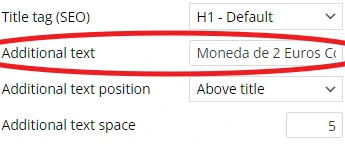
The additional text in the Page Title Block (see this screen grab to see what I mean) is outside of the H1 in the source code, as you can see here.
Is this working as intended? If it is, is there a way to make it a part of the H1?
Anamaria Hello,
The column is sticky, but you have there a block, if you delete this block for example will be like this -> https://we.tl/t-W0lzXCl80e
Thank you!
Anamaria Hello,
The column is sticky, and this is how it works: https://we.tl/t-RlcNzypdNT You can delete a block if you always want it to remain there.
Thank you!
Bettina Hello @newspatron !
The Posts Loop element has only an option to exclude post IDs.
If you would like to use a Flex Block instead, then there is an option to exclude the categories: Multiple terms filter – This option allows you to filter the posts by multiple categories. The procedure is similar to the one used on Post ID filter. Add the category IDs separated by commas (ex: 13,23,18). If you want to exclude categories, add a ‘-’ symbol in front of each ID. If you want to display posts from a category and remove the posts included in one of its sub-categories, first add the parent category ID (ex. Fashion category – 341) and after it places the sub-category ID (ex. Daily subcategory id: 342) with a ‘-’ symbol in front. If you decide to use the ‘Multiple terms filter,’ the standard Category Filter is ignored.
Documentation is here: https://forum.tagdiv.com/flex-block-settings-guide/
Unfortunately, you can’t use two filter options.
We will take your query into consideration in the future.
Thank you!
Anamaria Hello,
Yes, for flex block 4 module 2, there is no option for the image position to be normal and this can be done only with custom work.
Thank you!
Calin Hi,
This can be resolved using a css code, like this one:
.td-top-menu-full {

    display: block;

}
This code should be set in Newsmag > theme panel > custom code > advance css > phone section – https://i.imgur.com/ZbyS3Kc.png
Thank you!
 stefanegirard
 Hi
I watched your video but it is ok for Flex Block 1 not for Flex Block 4 Module 2 as there is a Float left that cannot be removed – no “Normal” option.
Anamaria Hello,
You need to translate using tagdiv Composer; you need to edit with tagdiv Composer, select the block, and change the title.
Thank you!
Calin Hi Industria Digital,
The SELECT SQL_CALC_FOUND_ROWS wp_posts.ID are used for rows and blocks (our theme stores the settings from rows and elements in database and the mentioned sql is one of those that make a request to them).
Thank you!
 asica
asicaI’ve deactivated and reactivated plugins… tried reverting to an older theme version but nothing is helping. When I try to ‘add a new post’ I’m getting this error:
TypeError: (0 , nt.__experimentalGetShadowClassesAndStyles) is not a function
at save (https://greenbenchmonthly.com/wp-includes/js/dist/block-library.min.js?ver=ad737ee06c6f575025a0:14:194842)
at zr (https://greenbenchmonthly.com/wp-includes/js/dist/blocks.min.js?ver=6612d078dfaf28b875b8:10:4798)
at Ir (https://greenbenchmonthly.com/wp-includes/js/dist/blocks.min.js?ver=6612d078dfaf28b875b8:10:5179)
at https://greenbenchmonthly.com/wp-includes/js/dist/blocks.min.js?ver=6612d078dfaf28b875b8:10:34027
at Yn (https://greenbenchmonthly.com/wp-includes/js/dist/blocks.min.js?ver=6612d078dfaf28b875b8:10:34143)
at https://greenbenchmonthly.com/wp-includes/js/dist/blocks.min.js?ver=6612d078dfaf28b875b8:10:35228
at Zn (https://greenbenchmonthly.com/wp-includes/js/dist/blocks.min.js?ver=6612d078dfaf28b875b8:10:35292)
at https://greenbenchmonthly.com/wp-includes/js/dist/blocks.min.js?ver=6612d078dfaf28b875b8:10:35030
at Array.map (<anonymous>)
at Zn (https://greenbenchmonthly.com/wp-includes/js/dist/blocks.min.js?ver=6612d078dfaf28b875b8:10:35022)
Anamaria Hello,
You need to edit tagdiv Composer, select the block in the tab filter you and set what category you want -> https://i.imgur.com/0kz4hMP.png You can find more details here https://forum.tagdiv.com/flex-block-settings-guide/
Thank you!
 juniordiscart
 Hi Anamaria
I can provide access, though I have already cleaned up the conflicting plugin and its settings. The issue I posted above is not entirely reproducible any longer. When I install and activate the plugin now, the small reproduction scenario I had in my YouTube video loads the composer correctly. So perhaps it was related to a specific setting in the AIO SEO plugin.
However, my single post cloud template still breaks and fails to load (when the AIO SEO plugin is active) with the following message:
Error at zones: 6(models) : 5(dom). The model does not match the content Current state has involved an issue.
If you’re still interested in investigating that issue, I’m happy to provide admin access.
Kind regards,
Jan.
Bettina Hello @Fausto!
Please note that if you have some custom modifications in the theme files, then better save the code and replace it after every update.
Try to change the h3 into h2 in this path: td-composer/legacy/Newspaper/includes/shortcodes/td_block_image_box.php on 420 line.
Thank you!
Bettina Hello!
This block doesn’t have preloading or any pagination. But I mean to change these settings: https://app.screencast.com/S64zAK2SFZ53b and apply the settings presented in the guide to see if this helps with page speed. With flex blocks, you can create a big grid Flex 4, because it is more customizable.
Thank you!
 ausar
ausarI’m not able to show the publish date for posts using Flexblocks. They seem to ONLY show the modified date even though the modified date is NOT checked.
We are back publishing posts on a new install and want the original publish date to show.
See screen video
stefanegirardHi,
When I use a float left as you did for MODULE 2 in Flex Block 4, the image is on the left, the title on top right and the excerpt below the title.
https://www.stefanegirard.fr/parfum-beaute-magazine/
When I check with the Phone viewport, the title and the excerpt take a lot of place which is not very nice and unusual.
Sites on the Web often use this layout but when the screen is smaller, the title and the excerpt goes below the photo like the Robb Report site which uses Newspaper:
https://robbreport.com/motors/cars/
How to do that?
Thank you
 lpecchiproper
I need to create a full height page, a landing page, with no header and footer, just three elements, the first one aligned at the top, the last one aligned at the bottom, the second one occupying the middle part.
With TD Composer I’ve created a page with a full height row with three horizontally oriented columns (width 100%), and I chose the “space between” option in vertical align (see Row Layout Setting Image).
In TD Composer I see the page as I would like it (see image 1), while if I select the “space evenly” option the three blocks are correctly evenly distributed in TD Composer (see image 2).
However, the same the same displayed page ALWAYS shows the three blocks evenly distributed, even when the vertical align option is space between (see image 3).
How can I fix this situation?
I am using Newspaper 12.6.5, and the example I am showing you is simplified, just to show you the malfunction.
Thanks in advance, Luca
Image 1 https://imgur.com/cn2Ddzg
Image 2 https://imgur.com/K5zUspZ
Image 3 https://imgur.com/t6R0oLt
Row Layout Settings https://imgur.com/8sm9jKI
Bettina Hello!
A great start for you is to try to have fewer elements in that container or row, as such, on that page. Check out this guide and try to use different settings on your blocks: https://forum.tagdiv.com/what-is-ajax-preloading/
Thank you!
Bettina Hello!
Try to use the Woo Product Block, and you can display them in 2–3 rows.
Also, you can use the menu product to duplicate and add them to however many columns you want. Another way is to use other elements than these and manually add the images and descriptions and style them using the shortcode settings. Also, we have the button shortcode, and you can set the link you want.
Thank you!