- ApiPractical example – How to add a new Block and Module
- Apitd_api_block::delete
- Apitd_api_block::update_key
- Apitd_api_block::update
- Apitd_api_block::add
- ApiAPI – Blocks – Introduction
- Apitd_api_thumb::update_key
- Apitd_api_thumb::update
- Apitd_api_thumb::add
- ApiAPI – Thumbnail – Introduction
- Apitd_api_category_top_posts_style::update_key
- Apitd_api_category_top_posts_style::update
- Apitd_api_category_top_posts_style::add
- ApiAPI – Category top section style – Introduction
- Apitd_api_module::update_key
- Apitd_api_module::update
- Apitd_api_module::add
- ApiAPI – Modules – Introduction
- ApiUsing the Theme API in plugins
- ApiThe Theme API
 Calin
Calin Hi,
I understand, have you tried several cookie plugins and still the result is the same?
What I think is happening is that this plugin blocks some css code or some javascript from the gallery.
Please do some testes with othere plugins: Top 10 Cookie Consent plugins for WordPress
Thank you!
 Anamaria
 Hi,
In order to make them to look the same size, you’ll need to set an excerpt on title and post content like this -> https://i.imgur.com/o8UQm5B.png
Also, you can set the excerpt on words or letters from theme panel -> https://i.imgur.com/c7Q8ckX.png
Here is a similar topic -> https://forum.tagdiv.com/topic/flex-block-1-and-same-blocks-height/
Thank you!
Anamaria Hello,
You can set the image radius in the tab layout on the flex blocks https://i.imgur.com/WHKCgqH.png and for big grid flex you need to use a custom coe css
.td-big-grid-flex .td-image-wrap {

border-radius: 25px;

}
Set the code in the theme panel > custom code> custom css.
Thank you!
 ezioboy
① Cloud → Can you add a block between red? The current page is also in the state of adding the homepage block. Can you add more?
https://ibb.co/KX16KMF
② I want to designate only the red part, but even if I move the mouse here and there, either the whole or only the text is specified.
Doesn’t the TagDiv composer have something like a task bar? For example https://ibb.co/n1xTDxg Gudenberg is like this. It’s too inconvenient.
https://ibb.co/XY7rn30
③ Please explain how to make a colored cell like the one in red.
https://ibb.co/Gx6ktXN
④ The WordPress mark image sticks too tightly to the top, so even if I try to increase the CSS margin, I can’t get this column even if I move the mouse here and there.
⑤ I want to put a box color like ③ here. How can I do that?
 tektenweb
Hello, is it possible to make the boxes the same height? I am using “FlexBlock1” and I want them all to be the same height for visual layout purposes. https://ibb.co/GpgCPSW
Thank you
 simchris
Hi, folks
after trying some normal debug stuff; a) disable any custom CSS; b) remove Google ads; c) disable some widgets; still having minor CSS issue cannot solve, as not sure if specific to me, or general element from composer plugin.
Specifically, on Chrome Desktop, Windows 11 Pro (all latest versions); latest version of Newsmag theme and composer plugin. No other composer plugins installed; have the default WordPress plugins to allow legacy widgets and post editor.
ISSUE: on home page, the ‘slider’ element, background gradient seems to run full width to the edge of the left column outside the slider element.
I am using simple grid layout as
[ row ]
inside row,
[ 2/3 col ] [ 1/3 col ]
in right col have the widget element and nothing else
You may be able to see the issue here:
NewYorkNetwire.com
and here is home page code elements from composer
[tdc_zone type="tdc_content"][vc_row][vc_column][/vc_column][/vc_row][vc_row][vc_column width="2/3"][td_block_slide title_tag="" ms_title_tag="h2" custom_title="FEATURED" limit="2" category_id="4048" header_color="#dd3333"][td_block_4 custom_title="NEW YORK BUSINESS NEWS" limit="2" category_id="4048" offset="2"][td_block_4 custom_title="NEW YORK BUSINESS NEWS" limit="2" category_id="4048" offset="4"][td_block_11 ajax_pagination="load_more" category_id="6" limit="6" offset="6"][td_block_4 custom_title="NEW YORK GOVERNMENT AND POLITICS" limit="2" category_id="10"][td_block_11 category_id="10" offset="2" ajax_pagination="load_more" limit="2"][vc_separator border_width="2"][td_block_8 custom_title="NATIONAL NEWSWIRE STORIES" header_color="#1e73be" limit="8" category_id="5" ajax_pagination="load_more"][/vc_column][vc_column width="1/3"][vc_widget_sidebar sidebar_id="td-homepager"][/vc_column][/vc_row][/tdc_zone]
This site was just migrated to v5 from v3. I delete old home page elements completely, but still same ‘page’ — started with fresh layout.
On my iPad it looked just fine; but not on PC desktop.
Thanks for help on this one 🙂
 muterobert
Hi we’re using an older version of Newsmag (3.2) and have recently added a cookie consent plugin that allows users to accept or block cookies.
When users choose to block cookies it causes the theme’s image slider galleries to break like so: https://imgur.com/a/4xRQvGh
What cookies or scripts need to be whitelisted in order to keep the galleries from breaking?
ezioboy Anamaria Hello,
This request is custom work because the change needs to be done in multiple files.
For each block, the theme makes a custom query depending on the filter set
The query it’s made in
td_data_source.php
To add a new sort order you have to edit
td_config.php
file and add your sort. Next step would be to generate the new sort in
td_data_source.php
by adding the required arguments to the query.
Thank you!
Anamaria Hi,
1. Please edit module 2 -> https://forum.tagdiv.com/edit-modules-flex-block-x/ and comment this section -> https://i.imgur.com/5dW8ye5.png and this section -> https://i.imgur.com/thY5Pu9.png
2. Please provide some screenshots.
Thank you!
 Atithya
 Whenever I am adding the Post form submit from left panel to the page, the block just keep on loading and make website unresponsive. Login to the website already given to your team earlier.
Anamaria Hi,
You need to add only the code foe block, without the row/column -> https://i.imgur.com/0CGegB6.pnghttps://forum.tagdiv.com/set-block-inside-post-content/
[td_block_trending_now]
Thank you!
 ludyma
Hello, I have discovered that there is a problem that I have with the authors. On the authors’ website they only show the same photo for everyone and it does not correspond to the author. (photo_1) Without sent in the articles (photo_3) if the photo is correct. I use an es cloud block (author template 2). (photo_2)
 ShawnTierney
Good afternoon,
On certain categories/archive pages I need to sort by a custom filed.
I’ve added the code to do this to my php files, and it works with the default wordpress theme.
But when I add this code to my Newspaper site, it seems the “block” sort order is overriding my custom code.
While I do think it is great that TagDiv provides so many sort order options, how do I choose “none” so I can have a custom sort order? I tried a few blocks but not all – is there a block that allows us to choose no or default sort order?
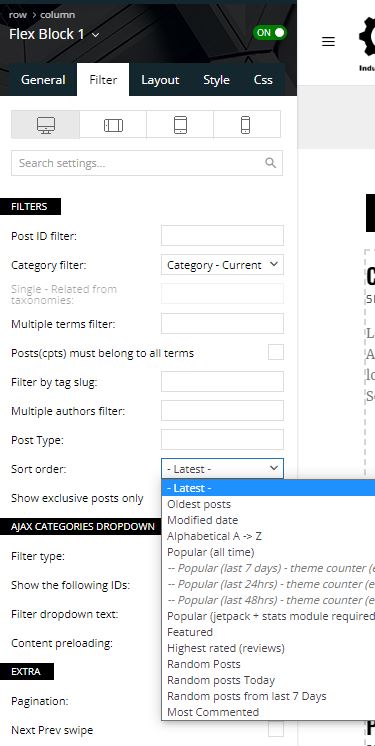
Thank you very much in advance,
Shawn
 zhangleji
Hi,
I created a new CPT ‘vendors’ and taxonomoies ‘location’ and ‘price’ and wanted to show ‘location’ and ‘price’ on this page https://snipboard.io/EzeMhN.jpg .
I knew I would need to edit the module file as shown in this tutorial https://forum.tagdiv.com/edit-modules-flex-block-x/, but can you let know how to edit it here exactly? For example, I opened my module file and change the taxonomy to ‘location’ but it didn’t work. https://snipboard.io/7npkec.jpg Anything else do I need to change? Under the taxonomy ‘location’, I have a few cities names already https://snipboard.io/vb16JY.jpg
 sweetgunner
Hi,
I’m using a cloud template (Gossip) and I tried everything you said here > https://forum.tagdiv.com/set-block-inside-post-content/ but nothing happens inside my post content.
I’ve created a page and added a flex block, then I copied the code
[tdc_zone type=”tdc_content”][vc_row][vc_column][td_block_trending_now][/vc_column][/vc_row][/tdc_zone][tdc_zone type=”tdc_content”][vc_row][vc_column][td_block_trending_now][/vc_column][/vc_row][/tdc_zone]
And pasted inside the single post template, on Content block as an inLine Ad:
Not even adding in the Theme Panel… (I dont use any other kind of ads)
Am I doing something wrong?
 nearview
 Hi Bettina. I am really trying to not get frustrated, but it’s like you’re not even reading what I’m writing. Did you see my screenshots above? Did you see how I showed our AMP plugin settings and that we’re using the /amp/ setting for the AMP plugin? Are you all even looking at the information and screenshots that I took a TON of time to document? Or are you all just throwing out generic responses without even trying to understand the information I’m providing?
I know EXACTLY how AMP works. We’ve implemented AMP on dozens of WordPress websites and at least 15 tagDiv Newspaper sites. But this is the first time we’ve implemented AMP on a site that also uses cloud templates … and it’s NOT working the way we expect.
And you do NOT need to come from Google in order to see an AMP page. Other content aggregators such as SmartNews and NewsBreak also use AMP versions of pages. And you can navigate directly to an AMP page without having to go through Google. Here’s an AMP page on our current, old site (not a tagDiv Newspaper site):
https://hvmag.com/food/baked-by-melissa/amp/
You can see the AMP page just fine even if not coming from Google … and you can see that you don’t need to have ?amp at the end of the URL. We have the AMP plugin set up currently to use /amp/ which is just fine.
Here’s another AMP page, but on a tagDiv Newspaper site that does NOT use cloud templates:
https://biztimes.com/nine-block-450-million-redevelopment-planned-in-downtown-kenosha/?amp
You can see the AMP page just fine even if not coming from Google. This particular site does use ?amp as the setting in the AMP plugin. And it’s showing the tagDiv mobile them just fine … because the site does NOT use cloud templates.
Please … before you all respond again … take the time to actually watch the video in my first post. Then fully read my next post and look carefully at the screenshots that I included in that second post.
Thank you.
P.S. I would be willing to pay a good amount to have a Zoom meeting with you all to try to work this out. 🙂

 smilelondon
Hi there,
we are facing an issue with the Flex Block only.
When we create new posts we often have the thumb placeholder not showing, actually nothing – which then causes the formating to fail for our newsroom page.
You can check the normal behaviour here: https://www.livetube.tv/news
Here is an example how it looks when the first image is not showing and also not the thumb placeholder
https://app.screencast.com/HQv1Q5nE4fzLq
Here with magnifier
https://app.screencast.com/w9BRg0tku0qUk
Here is a link to our thumb placeholder
https://www.livetube.tv/news/wp-content/uploads/sites/8/2022/11/Placeholder-Large-LiveTube.jpg
For all other blocks the thumb placeholder is showing correctly
We would appreciate your help with this
Thanks
Anamaria Hi,
But do you have the price and location for each CPT? I don’t know what changes you made there that the featured image, price, and location are not displayed, I think it’s a configuration problem. You can save the block where is dialed correctly and it where is not displayed correctly.
Also, check the padding from here https://i.imgur.com/uEkYbZj.png
Thank you!
 Bettina
 Hello Shawn!
Unfortunately, we haven’t any block with this feature.
Thank you!
ShawnTierneyGood morning,
Do you have a homepage block that will display posts from another wordpress site?
I have two sites and two licenses of Newspaper, and I would like to have the homepage of my second site display and link to articles from the first.
I do not see any blocks that have this option, so I’m considering using your HTML block to display an RSS Feed from my first site in a block on my second site, since I don’t want to import or duplicate the posts form the first site.
Any thoughts or suggestions appreciated!
Shawn
nearview Thx, Anamaria. We also discovered that there is some CSS that was impacting the embedded block. All is working well now. I appreciate your help!
 hadharm
 mila_grish
At some point inline images stopped displaying correctly in the editor and on the frontend.
Disabling most of the plugins did not resolve the issue. Any suggestions would be very welcome.
(The “inline image” is one of the context options for the regular Paragraph block and they typically display right along with the text at the correct image size, on the same line.)

Inside the editor: image hovers above the line after being added.

Appearance when previewing the post: a line break is automatically added in.
https://necropticon.com/musings/tolkiens-elves-are-cursed-sinners/
Anamaria Hello,
Yes, you can disable plugins, if you don’t use them.
Also, if you use blocks from tagDiv Standard pack plugin, then please use flex blocks and big grid flex blocks; this plugin loads all the styles even if it is not used.
Thank you!