
- ApiPractical example – How to add a new Block and Module
- Apitd_api_block::delete
- Apitd_api_block::update_key
- Apitd_api_block::update
- Apitd_api_block::add
- ApiAPI – Blocks – Introduction
- Apitd_api_thumb::update_key
- Apitd_api_thumb::update
- Apitd_api_thumb::add
- ApiAPI – Thumbnail – Introduction
- Apitd_api_category_top_posts_style::update_key
- Apitd_api_category_top_posts_style::update
- Apitd_api_category_top_posts_style::add
- ApiAPI – Category top section style – Introduction
- Apitd_api_module::update_key
- Apitd_api_module::update
- Apitd_api_module::add
- ApiAPI – Modules – Introduction
- ApiUsing the Theme API in plugins
- ApiThe Theme API
 hadharm
 Ohh great. Thanks. While I am testing the page at hiideemedia.com/wishlist. I noticed some product title have more characters/words than others. Which makes it looks awkward. Is there any setting to limit the product title on wishlist (woo product block + favourite) to certain number of characters to maintain even spaces???
Also, the favourite shows all products while it is empty instead of saying you have no favourite or wishlist yet, Visit the Store/Shop??? Any settings to correct that too.
Thanks.
 Anamaria
 Hi,
If you want to have only an image, not a post, and when you click on the image to take you to the category, then you need to use a Single Image Background or Single Image and set the link -> https://i.imgur.com/Y1fHoln.png
Also, the ajax option is only for Flex Blocks, not for Big Grid Flex blocks.
Thank you!
hadharmGood day sir/ma, please I noticed the favorite love button on Woo products and it is active at hiideemedia.com/shop but how will a user see the products added to their wishlist????? I have searched for wishlist element/block in tagdiv builder but none comes up.
Are there any customizations for it on Newspaper like a code to display a wishlist or a product favourite icon like cart icon to use on the navigation menu?
Or a code to add into a page like hiideemedia.com/favourite???
 sjahan
Hi, every time I update the theme using the wordpress admin portal the shortcodes don’t display correctly and you see the actual shortcode on the end user site. I was able to manually update the theme, which helped resolve that issue. However, I’m having the following issues now:
1. The widgets under Appearance–>Widgets in the admin panel aren’t showing up
Screenshot: https://ibb.co/WxhzKC0
2. One of the shortcodes (that I’ve noticed) has remained. This is on the homepage sidebar area.
Screenshot: https://ibb.co/SJGZHY0
The code showing is:
[td_block_social_counter custom_title=”Stay Connected” facebook=”fugitivewatchtv” youtube=”FugitiveWatch” style=”style4 td-social-colored” f_header_font_transform=”uppercase” twitter=”fugitivewatch” instagram=”fugitivewatch” open_in_new_window=”y” block_template_id=”td_block_template_8″ manual_count_instagram=”2743″ manual_count_youtube=”2138″]
website: fugitive.com
 sejpost
On our homepage, we have content blocks on the left side going down.
The main content block (sorted by featured categroy) is working great.
The “MORE LOCAL NEWS” content block is working great.
However, the other blocks are not showing the latest stories/posts. When I go into edit the page, they show correctly and then when I hit “save” they don’t show the most recent ones.
Look at Entertainment category in the edit page:
Now, look at it on the site:
Basically, many of the content blocks on the homepage are showing old content and not the latest posts as selected in the edit page. Any help?
Look at the obituary stories on the homepage at bottom:
Homepage – scroll down to see obits on homepage block at bottom.
Now look at them on the category page: Obit Page with most recent ones
How do I get the most recent stories/posts to show up on the homepage – all my settings are correct and I cleared all the site cache. What’s wrong?
Another example.
See entertainment category on site (has old stories, not recent? https://ibb.co/P5rkjbQ
Now see it in edit mode with most updated stories: https://ibb.co/T2qnvZB
 Bettina
 Hello @Sokien !
You can use a flex block only on the category pages with its special filter: current category: https://forum.tagdiv.com/flex-block-settings-guide/
Thank you!
Anamaria Hi,
You can use Ajax categories dropdown https://i.imgur.com/Z1IQggd.png -> https://forum.tagdiv.com/flex-block-settings-guide/
Thank you!
Anamaria Hello,
Please make sure that you have the tagDiv Shop and Woocommerce plugins activated.
You can import from Cloud Library on your page -> https://i.imgur.com/056P42f.png-> https://i.imgur.com/Xwb3E5T.png. The block will be set at the bottom page content, but you can move it where you want, select the row => https://i.imgur.com/ddupL4m.jpg
Thank you!
 NDDdude
 I can’t seem to show code in a code block to show you examples
NDDdude Hi, we’re running Newspaper on nbnnews.com.au.
and we’re using Newspaper v9.5.
We’re trying to upgrade to the latest version, but we’ve hit a major stumbling block.
Here’s the problem, when we have a video and enter its file name in a custom the video player appears.
We use custom fields to populate required fields to display a video player and poster frame.
1) Enter a file name
2) Enter a image name
SO basically our journalist enters a video file name and image file name and the video appears.
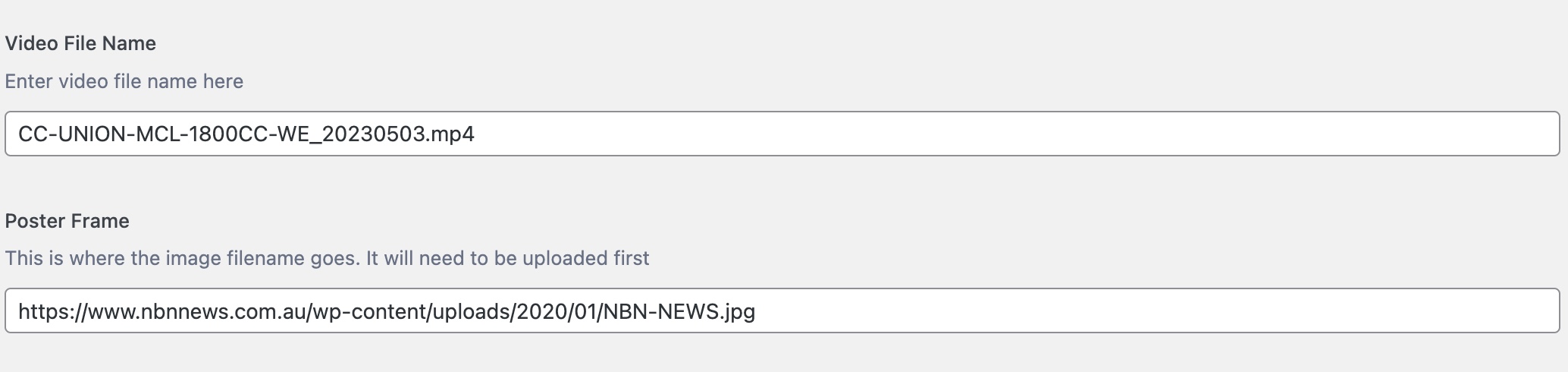
Please see here for reference:-
https://www.nbnnews.com.au/2023/05/03/father-and-son-avoid-jailtime-after-defrauding-mining-company/
Using an if/else php call, we either display a video player or not by using CSS classes.
Once the video file name is entered the “else” bit kicks in and shows the video player.
We’re using the loop-single.php file and sitting the code block just under the
And on version 9.50 this works.
On v12 I can’t get this to work in a child theme or hacking the main theme.
I can’t insert any code (php, html) anywhere and have it render.
I’m not a programmer, but through looking at tutorials and trial and error I got it to work.
And it’s been ok for years.
This has become critical to fix because using v9.5 and updating to php8, it’s throwing up a cross-scripting error.
Here’s the code:-
Any help would be greatly appreciated. I love this theme, but I might have to try other theme to make this work. And I really don’t want to do that.
 Sergey
 Can you explain why the developers decided to block many popular domains, including .group? What is the reason to do that?
Anamaria Hello,
You can’t display the source name on the flex blocks.
You can use the option “Custom Label” https://i.imgur.com/qhDjo0A.png but this option is only for blocks.
Thank you!
Bettina Hello!
This option: https://prnt.sc/LK8OAjZpwUIn is working only for post and categories, not blocks or homepage.
I set primary category for that post: https://prnt.sc/D6rEBXOApfNP and now it should display only that primary category for that post.
Thank you!
Bettina Hello!
Use the special filter current category and it will apply well for every category: https://forum.tagdiv.com/flex-block-settings-guide/. If not, you can duplicate the template.
Thank you!
Anamaria Hi,
Please edit the cloud template with tagDiv Composer -> https://i.imgur.com/j8YvKks.png click on the block and remove the offset -> https://i.imgur.com/dJ0iFQu.png let that field empty.
Also, please give us a link to the site and a video with the steps you take.
A solution for sending a screenshot/video is this:
Download, capture, and send: https://www.techsmith.com/jing-tool.html
After making the screenshot, you will have a link; paste it here.
Thank you!
Anamaria Hi,
To sort the block for Popular (24h,48h and 7days) you need to have added the element SINGLE POST VIEWS => https://i.imgur.com/pLWuoSS.png -> https://i.imgur.com/BbrBmL0.png, also, for Popular you need to have this option enable https://i.imgur.com/grI3bti.png
The sort option will be displayed popular posts of the last 48 hours, those can be older posts.
Also, for this, I recommend using cache option on the blocks -> https://forum.tagdiv.com/use-flex-blocks-cache-option/
Thank you!
Anamaria Hello,
Please let me know what you use for editing, Gutenberg, or Classic editor.
If you use the classic editor you can check the size here -> https://i.imgur.com/EfReygd.png
If you use Gutenberg please make sure when you add the image in full size -> https://i.imgur.com/dLiIGVg.png -> https://i.imgur.com/knrPUfU.png Also, you need to
stretch the row -> https://i.imgur.com/XlFQnvz.png because the content size default is 1200px; and check after.
Those are for some standard templates and flex blocks.
Thank you!
Anamaria Hi,
I checked and you have here a padding added -> https://i.imgur.com/MDFaE8F.png
This with space is from an extra block that you added -> https://i.imgur.com/J3STRy1.png
Thank you!
Anamaria Hello Armand,
To have a category template with subcategories, you need to duplicate the template, and after you can use a flex block and a Big grid Flex to display the posts from subcategories. You must duplicate the category template, because if you set a block on a certain subcategory, then it will be displayed for all categories.
Check this topic: https://forum.tagdiv.com/topic/different-logo-in-categorypage/; Here is explained how to duplicate a header correctly and make some changes for a category template or other templates.
You can assign the template for each category in Theme Panel -> Categories.
Thank you!
hadharm Please any solution to this issue for my wordpress multisite???
The login details are correct and the login is working properly. The functions that are not working are; the email to verify new account and forget password.
The login detail I give is correct to log in to check. Kindly make sure block letter start first.
-
This reply was modified 3 years by
hadharm.
 DocDigit
 That is exactly what we try to do. Let me explain what is happening
1.
> If I click on this tag: https://prnt.sc/ve568HZEL0e6, then it leads me on
> the correct page: https://prnt.sc/u-dOw8it7NqN
Correct, the page says ‘RC Nieuws’ but its content has no RC Nieuws related articles in it.
2.
> If you mean these tags are different: https://prnt.sc/_ad7x_etWVS1 , then
> please edit this page https://cloudzeeland.nl/category/rcnieuws/ with the
> TagDiv Composer and check the filter of that block
Yep, that is what we do. Only after that, and click on another category tag, the name of that page is ok, but the content of that page (or the set filter) is exactly the same as the one I altered at (1).
Now just click on another category tag in an image.
You now will see that if you click again on the category tag (1), it brings you to the page with the correct heading, but with the content we set filtering at (2).
Hope this will be more clear to you. All help is appreciated.
Bettina Hello!
If I click on this tag: https://prnt.sc/ve568HZEL0e6, then it leads me on the correct page: https://prnt.sc/u-dOw8it7NqN
If you mean these tags are different: https://prnt.sc/_ad7x_etWVS1, then please edit this page https://cloudzeeland.nl/category/rcnieuws/ with the TagDiv Composer and check the filter of that block.
Thank you!
DocDigit Yes, that is exactly what I did, but as in that block are different category postings it comes out in a wrong category after clicking on the black category tag.
Bettina Hello!
Edit the page with the TagDiv Composer and check which filter is used in that block.
Thank you!
 Ahmet Hakan Kablama
 Thank you for your answer.
I am using the post block “Single Post Content”. Unfortunately I can’t use block relative sizing in this Block. Whichever block I add to the text content, that size image appears for the text.
It doesn’t matter if I change the image sizing in “Settings > Environment”. The 696 px wide image setting does not change.





