- ApiPractical example – How to add a new Block and Module
- Apitd_api_block::delete
- Apitd_api_block::update_key
- Apitd_api_block::update
- Apitd_api_block::add
- ApiAPI – Blocks – Introduction
- Apitd_api_thumb::update_key
- Apitd_api_thumb::update
- Apitd_api_thumb::add
- ApiAPI – Thumbnail – Introduction
- Apitd_api_category_top_posts_style::update_key
- Apitd_api_category_top_posts_style::update
- Apitd_api_category_top_posts_style::add
- ApiAPI – Category top section style – Introduction
- Apitd_api_module::update_key
- Apitd_api_module::update
- Apitd_api_module::add
- ApiAPI – Modules – Introduction
- ApiUsing the Theme API in plugins
- ApiThe Theme API
 Siebren10
Hi! Is it possible to not display the excerpt on block 16? I cannot find the setting anywhere.
 Calin
Calin Hi,
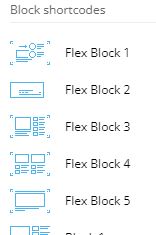
Blocks and Big Grid are part from the standard pack, are blocks that are not adjustable after the screen width also you do not have the possibility to edit the blocks in details. Now the Flexi Block and Big Grid Flex are the blocks that were added with cloud templates, those are adjustable on each width that you set on your pages or cloud templates, also you can full edit them with tagDiv Composer. Also you can check the documentation about those elements where are explain better the settings included:
Flex Block -> https://forum.tagdiv.com/flex-block-settings-guide/
Big Grid Flex -> https://forum.tagdiv.com/big-grid-flex-settings/
We recommend to use flex blocks and grids, also in our latest demos we use only them so those pre-build website can be installed and used without tagDiv Standard pack and the entire website it is full customizable using the frontend editor (tagDiv Composer).
I hope this will help you!
Thank you!
Calin Hi,
The big grid 1 is a block made with 2 types of modules, with MX5 and MX6 (this is the 265 X 198 format like you said) -> https://i.imgur.com/1Xhs5KS.png -> https://i.imgur.com/yCpWyMD.png -> https://i.imgur.com/XgzE2Ov.png -> https://i.imgur.com/5jOczAY.png -> https://i.imgur.com/wtU28aw.png
Now for me the modules display the image quite normal https://i.imgur.com/5Jycplv.jpg unfortunately, without a link or a scree where to see how it is for you, I can not say if there is or not a problem. If you do not want to share details about your website on forum, you can contact us in private via email, at contact@tagdiv.com provide a link to your website and include this topic in email. Also make sure that you do not have an extra plugin that can interfere with the theme thumbs.
Thank you for your understanding!
 Pride Society at Sac State
Hello. I’m trying to create a block on my page that links to a couple of external websites, wherein I have an image and some text below or beside it. I’m not sure what block to use to do this. I’ve searched around for quite a while and can’t find something suitable.
Please advise.
 blockchainniat
I want to remove the word Header ad from my website
http://blockchainniat.com/
 tedted
Hi there
I have finally installed the newsmag theme but for some reason, it’s corrupt the original theme which come with the wordpress seems to be blocking the newsmag theme, can you take a look if I give you login details please help me?
The domain is
ripository.com
I wondered if you can install it properly for me as a favor as I am so stuck I have been trying for hours to get it right, I managed to activate it fine but as you can see, the original theme seems to still be there
Let me know how to send a private message with login details if you can please help me?
Many thanks for your help
Jim
 Bill Fleak
We would like to have the Authors name and date appear to the right of the Authors headshot. We are using this in Flex Block 1. Please see link https://www.screencast.com/t/8ZuUWgiFC
We currently have the CSS below to make the author’s name and date breaking into 2 lines.
CSS:
/* Authors / Byline to display in 2 lines */
.metainfobreak .td-editor-date .td-author-date .td-post-author-name {
display: block; }
 stockswatcher_website
I am using Pulse Pro theme which is using flex blocks to display post, now i want to display custom taxonomy with posts.. please guide me how i can do this.
Thanks
 Matuser
Hi
What are the differences between:
– Blocks and Flexi Block
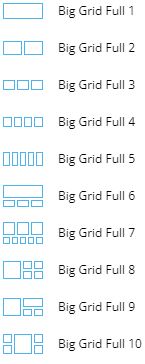
– Big Grid and Big Grid Fex and Big Grid Full
?
What are recommended ways of using each?
What are possible ways of using each?
What every of these was designed for?
What usage of each is not remmended?
How every of these should not be used?
Please provide examples.
Thank you,
Matuser Hi
Unfortunatelly the answer (above) / links don’t provide solution.
We want to use (and have already used) Grid-1 in this part of the website and not use Flexi-Block-X (Flexi-Blocks may be used in different parts of the website), so the links in your answer on configuring Flexi-Blocks or using child theme do not apply here.
The thing is that the 265×198 thumbs for 265×198 windows of “Module-MX6“ in Grid-1 are enabled and are generated by the theme ,
as well as
this is newly reated website (not re-design of an existing content) and content (images and text) are added after (not before) Grid-1 has been chosen (content being added to existing Grid-1 element not the other way around).
So if
– Grid-1 is using 1x MODUKE-MX5 and 4x MODULE-MX6 Blocks,
– MODULE MODULE-MX6 has window size of 265×198 [px]
and
– the applicable thumbs are enabled and are generated by the theme
why the images are blurred?
Why the 265×198 [px] thumbs generated for an image are not used in 265×198 [px] window of “Module-MX6“ of Grid-1?
Why the 265×198 thumb description does not say its used for applicable 265×198 MX6 Block [ while in the same time 534×462 thumb is described as to be used also for corresponding 534×462 MODULE-MX5 in Grid-1 ] ?
QUESTIONS REMAIN:
-I- which thumb is used for Module-MX6 in Grid-1 / Big-Grid-1 if the 265×198 thumb is not ?
-II- which thumb, from the list of all thumbs available, should be enabled in Newspaper theme so that it’s used for generating image for 265×198 Module-MX6 if the 265×198 is not (it’s only for Module-M1 according to the description)?
-III- why the feature pictures in Module-MX6 are blurry and how to fix that?
Regards,
Bill FleakWe are using Flex Block 3 and would like a Vertical Divider between Module 1 and Module 2. I am able to add a horizontal divider, but not Vertical on both modules. See video.
Bill Fleak The site is located here dev.hrmasia.com. Here is a link to the video showing how we made the radius corners in the theme. We also added the custom CSS found on your forum to execute the Zoom on hover. Also included in the video.
We would like for the corners to display radius all the time even on hover with zoom effect if possible.
https://www.screencast.com/t/C7IaLE9SmQDg
Csuom CSS:
/* Image Zoom Effect for all blocks */
.td-module-container:hover .td-thumb-css {
transform: scale3d(1.1, 1.1, 1);
-webkit-transform: scale3d(1.1, 1.1, 1);
border-radius: 20px!important;
}
.td-module-container .td-thumb-css, .td-module-container:hover .td-thumb-css {
transition: transform .5s ease;
}
.td-module-thumb {
overflow: hidden!important;
}
 prodottiecologici
Instagram Block is not showing.
Error: Failed to load resource: the server responded with a status of 403 () – https://scontent-ams4-1.cdninstagram.com/v/t51.2885-15/241230823_153793266844796_3415188557184628160_n.jpg?_nc_cat=110%26ccb=1-5%26_nc_sid=8ae9d6%26_nc_ohc=onqlji0QXWUAX9fRnlw%26_nc_ht=scontent-ams4-1.cdninstagram.com%26edm=ANo9K5cEAAAA%26oh=790fbd31df18d3a0b2e7faf00e61a3d2%26oe=6165C795
 Anamaria
 Hello,
Please use the flex blocks which have the option to adjust the image size => https://www.screencast.com/t/sMBfMtyRW where you can set the height and width.
More information about flex block can find in those guides :
-> https://forum.tagdiv.com/big-grid-flex-settings/
-> https://forum.tagdiv.com/flex-block-settings-guide/
Also, please check this topic https://forum.tagdiv.com/topic/thumbnails-center-top-cropping/
Thank you!
 eduonix
Hi There
I have recently upgraded to latest newspaper theme. But my post id not showing sidebars. How do i fix it ?
Anamaria Hello,
If you referring to the excerpt on the blocks, you can set the limit, please check this article https://forum.tagdiv.com/excerpts-introduction/ -> https://forum.tagdiv.com/big-grid-flex-settings/ -> https://forum.tagdiv.com/flex-block-settings-guide/
If this is not what you mean, then please provide more information and screenshots.
Thank you!
Anamaria Hello,
If you set the filter to the latest, the block will be displayed only the posts filter by publish date(latest), not modified date.
Please make sure you don’t set the filer on a modified date => https://i.imgur.com/4znATVa.png
Thank you!
Anamaria Hello,
You can apply a filter on each block as you want, to not display the same posts, you need to enable the option unique article, which checks if that post is showing in other blocks => https://forum.tagdiv.com/unique-articles/ -> https://www.screencast.com/t/qPztPvlx
This option automatically removes duplicate posts from the page.
Thank you!
Anamaria Hello,
Please edit with tagDiv Composer, select the block and in the tab called General, please remove the value for offset posts => https://i.imgur.com/f8amP4g.png
Thank you!
Anamaria Hello,
Please check the console if you have any errors when you try to open the wp editor, maybe is possible to be from the firewall or security module which blocks the admin-ajax.php request, which usually displays a 403 or 404 error.
If you don’t use a security plugin, please ask your host about this, maybe you have a security module that blocks this.
If you use a plugin like Wordfence please set it in learning mode.
Also, if you are using Cloudflare, please make sure that is set as in our guide https://forum.tagdiv.com/cloudflare-cdn/, you need to disable the Rocket Loader.
Let me know the results!
Thank you!
Anamaria Hello,
You can set for each post an excerpt https://i.imgur.com/9c5htkD.png and after you can show that excerpt on block -> https://i.imgur.com/GJbEH3X.jpg
Thank you!
MatuserNewspaper v11.2
-1-
Featured images displayed in 265×198 windows of “Module-MX6“ in Grid-1 are not sharp, they’re blurred. The same applies also to “Module-MX6” in Big-Grid-1 added / editted on a different page with tagDiv composer
https://ibb.co/HX8s7hv
(images in example Grid-1 / Big-Grid-1 pixelized due to security; the graphics shows just images locations marked with red frames)
The same source feature image displayed in “Module MX5” in Grid-1 / Big-Grid-1 looks much sharper.
This (blurry images) happens even though applicable 265×198 thumb has been enabled in the theme BLOCK SETTINGS and 265×198 thumb image has been correctly generated for the image.
-2-
Also, no thumb seems to be available in BLOCK SETTINGS for “Module-MX6“. as the mentioned 265×198 thumb is not described as a thumb used for Module-MX6 (on contrary see that for example 534×462 thumb is used for Module-MX5 according to the description).
QUESTIONS:
-I- which thumb is used for Module-MX6 in Grid-1 / Big-Grid-1 if the 265×198 thumb is not ?
-II- which thumb, from the list of all thumbs available, should be enabled in Newspaper theme so that it’s used for generating image for 265×198 Module-MX6 if the 265×198 is not (it’s only for Module-M1 according to the description)?
-III- why the feature pictures in Module-MX6 are blurry and how to fix that?
Thank you
Matuser Hi
Thanks for the update but this problem is not related to Grid or Grid’s modules scalling / cropping but is releted to adjusting a (featured) image (by either cropping or proportionally re-scalling that image) by Newspaper theme, so that this picture fits into particular Newspaper theme module window: Module_MX5 in this case (from Grid_1)
—————————————————————–
https://forum.tagdiv.com/theme-blocks-modules/
Block        3/3 Row	               2/3 Row   1/3 row

Big Grid 1   Module MX5 + Module MX6    –          –
—————————————————————–
Yes, your instuction was followed, meaning:
– 534×462 Thumb was enabled in Newspaper theme -> BLOCK SETTINGS https://ibb.co/gwgmJL9
(https://www.screencast.com/t/N18dR3qZrh)
– Regenerate Thumbnails plugin was installed and used (https://forum.tagdiv.com/using-the-theme-with-existing-content/)
After the featured image was actually modified as in the instructions, it’s fitting much better to MX5 Module window: https://ibb.co/GFN9Jzf.
Could you please elaborate why earlier you wrote that
“standard elements, already customized which you can not customize it” ?
while it looks like it was acctually possible to adjust (customize?) the feature image ?
Please axplain also:
what do you mean by “default template” here?
what do you mean by “old ones” elements?
Thank you
-
This reply was modified 5 years by
Matuser.
 OmarBish
is it possible to knot duplicate the same post on the same page .
currently I have three flex block that showing content with the same filter category but all of them duplicate same posts is it possible to avoid this or add kind of offset in these flexpost filters.
this picture show three flexbox and all three of them show the same post : https://drive.google.com/file/d/1ID1ZODaYyKFVrRmTmLCehP6Wo4HiO2jJ/view?usp=sharing
website url: https://ihsan-alotibie.com/
 Fapulous
I have my own posts published but they wont appear on flex blocks, only the demo posts work. Deleting the demo content wont help, I may be missing something on my blog posts or there’s a setting on the Filter that is not correctly setup, I couldn’t find any documentation on that. thank you