
- ApiPractical example – How to add a new Block and Module
- Apitd_api_block::delete
- Apitd_api_block::update_key
- Apitd_api_block::update
- Apitd_api_block::add
- ApiAPI – Blocks – Introduction
- Apitd_api_thumb::update_key
- Apitd_api_thumb::update
- Apitd_api_thumb::add
- ApiAPI – Thumbnail – Introduction
- Apitd_api_category_top_posts_style::update_key
- Apitd_api_category_top_posts_style::update
- Apitd_api_category_top_posts_style::add
- ApiAPI – Category top section style – Introduction
- Apitd_api_module::update_key
- Apitd_api_module::update
- Apitd_api_module::add
- ApiAPI – Modules – Introduction
- ApiUsing the Theme API in plugins
- ApiThe Theme API
 leorodrigues94
Hey team, how are you guys doing?
I would like to know if there’s a way to disable some component (in this specific case a Flex Block) for it not being displayed when the user of my website is browsing on mobile.
Do you guys know if there’s a way to do this?
Thanks and hope you guys have a nice day!
 Bettina
 Hello!
In this video you can see that I create something similar using flex block 4: https://www.screencast.com/t/DWctPM7H0gK
Hope that helps you!
Thank you!
Bettina Hello!
This is the shortcode:
[tdm_block_button button_text="Button text" button_size="tdm-btn-lg" button_display="tdm-block-button-inline" tds_button="tds_button3"]
Hope that helps you!
Thank you!
Bettina Hello!
It seems you use a cloud template, so in this case you can edit the page with TagDiv Composer plugin( documentation here: https://forum.tagdiv.com/tagdiv-composer-tutorial/ ).
You can move the element with drag & drop in another place. Read more about flex blocks setting here: https://forum.tagdiv.com/flex-block-settings-guide/
If you put the same elements on the same post, then they will show exactly the same. You need to change the template for the second one and also for the “Love Letters” post.
Thank you!
 Patrick93
Hello, I have a problem with the block 15 module.
At 0% zoom the images are blurred. Only when I zoom in closer with CTRL + + the thumbnails are sharp. What can be the reason for this.
Watch the video here >> https://drive.google.com/file/d/12BuuvR75pt5TLhIWw6AfTXAfUQ__XYyD/view?usp=sharing (change Quality to 1080p)
Domain: m o d u s x . d e
The error occurs on my 27 inch WQHD monitor.
On my 15 inch laptop everything is fine.
Patrick93Hello,
is there a possibility to rebuild the block 14 module with a flex module?
>> https://nimb.ws/AaJwWp
The reason: I don’t want to have a category and date displayed. But this can be set only with flex modules.
 SergioFD
 thx for information
pls see the screen-video
https://monosnap.com/file/RDNvzgjHyM6uv2UOJpUBWU77mFK4ov
as you can see in the video, the desired text block is not selected. the block below or above is selected. sometimes something is selected and not the text with the title is deleted, but the block above….
thx a lot…
-
This reply was modified 5 years by
SergioFD.
Bettina Hello!
It seems you use Flex Block 2 element and if you edit the page with TagDiv Composer, click on the button, you will be able to see the element’s settings. There you can find some settings in Layout tab called PAGINATION: https://www.screencast.com/t/uovzQ3Fv and in the Style tab: https://www.screencast.com/t/g4y2v8ysveC
Thank you!
 Mara
MaraHello there,
I have some problems.
a) Screen https://thepicsalad.de/
I like this category style of “Contemporary Art”. I want it on several blocks. Is it possible and how can I manage it?
b) Can I change the order of blocks? Or is there any way to change it?
c) Screen https://thepicsalad.de/category/fotoserien/
For the category “Fotoserien” I have two subcategories:
“Haut + Hand” and “Strukturen am Himmel”.
When I click “Haut + Hand” I get the post content shown on Screen 3. The result is fine. https://thepicsalad.de/2021/03/23/haut-und-hand/
When I click “Strukturen am Himmel” I get the same post content, shown on Screen 3.
This result is wrong. The content isn’t the content from “Strukturen am Himmel”. https://thepicsalad.de/2021/03/23/strukturen-am-himmel/
d) Screen 4:
For the category “Kunstkonzept” I have just one subcategory til this time:
“Love Letters” https://thepicsalad.de/category/konzeptkunst/
When I click “Love Letters” I get the post content shown on Screen 3, the same post as before. This result is wrong too. The content isn’t the content from „Love Letters“. https://thepicsalad.de/2021/03/19/love-letters/
Please help me.
Regards Bettina
 Vlad S
 Hello !
The disadvantages are that each thumb activated, creates a thumb in your backend, that means a new image, if you activate all of them, you will end up clogging your host with unnecessary thumbs.
Our suggestion is to take a look at what blocks you use, and make sure that the thumbs are active only for that.
Thank you !
 Calin
Calin Hi,
The block header title can be set general (using the default style that is coming with the demo) or individual -> https://i.imgur.com/UrwuBAs.jpg -> https://i.imgur.com/Jkq5wYQ.jpg when are set individual options.
Thank you!
 stringbenderb5
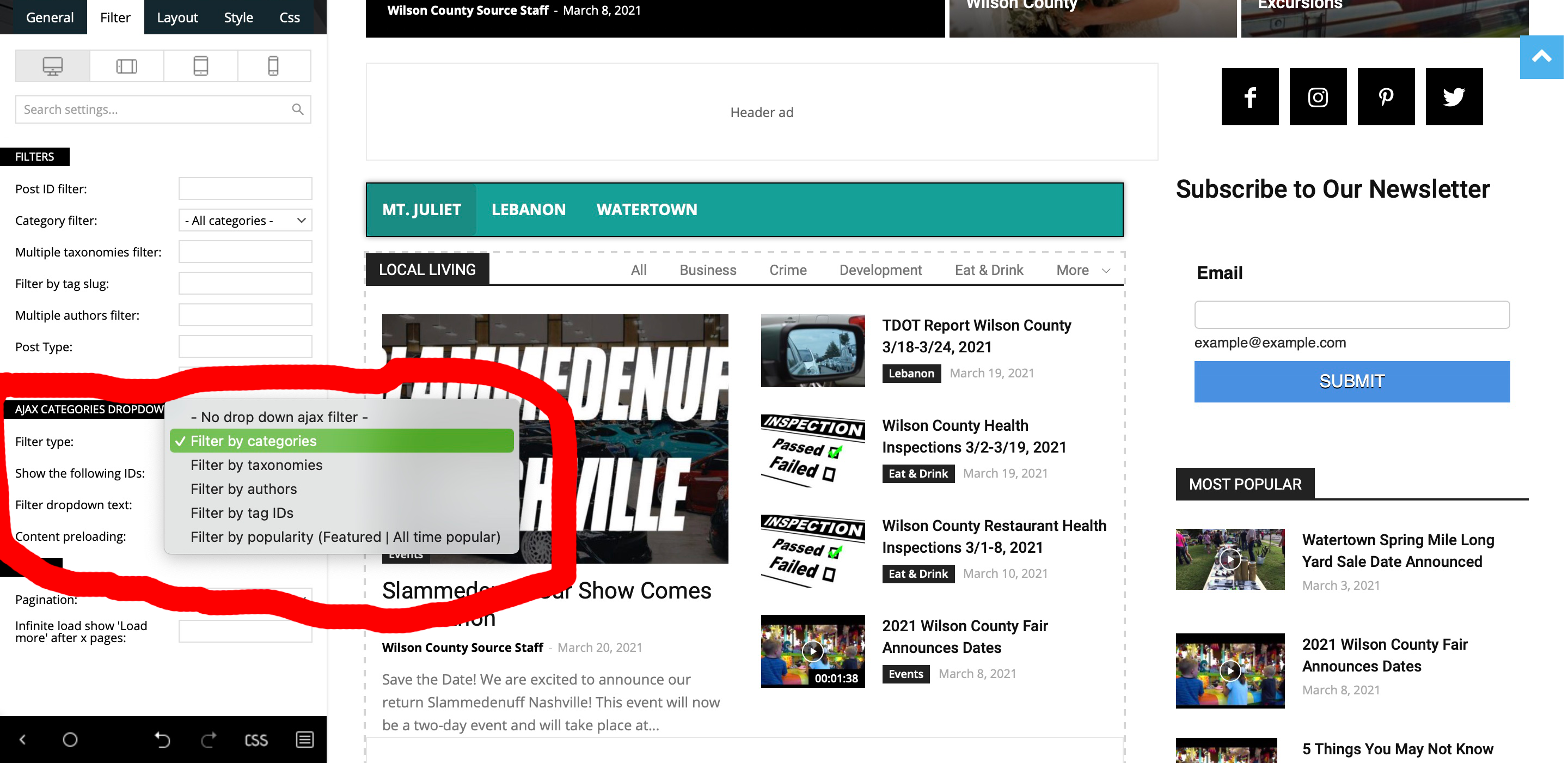
 Sorry, but the instructions you sent did not solve my issue. Please see below.
Filter by Categories gives me All, Business, Crime, Development, Eat & Drink, More (dropdown)
Filter by Taxonimies gives me only the selection “All”
Filter by ID Tags gives me All, lebanon, tn, tennessee, mt. juliet, obituaries, events, more (not sure why these are not capitalized.
So, none of the above settings gives me the below.
Element Used: Flex Block 3
Ajax Categories has been enabled.
I need it to display the below.
Parent Category: Latest News
Alax Tabs: Eat & Drink, Entertainment, Events, Health & Fitness, Kids & Family, Things to Do, Travel.
How do I get these specific categories to show up in those tabs?
As you can see in screenshot below it does not give me these options to select from.
Patrick93Does it make sense to just enable everything under Block Settings > Thumbs? Then I can make sure that the appropriate images are always present. What are the disadvantages if I just enable EVERYTHING?
 CommercioDay
Is it possible to decide from the settings of the single article how the preview will be displayed on the category page?
Block elements do not satisfy this need of mine. Is there any way to get this chance?
Thank you
 Anamaria
 Hello,
You can change the title with tagDiv Composer => https://www.screencast.com/t/cHCwlOfbj select the block and in the tab called “General”, you can change the Custom Title => https://www.screencast.com/t/B9cKPy4Jl after save it.
Please check our guides from here to more information:
– https://forum.tagdiv.com/tagdiv-composer-tutorial/
– https://forum.tagdiv.com/flex-block-settings-guide/
– https://forum.tagdiv.com/big-grid-flex-settings/
Hope that helps you!
Thank you!
Bettina Hello!
Edit the page with TagDiv Composer, add element, search about “Column text”, click on the element and then you will see a black button on the settings: https://www.screencast.com/t/jfkQKhgvyU
Click there and then you can write your text in the window modal called “WP Editor”.
In order to edit with TagDiv Composer, you should use a cloud/PRO template: https://forum.tagdiv.com/tagdiv-composer-tutorial/
Please use flex block 2 if you need this design.
Thank you!
Bettina Hello!
You should review the filters applied in every elements by editing the homepage with TagDiv Composer plugin. If the filter is not set correctly, then the posts are displaying wrong.
Click on the element and you will see some settings for that element and also more tabs there like filter also.
Please check our guides from here:
– https://forum.tagdiv.com/tagdiv-composer-tutorial/
– https://forum.tagdiv.com/flex-block-settings-guide/
– https://forum.tagdiv.com/big-grid-flex-settings/
Hope that helps you!
Thank you!
Anamaria Hello,
Please check if you don’t have set the offset posts on that block, if it is a number please delete it => https://www.screencast.com/t/LxDVEGZR5vgT
If this is not what you mean, please provide more information!
Hope this helps you!
Thank you!
Anamaria Hello,
That is a block, you need to select the block and in the tab called “General”, you can change the Custom title => https://www.screencast.com/t/iIkY1NxUypv
Thank you!
Anamaria Hi,
Unfortunately, there is no panel where you can make changes for all blocks, each must be edited separately with tagDiv Composer.
Thank you for understanding!
Anamaria Hi,
Unfortunately, there is no panel where you can make changes for all blocks, each must be edited separately.
Thank you for understanding!
Anamaria Hi,
I think it was a misunderstanding, I thought you were referring to blocks on a page or cloud templates, but if I understood correctly you were referring to posts, only if you use a single post template in the cloud library you can edit it with tagDiv composer, the standard ones do not have this option.
Thank you!
 Berbi
BerbiHello,
As TagDiv newsletter is not compatible with SendingBlue, I am trying to install an Iframe in order to display the newsletter form.
Here is my code :
*********************************************************************************
<iframe width=”540″ height=”305″ src=”my_source_code” frameborder=”0″ scrolling=”auto” allowfullscreen style=”display: block;margin-left: auto;margin-right: auto;max-width: 100%;”></iframe>
*************************************************************************************
To install it, I added an HTML raw on the footer : https://www.screencast.com/t/BA1rwKP1YYf6.
However the result is poor : https://www.screencast.com/t/fjfF5Qxvy9kw.
How can I make so that the form displays at 100% horizontal and vertical ?
Thanks in advanced
 Simion C.
 Hi,
Please try to understand that we try to reply to all support request as soon as possible, in the order in which they are received, and also within the allocated support schedule mentioned at the top of the forum page -> https://prnt.sc/10sc3z1 This is fair to all theme users that request support. Sorry for any inconvenience.
1. The blocks the theme provides have pagination options https://forum.tagdiv.com/block-settings-tutorial/ All of them have the pagination options mentioned in the guide. The pagination is not automatic, it will have to be actually used by the visitor in order to work. The blocks will display the posts they are set to initially, then using the pagination will make them display the next posts. How would this automatic pagination work exactly, even if the blocks would have it?
2. That is not possible unfortunately. The modules that form blocks and grids can only show categories as a category tag, the primary category of the post will be displayed https://forum.tagdiv.com/primary-category/ The modules cannot display tags, only categories. The tags a post has will be displayed in the single post page.
Thank you!
 Gatso
Gatso Hi there,
Is there any master editor? Should I change them on each blocks? I have many blocks in my web site & if I change one by one it will be much job. I would like to change color & size etc.
Thank you


