
- NewspaperFlex Block Builder and Flex Loop Builder
- NewspaperHow to use the Flex Blocks cache option
- NewspaperHow to edit modules for Flex Block X
- NewspaperHow to insert a block inside the content of a post
- NewspaperFlex Block Settings Guide
- NewspaperMeta Info on Modules and Blocks
- NewspaperTheme modules and blocks
- TutorialsDefault Block Settings Guide
- NewsmagBlock settings tutorial
- NewsmagCategory tag on modules/blocks
- NewspaperThumbnails – Fix strange looking images on blocks
- NewspaperBlock settings tutorial
- NewspaperCategory Tag on Modules/blocks
- ApiPractical example – How to add a new Block and Module
- Apitd_api_block::delete
- Apitd_api_block::update_key
- Apitd_api_block::update
- Apitd_api_block::add
- ApiAPI – Blocks – Introduction
- NewspaperWP Rocket and Newspaper Theme: Optimization Guide
 Calin
Calin Hi,
What I will recommend is to edit the homepage using tagDiv Composer https://i.imgur.com/8UMyRBm.png select that block and in the Layout tab, change the image size, set it on large or full – https://i.imgur.com/eJK2fXK.jpeg
Thank you!
 jamie@gundigest.com
Hello,
I am trying to use the official child theme following the official documentation at https://forum.tagdiv.com/the-child-theme-support-tutorial/
I have downloaded the full Newspaper package and located the official child theme in the /code/ folder. I have placed this folder in my /wp-content/themes/ folder. When attempting to activate this theme, I receive a fatal error on my site:
There has been a critical error on this website. Please check your site admin email inbox for instructions. If you continue to have problems, please try the support forums.
Inspecting error logs, I find this error:
2025/08/06 22:27:18 [error] 53#53: *900 FastCGI sent in stderr: "PHP message: PHP Warning: require_once(/www/kinsta/public/mysite/wp-content/themes/Newspaper-child/blocks/acf-blocks-loader.php): Failed to open stream: No such file or directory in /www/kinsta/public/mysite/wp-content/themes/Newspaper/functions.php on line 644;
It looks like the parent Newsletter theme is looking for files/folders it expects to be in the active theme instead of the template. The child theme should not be required to contain specific files/folders from the parent theme unless the child theme intends to make changes in these files. This causes the child theme to be highly vulnerable to future updates from the parent theme.
When looking at the official child theme documentation you state:
!Important:
Since all of the theme functionality was moved to the tagDiv Standard Pack, the root theme folder is wp-content\plugins\td-standard-pack\Newspaper.
You do not have to place this path in your child theme though. Simply add the files in newspaper-child directly and the system will rewrite files from the above folder.
However, the td-standard-pack is an optional plugin, and I have a few questions:
1.) Does it need to be activated in order for child themes to work?
2.) Is it required to copy the files/folders from this plugin into the child theme folder?
3.) If it was your intention for the child theme to contain these files, why does the official child theme not come with them?
4.) Is the official child theme intended to be broken as-is until these files are added?
Thank you for any help you can provide.
Calin Hi,
To achieve the same results as the one provided by the option mentioned by you, you cna use tagDiv Composer, edit the template, select the flex block where you want to have the “sticky” article and in the filter tab, set the article id – https://i.imgur.com/XbNvA0v.png – https://i.imgur.com/zjhdljh.png
Thank you!
Calin Hi,
This is because the code coming from the theme is stronger, having a more direct path than the one set by you.
Please try like this:
body.single .tdb-block-inner blockquote p {

font-size: 22px !important;

font-weight: 600 !important;

line-height: 1rem ! Important;

}
I hope this will help you!
 muterobert
Wordpress has a built-in “sticky” post function where you can mark one post as “Sticky” to ensure that it always displays at the very top of the list of posts, even if it isn’t the latest post: https://i.imgur.com/Pe6CgoD.png
I test this function in the Newspaper theme to see if it would appear as the first post in the Flex Block 1 I have at the top of my front page. However it doesn’t seem to work as it would with a default WP theme. Is there a way to support this functionality in Newspaper or a way to recreate it without much hassle?
muterobert Thanks for the reply!
Using this code:
.single-post blockquote.td_quote_box {

    background: white;

    position: relative;

    left: -30px;

    width: calc(100% + 60px);

}
Gives this result: https://i.imgur.com/OFUqxmQ.png
Removing the “+ 60px” gives this result: https://i.imgur.com/xg5pku5.png
It’s closer, but still not spanning the entire width of the parent container
The origin page is here if you’d like to take a look directly: https://alpha.roadtovr.com/another-axiom-project-a2-echo-vr-gorilla-tag/
 Emanuele
we cannot add a custom css for the theme quotes. the theme is outputting this:
.tdi_141 .tdb-block-inner blockquote p {
font-family: Chivo !important;
font-size: 48px !important;
line-height: 1 !important;
font-weight: 900 !important;
text-transform: none !important;
color: #000000;
}
but if we add something to the wp customizer, with the !important nothing happen because the code above is outputted after so we are not able to change the theme css. any suggestion on how to update the quotes css?
for example this is not applied:
.tdb-block-inner blockquote p {
font-size: 22px !important;
font-weight: 600 !important;
line-height: 1rem ! Important;
}
thank you!
 stemalo
I tried now so many times to get PayPal working, no success. Tried live mode, sandbox mode, copied client ID, not working. The site opens for a split of a second a popup ( maybe PayPal) but disappears immediately. And no, I do not blocking popups via firefox, checked this already.
Calin Hi,
Please check this:
1. Check robots.txt
– Go to: https://expertsay.blog/robots.txt
– Ensure it does NOT have any Disallow: / or rules blocking Googlebot.
– If it looks suspicious or overly restrictive, restore it to the default or intended settings.
2. Check for Noindex Tags
– View your homepage and a few posts/pages in your browser.
– Right-click and choose “View Page Source.”
– Search (Ctrl+F) for or similar tags.
– If present, remove these via your SEO plugin or theme settings.
3. Test with Google Search Console
– Open Google Search Console > Coverage or Indexing report.
– See exactly what errors or warnings are being reported (“Crawled – currently not indexed”, “Blocked by robots.txt”, etc).
– Use the URL Inspection tool for your homepage and a few key pages. Check for: crawlability, indexability, any blocked resources
4. Theme Compatibility & SEO Plugins
– Sometimes new themes override or conflict with SEO plugins (Yoast, Rank Math, etc).
– Check if your SEO plugin is active and up to date.
– Go to SEO plugin settings > Search Appearance > Make sure “Noindex” is not enabled for posts, pages, or the homepage.
5. Sitemap Issues
– Check your sitemap at https://expertsay.blog/sitemap.xml
– Make sure it’s accessible, valid, and submitted in Google Search Console.
I hope this will help you!
Calin Hi,
Please try this custom css:
.single-post blockquote.td_quote_box {

    position: relative;

    left: -30px;

    width: calc(100% + 60px);

}
I hope this will help you!
muterobertI have a 30px left/right padding on my Single Post Content element to keep the text from touching the edges of the column. However, I’d like the background of the blockquote to extend to the very edges of the column.
Right now I’m trying something like this:
.single-post blockquote.td_quote_box {
background: #EDF7F6;
width: 100%;
}
But as you can see this is respecting the 30px left/right padding of the Single Post Content element, and thus not actually extending to the edges: https://i.imgur.com/StGwkP1.png
If I go to 110% width to try to overflow the edges, it only overflows on the right side instead of both sides equally: https://i.imgur.com/HD29vgm.png
Any thoughts on how I can achieve this?
 nycinsider
I’ve had the same homepage for 7+ years with various slides/blocks and every month I change the filters. Starting today, any filter I try and change is deleting the entire element. If I put in a different slide #, the whole block disappears. Same for all the other blocks. This has never happened in the 100s of times I’ve done this. What changed and how to fix it? If I could fix in the text editor, I would, but as you know, your code back there is gibberish.
Calin Hi,
1. Unfortunately, there is no option for this, but you can set an image for those articles that do not have one – https://i.imgur.com/yHD0RPQ.png. Doing this will no longer display that gray placeholder; it will display the image set by you, and the block layout will remain the same.
2. This can be done only if you set a category or tag for those articles that do not have a featured image and after that, exclude the category or tag from your blocks https://forum.tagdiv.com/flex-block-settings-guide/ https://i.imgur.com/UXnS2Uy.png
Thank you!
 Arturooooooo
Hello Team,
I am having issues applying category templates to my pages using tagDiv Composer on my website https://www.anglertest.de
As a starting point I used the aniglobe category template renamed it to koedertest-category and adjusted it to my needs but the changes are not beeing applied.
1) There is no way for me to switch the category in the composer to preview it in the composer
2) When visiting a category the “edit in tagDiv Composer” button is not visible
3) Not a single category template is ever beeing applied to categories. I have set the template as global without success. Changing the template on-the-fly from the frontend did not work. Setting the template from the theme panel category settings did not work either.
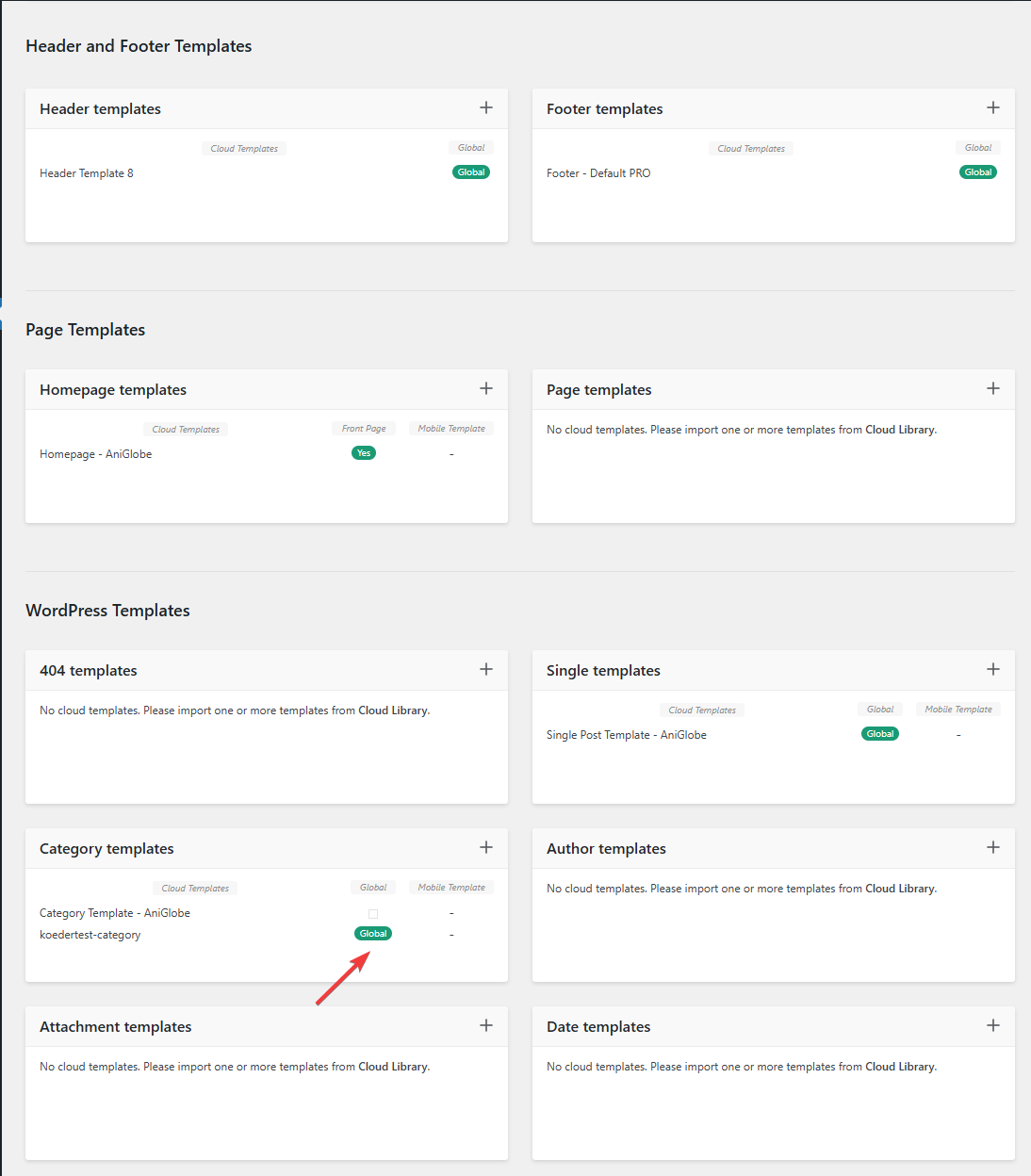
In this picture you can see that my template should be assigned globally
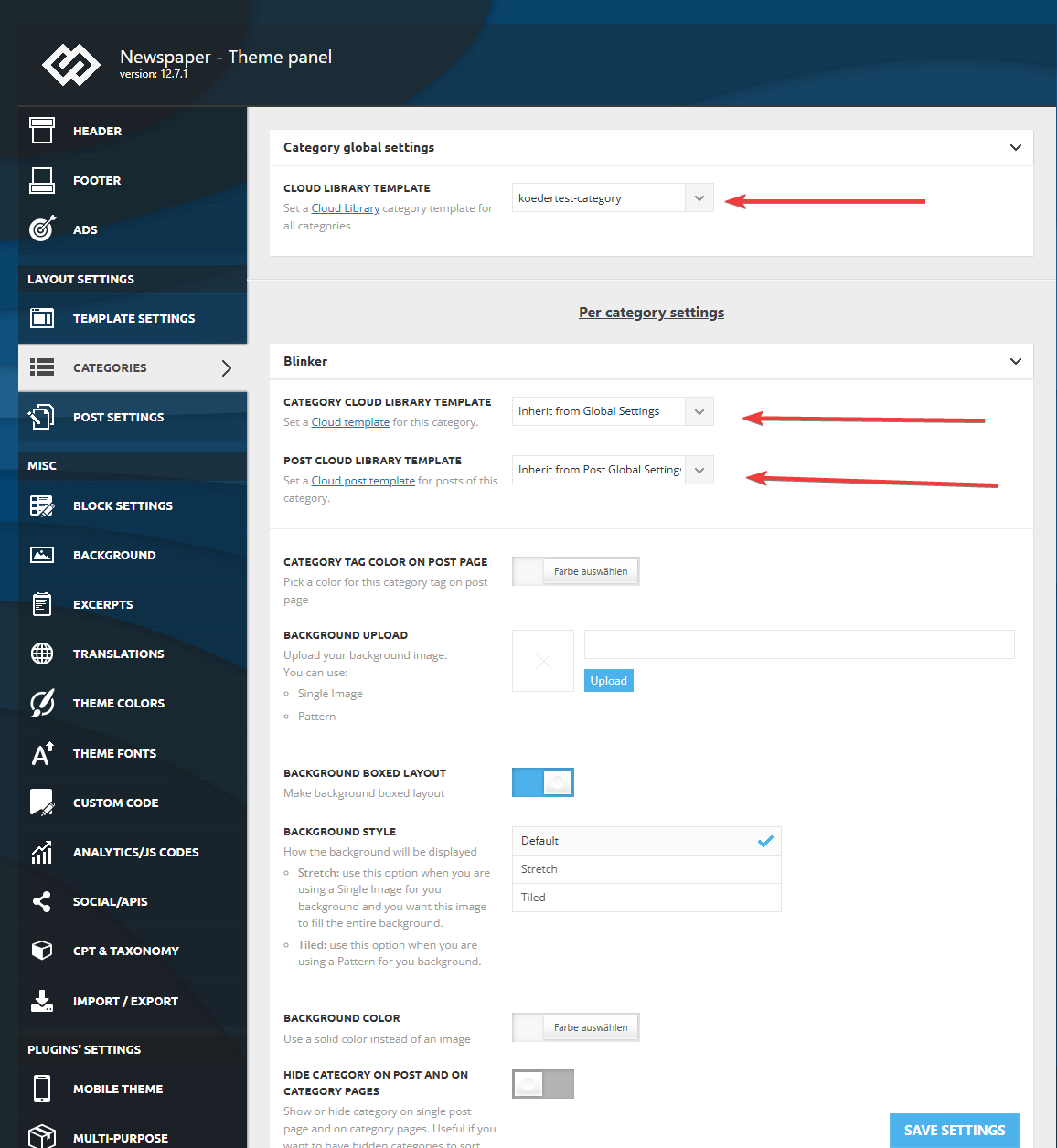
I made sure that in the theme panel under categories that the same template is globally set and checked every category underneath to inherit from global settings.
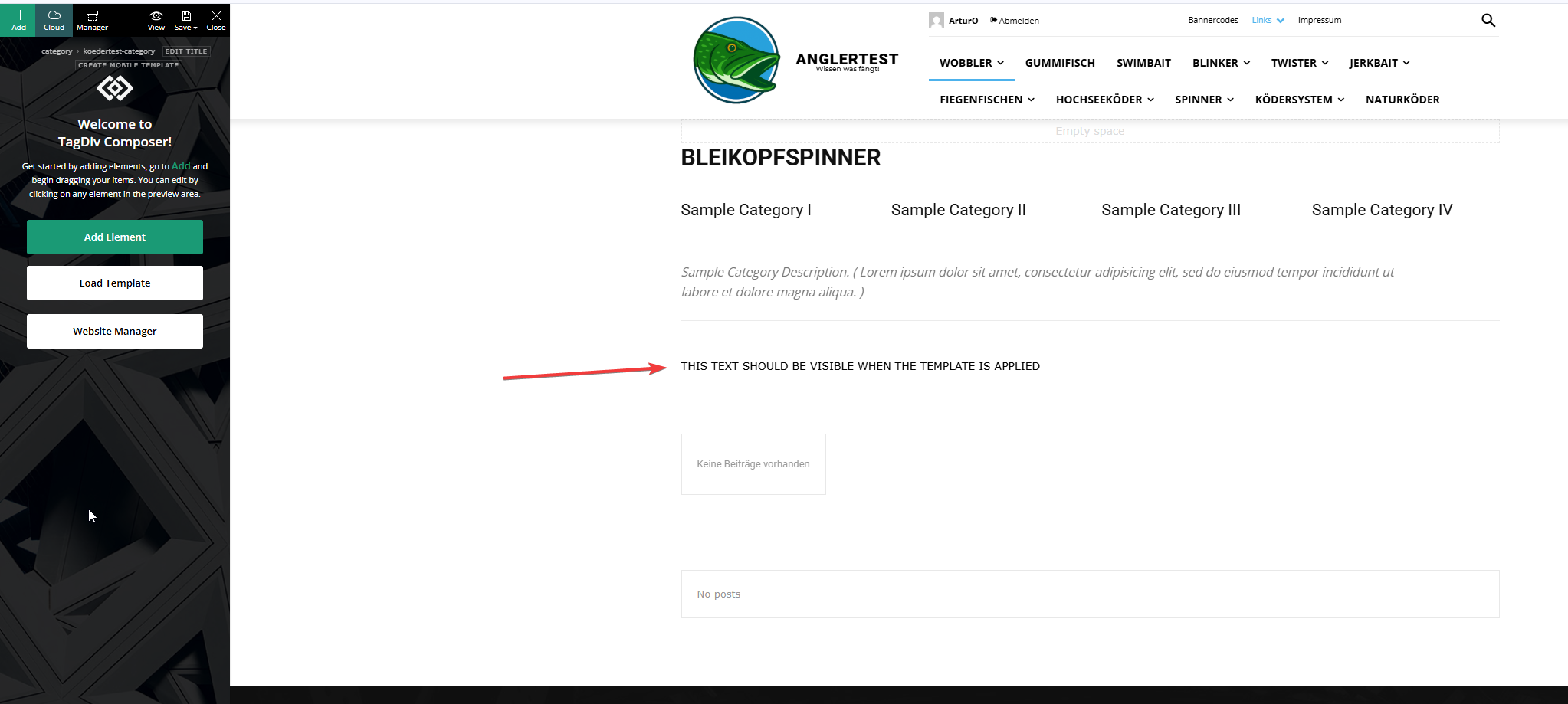
This is the actual template and I added an html block to verify if the template was assigned.
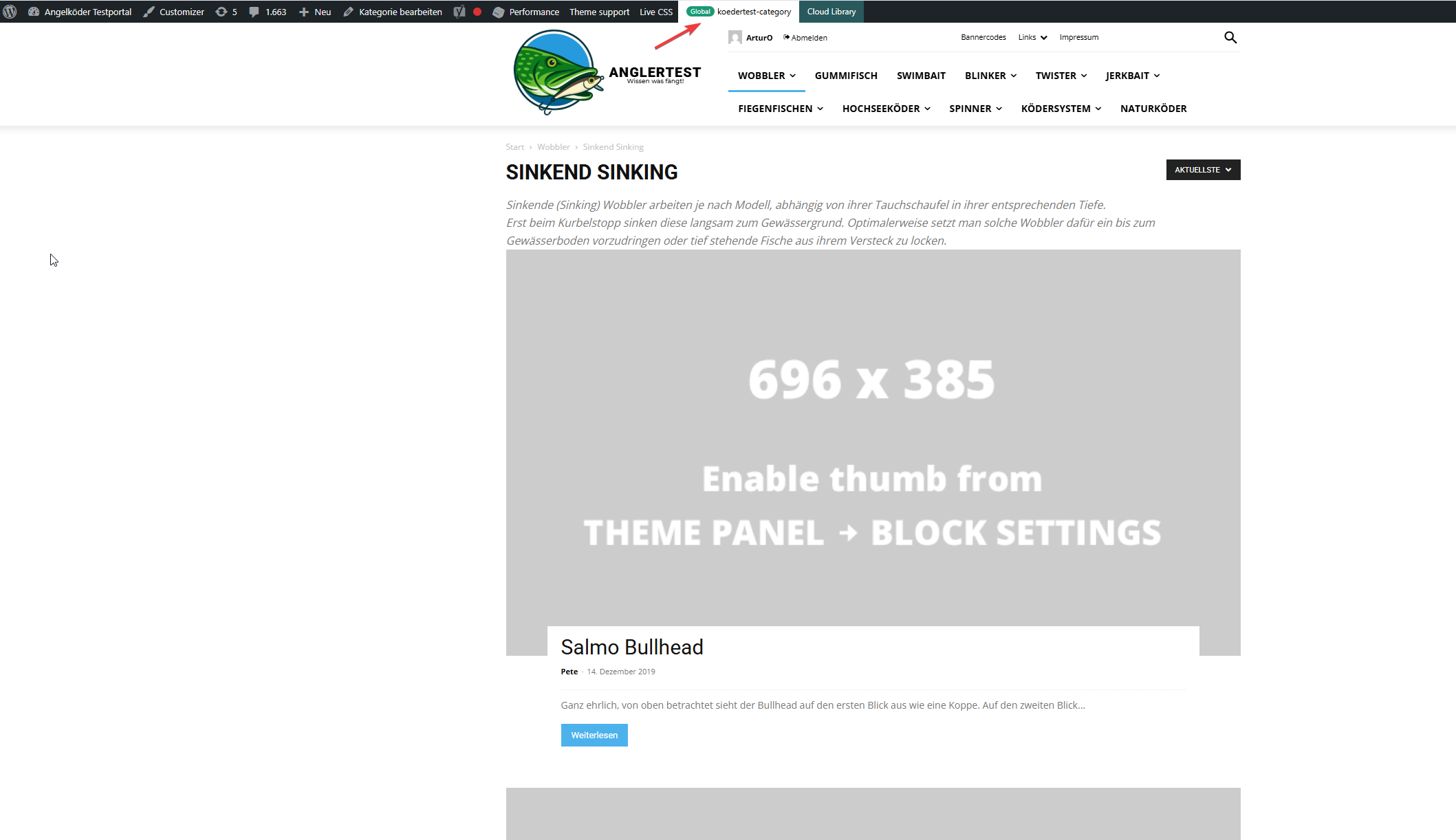
In this picture you can see that the template for the “wobbler” category looks completely different.
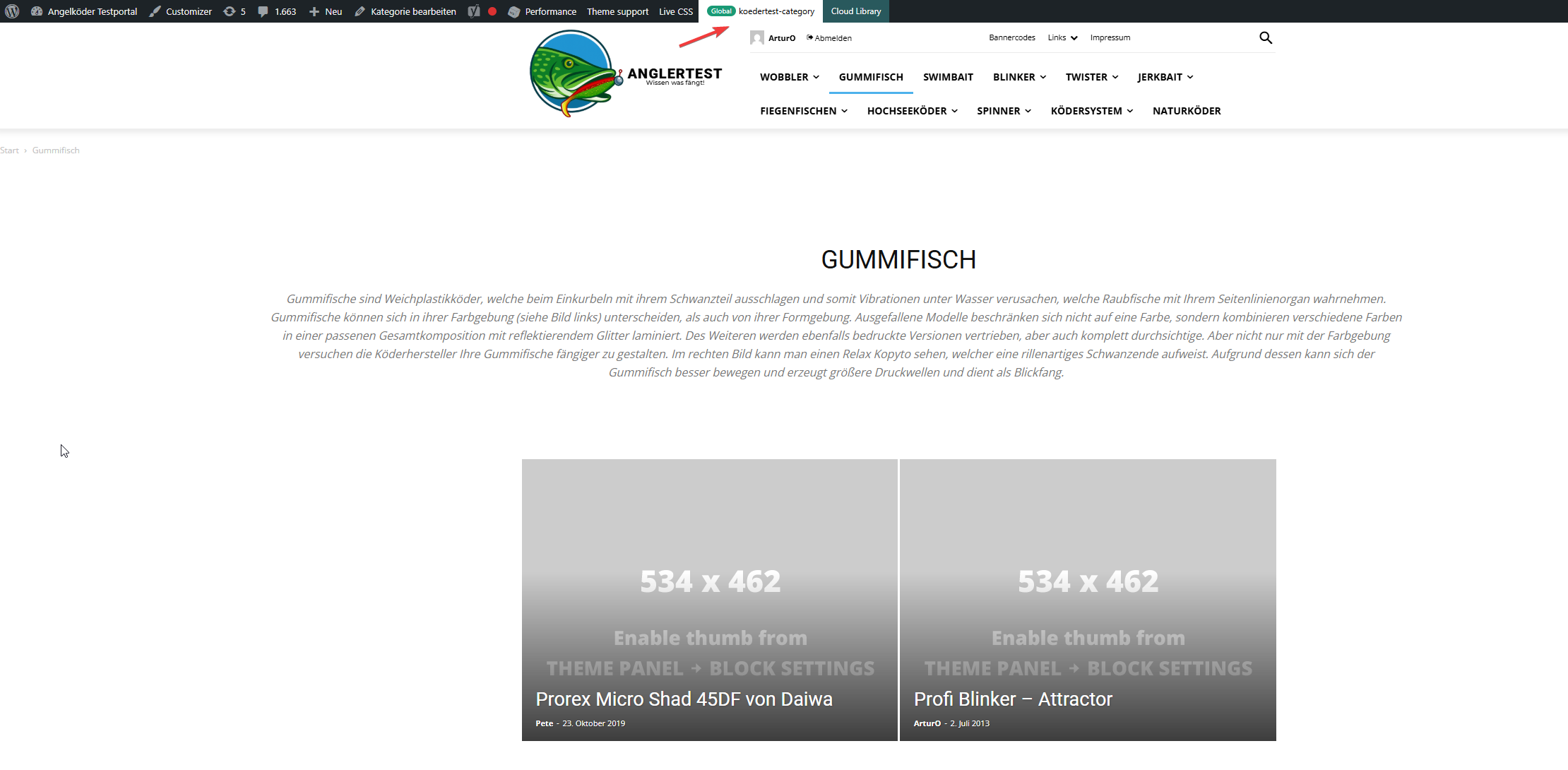
Strange enough, the template for the “gummifisch” category looks slightly different with the same theme applied (see arrow up top), the text I inserted to check was nowhere to be found (not even in source code)
In the very beginning I installed the aniglobe templates intially without demo content, but changed up the templates one-by-one. I did not find any option to disable or uninstall the prebuild website.
In my endless tries with different configurations I was not able to aplly the template, but I found something interesting which might explain the bugs I encounter.
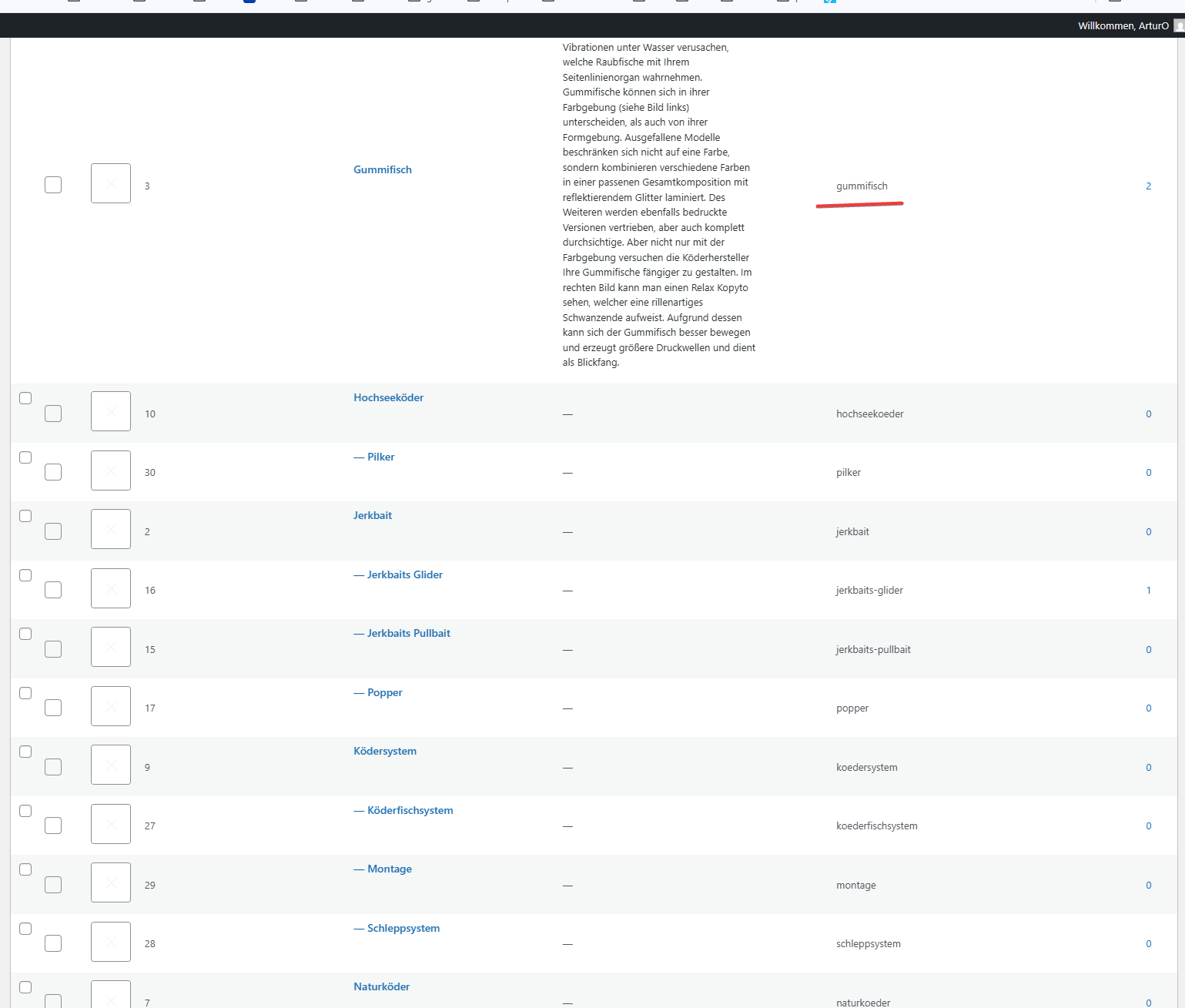
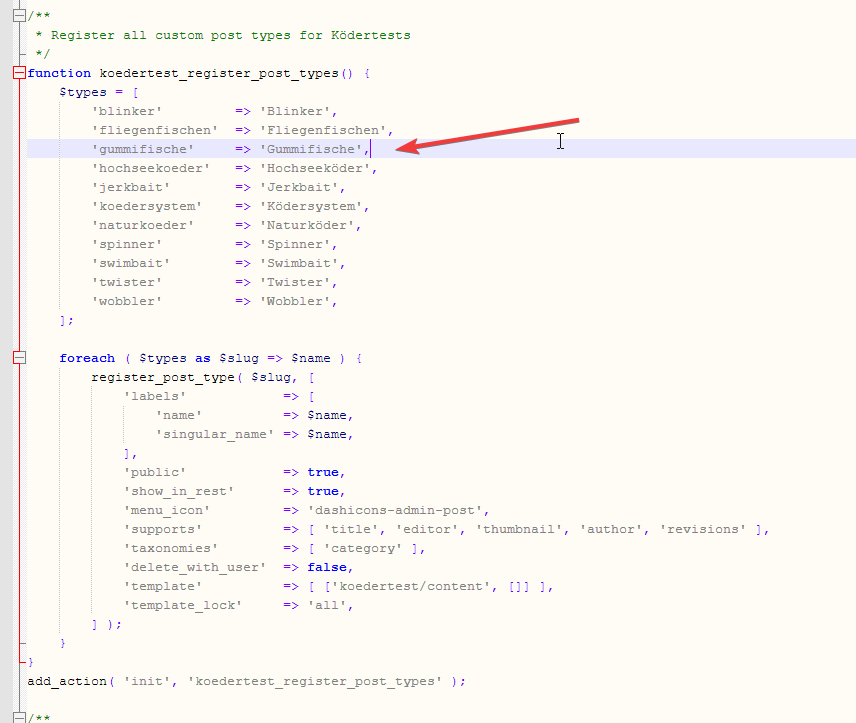
In those pictures you can see the categories I use and the post_types I register. The post_types are using those categories and I make sure that every post of those post_types has at least one category assigned. All post_types share the same categories (native category from wordpress).
The permalink structure is setup like /%category%/%postname%.html for every post_type. Category basis is set to “angelkoeder”.
Every category is named after a post_type. Nested categories are not named after post_types.
The only exception is the category “gummifisch” where post_type “gummifische” articles are categorized under. I might have missed the “e” when I set this up in 2013.
Somehow this category looks different as you can see in the above screenshot.
Furthermore I discovered that, when I change the template in the theme panel to “no template” (but do not save those settings) it reveals the settings I made previously with “Module 14” as article display view. You can see in the screenshot above for the “wobbler” category that this is the applied design even though the bar on top suggests my custom “kodertest-category” template is supposed to be applied.
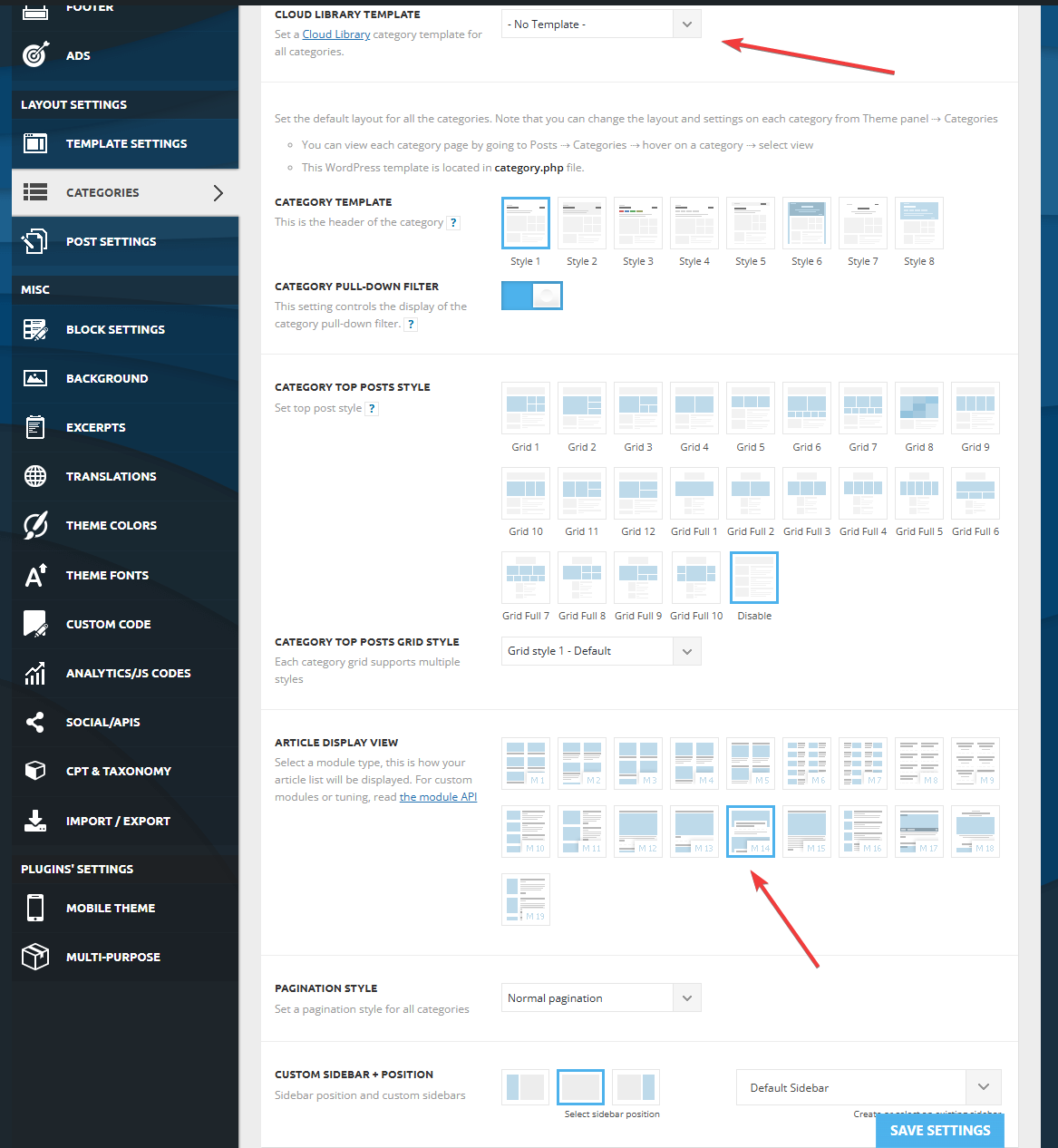
Any help is highly appreciated. If needed I can provide further screenshots.
Thank you for your help.
 Atithya
 Will the functionality be the same if we use an HTML block and paste HTML/Javascript code directly from Get response?
 JeffHi
I tried to sign up for your service to migrate from SiteGround and you all have blocked new customers? When are you going to open up back up for migration?
Calin Hi,
Please try this custom css:
@-moz-document url-prefix() {

.single .tdm_block_image_info_box .tdm-image-description {

position: absolute;

top: inherit;

}

.single .tdm_block_image_info_box .tdm-with-button .tdm-image-description {

top: 0;

}
}
I hope this will help you!
 slivertorp
 Hi Calin, thanks to your precious advice, I have managed to fix the infinite loading on my second website by disabling/re-enabling a couple of security plug-ins.
So I have pasted the same css code from your last comment, but for some reason, on that website, the css code doesn’t make the text and button visible on my “image info box” blocks as you can see on Firefox on the side bar: https://australie.bucket-list.fr/visiter-sydney-le-guide-complet-des-incontournables/ for the campervan image and the plane image for example.
Would you know what could be causing that?
Thanks a lot.
 nearview
 Calin, that’s not it. I can guarantee you that all of these WooCommerce add-on developers are not going to write special code just to support TagDiv themes.
The biggest issue is TagDiv’s lack of proper integration for standard WooCommerce hooks. THAT is what the various add-on developers are going to code for.
Hopefully TagDiv will implement changes similar to the one that we documented earlier in this thread.
When we manually added that code to one of our sites, magically the TagDiv WooCommerce blocks started working properly with add-ons like group subscriptions and more.
Calin Please conduct a test using only TagDiv plugins and see if the situation persists. Also, please provide some screenshots with the settings of the thumbs you have in the theme panel https://forum.tagdiv.com/thumbs-on-modules-and-blocks/
Thank you!
Calin Hi,
I just made some tests and the option is working correctly – https://i.imgur.com/DZRycgF.png – https://i.imgur.com/bIcZHRV.png – https://i.imgur.com/cTDNQmr.png
Just make sure that you ave the thumbs selected enabled in the theme panel – https://forum.tagdiv.com/thumbs-on-modules-and-blocks/
Calin Hi,
I think that this kind of content will need to be done by the author of the article, when creating the article, to add the block inside the article with the link to Amazon.
Thank you!
 regio-online
 In the meantime I also figured out that it is the plugin WP Media Folder that creates the largest amount of db rows in postmeta, wich have everything to do with the set image sizes in the themepanel of Newspaper and WP Core.
In have a question regarding those imagesize settings.
The WPMF Google Drive addon or the theme creates a db row _wp_attachment_metadata, wich holds references to the image file on Google Drive, but does so many different times in many different sizes (se below. I only mention the image size not the whole code. Every size is mentioned twice):
————
https://drive.google.com/thumbnail?id=19EI*************ZWn&sz=w300
https://drive.google.com/thumbnail?id=19EI*************ZWn&sz=w1024
https://drive.google.com/thumbnail?id=19EI*************ZWn&sz=w150
https://drive.google.com/thumbnail?id=19EI*************ZWn&sz=w768
https://drive.google.com/thumbnail?id=19EI*************ZWn&sz=w1536
https://drive.google.com/thumbnail?id=19EI*************ZWn&sz=w2048
https://drive.google.com/thumbnail?id=19EI*************ZWn&sz=w150
https://drive.google.com/thumbnail?id=19EI*************ZWn&sz=w218
https://drive.google.com/thumbnail?id=19EI*************ZWn&sz=w300
https://drive.google.com/thumbnail?id=19EI*************ZWn&sz=w324
https://drive.google.com/thumbnail?id=19EI*************ZWn&sz=w485
https://drive.google.com/thumbnail?id=19EI*************ZWn&sz=w696
https://drive.google.com/thumbnail?id=19EI*************ZWn&sz=w1068
https://drive.google.com/thumbnail?id=19EI*************ZWn&sz=w1920
https://drive.google.com/thumbnail?id=19EI*************ZWn&sz=w1600
https://drive.google.com/thumbnail?id=19EI*************ZWn&sz=w2200
https://drive.google.com/thumbnail?id=19EI*************ZWn&sz=w2800
https://drive.google.com/thumbnail?id=19EI*************ZWn&sz=w3400
https://drive.google.com/thumbnail?id=19EI*************ZWn&sz=w4000
——————-
This looks generated by WPMF, but it are the themepanel block settings => Thumbs on Modules/Blocks and I quess the WordPress thumbnail, meium, large and full settings.
At the moment I have all the thumb sizes turned on (except the retina), but I use 3 blocks in my pages, Beginning with one Big Grid Flex Block 6, several Big Grid Flex Block 1 and several Flex Block 1. With Flex Block 1 I use different views and image sizes to show.
However if I fill out ‘full’ or ‘1920×0’ the images fit in every Block in any size. It is good to know that before I upload an image through the WPMF Google Drive folder in WP Media Library, I first resize every image to max 1400w x 600h in jpg format and compressed to on everage 120Kb an image. At the moment there are over 35.000 images on Google Drive (about 3.5GB total in size).
Question (at last): if I can set every block in my pages to the full or 1920 setting, could I then disable all other thumbnail size settings? There is only one size image on Google Drive, but is delivered (as seens in the db row) in different size.
That is accumulating a lot of unnessary data it seems making my postmeta table very large and prone to disrupption of service.
If it is possible as I asked, I will have to contact WPMF for a way to get rid of the bloat of information no longer needed.
Hope you can make some sense om my message, because even writing it down was complex for myself.
 jjgoi
jjgoiHi,
I recently bought the Newspaper template and used the Forest Beat theme and found the experience to be so extremely difficult-to-use and cumbersome.
It doesn’t come with a page template – which is fine – but clearly there’s no way for me to even create a tagdiv template at all that my non-post pages can use. A hacky way I did was to import any random template into “Page”, and copy-pasted the Base64-encoded source.
I went through your knowledgebase and there doesn’t seem to be any way to figure out how this can be used?
1. How do you even add your own template such that it can be used by pages? I only just need a simple page layout but seems to be an impossible task.
2. If I want to customise the “Single Post Author” component on a page, I noted the default Forest Beat overrides font-size as 16px, somehow I cannot replicate that via the tagDiv composer?
3. I wanted to change the theme colours of Forest Beat, from the theme colours tab, I can only change the primary accent and a bunch of other colours, but I cannot find these:
--light-green-forest-beat – where can I modify this?
The entire tbd-global-colors block (via view-source) is:
--mm-custom-color-4:#C2A25D;--mm-custom-color-5:#F7F9F9;--mm-custom-color-1:#053426;--mm-custom-color-2:#B79259;--mm-custom-color-3:#79847E;--accent-color:#fff;--accent-forest-beat:#5c6b28;--dark-green-forest-beat:#1D2110;--white-forest-beat:#FFFFFF;--transparent-white-forest-beat:rgba(255,255,255,0.25);--transparent-white-2-forest-beat:rgba(255,255,255,0.6);--transparent-white-3-forest-beat:rgba(255,255,255,0.7);--transparent-dark-green-forest-beat:rgba(29,33,16,0.8);--transparent-dark-green-2-forest-beat:rgba(29,33,16,0.25);--light-green-forest-beat:#F3F7EE;--transparent-dark-green-3-forest-beat:rgba(29,33,16,0.65)
Is the experience intended to be like that?
 giulionicolai
Hello, I’m using the Newspaper theme with the default Gutenberg block editor. In the editor, all H2 and H3 headings appear correctly styled and sized. However, when viewing the live post, those same headings are rendered extremely small—almost unreadable—on all devices and articles.
I haven’t made any CSS customizations or used a child theme. The site is running WP Super Cache, but clearing the cache doesn’t fix the issue. The problem seems to be related to the theme’s default CSS or its compatibility with Gutenberg heading blocks.
How can I restore proper heading sizes on the frontend without switching to tagDiv Composer? Any help would be appreciated!





