
- ApiPractical example – How to add a new Block and Module
- Apitd_api_block::delete
- Apitd_api_block::update_key
- Apitd_api_block::update
- Apitd_api_block::add
- ApiAPI – Blocks – Introduction
- Apitd_api_thumb::update_key
- Apitd_api_thumb::update
- Apitd_api_thumb::add
- ApiAPI – Thumbnail – Introduction
- Apitd_api_category_top_posts_style::update_key
- Apitd_api_category_top_posts_style::update
- Apitd_api_category_top_posts_style::add
- ApiAPI – Category top section style – Introduction
- Apitd_api_module::update_key
- Apitd_api_module::update
- Apitd_api_module::add
- ApiAPI – Modules – Introduction
- ApiUsing the Theme API in plugins
- ApiThe Theme API
 Calin
Calin Hi,
The amp code is set correctly.
Normally the error that you get is coming from an adblocker, please check this guide https://mixedanalytics.com/blog/tag-assistant-error-occurred-while-tag-fired/
Hope this will help you!
 ryuugames
hi, currently i’ve a problem. when try to change the block title design for sidebar on post it does not appear just plain like this one.
https://prnt.sc/109uqit
but on homepage, it does appear like this
https://prnt.sc/109ur7b
 marco.ruffelli
Hi,
I’m trying to copy this template that seems to me made with newspaper.
https://www.vogue.it/moda
It seems to me that there are 2 column rows with “Flex Block 1” on the first column and “Flex Block 2” on the second. At the end there is a paging control. In my case even using the Post Loop instead of the Flex Block page/2 is empty. However I can’t add the pagination control centered with respect to the 2 columns.
If I could, I would also like to know how the categories menu above was done. With a “Header main menu” linked to a wordpress menu? So for each category I have to make a template linked to a wordpress menu?
thanks for the help
 dnf67
dnf67 Thank you for your reply. So we cannot change the order of what stories appear in what blocks?
 tomgarlick
 I had a feeling it could be a cache problem. I will play around with it.
That is correct. New posts are no longer appearing in the latest article block. They only appear when I login as an admin user.
 Bettina
 Hello!
Set your thumbs from Newspaper -> Theme panel -> Block settings -> Thumbs on modules/blocks. If you deactivate a dimension from here, next time when you will upload an image, it will not be resizes to that dimension.
After changing the thumbnail sizes you need to regenerate your thumbnails using a plugin. Check this: https://forum.tagdiv.com/using-the-theme-with-existing-content/
Thank you!
Bettina Hello!
We have a lot of big grid and big grid flex styles, so you can use whatever style fits for what you need. The differences between them are some settings.
Unfortunately, you can not change the blocks style, but you can choose which one is the best for you.
For more information, please check also our documentation from here: https://forum.tagdiv.com/big-grid-flex-settings/
Thank you!
 andxtagdiv
In you menu block you have active and hover in one selector. I am having trouble to find those.
Would you be able to tell me the selector for “active”. So that I can style it separately from hover.
Thank you
 Anamaria
 Hello,
If you use the mobile theme plugin and this appears on the desktop or on the tablet, in most cases is a cache problem. We recommend using WP Super Cache plugin with the settings from our guide this is working correctly: https://forum.tagdiv.com/cache-plugin-install-and-configure/
Also, what do you mean that no new posts appear on the mobile version? When you post an article does it not appear in the “Latest articles” block?
Thank you!
Calin Hi,
You need to filtered with tagDiv Composer the blocks from your homepage after the latest posts -> https://i.imgur.com/MXKOQZ4.png -> https://i.imgur.com/e5iGM79.jpg
Hope this will help you!
Thank you!
Anamaria Hi,
That block doesn’t have the filters, it automatically displays the posts from the current/selected tag (the posts loop bock has an automatic filter).
All you have to do is add that block.
Thank you!
 chip303
Hello my dears!
I have a question about changing a featured image in the single template. Round pictures can be seen in the flex block 1 (xs-small 150×0) – something like this would be ideal for logos on a custom template.
Logo on the left, next to the title of the article and below the sub-title
How can I reduce such a featured image and display it in round shape? I found rounded corners in the search function. But is that also possible completely? With CSS?
Thanks for your efforts, the support here is great!
Thomas
 jrich78
Can’t get anything accomplished with the included slider revolution. I am now trying to use the slider block in TagDiv Composer. My question is… how do can you get that to resize to say 620px or less instead of being full screen so that other connect can go to the right of it like a normal website? The slider itself resizes but the container still takes up the full width and the images don’t size correctly, “title bar” or whatever its called etc for the content isn’t seen.
 bolo
boloIs there a simple way to disable the link of the category tag in the blocks? Thank you.
Calin Hi,
1. Is possible to some elements on the homepage that are prevent the fonts to load, some times is fixed if you set an icon with tagDiv Composer over the menu.
2. That is a plugin conflict usually this situation appear when you use cloud templates and Bakery. We recommend to use only one of theme and disable the odor one. Usually we recommend to use tagdiv cloud library.
3. To display in category page only posts from that category, you need to edit it with tagDiv Composer select the flex block and in filter tab set the filter for current category -> https://i.imgur.com/4gZMXVV.png
Hope this will help you!
Thank you!
Anamaria Hello,
Unfortunately, for posts loop, you can’t apply filters to sort. The posts loop is a special block and doesn’t have filtering options.
You can use Flex Block 1 and adjust them to have the same aspect as the Posts Loop and you can apply the filter => https://www.screencast.com/t/yHvg4cymS
Thank you!
 marcorroma
 Hi,
if I create a template category with 2 “Flex” post blocks, with an ADS in the middle, how can I manage the pagination?
If I set up the first Flex post block without pagination, and the second Flex post block (with offset) with pagination, how is pagination handled?
Does it work correctly only if I set “Load more button” or “infinite load”? If I set “next prev ajax” does it work?
Thank you
 tmhai
tmhaiHello,
I use Newspaper Theme. I would like to show list of pots for one Category, I’ve usded Post Loop Element. But it shows posts of all categories. With Flex Block I can choose category in Filter, mais I cannot do that with Post Loop Element. What should I do to set filter for one Category with Post Loop?
Thanks
Bettina Hello!
It is wrong to write offset -10, you need to write there a positive value for example 10.
Also, it is a bit tricky to use 2 different posts loop. The problem there is the pagination if you will use 2 posts loop, maybe you could use the button load more for example.
I recommend you to use a flex block, so they have a tab Filter where you can select to display posts only from a category dynamically: https://forum.tagdiv.com/flex-block-settings-guide/
Hope that helps you!
Thank you!
Anamaria Hello,
Unfortunately, the block of ” related articles “no longer exists, but you can add a block and filter it => https://www.screencast.com/t/ltyiPRQg0
Hope this helps you!
Thank you!
 decker.tdtrade
 I am having this same issue. Was this resolved or is it still being investigated?
Thank you! I have tried to enter the affiliate ad in the Custom Ad portion of the Theme Panel as well as directly in the Custom HTML block in the Composer. Neither are working.
Have a great evening.
 SvijetS
Hi,
is there any chance to have min 2-3 block of post category filter for AMP version?
thx
 Anna Drummond
Hi there,
My ‘leave a comment’ section on my mobile single cloud template just turned to code. I have not edited this template at all recently, so I’m not sure why it happened. Would love to know how to fix it.
Here is the screenshot of the website: https://imgur.com/a/6C8jU3i
The URL (mobile) is https://annadrummond.com/when-doing-a-puzzle-sometimes-all-you-can-see-is-the-next-piece/
This is the code that appears scrambled:
[tdb_single_comments form_layout=”2″ block_template_id=”td_block_template_8″ f_header_font_family=”75″ f_header_font_transform=”” f_header_font_size=”eyJhbGwiOiIzMCIsInBob25lIjoiMjgifQ==” f_header_font_line_height=”1.2″ f_auth_font_family=”438″ f_auth_font_transform=”uppercase” f_auth_font_size=”eyJwaG9uZSI6IjE2IiwiYWxsIjoiMTQifQ==” f_auth_font_weight=”400″ f_meta_font_size=”10″ f_meta_font_family=”438″ f_meta_font_spacing=”+2″ f_meta_font_transform=”uppercase” f_descr_font_family=”438″ f_descr_font_spacing=”+1″ f_descr_font_size=”eyJwaG9uZSI6IjE0IiwiYWxsIjoiMTMifQ==” f_auth_font_spacing=”+1″ f_reply_font_family=”438″ f_reply_font_transform=”uppercase” f_reply_font_spacing=”+2″ f_reply_font_size=”10″ f_reply_font_weight=”300″ f_frm_title_font_family=”438″ f_frm_title_font_spacing=”+1″ f_frm_title_font_size=”eyJwaG9uZSI6IjE2IiwiYWxsIjoiMTQifQ==” f_frm_title_font_weight=”400″ f_input_font_size=”eyJwaG9uZSI6IjE0IiwiYWxsIjoiMTMifQ==” f_input_font_family=”438″ f_input_font_spacing=”+1″ f_btn_font_size=”12″ f_btn_font_transform=”uppercase” f_btn_font_spacing=”+1″ f_btn_font_weight=”400″ f_btn_font_family=”438″ f_agreement_font_size=”13″ f_agreement_font_family=”438″ f_agreement_font_spacing=”+1″ sep_color=”rgba(189,0,255,0)” btn_bg_color=”#e47748″ bt
Thanks!
Anna.
 pepperandplatinum
I love the setup of this page, how it has links at the top and the images change as you select them.
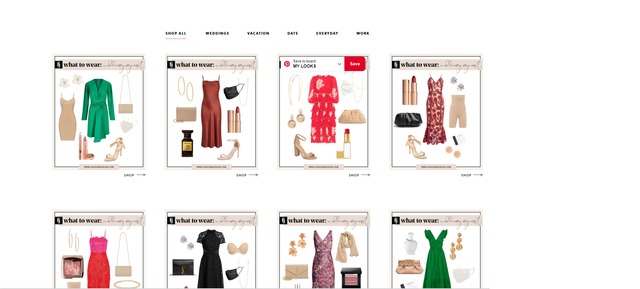
I primarily use Tagdiv but also have elementor.
I would love to know if I can recreate this with blocks etc.
Thank you!
 CasaPantalones
Hi,
I have created a page with 5 blocks on 2+2+1. The blocks are derived from the ‘Get a membership – Spa Heaven’ block from the cloud.
The same margins and settings are used as you can see on the screenshots. However I keep having blocks which all have a different size and aren’t horizontal aligned.
How do I get the blocks in the same sizes and have it horizontal aligned?
Screenshots:
https://ibb.co/zrHj81X
https://ibb.co/LvN7YvL
https://ibb.co/SJsmWqJ
Thank you in advance.



