
- TutorialsDefault Block Settings Guide
- NewspaperWP Rocket and Newspaper Theme: Optimization Guide
- TutorialsFrom WPBakery to tagDiv Composer
- TutorialsOffset Feature
- TutorialsWhat is Ajax preloading?
 marcorroma
Hi, is it possible to use the WordPress “sticky posts” instead of the “Featured” category?
Sticky post screenshot:
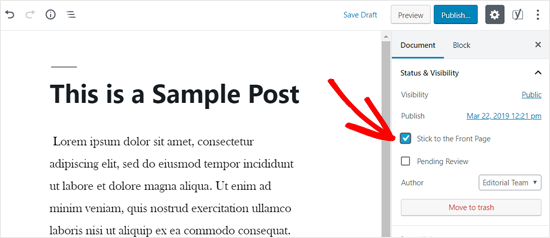
I would like to filter post blocks by “only sticky posts”.
On news sites I always set a post block at the top with “only sticky posts”. This facilitates the positioning of important posts/news. And all my editors use this method currently.
Thanks for support.
Sorry for the many support messages (these are questions already asked about the comments on themeforest site).
marcorromaHi, I kindly ask you this request, I hope you can help me.
That a post block includes posts from 2 categories, for example: “X”, and “Y”; and that excludes posts from the category: “A”. So when a post has categories “X” and “Y” it is displayed, while when a post has categories “X”, “Y” and “A”, it is not displayed. This function serves me to exclude previously published posts that I do not want on a page (as if I moved that post to the archive, so as not to display it in categories or pages). Keeping the categories important to the post breadcrumb, i.e. (in this case): X and Y.
Thanks.
marcorromaHi, how can I use the “unique posts” function for categories?
I manage parent categories where I would like to insert a post block with the main news (featured posts) of all the child categories at the top, and at the bottom create a post block for each child categories.
The “unique posts” function is currently only provided for pages.
I await support.
Thanks a lot.
PS. Your theme is something spectacular. The best ever.
I was looking for a theme like yours for 2 years, and only now I have found it. Fantastic work!
 zenzino
I can’t change the size of the body font using the Theme Panel. I’ve changed it in the General settings and the Post setting.
I used inspect element and found the following:
.tdi_85_ff9, .tdi_85_ff9 > p, .tdi_85_ff9 .tdb-block-inner > p {

font-size: 14px !important;

line-height: 1.8 !important;

}
This seems to be overriding the setting from the Theme Panel. I never created that CSS and it doesn’t appear in my Custom CSS panel. Where could that code be coming from?
https://greenlivingmag.com/marci-zaroffs-latest-eco-venture/
Thanks,
zenzino
 Anamaria
 Hi,
I think you set the wrong filter on the block set on a category page template if you want to display posts from a selected category you need to use the specifical filter => https://www.screencast.com/t/Tn5eTUmhR
If you use other filters on category page the blocks will display posts on each category.
Thank you!
 transcontinentaltimes
 Hi Ana,
We have already followed the steps and we have set the fonts from TAGDIV composer from Style section as well. Please check, as we have changed the font for our tdb-logo-text-title (Transcontinental Times).
Here is our test website: staging.transcontinentaltimes.com
When we inspect the element in browser, we can see the Chomsky New font but not on website
.tdi_32_6ff .tdb-logo-text-title {
display: block;
font-family: Chomsky New !important;
font-size: 50px !important;
font-weight: 500 !important;
text-transform: capitalize !important;
}
We have followed the guidelines, mentioned on : https://forum.tagdiv.com/font-customization
We have uploaded the .woff extension, through theme panel.
Changed the text font style and updated the website.
Not appearing the new change in fonts.
Could you help us to understand, what is required and what would be the issue?
Anamaria Hello,
Usually, can be from firewall or security module which blocks admin-ajax.php request. Please verify the console for error while saving the settings on the Theme Panel, usually, it displays a 403 or 404 error.
If you don’t use a security plugin, please ask your host about this, maybe you have a security module which blocks this.
If you use a plugin like Wordfence please set it in learning mode.
Also, sometimes is possible to be only jquery problems. Those can be resolved using a plugin for jQuery, like Enable jQuery Migrate Helper plugin and try this option => https://www.screencast.com/t/WYlKJVLi. Clear all the caches (also the browser cache).
Hope this will help you!
Let me know the results!
 kappe79
Hi,
I need to create a block in homepage showing post’s custom fields, for example after post title

It would be better to insert e short code calling back a plugin function.
How can I do it?
Thanks
Anamaria Hi,
To disable the option the Auto Loading edit with tagDiv Composer -> Show site wide settings => https://www.screencast.com/t/A9nO0Vy1
You can use the infinite load on the page if you set this on the last block on the homepage. For example, I have the Posts Loop 2 and I set on this the Infinite load => https://www.screencast.com/t/Udv7BsKb8J, if you have another like Flex Block you can set like this => https://www.screencast.com/t/nmJQKZmz
Hope this helps you!
Thank you!
 IliasK
 Thanks Vlad.
One additional question on this:
It is quite often to mark a post with more than one categories.
Is there any way that we could avoid repeating the same post again and again in different category blocks within the same page?
Thanks again.
 Vlad S
 Hello !
Newspaper Theme only offers the filtering options that are available on some elements as you can see here: https://www.screencast.com/t/mmMaEukGO069 You can filter posts or show only them using their IDs.
This are the only options to filter your posts in Newspaper Theme elements. Unfortunately you cannot edit each module from a block.
Thank you !
 Topfgartenwelt
 Dear Vlad, I know that it works perfectly if I directly insert the ads in Newspaper. But the legal requirements have changed. In the EU no ad is allowed to be shown without consent and Google AdSense makes problems if there are too many impressions for visitors from Social Media. Unfortunately Newspaper offers no possibilty to stop referrers for Facebook and so on.
If a block or a CSS-Wrapper is inserted in the layout always a Layout Shift occurs like here: https://www.topfgartenwelt.com/svg-logo
This also happens if I write a CSS-Wrapper and put it directly into the Ad-Section of the Newspaper Composer. Why is that happen?
Greetings Kathrin
 ted
tedHello – I’m trying to embed a self-hosted video through tagDiv Composer’s Video Embed option and running into a “Render failed – please enter a valid video url” error message. The video is here: https://regulatory.news/wp-content/uploads/2021/01/Regulatory.News-Explainer-Video.m4v. I know this is a valid video URL because I was able to successfully add the same video to this page using the WordPress block editor: https://regulatory.news/about-regulatory-news/
The Video Embed tool is working if I use a link to a YouTube or Vimeo video, but we’d like to use a self-hosted video in this instance.
Any suggestions? Thank you for the help!
 ingriddurupt
 This is what appears when I click on the page “Home”.
I don’t understand your answer.
How can I edit this with blocks ?
 mikabo
Hi,
we are new to the Newspaper theme and have an issue with cloud templates. We downloaded an example template, duplicated it and assigned it to 3 different categories.
After setting up the cloud-template we go to the category page (frontend) in the browser and click “edit with tagdivComposer”.
The problem:
While we can edit for example Headlines for that category without problems the issue is that settings we make that way regarding category-filters in for example “Block 3” (kind of post loop) are synchronised in every category using that cloud-template. We want to use the same “Layout” on all 3 category pages but of course we need to set different settings on modules. We could duplicate the cloud-template a few times and only change the filter settings in the “loop-modules” but that doesn’t feel right. In case we want to rearrange positions of modules we would have to so it multiple times.
Hope you can clarify how to do this in a clean way.
Best regards,
Karsten
PS:
Just in case I was not clear:
Let’s say we have the categories “city” and “lifestyle” – to both assigned the same cloud-template.
In the cloud-template we have included the “Block 3” module. When going to the “city” category page (frontend but logged in) and edit the Block 3 module via “edit with tagDiVComposer” and set the filter like “display 8 posts having category city or cars”, after saving we have the same results in the Block 3 module when visiting the lifestyle category page in the frontend, while headlines we edit exactly that way stay different. Both category pages need the Block 3 module (just an example) but different filters applied to.
 nhowarth
 Unfortunately Vlad, I cannot see a way of using two blocks instead to get the correct results from a search.
Any thoughts?
Regards
Nigel
Anamaria Hello,
You can set the hover on the icon, title and button => https://www.screencast.com/t/SybQm8BUF , but for making the whole icon box to black on hover, you need to use a custom CSS => https://www.screencast.com/t/Uuld1Zr1y
The code you can insert in Theme Panel -> Custom Code -> Custom CSS => https://www.screencast.com/t/lryYSSg6gk
The code is:
.tdm_block_icon_box:hover, .tdm_block_icon_box:hover .tdm-title

{

background-color: black;

color: #fff;

}
Hope this helps you!
Thank you!
IliasKHello there!
We add each article in only one parent category but in several child categories that are not necessarily located under the same parent category.
We set as Primary Category, the one that suits as best, between the child categories.
We want to filter a block or a flex block in order to saw only the articles to have as primary category any of the child categories under a specific parent category. Is it possible?
For example, let’s say that we have:
“Parent-01” with Child Categories: “Child-01a”, “Child-01b”, “Child-01c” etc.
“Parent-02” with Child Categories: “Child-02a”, “Child-02b”, “Child-02c” etc.
“Parent-03” with Child Categories: “Child-03a”, “Child-03b”, “Child-03c” etc.
We upload articles by checking categories in the following way:
Categories: Parent-01, Child-01a, Child-01c, Child-02b, Child-03a
Primary Category: Child01a
We want to filter in a block, every article has as Primary Category one of the child categories “Child-01a”, “Child-01b”, “Child-01c” (under the same Parent-01 category), regardless of the additional child categories that may be included in this article, that aren’t located under the same Parent.
Thanks for your help
Vlad S Hello !
At the moment in Newspaper Theme you cannot use 2 post loops on the same template. You can achieve something similar using 2 blocks instead of the posts loop.
Thank you !
transcontinentaltimes We are having the same issue:
Here is our test website: staging.transcontinentaltimes.com
When we inspect the element in browser, we can see the Chomsky New font but not on website
.tdi_32_6ff .tdb-logo-text-title {
display: block;
font-family: Chomsky New !important;
font-size: 50px !important;
font-weight: 500 !important;
text-transform: capitalize !important;
}
We have followed the guidelines, mentioned on : https://forum.tagdiv.com/font-customization
We have uploaded the .woff extension, through theme panel.
Changed the text font style and updated the website.
Not appearing the new change in fonts.
Could you help us to understand, what is required and what would be the issue?
 Calin
Calin Hi,
Yes, our theme use thumbs, and those are made for each thumb that is enable in theme panel.
Also if you want to see the thumb on what module is use you can check this in theme panel https://i.imgur.com/2wPxZEt.png or you can use the documentation from Newspaper (this has more blocks then Newsmag, but you can see the ones you have) -> https://forum.tagdiv.com/theme-blocks-modules/
Hope this will help you!
nhowarthI’m using the Newspaper theme version 10.3.9.1 and trying to insert ads on search results pages.
I’ve tried both Posts loop & Posts loop 2 without success as follows:
I set up a first Posts loop (or Posts loop 2) block and set Limit post number 4, sort order Latest and No pagination.
Then I would insert an ad block.
I set up a second Posts loop (or Posts loop 2) block and set Limit post number 4, Offset posts 4, sort order Latest and No pagination.
This looks fine in TD Composer and I save the changes – see https://imgur.com/Kxw4IA8
However, when I view the page, the Offset posts on the second block is ignored and the first Post loop block is repeated – see https://imgur.com/5ZMrjKF
I’ve deactivated all non-TAGDIV plugins – the problem persists.
Any thought on how to correct this?
(I use this method of inserting ads in several places; all work fine. It’s only the Post loop blocks giving problems.)
TIA
Nigel
Anamaria Hello,
Unfortunately, for the blocks, our theme doesn’t have implemented the option to open posts from blocks in a new tab.
We are sorry for the inconvenience!
Vlad S Hello !
The slide element which comes from tagDiv Composer it looks like this and it only pulls posts and it works like a block but it offers you a slide effect: https://www.screencast.com/t/LrFJAPusQh This is an element from tagDiv Composer, You will have to open tagdiv composer on your homepage or on your templates and add it.
The other solution would be to use Revolution Slider. Unfortunately we have not tested any more plugins in this matter, you can however test and see other plugins that fit your taste and work with the theme.
I hope this was more helpful !
Thank you !
 steve@tvstrategies.com
Hi – My designer needs to know the sizes and aspect ratios for images used in boxes, blocks and modules. I can’t find the reference for this in the online documentation. Is there a table that shows them all?
For example “Module xx is made up of Block YY.
“Image Box is made up of ZZ.”
“Image box uses images that are YYY x ZZZ” (and identify the aspect ratio)
Now, if I want to use the Image Box for 3 images across a row, what size do the images have to be, if I want the images to be square? See this page: https://piracymonitor.org/partners/synamedia/ Also, What do I need to do if I want these images to be 16×9 aspect ratio instead of square?
Thanks
– Steve

