
No search results were found in Documentation!
 Calin
Calin Hi urishtaujjain, can you please provide some more details? I’m not sure if I correctly understanding. Are you referring that the new posts/articles are not displaying on mobile? If so, this can be related to the cache settings, make sure this is clean when a post is publish or updated.
Thank you!
Calin Hi Daily Nintendo, as simchris mentioned, most of the time this situation it’s related to a cache, those should be set to be clear from the website and a post is publish/updated.
Thank you!
 Anamaria
 Hi,
Usually, this happens with cache plugins. If the cache plugin does not have mobile support then the mobile version can be delivered instead.
The solution would be to use the recommended WP Super Cache plugin instead and activate these settings (especially the mobile device support): https://forum.tagdiv.com/cache-plugin-install-and-configure/
Also, you can check this https://i.imgur.com/Es7nHNh.png
Thank you!
 mubassirhayat
Hello.
I have set up a mobile page for my Homepage, but the mobile version is shown on the desktop and the default homepage is not.
I’m using the tagDiv Newspaper theme and LiteSpeed Cache plugin.
 ArtRights
 Same error here:
AH01071: Got error 'PHP message: PHP Fatal error:  Uncaught TypeErro

r: array_filter(): Argument #1 ($array) must be of type array, bool given in /var/www/html/wp-content/plugins/td-cloud-library/state/single/tdb_state_single.php:957
Have commented out the lines in question and now works
PHP 8.2.20 (cli) (built: Jun 17 2024 13:33:14) (NTS)

Copyright (c) The PHP Group

Zend Engine v4.2.20, Copyright (c) Zend Technologies

    with Zend OPcache v8.2.20, Copyright (c), by Zend Technologies
 Bettina
 Hello!
Do you use the latest update of the theme and plugins?
Update WordPress, PHP, the theme, and plugins to the latest version: https://forum.tagdiv.com/how-to-update-the-theme-2/
Make a test and deactivate all plugins except tagDiv ones. Also, if you are using a cache plugin, deactivate it, clear all cache, and try again.
Let me know the results!
Thank you!
 marcnyc
 Thanks for posting. It keeps happening and I was using W3 Total Cache so now I just disabled that and installed WP Super Cache. Hopefully that will work
 putereaapatra
 Hello again!
Thank you for your reply! I have deleted my cache plugin and the problem is now solved for the PC version. The website looks as it should without me being logged in as an admin.
The problem with the footer still remains. I have created a custom footer from CLoud Templates, using the Week Pro. In the NewsPaper – Theme Panel -> Footer, it is selected this template. If I go to homepage – Edit page -> tagdiv composer -> Manager and I preview the mobile version from there, it looks perfect.
But not from my smartphone. On my smartphone, I see a black background with “Alegerea editorului” (Editor’s pick) and a few articles with broken featured images, “Categorie populara” (Popular category), an empty “Despre Noi” (About Us), which are not supposed to be there at all. And a blank copyright symbol with no text at all. The footer I have created has a light background, recent articles, details next to the copyright symbol and so on.
 pinktrianglepress
 It seems like post restore the newspaper theme license is deactivated.
I re-activate the license but then If I go into the header the theme panel all the settings are wiped out. For example on the header the Cloud Library Template is set to “No Template” on staging but on production its set to “Header Template – Default”
I went into production and used the import/export to export all the settings and then imported them on staging. After doing so I can now see all the settings for example the Cloud Library Template is now set properly. However even after doing a cache flush things still don’t appear correct.
I disabled the Newspaper theme and enabled the Twenty Twenty Four theme, then re-enabled the Newspaper theme and now my site looks much closer to production – the background is black and the fonts are correct but the navigation is missing and there’s all this extra space on the top. Highlighting the empty space I see its code like this:
[tdb_header_logo align_vert=”content-vert-center” align_horiz=”content-horiz-center” image_width=”eyJwb3J0cmFpdCI6IjIyMCJ9″ media_size_image_height=”165″ media_size_image_width=”600″ tdc_css=”eyJhbGwiOnsiZGlzcGxheSI6IiJ9fQ==”]
What would cause this? Is there something else I need to export from production and import onto staging?
Bettina Hello!
Make sure this option is enabled: https://app.screencast.com/3YzpAZLKgj0as save the settings, clear the cache and check the results.
Thank you!
 Aldis
Aldis Hi,
Thanks for code. I do as you told, but locker still don’t work with cache plugin switched on.
For information, we use WPRocket (if it is important)
Can you please check in screenshots are there ok with code? https://drive.google.com/drive/folders/1vMTwMeWWsXm3y1wZyYKxbIcuIK1gjer3?usp=drive_link
BR, Aldis
 random123
 If it’s depreciated then why are you sending me the video about it?
I don’t mind getting someone to fix the cache, I’d just like to understand why the newspaper theme is so low in terms of google speed score when no cache is enabled.
Bettina Hello!
Please address the issue to the LiteSpeed developer or change the cache plugin.
The CSS Analyzer is deprecated.
Thank you!
random123 I understand that this isn’t part of the support as it’s part of the services you sell, but I’d still have liked to have some documentation related to the litespeed cache extension.
As for your video on the CSS analyzer, I don’t have it in my menu. Is this normal?
I don’t understand why when I disable the cache, the speed score is so bad. It’s below 70. How can this be? Why is the mobile theme so slow?
thank you
Anamaria Hi,
You can ask your host about this if the cache on the server has this option.
Thank you!
Bettina Hello!
No. I do not recommend it. You can use any extra plugin that is not tested with our theme but please take care of a future plugin conflict.
This will require custom work, which is not covered by the support team.
For customization and other services, you can contact our custom work team here: https://tagdiv.com/premium-customization-services/.
Disable the cache to see if the problem is because of the cache.
Thank you!
 dtbcoin
 Thank you for your time and answer.
My host will not allow any cache plugin to be uploaded, as they say they have their own cache installed.
So I am guessing game over.
Thanks
random123 Thank you for your help, I already use litespeedcache, is the plugin you recommend better?
Also, if you go to my site on the mobile version, you’ll see that there’s almost nothing on the home page, which is why I can’t figure out how to fix my DOM problem. Is it a theme problem? The cache?
It seems that when the page loads, the elements are displayed incorrectly. Thanks for your help!
Bettina Hello!
We recommend the Wp Super Cache plugin.
There is all about the DOM. Which means you need to have less elements into that container or row, as such on that page. I can suggest you only to take care of how many elements you use on that page. You can try to use a cache plugin or a plugin which can minify the page or combine some elements in order to reduce its size.
To increase the page speed you can check these similar topics for more solutions:
– https://www.infophilic.com/get-almost-100-pagespeed-newspaper-theme/
– https://forum.tagdiv.com/topic/score-100100-pagespeed-with-newspaper-wordpress-theme/
– https://developers.google.com/speed/docs/insights/v5/about
– https://www.youtube.com/watch?v=tnkVapqhIHc
– https://www.xtechkr.com/optimize-newspaper-theme/
– Check those guides : https://web.dev/lcp/ – > https://www.sqlpac.com/en/documents/google-pagespeeds-lighthouse-6-new-features-lcp-cls.html -> > https://wp-rocket.me/google-core-web-vitals-wordpress/improve-cumulative-layout-shift
– https://forum.tagdiv.com/topic/to-high-cumulative-layout-shift-in-mobile-theme/
Please check the tutorials from those platforms gt metrix and Google Pagespeed Insights and I’m sure you can increase the page speed.
Please note that page speed is not covered by the support team: https://forum.tagdiv.com/newspaper-theme-support/
Thank you!
random123Hello,
I’m contacting you because I’m having two major problems that are preventing me from taking full advantage of my newspaper theme.
The first is that I have a caching problem and I don’t know if it’s linked to the theme or not. I’m using LiteSpeedCache and every day I have to clear my cache, otherwise my site doesn’t display and the images no longer display.
Regarding the PageSpeed test, I can’t solve the following problem:
Avoid excessive DOM size / A large DOM uses more memory, leading to longer style calculations and costly layout adjustments. Find out how to avoid excessive DOM size. Here is the screenshot:
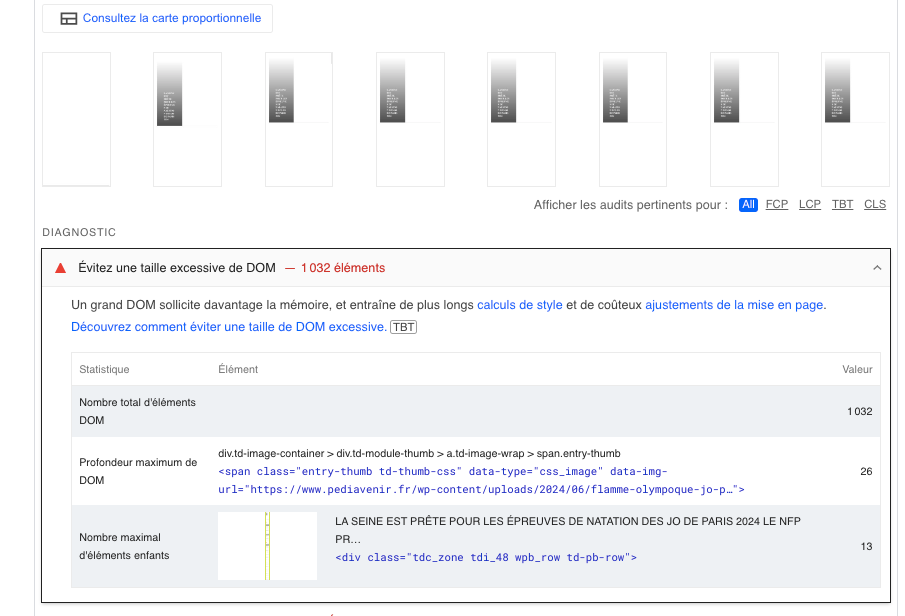
Thanks for your help!
Bettina Hello!
1. That notification still remain there. This is a known issue and the opt-in builder is fully updated.
2. This seems to be a caching issue. Clear all the cache or disable all the caching tools to see if the issue is still there or not.
3. I can see it is the same responsive template.
Thank you!
Bettina Hello!
Please save the settings, clear the cache and try again.
Thank you!
Bettina Hello!
Please update WordPress, PHP, the theme, and plugins to the latest version: https://forum.tagdiv.com/how-to-update-the-theme-2/
Do you remember to set the wrong width somewhere? Make a test and deactivate all plugins except tagDiv ones. Also, if you are using a cache plugin, deactivate it, clear all cache, and try again. If the problem is still there, then please contact us via email at contact@tagdiv.com and provide the following:
– admin url and credentials
– a link to this topic in order to identify you
Thank you!
Anamaria Hello,
Alright, you had a mobile theme enabled and then disabled it, after which you created a mobile page, great. However, to avoid the problem of having the desktop version on the phone, or vice versa, you should use a caching plugin like WP Super Cache or WP Rocket, and enable the mobile cache option. This way, this problem should no longer occur https://i.imgur.com/Mu0hVJe.png -> https://forum.tagdiv.com/cache-plugin-install-and-configure/
Thank you!
Bettina Hello!
No. You should use cloud templates. In No preloading option, the theme will make an Ajax request on each click on a filter. After the request is made, the theme is using a browser cache to store the result and not make an additional request for the same resource until the page is reloaded.
Thank you!


