
No search results were found in Documentation!
 EquipaRefrigeracao
Hello,
I hope you’re doing good.
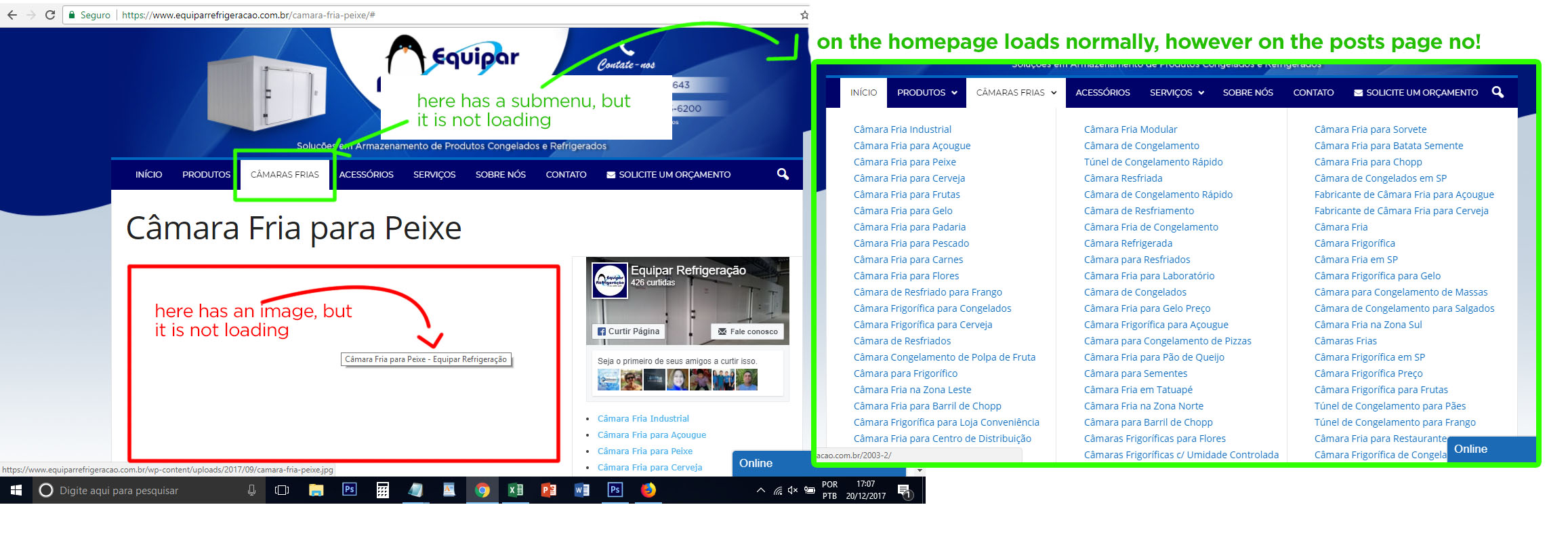
I’m with a great problem on my website: the images are not being displayed in the posts, and others things like submenu, search field not too. Sometimes they show up, sometimes they do not.
I think it could be a problem with CSS or JavaScript on the Newsmag theme, since I tried everything: I optimized the images, solved SSL problems, optimized the database, try it on other browsers, flushed browser cache, but so far nothing solved my problem.
This is a post example: https://www.equiparrefrigeracao.com.br/camara-fria-peixe/
Could you help me? See the image attached, please.
Thank you
 Simion C.
 Hi,
There is a setting in the theme panel that removes the author name on posts
– https://www.screencast.com/t/xc1ge2g5
– https://www.screencast.com/t/q9WTGGffiHR
This setting should be sufficient, there would be no need for additional CSS code. If you disabled them in the panel as shown and they are still displayed, try clearing any installed cache. It could be a caching issue.
Thanks
 Thakksy
 Thanks for the support, I deleted the css code emptied the cache and changed to “Block Header 6′ just like the rest of the site but it still isn’t displaying correctly.
Simion C. Hi,
There is a general setting in the theme panel, but that will remove the post meta for all the blocks on the website. So in this case the code provided above will remove this meta only for the top big grid present in the Fitness blog demo. The code works as it can be seen here
– https://www.screencast.com/t/6jpgwku96pW
Enter it as shown and maybe clear the cache, then check the results. If it is still not working, please provide a link yo your website so we can inspect it.
Thanks
 Catalin
 Hello ufuksen,
I have inspected your website page and I saw that your search page is using the module_16 which are not working good. Please try to disable all of the untested plugins because I saw that you are using something like this which can interact with the theme core files and causes a lot of unknown issues. Try to disable all of these and leave just to active only the plugins that come bundled with the theme core files and rule out any conflicting plugins. If the problem is still there, I recommend you to make a new clean install from scratch via FTP way, clear all the caches and check the results. Please keep in mind that I have tested this module to my website and the search results seem to work as expected, without any problems. Try to clear all the caches, purge CDN files if you are using something like this and check the results. The problem is that the thumbs for search template are not right cropped and that’s why you do not bring good results. Check here -> https://www.screencast.com/t/ft726CVpMX After you have followed all of these steps and if the problem is still there, you should Regenerate your thumbnails with Thumbnails Regenerate or Force Regenerate.
Hope this helps and let us know how it goes!
Thanks for your understanding!
 Bogdan B.
 Hello,
The patch folder is meant for people who modify the theme files and do not want to replace all of the theme files when updating. The patch folder contains just the modified files in between versions.
As for the image issue, it could be a plugin conflict so please disable all plugins except the page builder, clear cache and reset cdn files if you use it. Please also check any custom code you might have added to the theme panel or the theme files. If you use a child theme, please switch to the main theme to make sure it does not affect the proper functionality of the theme.
Thank you!
Bogdan B. Hello,
This could be a plugin conflict so please disable all plugins except the page builder, clear cache and reset cdn files if you use it. Please also check any custom code you might have added to the theme panel or the theme files. If you use a child theme, please switch to the main theme to make sure it does not affect the proper functionality of the theme.
Thank you!
Catalin Hello Staezione,
It seems to be strange. I have tested your website on Firefox browser and your ads seem to work as expected, as you can see here -> https://www.screencast.com/t/uX4dJmzZ If the problem will continue to be there, please try to disable all of the untested plugins, clear all the caches and check the results. Also, if the issue will persist, you should contact the Google Adsense department and check the results.
Thanks for your understanding!
 Equinoctium
 Do not keep older copies of the theme inside wordpress themes folder
Reset the cache after you update
Update the plugins. The theme required and recommended plugins are included in the theme package inside the ../Newspaper-tf/plugins folder.
?
This is the correct solution, thank you Chris for this, I suggest Tagdiv to update the instructions in their video and documentation so others will not fall into this issue and lose valuable time.
Thank You Chris, You are the Best!
Simion C. Hi,
The mobile theme plugin is sensitive when it comes to caching. We have only tested it with the recommended WP Super Cache plugin, in these circumstances it will work properly
– https://forum.tagdiv.com/cache-plugin-install-and-configure/
– https://forum.tagdiv.com/cloudflare-cdn/
Other caching configurations are causing issues in some cases, similar top what you are describing. Note that the mobile plugin is optional, so a solution would be to simply deactivate it. The main theme has a responsive design so there will not be any problem.
Thanks
 jmisenti
Hello,
We are having an issue related to the mobile plugin. The mobile plugin seems to be doing some level of user agent detection and it is clashing with our CDN caching strategy. Can you please point me to the user agent mapping within the plugin so that I can sync this with our CDN so that the proper version of the site is cached. (Currently there are times when the CDN is picking up the mobile version of the site for all users.) Thank you for your help and please let me know if you need additional information from me.
Jeff
 tacomaweekly
 Hey,
I’ve just installed the Mobile Theme and am running into this current issue of a 500 error on mobile only. I’ve deactivated all plugins that I can. Others I cannot because it is either managed by WordPress or I’m afraid deactivating the other plugins for fear of losing all data associated. Newspaper theme is currently updated via Envato Market plugin and sitting at version 8.5.1. Cache was cleared, then those caching plugins deactivated. Deleted and reinstalled mobile-theme plugin. Same 500 error and what’s weird is that it’s only occasional.
I also cannot update via FTP as we have WordPress hosting and they do not allow back-end access.
Anything else I can try?
Thanks for your time,
-TW
-
This reply was modified 8 years by
tacomaweekly.
Catalin Hello hvalverde,
Please notice that our theme has been designed to be used with Seo Yoast plugin and until now, we do not have any bad reports in this case, sorry! Make sure that you are not using some untested plugins which can interact with the core files and this plugin and causes a lot of unknown issues. Clear all the caches and check the results.
Hope this helps and let us know how it goes!
Thanks for the message!
Simion C. Hi,
Such issues may not be caused by database problems. It could be caused by plugins. Please try as a first step to deactivate all plugins except theme plugins and clear any installed cache. Check if this has any effect on the website functionality.
Thanks
Bogdan B. Hello,
This could be a plugin conflict so please disable all plugins except the page builder, clear cache and reset cdn files if you use it. Please also check any custom code you might have added to the theme panel or the theme files. If you use a child theme, please switch to the main theme to make sure it does not affect the proper functionality of the theme.
Thank you!
Catalin Hello Stoneflipper,
Unfortunately, notice that you should update the version of Safari browser, clear all the caches and check the result. Notice that our theme is fully tested with the browser and should work as expected.
Hope this helps and let us know how it goes!
Thanks for your understanding!
Simion C. Hi,
If you removed it from there then it should not be displayed anymore, since the code is no longer present. I have removed the same code and it is working.
That can only be the result of caching. Please clear the browser cache, or try with a different browser.
Thanks
Bogdan B. Hello,
Usually this happens when there is a broken html tag on that page or post. Please check the code in text mode and make sure all html tags are closed. It could also be a plugin conflict so please disable all plugins except the page builder, clear cache and reset cdn files if you use it. Please also check any custom code you might have added to the theme panel or the theme files. If you use a child theme, please switch to the main theme to make sure it does not affect the proper functionality of the theme.
Thank you!
Catalin Hello biggleem,
Try to make a new clean install from scratch via FTP way because this is the surest method in this case. Clear all the caches and check the results. Purge all CDN files if you are using the Cloudflare.
Hope this helps and let us know how it goes!
Thanks for the message!
 lcerura
 Okay, so those items sorted themselves out by completely clearing our my caches.
But, I’ve still got issues with making use of the ADs section in the Theme Panel. Keep getting the rotating wait thingy…as if it’s endlessly working.
 joshwest3
 I’ve tried on multiple different browsers and screens, and the issue is always there. Please look more closely at the following pages:
http://comicbookcorps.com/category/comics/page/3/
http://comicbookcorps.com/category/comics/page/6/
I’d appreciate some help on this, this isn’t an issue of clearing the browser cache.
 PatWire
 I have this same issue after update to 8.5.1 – search bar just below menu on desktop and on mobile ( not td mobile theme ) it is on the opposite side, the same side as the hamburger for the menu – instead of one icon on each side. Cleared all host caches and Cloudflare cache.
Thanks
 nguyentrungxin
 This is my code after editing:
editor style
*/
/* max width – content + sidebar */
/* max width – full content */
html .mceContentBody-max-width-big {
max-width: 1068px;
background: #ffffff url(‘images/editor-style/grid-no-sidebar-desktop.gif’) repeat-y left top;
But I do not see the change
I deleted the cache
 pedroxi
I have problems with the logo of my head
I have problems with the logo of my head
my logo is across the width of my page
When I load my page the logo is dwarfs, is small
I have disabled all the plugins and continue with the problem
I have emptied the cache of the CDN and my YOAST SEO and continue with the problem
please I need help for this problem
please look at it in several search enginesmy page is http://pysnnoticias.com/
 fauzan24
 Just have to clear the cache. It’s solved now. Thanks!
