
No search results were found in Documentation!
 Bogdan B.
 Hello,
Sorry for the delay, we do not work on weekends.
We know of 3 possible causes for this issue.
1) The wp super cache setting to cache page. Please only use these settings in wp super cache: https://forum.tagdiv.com/cache-plugin-install-and-configure/
If you use any other cache plugin, make sure you do not cache pages for known users or for logged in users depending on the plugin setting.
2) Do not use this setting in seo by yoast: https://www.screencast.com/t/n8Cc35EofLh
3) Editing a page that was previously built with another page builder.
You need to edit the page with the builder it was initially created with. Do not edit a page with tagdiv composer if it was not originally built with it. If you created your page in visual composer and then switched to our own page builder, you will have to re-create that page
Please test this on a brand new page with no existing content.
Thanks
 Catalin
 Hello sil2,
I have inspected your website and I saw that you are using a minified version of the theme using Cloudflare-static/rocket.min.js and also if you are using some untested plugins, try to disable all of these, clear all the caches and check the results. Until now, notice that we do not have any bar reports in this case and the theme works as expected, without any problems. If the problem is still there, try to make a new clean install from scratch via FTP way and check the results.
Thanks for the message!
Bogdan B. Hello,
We know of 3 possible causes for this issue.
1) The wp super cache setting to cache page. Please only use these settings in wp super cache: https://forum.tagdiv.com/cache-plugin-install-and-configure/
If you use any other cache plugin, make sure you do not cache pages for known users or for logged in users depending on the plugin setting.
2) Do not use this setting in seo by yoast: https://www.screencast.com/t/n8Cc35EofLh
3) Editing a page that was previously built with another page builder.
You need to edit the page with the builder it was initially created with. Do not edit a page with tagdiv composer if it was not originally built with it. If you created your page in visual composer and then switched to our own page builder, you will have to re-create that page
Please test this on a brand new page with no existing content.
Thanks
Catalin Hello bemibel,
I have inspected your source page and I saw that you have some custom code on your Custom Code Area which can influence this effect. Try to check it, clear all the caches and check the results. Notice that the default theme’s behavior does not have this effect. All these effects come from your changes.
Thanks for your understanding!
Bogdan B. Hello,
Our theme already has nested comments. Here is an example of the default comments functionality in our theme: https://www.screencast.com/t/6RD8UZPfP0k
I’m not sure why your comments are not nested. Please disable all plugins except the page builder, clear cache and reset cdn files if you use it. Please also check any custom code you might have added to the theme panel or the theme files. If you use a child theme, please switch to the main theme to make sure it does not affect the proper functionality of the theme.
Thank you!
Bogdan B. Hello,
What did you change before the images disappeared? do you have updates set to automatic? This is usually an issue. Please try to disable all plugins except the page builder, clear cache and reset cdn files if you use it. Please also check any custom code you might have added to the theme panel or the theme files. If you use a child theme, please switch to the main theme to make sure it does not affect the proper functionality of the theme.
Thank you!
Bogdan B. Visual composer works as expected on our end with the new or with the old version. THe WP update has nothing to do with the issue itself. It could be a plugin that is not compatible with the new version of wp so please disable all plugins except the page builder, clear cache and reset cdn files if you use it. Please also check any custom code you might have added to the theme panel or the theme files. If you use a child theme, please switch to the main theme to make sure it does not affect the proper functionality of the theme.
Thank you!
Bogdan B. Hello,
Please disable the rocket loader option from your cloudlflare cdn and only use these settings for cache and cdn:
https://forum.tagdiv.com/cache-plugin-install-and-configure/
https://forum.tagdiv.com/cloudflare-cdn/
Thank you!
 The Irish Place
 Update: Problem solved after the updates and clearing the cache.
 tonitarres
 Sorry, it was a memory cache problem of my browser.
I solved adding this css to custom css panel in theme panel.
.td-boxed-layout .td-container-wrap.td-main-page-wrap {

background-color: rgba(255, 255, 255, 0.1)!important;

}
Thanks!
 JesseHollar
I’ve just added the instagram widget to my sidebar and by default it showed only one image.
I’ve added a bunch of pictures to my instagram and then updated my widget settings to reflect more images, but no matter how many rows/pictures per row that I select, it still continues to only show one image. I’ve also deleted my cache a few times since.
Is this an ongoing issue with anyone else or is there a fix to this?
Thank you in advance!
 hpy2bsal
I am sure that I’m doing something wrong, but I can’t figure it out. I am not achieving full-width post images (without margins) on my homepage even though I’m using full big grid modules. I thought that maybe I needed to increase the size of my screen, but that doesn’t make sense because I can see full-width full big grid images on your demo pages.
I noticed this when I viewed the various devices on http://ami.responsivedesign.is/. The proportions are not the same on the laptop view as when I am viewing it on my 13″ MacBook Pro.
Your assistance with this is greatly appreciated. I’ve never experienced this with other themes I’ve used in the past so I hope that I can get this corrected.
Oh, and yes, I have tried disabling all of my plugins and cleared my cache as well. It doesn’t correct the problem.
 Pradeep Augustine
After the update, few things have changed.
1) The menu – whenever I switch the theme it keeps changing. The default main menu keeps changing to the top menu automatically. Again I need to set the menu from the appearance tab.
2) WP super cache expert mode mod rewrite rules not updating.
 ddougerw
 hi
I’ve disabled all plugins except for pagebuilder, cleared all caches but errors still are happening. debug is off, no recent changes to theme
Nov 17, 02:07:50
PHP Notice: Undefined index: source in /home/fidopedi/public_html/wp-content/themes/Newspaper/includes/wp_booster/wp-admin/panel/td_view_theme_plugins.php on line 154
Nov 17, 02:07:50
PHP Notice: Undefined index: source in /home/fidopedi/public_html/wp-content/themes/Newspaper/includes/wp_booster/wp-admin/panel/td_view_theme_plugins.php on line 154
Nov 17, 02:07:50
PHP Notice: Undefined index: source in /home/fidopedi/public_html/wp-content/themes/Newspaper/includes/wp_booster/wp-admin/panel/td_view_theme_plugins.php on line 154
Nov 17, 03:23:20
PHP Notice: Undefined index: source in /home/fidopedi/public_html/wp-content/themes/Newspaper/includes/wp_booster/wp-admin/panel/td_view_theme_plugins.php on line 154
Nov 17, 03:23:20
PHP Notice: Undefined index: source in /home/fidopedi/public_html/wp-content/themes/Newspaper/includes/wp_booster/wp-admin/panel/td_view_theme_plugins.php on line 154
Nov 17, 03:23:20
PHP Notice: Undefined index: source in /home/fidopedi/public_html/wp-content/themes/Newspaper/includes/wp_booster/wp-admin/panel/td_view_theme_plugins.php on line 154
Nov 17, 19:59:06
PHP Notice: Undefined index: source in /home/fidopedi/public_html/wp-content/themes/Newspaper/includes/wp_booster/wp-admin/panel/td_view_theme_plugins.php on line 154
Nov 17, 19:59:06
PHP Notice: Undefined index: source in /home/fidopedi/public_html/wp-content/themes/Newspaper/includes/wp_booster/wp-admin/panel/td_view_theme_plugins.php on line 154
Ignore
Nov 17, 19:59:06
PHP Notice: Undefined index: source in /home/fidopedi/public_html/wp-content/themes/Newspaper/includes/wp_booster/wp-admin/panel/td_view_theme_plugins.php on line 154
Log file: /home/fidopedi/.cloudflare/php-errors.log (1.71
Bogdan B. Hello,
1. This could be a caching issue. If you say you changed your menu in the bacj-end from the WP menus section but it still will not apply, then it is either a cache issue or a plugin conflict.
2. That does not seem to be a social counter widget. Please check the widgets area and check the footer widgets. Remove any social widget from there. It might be a social plugin shortcode
Thank you!
Bogdan B. Hi,
Please check your cache. The weather widget works fine.
Thanks.
 IamLegend
 Nano,
Ajax Load More will work out of the box for basic layout if you want it to adapt to Newspaper template you have to do some custom css. Remember to get their add-on Ajax Cache.
I don’t own Jnews or Publisher theme so I don’t know how they work.
Yes, with high traffic site you don’t want to use Newspaper’s infinite loading feature. It will suck the living hell out of your server bandwidth because most of the queries are going thru admin-ajax.php.
IamLegend To be honest,
I have been researching on infinite loading for a long time and the only way for it to work with this theme is to use a plugin Ajax Load More since it has a feature called Ajax Cache.
The reason why I don’t recommend this theme to use infinite loading is that of the way the core engine of works. Almost all the queries are using the admin-ajax.php to process the load and if your website is low impact then you don’t have to worry but once the traffics are above 1000+ view, you will regret using infinite loading especially those requests are not cached.
Just my 2 cents.
Peace
 Simion C.
 Hi,
That is not an error, it is mentioning that the !important tag is used, as well as an overqualified element. Nothing to worry about.
However the code should work properly. If it is not applying and there is no effect after entering it, it could be caching.
Clear all installed cache after adding the code in the theme panel.
Thanks
 Thomson Studio
Greetings,
After numerous hours of troubleshooting this WP Super Cache error, I have resolved to post an inquiry on this forum. Any information you can provide is sincerely appreciated. The WP Super Cache plugin was operating well earlier, but after a while, an error appeared stating “Warning! Could not update /var/www/html/wp-config.php! WPCACHEHOME must be set in config file.” in addition to another message stating “Warning! /var/www/html/wp-content/advanced-cache.php does not exist or cannot be updated.” I have tried to reinstall the plugin, modify the wp-config.php file and the advanced-cache.php file as well as change the file permissions of the wp-content file, but have not had any success. When modifying the advanced-cache.php file both messages disappear but a message stating the WP_Cache needs to be set to true on the wp-config.php file then appears and when I set the wp cache to true in the wp-config.php file I receive an HTTP 500 error and have to remove this setting in the wp-config.php file. So, does anyone happen to have any advice on this situation?
Here is a screenshot of the error messages:

Bogdan B. Hello,
We know of 3 possible causes for this issue.
1) The wp super cache setting to cache page. Please only use these settings in wp super cache: https://forum.tagdiv.com/cache-plugin-install-and-configure/
If you use any other cache plugin, make sure you do not cache pages for known users or for logged in users depending on the plugin setting.
2) Do not use this setting in seo by yoast: https://www.screencast.com/t/n8Cc35EofLh
3) Editing a page that was previously built with another page builder.
You need to edit the page with the builder it was initially created with.
Please let us know if you still encounter issues after checking these causes.
Thanks
Bogdan B. Hello,
This could be a plugin conflict so please disable all plugins except the page builder, clear cache and reset cdn files if you use it. Please also check any custom code you might have added to the theme panel or the theme files. If you use a child theme, please switch to the main theme to make sure it does not affect the proper functionality of the theme.
Thank you!
 tekniksmart
 I also get that error, and it’s very irritating because I can only edit parts of the page with TD Composer.
In my investigation it looks like memcached and how it’s used with WordPress could be the problem. But I’m not sure until I have looked more into that.
Simion C. Hi,
Please try and test without the ad implementation you currently have. Remove all ads/plugins and test again. It seems that it takes a considerable amount of time loading the ads.
Then try deactivating or reducing the number of images displayed in the footer Instagram.
There is a guide for improving page speed available, test the website with the Google page speed tool and follow the recommendations
– https://forum.tagdiv.com/how-to-make-the-site-faster/
It seems to specify that the server response time is not adequate
– https://www.screencast.com/t/eZmOZsB6
There are many page speed guides and discussions posted by the theme users, with great results
– https://forum.tagdiv.com/topic/score-100100-pagespeed-with-newspaper-wordpress-theme/
– https://forum.tagdiv.com/topic/newspaper-theme-speedify-your-website/
– https://forum.tagdiv.com/cache-plugin-install-and-configure/
– https://forum.tagdiv.com/topic/tutorial-chriss-custom-optimizations-for-functions-php-etc/
Thanks
 pciza
pcizaHello,
I have a problem with weather widget – sometimes it shows prediction for 6 days instead of 5 days, see image.
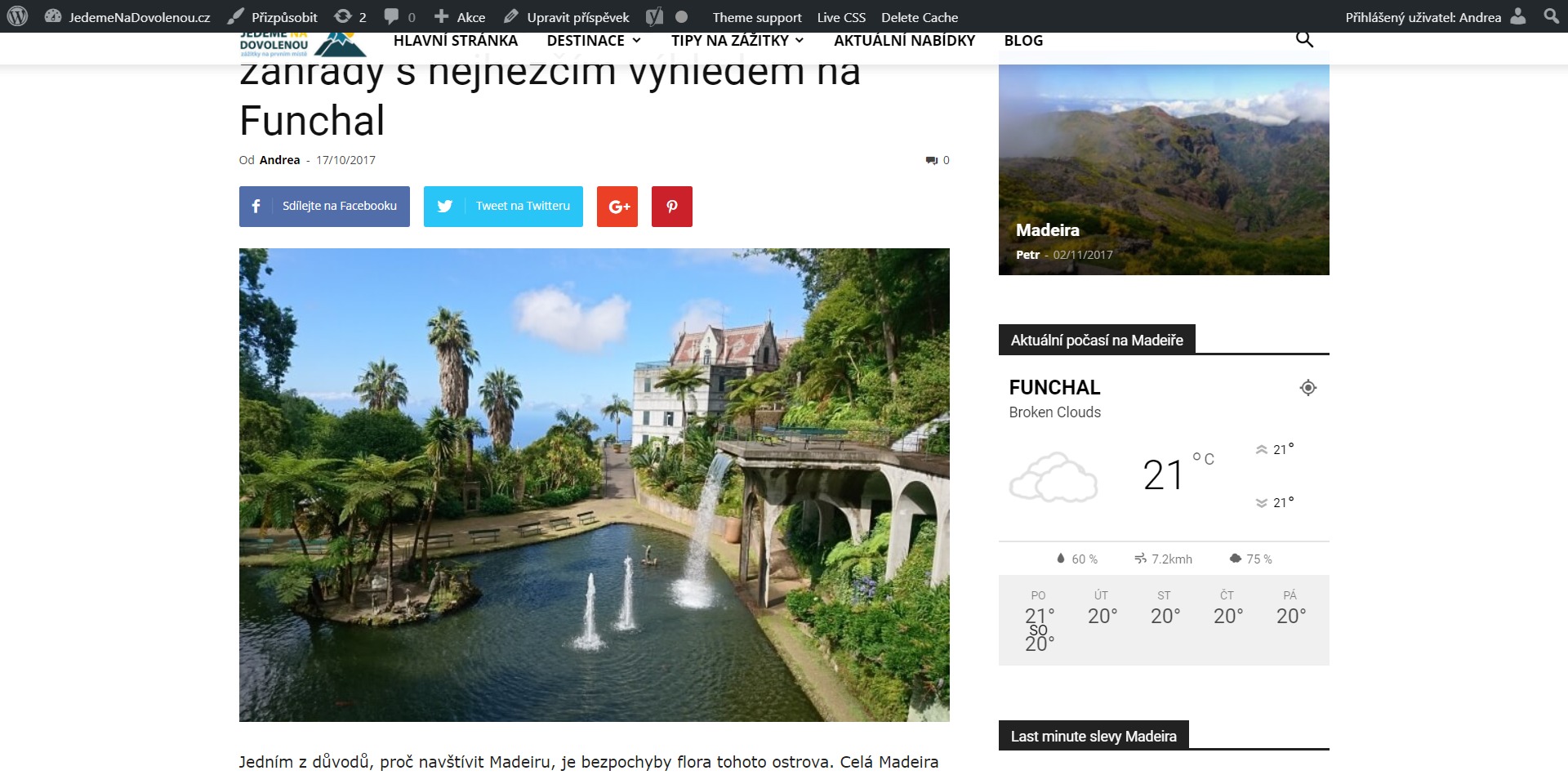
I thought it is caused by caching plugin so i uninstalled W3 Total Cache and installed recommended WP Total Cache but the only change is that my speed insights results have worsened (10-15 points both for mobile and desktop). This error appears mainly in the evening (UTC+1).
Thanks
Andrea
